
Kadence Conversions transforms your website into a conversion-boosting machine, enabling you to create eye-catching elements like popups and banners effortlessly. With this plugin, you can create lightweight popups, sale banners, and slide-ins to engage visitors and boost conversions.
Are you struggling to convert website visitors into subscribers or paying customers? You’re not alone—and that’s exactly where this Kadence Conversions review comes in.
Kadence Conversions is a lightweight yet powerful WordPress conversion plugin developed by Kadence WP. Built with the native WordPress editor, it ensures seamless compatibility and simplicity for any WordPress website. It enables users to build attention-grabbing popups, sale banners, modals, and slide-ins directly within the Gutenberg block editor. Users can do this without touching a single line of code.
This plugin helps you in various ways. You could be running a blog, an online store, or a niche website. It helps you increase conversions and grow your email list. It also reduces cart abandonment and promotes special offers. It’s fast, responsive, and designed with performance in mind.
In this detailed review, we will examine all the features. These features make Kadence Conversions one of the best WordPress popup plugins to use in 2025.
What are Kadence conversions?
Kadence Conversions is a powerful WordPress plugin designed by Kadence WP to enhance your website’s conversion rates. It significantly transforms the landscape for site builders.
Built on the WordPress block editor, it provides an intuitive interface right within your WordPress admin dashboard. Kadence Conversions provides a variety of displayable conversion elements. To use predefined designs and templates within Kadence Conversions, you need to have the Kadence Blocks plugin installed and activated.
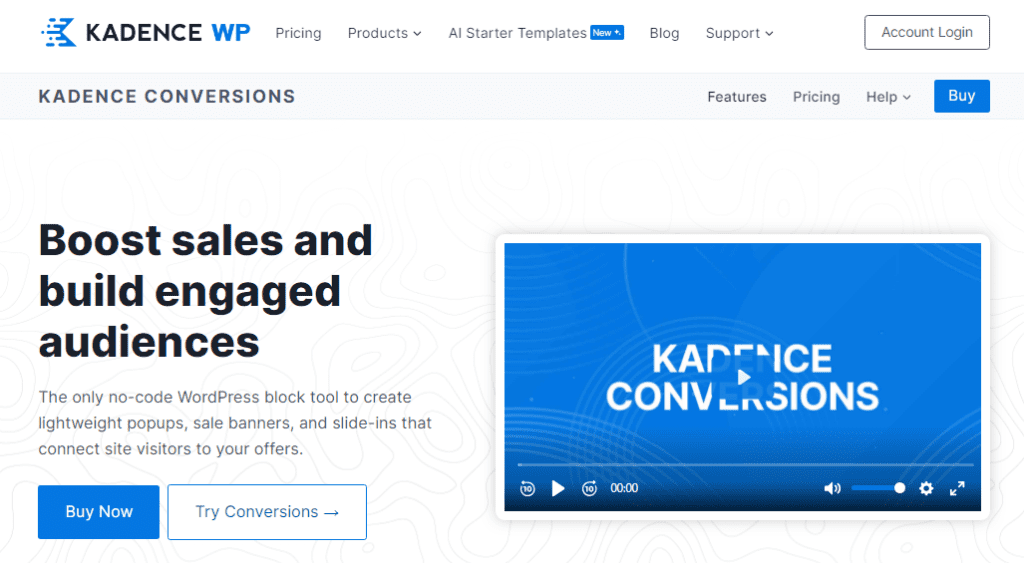
You might want to check out Kadence Conversions if you need a WordPress plugin. It can help you create stunning conversion elements on your website. After using it for a few months, I’m impressed with its features and performance.
With Kadence Conversions, you can quickly create popups, banners, and slide-ins using the WordPress block editor. No coding is needed. You can choose from a variety of pre-made templates or customize your own design with the intuitive interface.
Kadence Conversions also offers advanced targeting, analytics, and integrations with popular email marketing services. It has helped me grow my email list, increase my sales, and improve my user experience.
I highly recommend Kadence Conversions to anyone who wants to boost their WordPress site conversions in 2025. For more information and to explore bundled offerings, visit the Kadence website.
Top Features of Kadence Conversions Plugin
Kadence Conversions is packed with features that help boost user engagement and increase signups, sales, and leads.
The Kadence team actively develops and supports the plugin. They provide detailed documentation and regular updates. These updates improve site customization and functionality.
In this Kadence Conversions Review, we’ll explore the key features and benefits of this powerful WordPress plugin. Here’s a look at what makes this plugin stand out:
Kadence Conversions maintains fast loading speeds by efficiently managing the site’s resources, ensuring optimal website performance.
1. Drop-in-Ready Designs
Choose from a growing library of prebuilt designs for each conversion item. No need to start from scratch—these designs are ready to use out of the box. With these templates, you can create dynamic offers that capture visitor attention and drive conversions.
Whether you’re creating a popup, modal, slide-in, or banner, Kadence Conversions has you covered.
Kadence Conversions was built from the ground up to integrate seamlessly with WordPress for easy popup and form creation.
2. Pre-Designed Templates for Faster Launches

Kadence Conversions offers a library of professionally designed templates for popups, slide-ins, and banners.
These templates are conversion-optimized and can be imported with just one click—no need to start from scratch.
- High-converting layouts
- Optimized for lead generation
- One-click import for faster setup
- Beautiful, responsive designs
Some key benefits of the template library are:
- Professionally designed for high conversions
- Optimized for lead generation.
- Beautiful, high-quality designs
- 1-click import for instant implementation
- Variety of options for pop-ups, slide-ins, and banners
These high-converting templates are specifically designed to help convert prospects into subscribers or customers.
To use a template, simply import it with one click. Customize the text for your offer. You have an effective popup or banner ready instantly.
With numerous high-converting templates created by experts, you can quickly boost conversions on your WordPress site.
3. Built for Gutenberg Block Editor
If you’re already using Gutenberg, you’ll love how seamlessly Kadence Conversions integrates with it. Build and customize your conversion elements using familiar Gutenberg blocks, including advanced ones from Kadence Blocks Pro.
- No learning curve for Gutenberg users
- Clean interface with live previews
- Performance-friendly (faster than page builders)
Kadence Conversions leverages the block editor for easy form building. And it integrates seamlessly without the performance downsides of some other form plugins and page builders.
4. Helpful Integration using Kadence Blocks
Kadence Blocks is a popular WordPress plugin that provides 30+ ready-made Gutenberg blocks.
When you use Kadence Conversions, you can leverage these powerful blocks to easily build opt-in forms. With Kadence Conversions, you can quickly create opt-in forms to boost lead generation and engagement.

This means the two plugins integrate beautifully to help create conversion-focused popups, slide-ins, and banners without coding.
In summary, Kadence conversions and Kadence blocks work together effectively. This combination makes it simple for anyone to create high-converting opt-in forms.
Even if you have no coding skills, you can quickly build professional designs using the library of templates and blocks.
The seamless integration between the two plugins offers a major benefit. It allows for rapidly creating beautiful opt-in forms. These forms are functional and drive conversions.
5. Advanced Targeting Rules
Kadence Conversions provides powerful display rules to control where and to whom your conversion items appear. Target by:
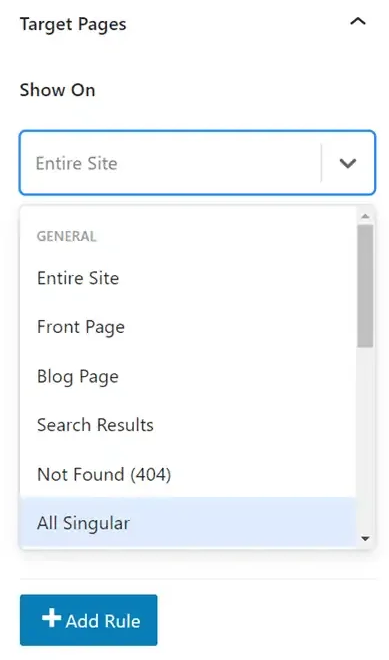
You can target opt-in forms using the following criteria:
- Page types (homepage, posts, WooCommerce)
- Tags, categories, post IDs
- Device type (desktop vs mobile)
- Specific URLs or product pages
- Targeting specific pages to personalize offers and improve conversion opportunities
Use include/exclude logic to show popups to the right audience at the right time.
6. Smart Trigger Settings
Timing is everything. Kadence Conversions allows you to trigger popups based on user behavior. It includes the use of automatic triggers. These can be configured to display conversion elements based on specific user actions or timing.
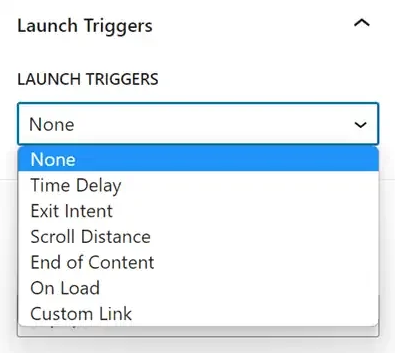
The available triggers include:
- Time delay: Display after a set time
- Exit intent: Display when a visitor is about to leave.
- Scroll distance: Display after scrolling down the page.
- End of content: Display at end of post or page
- On load (custom triggers): Display immediately on page load
- Custom link: Display when a custom link is clicked.
The timing of automatic triggers can be set to deliver optimized messages. These messages are tailored to the customer’s stage in the buyer’s journey. This ensures that your messaging is both timely and relevant.
This gives you complete control over user interaction to maximize conversions. Optimized messages delivered at the right time can significantly improve conversion metrics.
You can also limit triggers to desktop, mobile, or both.
With this variety of triggers, you can precisely control the user experience. Display a banner at the right time through exit intent to capture attention.
Show a popup after a blog post to promote related content.
7. Schedule Campaigns in Advance
Planning a Black Friday deal? Want a weekly recurring opt-in form? Kadence Conversions lets you:
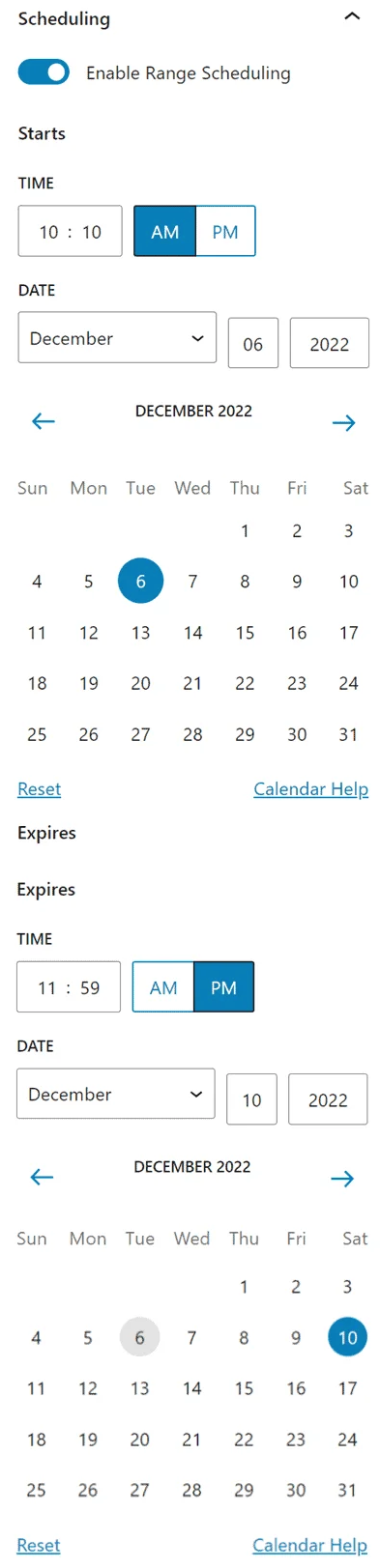
- Schedule start and end times
- Create recurring campaigns
- Automate seasonal offers and events
- Run evergreen campaigns without manual edits
This feature is perfect for marketers who want to set and forget their lead-gen strategies.
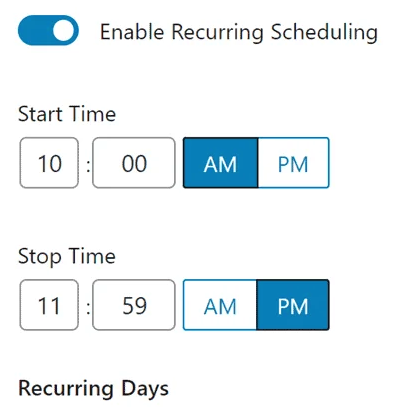
Key benefits include:
- You can schedule the campaigns in advance instead of last-minute scrambling.
- There is no need to manually turn campaigns on or off
- Create recurring campaigns that repeat automatically.
- Perfect for promotions, holidays, and evergreen content
- A more organized approach than random popups
8. WooCommerce Integration (with Add-On)
Using WooCommerce? With the Kadence Shop Kit add-on, you can unlock eCommerce-specific targeting features like:
If you have a WooCommerce store, Kadence Conversions can target popups based on cart price. It can also target specific products in the cart and more. This allows you to reduce the number of abandoned carts.
Key benefits include:
- Show popups based on cart value
- Target specific products in the cart
- Use exit-intent popups to reduce cart abandonment
- Deliver discount codes in real time
This is a must-have for WooCommerce stores aiming to boost conversions without bloating the site.
9. Built-In Analytics & Google Analytics Events
Kadence Conversions tracks views and conversion rates for each campaign via a clean built-in dashboard. The plugin provides built-in conversion analytics to help users track performance and optimize their offers. The track performance built into Kadence Conversions allows users to quickly access key metrics for ongoing optimization.
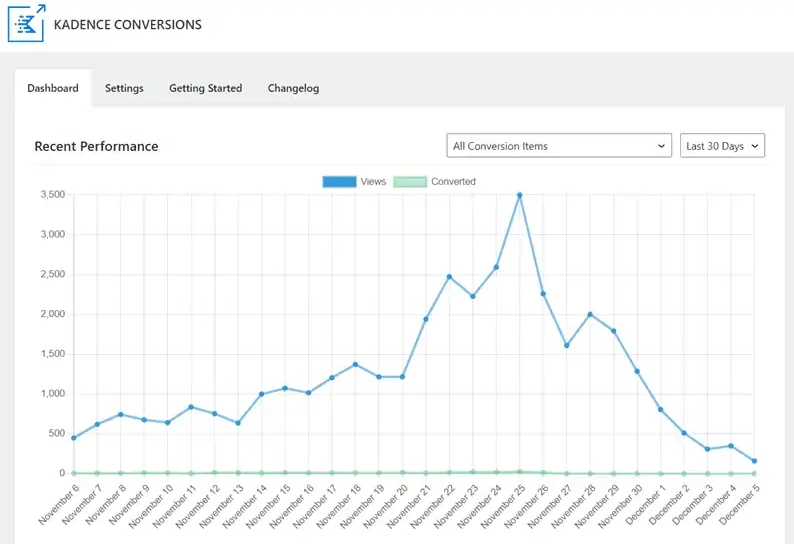
- Monitor performance by date (7, 30, 90 days)
- Track by campaign or aggregate stats
- Google Analytics event tracking integration available
This makes it easy to optimize campaigns using real data, not guesswork.
Kadence Conversions can also integrate with Google Analytics for expanded reporting.
To enable:
- Go to Kadence Conversions » Dashboard » Settings
- Check the box “Enable Google Analytics Event Tracking.”.
- Save Settings
With the internal analytics dashboard, you receive in-depth data. Google Analytics integration helps track the performance of your popups, slide-ins, and banners. Track views, conversions, and more to optimize your conversion rates over time.
10. Email Marketing & Webhook Integration
Kadence Conversions natively integrates with most popular email marketing tools:
Native integrations include:
- MailerLite
- FluentCRM
- SendinBlue
- MailChimp
- ActiveCampaign
Supported webhooks:
- Pabbly Connect
- Zapier
Easily connect your opt-in forms to your mailing list—no third-party form plugin required.
With the email and webhook integrations, leads generated from your popups, slide-ins, and banners can automatically flow. They move into your mailing list or other connected services.
This Kadence Conversions Review demonstrates how simple it is to integrate with popular email marketing platforms.
No manual exporting or importing is required.
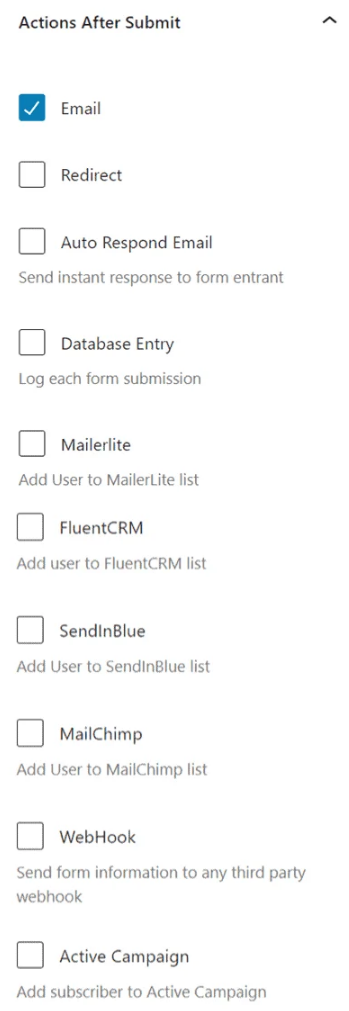
You can connect Kadence Conversions to virtually any platform, either natively or through Zapier and other webhooks. This smooth automation conserves your time and guarantees that no leads are overlooked.
Don’t let your visitors slip away—start building your list today with Kadence Conversions!
How to install and configure the Kadence Conversions Plugin?
Let’s walk through the step-by-step process of installing and setting up Kadence Conversions on your WordPress site. By the end of this guide, you will become an expert in creating eye-catching conversion elements!
Step 1: Go to Kadence Conversions Dashboard
Before we proceed, ensure that you have installed and activated Kadence Conversions. Once that’s done, follow these steps:
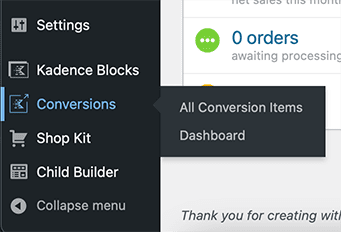
Log in to your WordPress admin dashboard. Go to the left sidebar and choose Conversions > All conversion items.
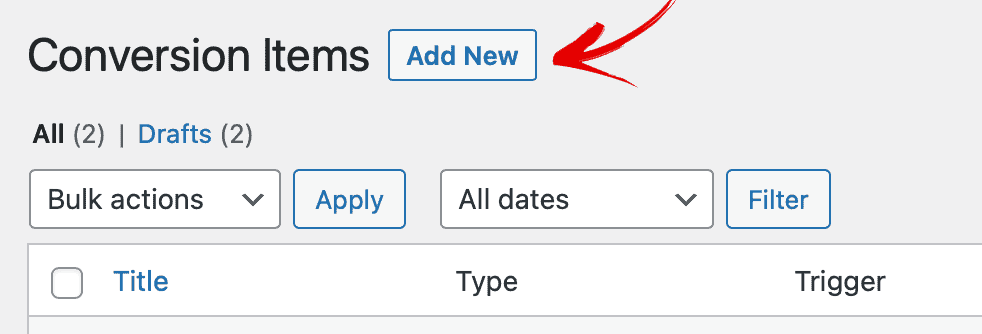
On the “All Conversion Items” page, click “Add New” at the top of the page.
Finally, choose the Kadence Conversion element. You can choose the popup, slide-in, or banner as per your requirements.
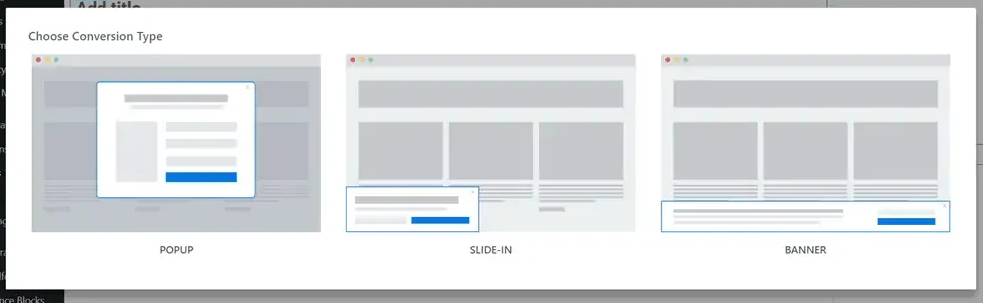
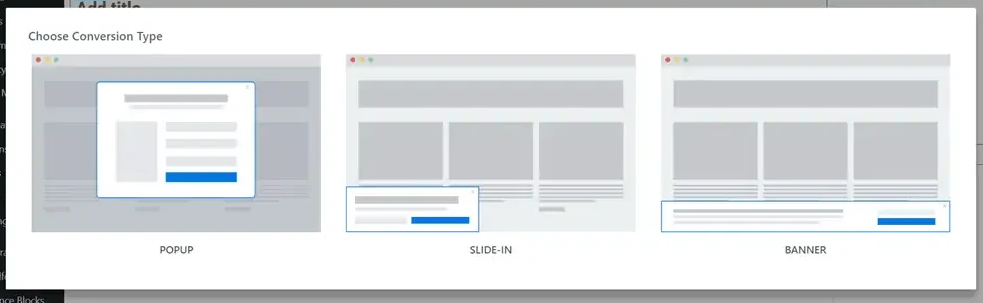
Step 2: Choose the conversion type.
Now that you’re in the Kadence Conversions dashboard, let’s create your first conversion:
Click the “Add New” button. Choose the type of conversion you want to create. Give your conversion a descriptive name (for your reference).
- Popup: A classic attention grabber.
- Slide-In: A subtle notification that slides into view.
- Banner: A top or bottom bar with a message.
Step 3: Select Conversion Template
Kadence Conversions provides a variety of templates to kickstart your design:
- After choosing the conversion type, you’ll see a list of available templates.
- Browse through them and select one that aligns with your goal.
- Don’t worry. You can customize it later!
Step 4: Customization
Time to make your conversion element unique:
- Design Settings:
- Customize colors, fonts, and other visual elements.
- Upload images or choose from the built-in library.
- Content:
- Craft a compelling message or offer.
- Add buttons, forms, or any other content you need.
- Behaviour:
- Set triggers (when the conversion appears):
- Exit intent: when users are about to leave.
- Page load: as soon as the page loads.
- Time delay: after a specific duration.
- Scroll distance: As users scroll down,
- Set triggers (when the conversion appears):
- Advanced Settings:
- Fine-tune animation, positioning, and other details.
Step 5: Set Display Conditions
Control where and when your conversion appears.
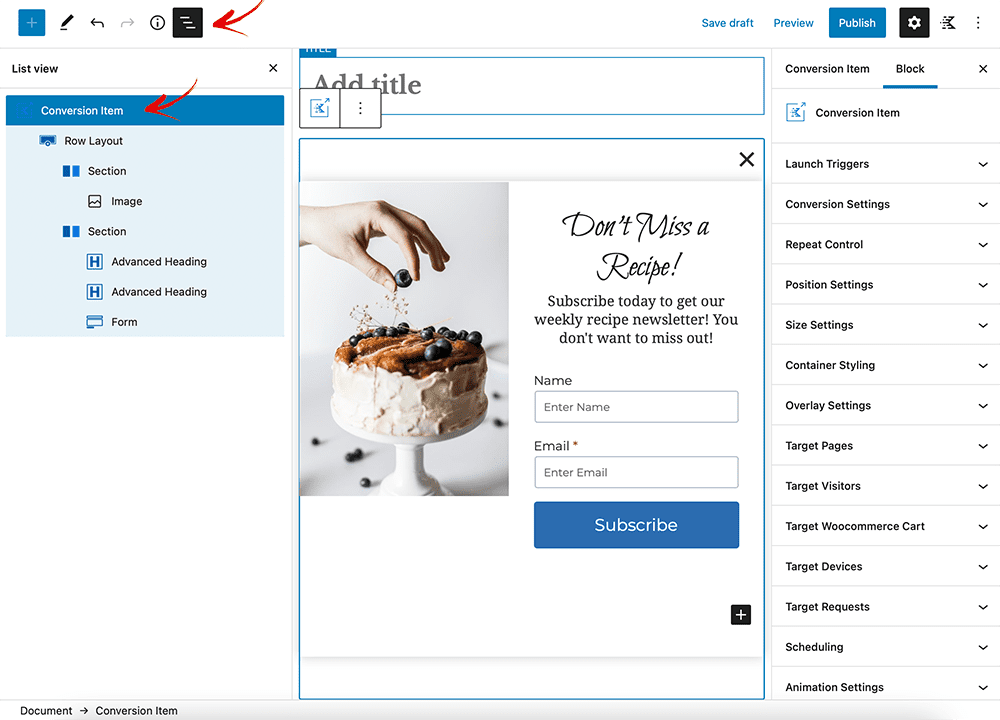
- Display Rules:
- Choose specific pages or posts where the conversion should show up.
- Set conditions based on user behavior (e.g., returning visitors, specific URLs).
- Exclude Rules:
- Exclude certain pages or user roles from seeing the conversion.
- Schedule:
- Set start and stop dates for your campaign.
- Perfect for limited time offers.
Step 6. Publish your conversion
Save your settings, preview your conversion, and hit “Publish” when you’re ready to go live.
Remember, Kadence Conversions empowers you to create eye-catching elements without writing code. Experiment, analyse, and refine your conversions to engage your audience effectively! 🚀
How to get Kadence Conversions plugin?
Kadence is a popular WordPress theme and plugin provider, known for its high-quality tools for website design and optimization. If you want to boost your website’s performance, consider the Kadence Conversions plugin. It is an excellent tool to increase conversions. This powerful plugin lets you create stunning lead generation forms, pop-ups, and banners. These are designed to capture your audience’s attention. They help drive results. Whether you’re running a blog, an online store, or a business website, Kadence Conversions offers three main benefits. It can help you grow your email list. It also promotes special offers and improves user engagement. Kadence Conversions streamlines your workflow. It reduces the need for multiple plugins. This helps website owners and agencies save money. It lowers costs and improves efficiency.
This guide will walk you through every step of purchasing the Kadence Conversions plugin. It will also guide you through installing and setting it up. This ensures you get the most out of this powerful tool while saving money. Let’s dive into the detailed process!
1. Getting Started
First, you need to click this magical link before getting this awesome lead-generating plugin. You will be redirected to the plugin pricing page.
2. Choose the Right Kadence Conversion Plan for Your Needs

Visit the Kadence Conversions pricing page and select the plan that best suits your requirements.
- For agencies and those working with multiple websites, the Ultimate Plan is the ideal choice.
- If you only need plugins, the Kadence Conversions Plan for 5 sites is a great option.
Click the “Buy Now” button to get started with your chosen plan.
3. Add the details
After redirecting to the payment page, fill in the required billing and payment details. Then, choose your preferred payment method, such as credit card or PayPal, and click “Place Order” to complete your purchase.

To enhance your Kadence WP purchase with a 10% discount, use the coupon code BLOGGINGDEN during checkout.
On the checkout page, you’ll see a field labeled “Have a Promo Code? Click here”, click the link and enter the coupon code BLOGGINGDEN in this field. Click on “Apply” button to activate the 10% discount.
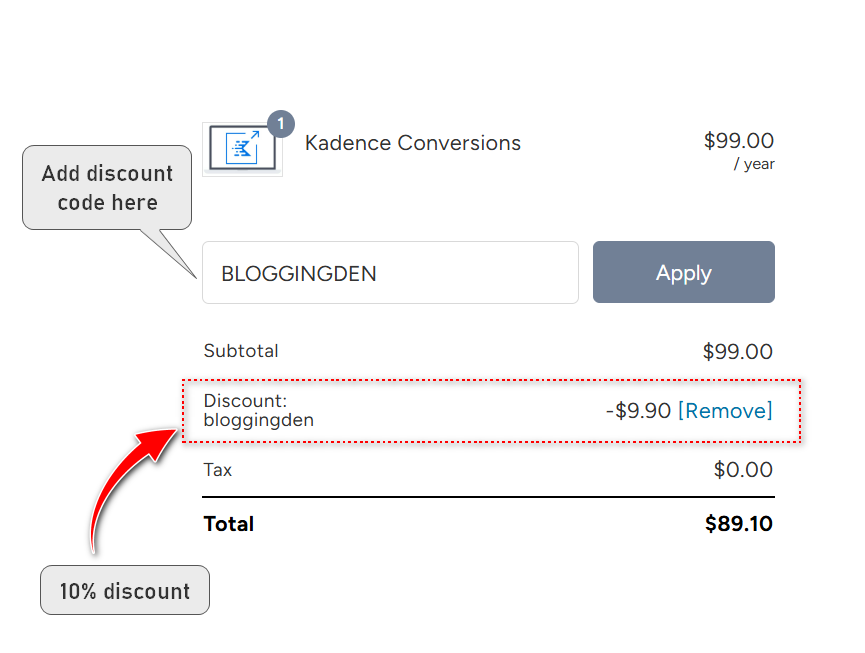
The total price will automatically update to reflect the discounted amount.
4. Download and Install the Plugin
- After purchasing the Kadence Conversions plugin, you will receive a confirmation email containing a download link.
- Download the plugin file to your computer, then log in to your WordPress dashboard.
- Navigate to Plugins > Add New > Upload Plugin, and click “Choose File.”
- Select the plugin file you downloaded, then click “Install Now.”
5. Activate and Configure the Plugin
- Once the plugin is installed, click the “Activate” button to enable it on your WordPress site.
- After activation, you’ll find the Kadence Conversions plugin in your WordPress dashboard menu.
- Go to the plugin settings to configure it according to your needs. You can create forms, pop-ups, and banners to boost conversions on your website.
Additional Tips
- Save Your License Key: After purchase, you’ll receive a license key in your email. Make sure to save it, as you’ll need it to activate updates and support.
- Explore Documentation: Kadence provides detailed documentation and tutorials for their plugins. Visit their support page if you need help setting up the plugin.
- Check for Bundles: If you plan to use multiple Kadence products, consider purchasing a bundle. A bundle, like the Kadence Theme Bundle, offers better value.
Who Should Use Kadence Conversions?
Kadence Conversions is ideal for bloggers, digital marketers, and eCommerce store owners. It’s also perfect for agencies that want a lightweight yet powerful conversion plugin. Kadence Conversions engages site visitors at different stages of their journey. This approach allows you to increase conversions by targeting users with personalized offers and experiences. Whether you’re collecting emails, promoting discounts, or reducing cart abandonment, this plugin has the tools you need.
Kadence Conversions Pros and Cons (December 2025 Update)
Pros of Kadence Conversions:
- Large library of professional templates
- Easy-to-use Gutenberg blocks
- Advanced targeting options
- Scheduling and recurrence
- Built-in analytics
- Email and webhook integrations
Cons of Kadence Conversions:
- Templates may need customization
- Steep learning curve
- Extra cost for WooCommerce
- Limited email features
- No CRM integrations
- Basic analytics
Kadence Conversions makes it simple to create high-converting popups, slide-ins, and banners with its library of templates and Gutenberg blocks
However, the plugin lacks some advanced email marketing and CRM features necessary for more complex marketing automation workflows. The plugin is very reasonably priced for the number of features included.
Kadence Conversions Pricing & Plans [2025 Updated]
Kadence Conversions can target popups based on the total price of the purchase.
Kadence Conversions Review provides insights into its pricing plans and value for money. There are three plans with affordable prices. Let’s talk about the pricing options for Kadence Conversions:
Kadence Conversions:
- Annual Plan: $99/year (renews at $99 annually; cancel anytime).
- Features: Upto 5 sites, one year of support & updates, 30-day satisfaction guarantee.
- Top Features: Product Template Builder, prebuilt library, built-in analytics, works with dynamic content, WooCommerce conditionals.
Ultimate:
- Annual Plan: $299/year (renews at $299 annually; cancel anytime).
- Includes:
- Kadence Conversions
- Kadence Blocks Pro
- Kadence Theme Pro
- Pro Starter Templates
- Kadence WooCommerce Shop Kit
- Kadence Custom Fonts
- Kadence Cloud
- Child Theme Builder
- Kadence Recaptcha
- Access to all plugins
Remember, all pricing is in USD, and you can change plans or cancel your account at any time. Special introductory pricing applies, and all renewals are at full price.
Lifetime Ultimate Plan: The Best Value Plan
The most comprehensive option is the Kadence lifetime ultimate. For a one-time payment of $899, you can use the Kadence product upto 25 sites and $999 plan for 1000 sites with one-time payment:
- Kadence Theme Pro: A popular free plugin
- Kadence Blocks Pro: A Gutenberg page builder plugin
- Kadence Related Content: A related posts plugin
- Kadence WooCommerce Elementor: WooCommerce page builder
The lifetime ultimate plan allows you to use all these Kadence products on 25 to 1000 websites. You also get unlimited support and updates for life.
You can buy Kadence Conversions as a standalone plugin or part of annual plans with other Kadence products.
This Ultimate plan offers exceptional value if you need multiple Kadence products. BloggingDen readers can get a special 10% discount on Kadence Conversions plan using the coupon code BLOGGINGDEN. If you choose the Ultimate plans, do not forget to take the 15% discount. You can find it on the Kadence WP Pricing 2025 page.
Kadence Conversions offers flexible plans depending on your needs. Whether you’re an individual site owner or an agency managing multiple WordPress sites, there’s a pricing tier for you:
| Plan Name | Sites | Price | Discounted Price | Includes |
|---|---|---|---|---|
| Kadence Conversions Plugin | 5 Sites | $99/year | $89.10/year | Conversion templates, triggers, analytics |
| Ultimate Plan – 25 Sites | 25 Sites | $299/year | $269.10/year | All Pro plugins + Kadence Theme |
| Ultimate Plan – 1000 Sites | 1000 Sites | $399/year | $359.10/year | Full access to Kadence Suite |
| Lifetime Ultimate Bundle | 25 or 1000 | $899–$999 | One-time payment | Lifetime updates, all plugins & support |
BloggingDen Bonus
Use coupon code BLOGGINGDEN to get 10% OFF any plan.
Pro Tip: If you use Kadence Theme or Kadence Blocks, consider the Ultimate Bundle for maximum value.
👉 Click here to get Kadence Conversions with 10% OFF
The lifetime access and support are valuable features. They make the Kadence Lifetime Ultimate the best long-term investment for power users of Kadence products. With the discount, it’s very affordable for the number of tools included.
/colu
FAQs on the Kadence Conversions plugin for WordPress blog
What is Kadence conversion?
Kadence Conversions is a WordPress conversion optimization plugin that allows you to create popups, slide-ins, banners, and forms using the Gutenberg editor. It’s lightweight, responsive, and highly customizable.
Does it work with WooCommerce?
Yes, but you’ll need the Kadence Shop Kit add-on to unlock WooCommerce-specific targeting (like cart-based popups and checkout triggers).
Is Kadence Conversions beginner-friendly?
Yes! Even if you’re new to WordPress, Kadence Conversions provides an intuitive interface. You don’t need coding skills to create eye-catching conversions.
What’s the pricing for Kadence conversions?
Kadence Conversions offers an annual plan at $89 per year (for unlimited websites). Alternatively, you can get it as part of the Kadence Full Bundle. The choice depends on your specific needs and budget.
How does Kadence Conversions integrate with WooCommerce?
Kadence Conversions can integrate with WooCommerce to target popups based on cart price, products, etc. But it requires the “Kadence Shop Kit” add-on, which is a paid upgrade. The add-on enables powerful eCommerce features like exit intent popups to reduce abandoned carts.
Is there a Kadence Conversions free version available?
No, Kadence Conversions does not have a free version. It is a premium paid plugin. However, you can try it risk-free for 30 days.
Do you recommend Kadence Conversions?
Yes, I recommend Kadence Conversions for anyone looking for an easy way to create popups, slide-ins, and other conversions without coding. The templates and integrations make it a beneficial choice to boost engagement. It provides good value at an affordable price point.
Does Kadence Conversions slow down my site?
No. It’s built for performance and doesn’t rely on bloated code or third-party builders. It runs seamlessly within the Gutenberg editor.
Can I use Kadence Conversions with other themes?
Yes. While it works best with Kadence Theme, it’s compatible with any well-coded WordPress theme.
What’s the refund policy?
You’re protected by a 30-day satisfaction guarantee. If it doesn’t meet your expectations, you can request a full refund.
How many sites can I use it on?
The base plan supports 5 websites. The Ultimate Bundle supports 25–1000 sites, depending on the license.
Get Started with Kadence Conversions Today
Ready to grow your list and boost your sales? Get Kadence Conversions now and unlock powerful features for your WordPress site.
👉 Click here to get Kadence Conversions with 10% OFF
My Overall Review of Kadence Conversions December 2025
We explored in this Kadence Conversions review how this plugin empowers WordPress users. It helps them drive more conversions without compromising site speed. Kadence Conversions offers advanced targeting and seamless Gutenberg integration. It also includes built-in analytics and WooCommerce triggers. This plugin is a must-have for anyone serious about conversion rate optimization in 2025.
You can design your conversion elements with the Gutenberg editor and choose from a library of templates. You can also set triggers, display conditions, and schedules for your campaigns.
The Kadence Conversions plugin integrates with popular email marketing services and WooCommerce. It also has built-in analytics to track your performance.
After using Kadence Conversions for three months, my email list grew by 30%. This success is all thanks to its intuitive design and advanced triggers.
It has increased my email subscribers, sales, and engagement. It is also very affordable and offers a 30-day money-back guarantee.
I highly recommend the Kadence Conversions plugin to anyone who wants to take their WordPress site to the next level. It revolutionizes the field of conversion optimization.
By reading this Kadence Conversions Review, you will learn more about how this plugin works. You’ll understand better how it can help you achieve your marketing goals.
With Kadence Conversions, you’ll save time, increase engagement, and grow your email list—all without writing a single line of code.
Don’t miss this opportunity to get this amazing plugin and transform your website into a conversion powerhouse. 🚀
Final Verdict: Is Kadence Conversions Worth It in December 2025?
We have thoroughly tested this plugin. Our Kadence Conversions review confirms one thing. This is an essential tool for any WordPress site owner serious about conversions.
Kadence Conversions offers everything you need to create high-converting popups, slide-ins, and banners. It provides these without slowing down your site or requiring third-party builders.
With its:
- Seamless Gutenberg integration
- Advanced targeting and trigger rules
- Scheduling automation
- Analytics dashboard
- Email and WooCommerce integrations
…it’s clear that Kadence Conversions is built for marketers, bloggers, store owners, and creators. They want to capture more leads and reduce bounce rates.
If your goal is to turn passive visitors into loyal subscribers, this plugin is an outstanding choice. It also helps convert them into customers in 2025.
- 30-Day Money-Back Guarantee
- No coding required
- Works with all modern WordPress themes
- Fast, lightweight, and built for conversions
Get started today!
Kadence Conversions Review 2025
Ready to enhance your site’s user experience and drive conversions? Kadence Conversions is available as a standalone plugin or as part of the Kadence Full Bundle and Kadence Lifetime Bundle.
Product SKU: Kadence WP
Product Brand: StellarWP
Product Currency: USD
Product Price: 99
Product In-Stock: InStock
5
Struggling with slow-loading popups? Kadence Conversions ensures your site speed remains unaffected. 🚀