Looking for a working Hostinger coupon code to get the maximum discount on web hosting, WordPress hosting, VPS hosting, cloud hosting, or domains? You are in the right place.
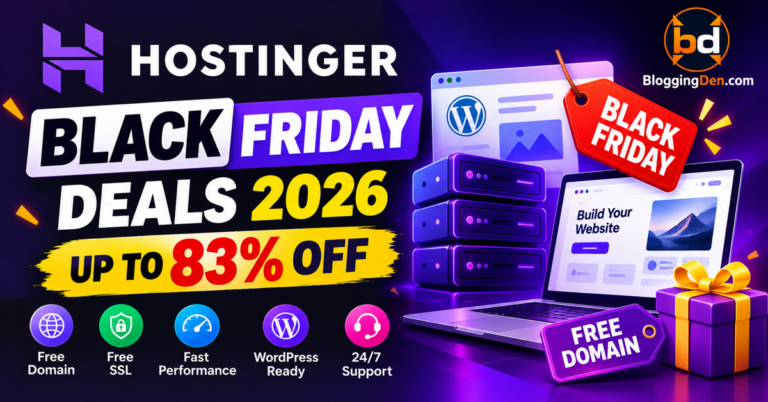
In this updated guide, you will find the latest Hostinger promo code, Hostinger discount code, and Hostinger hosting deals for September 2026. These offers can help you save money when purchasing a new hosting plan from Hostinger.
Whether you are starting a blog, building a business website, launching an online store, or moving an existing website to a new hosting provider, the right Hostinger coupon code can reduce your initial hosting cost.
Hostinger offers several hosting options, including Single Web Hosting, Premium Web Hosting, Business Web Hosting, WordPress hosting, VPS hosting, and Cloud hosting. Each plan is designed for different types of users, from beginners and bloggers to small businesses and high-traffic websites.
If you are looking for a Hostinger coupon code in India, the available discount may vary depending on the selected plan, billing period, currency, location, and eligibility. The same applies to users searching for a Hostinger coupon code for new customers or a Hostinger promotional offer for an existing account.
Before purchasing, compare the available prices, discount percentages, renewal costs, and plan features. You can also read our detailed Hostinger review to learn more about its performance, features, customer support, WordPress hosting experience, and overall value.
Latest Hostinger Coupon Codes and Deals
The following Hostinger coupon codes were manually tested on the latest Hostinger checkout page. They were working at the time of testing. However, Hostinger may change its promotional offers, prices, eligibility rules, and billing terms without prior notice.
| Plan / Offer | Starting Price per Month | Discount* | Coupon Code | Key Benefits |
|---|---|---|---|---|
| Premium Web Hosting | From ₹69 / $2.99 | Up to 83% OFF* | NY2021 / BLOGGINGDEN | Up to 100 websites, free domain eligibility, free SSL, 2–3 months free hosting, 100 GB SSD storage, and weekly backups |
| Single Web Hosting | From ₹149 | Up to 84% OFF* | SINGLE7 / BLOGGINGDEN | Suitable for beginners, one website, free SSL, and easy WordPress installation |
| Business Web Hosting | From ₹269 / $3.99 | Up to 81% OFF* | BUSINESS10 | More resources for growing websites, free domain eligibility, and free SSL |
| VPS Hosting – VPS 1 | From ₹399 / $4.99 | Up to 65% OFF* | VIRTUAL8 | Dedicated resources, improved performance, and full root access |
| Cloud Startup | From ₹699 / $9.99 | Up to 77% OFF* | CLOUD8 | Cloud hosting resources, free domain eligibility, free SSL, and scalability |
| Cloud Professional | From ₹899 / $15.99 | Up to 67% OFF* | CLOUD17 | Higher performance for large websites, high-traffic projects, and demanding workloads |
| Website Builder – 48-month plan | From ₹69 / $2.99 | Up to 75% OFF* | Automatically applied | Drag-and-drop website builder, eCommerce features, free domain eligibility, and free SSL |
Coupon verification: The Hostinger promo codes listed above were manually tested on the Hostinger checkout page and were working during the latest verification. Prices and discounts may vary according to the selected plan, subscription duration, country, currency, and account eligibility.
Hostinger discount codes
The below-provided Hostinger discount codes are very limited. First, click on the Hostinger promo code special link. Then, copy and paste the coupon code on the checkout page.
👉 These deals are tested manually on the latest Hostinger checkout page.
👉 Last verified: September 2026 – coupons checked on Hostinger checkout
WEB HOSTING Plans and Coupons
Single Web Hosting
Perfect for beginners who want to host one website at the lowest possible price.
- 1 website
- Free SSL
- Easy WordPress install
Premium Web Hosting
Best value for multiple sites, free domain, free SSL, and more resources.
- Free domain
- 100 GB SSD
- Weekly backups
Business Web Hosting
Recommended for small businesses and online stores that need extra performance.
- More resources
- Free domain & SSL
- Better performance
VPS Hosting (VPS 1)
Great entry-level VPS for growing blogs and apps.
- Dedicated resources
- Full root access
- Better performance
Cloud Startup
Affordable cloud hosting for new and scaling projects.
- Faster cloud servers
- Scalable for growth
- Free domain & SSL
FREE DOMAIN
Get a Free Domain with All annual Hostinger Web Hosting Plans
Hostinger Premium Web Hosting
Best value for bloggers and small businesses who want a strong discount and reliable hosting.
- Free domain and SSL
- 2–3 months free hosting
- Weekly backups included
Note: Discounts, codes, and free domain offers may change at any time based on Hostin
How to Activate a Hostinger Hosting Coupon Code in India in 2026
If you are purchasing Hostinger hosting from India, you can usually apply a Hostinger coupon code during the checkout process. Follow the steps below to apply your coupon and confirm that the discount is reflected in the final price.
Step 1: Visit the Hostinger Website
Start by visiting the official Hostinger website using the coupon or affiliate link provided in this article.
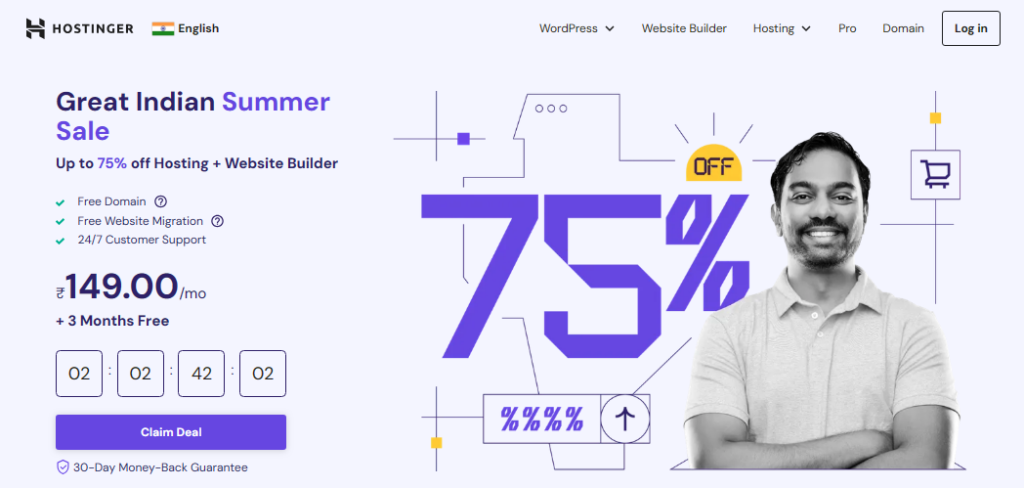
The link may automatically apply an available promotional offer. However, if the discount is not applied automatically, you can enter the relevant Hostinger promo code manually during checkout.
Tip: Make sure you are using the correct Hostinger regional website and currency before selecting a hosting plan.
Step 2: Choose Your Hosting Plan
Browse the available Hostinger hosting plans and select the option that best suits your website.
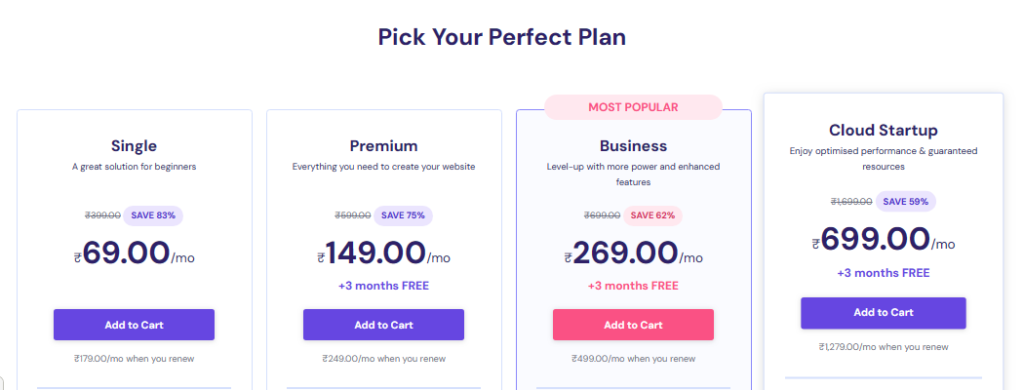
For example:
- Single Web Hosting: Suitable for one small website or beginner blog.
- Premium Web Hosting: Suitable for bloggers, personal websites, and multiple small websites.
- Business Web Hosting: Suitable for growing websites and small businesses.
- VPS Hosting: Suitable for users who need dedicated resources and more server control.
- Cloud Hosting: Suitable for larger websites that need additional resources and scalability.
After selecting your plan, click Add to Cart, Choose Plan, or the relevant purchase button.
Step 3: Select the Billing Period
Hostinger may offer different prices depending on the selected subscription period.
Before continuing, compare the available billing options, such as:
- Monthly billing
- Annual billing
- Multi-year billing
- Promotional long-term plans
The lowest advertised monthly price may require a longer subscription period and may be calculated by dividing the total upfront payment by the number of months.
Step 4: Find the Coupon Code Field
On the Hostinger checkout page, look for a field labelled:
- Coupon Code
- Promo Code
- Have a coupon?
- Enter promotional code
Paste the applicable Hostinger coupon code for India into this field.
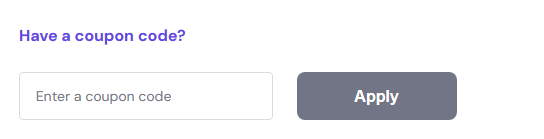
Use the code that matches your selected hosting plan. For example:
SINGLE7This code is intended for the Single Web Hosting offer listed in this article.
Step 5: Apply the Hostinger Coupon Code
Click Apply, Redeem, or the relevant button next to the coupon field.
After applying the code, check the order summary carefully. The checkout page should display the updated discount or reduced total.
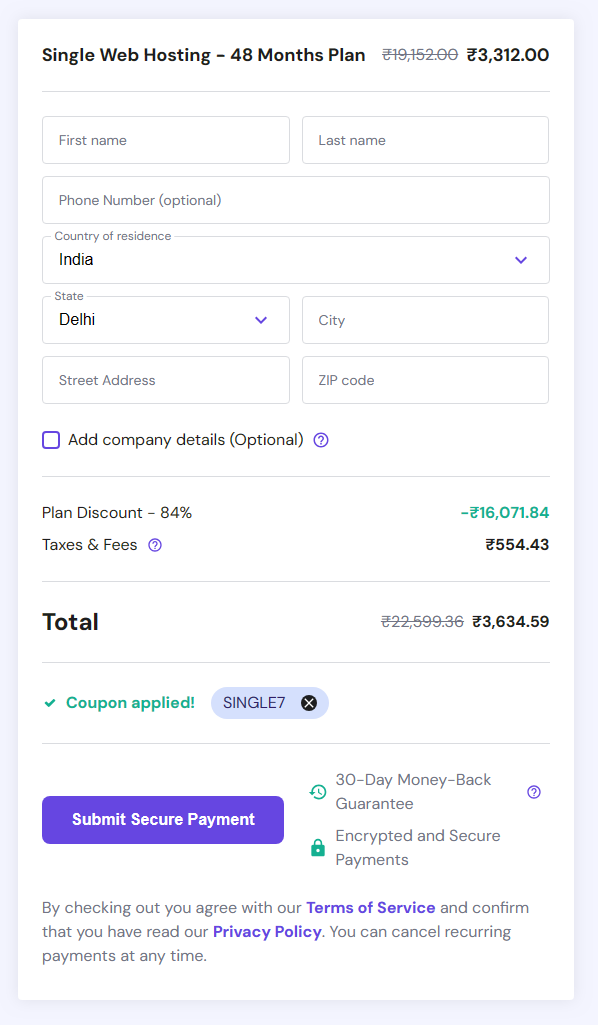
For example, when the applicable Single Hosting promotion is available, the discount may increase from the standard promotional offer to the higher discount shown in the coupon table.
Important: The final discount can vary according to the selected plan, subscription period, country, currency, customer eligibility, and current Hostinger promotion. Always confirm the final amount displayed at checkout.
Step 6: Review the Final Price
Before making payment, check the following details:
- Selected hosting plan
- Subscription duration
- Promotional discount
- Final amount payable
- Domain registration fee, if applicable
- Taxes or additional charges
- Renewal price
- Included features and benefits
Do not rely only on the advertised monthly price. Review the total amount charged today and the renewal price shown by Hostinger.
Step 7: Complete Your Payment
After confirming that the coupon has been applied successfully:
- Enter your account and billing details.
- Select your preferred payment method.
- Review the order summary once again.
- Complete the payment.
- Check your Hostinger account for the hosting activation details.
That’s it. Your Hostinger hosting plan should be activated after the payment and account setup process is completed.
Hostinger Coupon Code Tips for Indian Customers
Keep these points in mind when using a Hostinger discount code in India:
- Use the coupon code that matches your hosting plan.
- Check whether the offer is available for new purchases only.
- Select the correct billing period before comparing prices.
- Confirm that the discount appears before payment.
- Review renewal pricing separately from the introductory price.
- Check whether the free domain offer applies to your selected plan.
- Make sure taxes and additional charges are included in the final total.
- If a code does not work, try the other applicable code listed for the same plan.
- Avoid using expired or unrelated coupon codes from third-party websites.
Frequently Used Hostinger Coupon Codes
| Hosting Plan | Coupon Code |
|---|---|
| Premium Web Hosting | NY2021 / BLOGGINGDEN |
| Single Web Hosting | SINGLE7 / BLOGGINGDEN |
| Business Web Hosting | BUSINESS10 |
| VPS Hosting | VIRTUAL8 |
| Cloud Startup | CLOUD8 |
| Cloud Professional | CLOUD17 |
Verification note: The coupon codes above were working during the latest manual checkout test. Hostinger may change promotional terms, prices, eligibility, and availability at any time. Always verify the final discount on the checkout page before completing your purchase.
How to Activate a Hostinger Hosting Coupon Code in 2026 Worldwide
The following steps are intended for Hostinger customers worldwide, including users in the USA, UK, Europe, Asia, and other countries. Applying a Hostinger promo code is a simple way to access available discounts on web hosting plans.
Whether you are looking for a Hostinger coupon code 2026, a Hostinger discount code, or a special hosting promotion, follow these steps to apply the offer during checkout.
Step 1: Visit the Hostinger Website
Start by clicking the special Hostinger discount link below:
You will be redirected to the Hostinger website or the relevant promotional page. Depending on the current offer, the discount may be applied automatically through the special link.
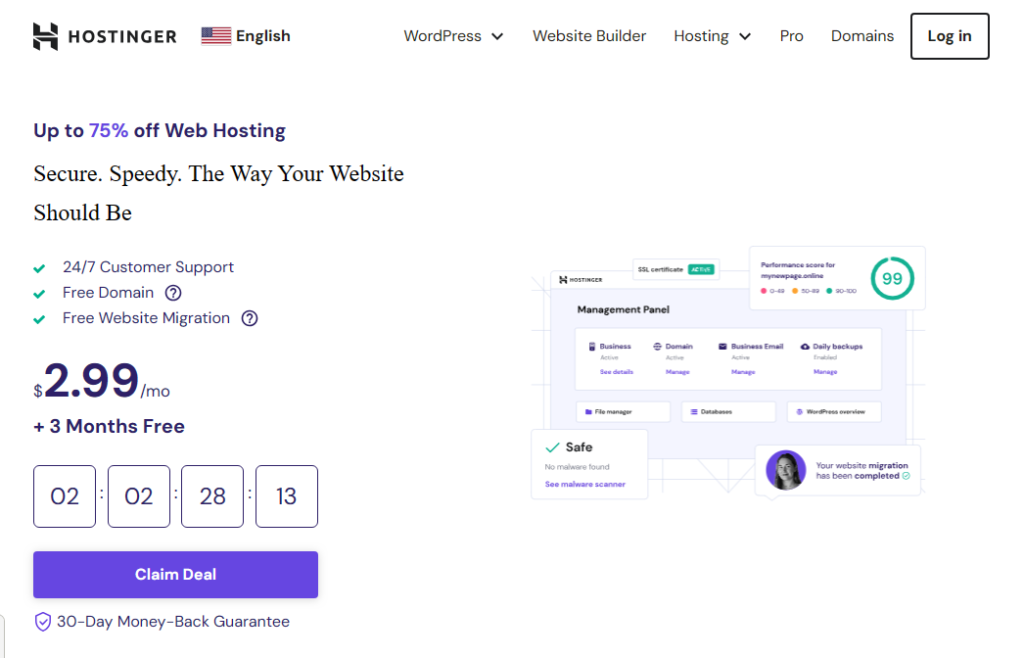
Once the website opens, browse the available hosting plans and choose the option that matches your requirements.
For example:
- Single Web Hosting: Suitable for one small website or beginner blog.
- Premium Web Hosting: Suitable for bloggers, personal websites, and multiple websites.
- Business Web Hosting: Suitable for growing websites and small businesses.
- VPS Hosting: Suitable for users who need dedicated resources and root access.
- Cloud Hosting: Suitable for high-traffic websites and larger projects.
After selecting your preferred plan, click Add to Cart, Choose Plan, or the relevant purchase button.
Step 2: Select Your Billing Period
Hostinger may offer different prices based on the subscription period you choose.
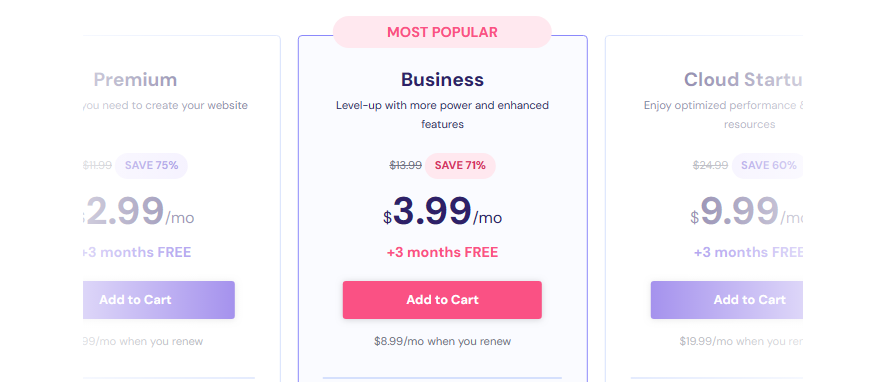
Before proceeding, compare the available billing options, such as:
- Monthly billing
- Annual billing
- Multi-year billing
- Promotional long-term plans
Remember that the lowest advertised monthly price may require a longer subscription period. Check the total amount payable today and the renewal price before continuing.
Step 3: Proceed to Checkout
After selecting your hosting plan and billing period, continue to the checkout or payment page.
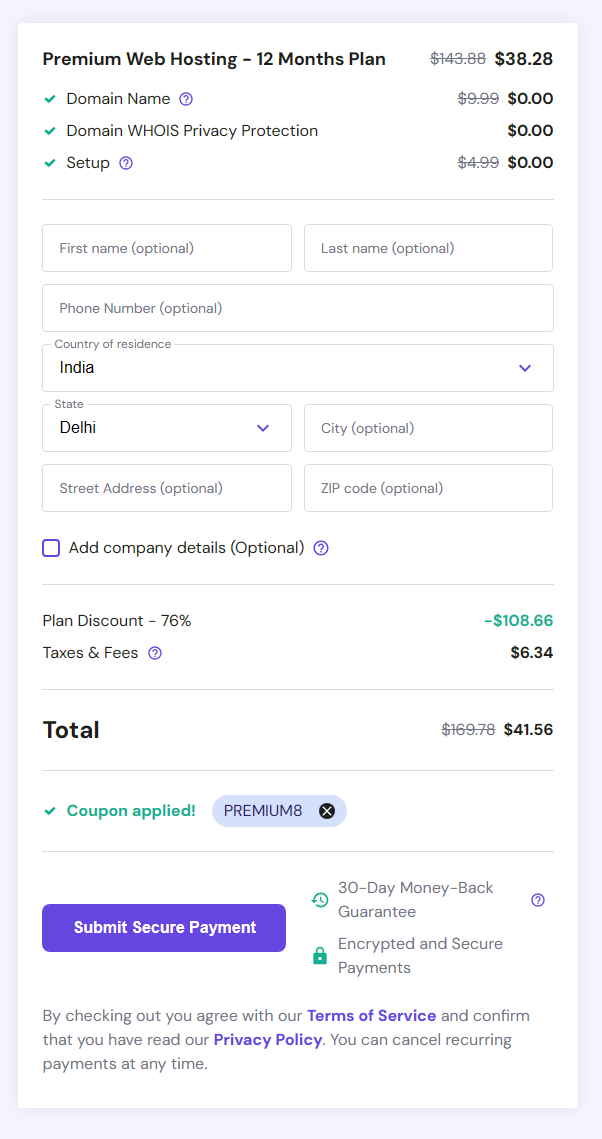
Review the order summary and check whether the promotional discount has already been applied. If the discount does not appear automatically, look for a field labelled:
- Coupon Code
- Promo Code
- Have a coupon?
- Enter promotional code
Step 4: Enter and Apply the Hostinger Coupon Code
Paste the applicable Hostinger coupon code into the promotional code field.
For example, a code such as: PREMIUM8
should only be used if it is listed as active and applicable to your selected offer.
Click Apply, Redeem, or the relevant button beside the coupon field.
After applying the Hostinger promo code, check the order summary to confirm that the discount has been reflected in the total price.
Important: Coupon eligibility may vary according to your country, currency, hosting plan, subscription duration, account status, and current Hostinger promotion. Use the verified code listed in the relevant section of this article rather than relying on an old example code.
Step 5: Confirm the Discount
Before making payment, carefully review:
- Hosting plan
- Subscription period
- Promotional discount
- Final price
- Taxes and additional charges
- Free domain eligibility
- Included hosting features
- Renewal price
The introductory price and renewal price may be different. Therefore, always check the complete billing summary before completing your order.
Step 6: Complete Payment
Once the coupon has been successfully applied:
- Enter your billing and account details.
- Select your preferred payment method.
- Review the final order total.
- Complete the payment.
- Check your Hostinger account for hosting activation details.
That’s it. You have successfully applied your Hostinger coupon code for 2026 and can begin setting up your website at the discounted price shown during checkout.
Hostinger Coupon Code Tips for Worldwide Customers
Keep the following tips in mind when using a Hostinger discount code:
- Use a coupon that matches your selected hosting plan.
- Check whether the offer is available in your country.
- Confirm the currency displayed at checkout.
- Check whether the coupon is valid for new customers only.
- Review the required subscription period.
- Confirm that the discount appears before payment.
- Compare the introductory price with the renewal price.
- Check whether the free domain offer applies to your plan.
- Review taxes and additional charges.
- Save a copy of your payment receipt and order confirmation.
Verification note: The coupon codes listed in this article were working during the latest manual checkout test. Hostinger may change prices, discounts, eligibility rules, and promotional terms at any time. Always confirm the final discount on the official Hostinger checkout page before completing your purchase.
Why Choose Hostinger Hosting?
Hostinger is a popular choice for bloggers, website owners, freelancers, and small businesses because it combines affordable hosting plans, useful website management tools, and performance-focused features.
If you are searching for affordable web hosting, fast WordPress hosting, or a beginner-friendly hosting provider, Hostinger offers several hosting plans to consider.
1. Affordable Hosting Plans
One of the main reasons users choose Hostinger is its competitive introductory pricing.
Its low-cost hosting plans make it easier for beginners, bloggers, freelancers, and small businesses to launch a website without a large initial budget. You can choose from Single, Premium, Business, VPS, and Cloud hosting plans based on your website’s requirements.
Using a working Hostinger coupon code or Hostinger discount code can help reduce the initial cost further. However, always check the selected billing period, final checkout price, and renewal price before purchasing.
2. Fast Hosting Performance
Hostinger provides performance-focused hosting infrastructure, including SSD-based storage and LiteSpeed server technology on applicable hosting plans.
These features can help improve website loading times when combined with:
- A lightweight WordPress theme
- Optimized images
- A reliable caching plugin
- A properly configured website
- A suitable hosting plan
- A data center located near your target audience
For bloggers and website owners targeting visitors in India, the USA, the UK, or Europe, choosing an appropriate server location can also be an important consideration.
3. Easy-to-Use hPanel
Hostinger’s hPanel is designed to simplify website and hosting management.
Even if you are not technically experienced, you can use the hosting control panel to manage tasks such as:
- Installing WordPress
- Managing domains and subdomains
- Creating email accounts
- Accessing website files
- Managing databases
- Configuring SSL
- Viewing hosting resources
- Setting up backups and security features
This makes Hostinger a practical option for beginners who want to manage their websites without dealing with complicated server administration.
4. WordPress Hosting and Website Tools
Hostinger offers hosting options for users who want to create a WordPress blog, business website, portfolio, or online store.
Depending on the selected plan, you may get access to features such as:
- WordPress installation tools
- Website migration options
- SSL certificates
- Website management tools
- Performance and security features
- Automatic or scheduled backups
- AI-assisted website creation tools on applicable services
If you are planning to start a blog, choosing a suitable Hostinger WordPress hosting plan can make the initial website setup easier.
5. Free Domain and SSL Eligibility
Some Hostinger hosting plans include a free domain for the initial subscription period, subject to the applicable plan, domain extension, billing term, and promotional conditions.
SSL certificates are also included with many hosting plans. An SSL certificate helps encrypt the connection between a visitor’s browser and your website.
Before purchasing, confirm:
- Whether a free domain is included
- Which domain extensions are eligible
- Whether the offer applies to your billing period
- Whether the domain is free only for the first year
- Whether renewal charges apply later
6. Customer Support and Learning Resources
Hostinger provides customer support options and a knowledge base containing tutorials and troubleshooting guides.
These resources can be helpful when you need assistance with:
- WordPress installation
- Domain connection
- Website migration
- SSL activation
- Email setup
- Hosting account management
- Website performance
- Common WordPress problems
The availability of support channels and response times may vary depending on the service and account type. Check the current support options available with your Hostinger plan.
7. Money-Back Guarantee
Hostinger offers a money-back guarantee on eligible services, subject to its current terms and conditions.
Before purchasing, review the official refund policy to understand:
- The applicable refund period
- Which services are eligible
- Any exclusions
- Domain registration conditions
- Renewal and cancellation rules
Do not assume that every product, add-on, domain, or renewal payment is covered in the same way.
Is Hostinger a Good Choice for Bloggers?
Hostinger may be suitable for bloggers and content creators who need:
- Affordable WordPress hosting
- Easy website setup
- Beginner-friendly hosting management
- Free SSL eligibility
- Website migration options
- Multiple hosting plan choices
- A hosting provider with performance-focused features
For a small blog or new website, Single or Premium hosting may be sufficient. Growing websites may need Business hosting, while larger projects may benefit from Cloud or VPS hosting.
The right choice depends on your traffic, number of websites, storage requirements, technical experience, and budget.
Need a Domain Coupon Code?
If you want to register a domain separately from your hosting plan, you can also check our latest Namecheap coupon code guide.
Namecheap may be useful for users who want to purchase a domain separately and manage hosting with another provider. Compare the first-year domain price, renewal cost, privacy features, and available domain extensions before making a decision.
Affiliate disclosure: This article contains affiliate links. If you purchase a product through one of our links, BloggingDen may earn a commission at no additional cost to you. This helps support our website and allows us to publish more hosting guides, reviews, and coupon updates.
Frequently Asked Questions About Hostinger Coupon Codes
What is the latest Hostinger coupon code for 2026?
The latest Hostinger coupon code 2026 depends on the hosting plan, country, billing period, and current promotion. In this guide, we list working codes such as BLOGGINGDEN, SINGLE7, BUSINESS10, VIRTUAL8, CLOUD8, and CLOUD17. Enter the applicable Hostinger promo code at checkout and confirm that the discount appears before payment.
Does Hostinger offer a coupon code in India?
Yes, Hostinger offers promotional discounts for customers in India. The available Hostinger coupon code India offer may vary according to the selected hosting plan and subscription period. Indian customers should visit the Hostinger India website, choose a plan, enter the applicable Hostinger discount code, and check the final price in Indian rupees before completing the purchase.
What is the best Hostinger coupon code for beginners?
The best Hostinger coupon code for beginners depends on the hosting plan they need. The Single Web Hosting plan is designed for one simple website, while Premium Hosting is suitable for blogs and multiple small websites. Use the relevant code listed in this guide, then confirm the final discount, storage, website limit, and renewal price.
How do I apply a Hostinger coupon code?
To apply a Hostinger coupon code, visit the official Hostinger website, choose your hosting plan, and continue to checkout. Find the field labelled “Coupon Code” or “Promo Code,” enter your code, and click Apply. Review the order summary to make sure the discount is reflected before entering your payment details.
Can I use more than one Hostinger promo code?
Hostinger generally allows only one coupon or promotional code per order. Therefore, you usually cannot combine multiple Hostinger promo codes to receive several discounts at the same time. If you have more than one working code, compare the offers and use the code that provides the applicable discount for your selected hosting plan.
Does Hostinger offer discounts for new customers?
Yes, Hostinger frequently promotes introductory discounts for new hosting purchases. A Hostinger coupon code for new customers may apply only to selected plans, billing periods, or first-time purchases. Existing customers may see different offers. Always check the coupon conditions and confirm eligibility at checkout before purchasing a new hosting plan.
Does Hostinger offer a discount for existing customers?
Hostinger promotions for existing customers may differ from new-customer offers. A Hostinger discount code that works for a new hosting purchase may not apply to an existing subscription, renewal, upgrade, or additional service. Check your Hostinger account and the applicable promotion before assuming that a coupon can be used for an existing plan.
Can I use a Hostinger coupon code for renewal?
Most introductory Hostinger coupon codes are intended for new purchases rather than standard renewals. Renewal prices are usually different from the initial promotional price. Before purchasing, check the renewal amount displayed at checkout and in your account. Do not assume that a discount applied today will also reduce future renewal payments.
Does Hostinger offer a free domain with hosting?
Hostinger offers a free domain for one year with eligible hosting plans and qualifying subscription periods. The offer depends on the plan, domain extension, and current terms. For example, eligible Premium and Business plans may include a free domain. Check the checkout page to confirm domain eligibility, registration conditions, and future renewal charges.
Is the Hostinger free domain offer available for every plan?
No, the free domain offer is not necessarily available with every Hostinger plan. Eligibility may depend on the hosting product, billing period, domain extension, and promotion. Hostinger’s official information states that qualifying plans purchased for at least 12 months may include one year of free domain registration. Confirm the exact offer during checkout.
What is the Hostinger renewal price?
The Hostinger renewal price is the amount charged after your introductory hosting period ends. It is usually higher than the promotional starting price shown in coupon articles. The renewal cost depends on the hosting plan and subscription period. Always check the renewal price in the checkout summary and save a copy of your order details.
Does Hostinger offer a 30-day money-back guarantee?
Hostinger provides a 30-day money-back guarantee for many eligible hosting services, subject to its refund policy and exclusions. Hosting, Cloud hosting, and other products may have different refund conditions. Domain registrations and some special products can have separate rules. Review the official refund policy before purchasing or requesting a refund.
Is Hostinger good for WordPress websites?
Hostinger can be suitable for WordPress blogs, personal websites, business websites, and online stores. Its hosting services include WordPress installation tools, website management features, SSL options, and migration services on applicable plans. Choose a plan according to your traffic, number of websites, storage requirements, and budget rather than selecting a plan only because of its discount.
Which Hostinger plan is best for a blog?
The best Hostinger plan for a blog depends on the blog’s size, traffic, and number of websites. Single hosting may suit one small beginner website, while Premium hosting may be more suitable for bloggers managing multiple websites. Business hosting can be considered when you need additional resources. Compare features, limits, introductory prices, and renewal costs before choosing.
Are Hostinger coupon codes valid worldwide?
Hostinger coupon availability can vary by country, currency, hosting plan, and customer eligibility. A code that works in India may not provide the same discount in the USA, UK, or Europe. Customers worldwide should use the relevant regional Hostinger website, apply the coupon during checkout, and confirm the final price before completing the transaction.
Why is my Hostinger coupon code not working?
A Hostinger coupon code may fail because it has expired, does not match the selected plan, is restricted to new customers, or requires a particular billing period. It may also be unavailable in your country or currency. Recheck the code, select the correct plan, and contact Hostinger support if the discount still does not appear.
Can I use a Hostinger coupon code for VPS hosting?
Some Hostinger promotions apply to VPS hosting, but VPS coupon eligibility may differ from web hosting offers. If you are purchasing VPS hosting, use the VPS-specific code listed in this guide, such as VIRTUAL8, when applicable. Confirm the available discount, server resources, billing period, renewal price, and refund conditions before payment.
Does Hostinger offer discounts on Cloud hosting?
Hostinger periodically offers promotional pricing for cloud hosting plans. The applicable Hostinger Cloud hosting coupon may depend on the selected plan, country, and subscription term. Cloud hosting is generally intended for websites that need more resources or scalability than basic hosting. Check the current offer and compare Cloud Startup and higher-tier plans before purchasing.
Is the Hostinger coupon discount applied automatically?
Some Hostinger promotions are applied automatically through a special offer link, while others require manual entry. If the discount does not appear automatically, look for the coupon field during checkout and enter the applicable Hostinger promo code. Always confirm the reduced total in the order summary before completing payment.
Where can I find verified Hostinger coupon codes?
You can find verified Hostinger coupon codes in this BloggingDen guide and compare them with the offer shown on Hostinger’s official website. We manually test the codes listed in the article, but prices and promotional terms can change. Check the last verification date and confirm the final discount at checkout before purchasing.
Does Hostinger offer discounts on domains?
Hostinger may offer domain promotions, free-domain bundles, or discounted registration offers with eligible hosting plans. Domain pricing varies by extension, registration period, location, and renewal terms. If you are buying a domain separately, compare the first-year price with the renewal cost. Also check whether privacy protection and other domain services are included.
Should I choose monthly or long-term Hostinger hosting?
A long-term Hostinger plan may provide a lower effective monthly price, but it usually requires a larger upfront payment. Monthly hosting can offer more flexibility but may cost more over time. Compare the total amount payable today, included features, renewal price, refund terms, and expected website usage before selecting a billing period.
Is Hostinger worth it after the coupon expires?
Hostinger’s value after the coupon expires depends on the renewal price, website traffic, included features, support needs, and hosting requirements. A low introductory price does not automatically mean the renewal price will remain low. Before purchasing, compare the initial discount with future renewal costs and check whether the plan still fits your long-term budget.
How often does Hostinger update its coupon offers?
Hostinger updates its promotions according to current campaigns, regional pricing, hosting plans, and seasonal sales. Coupon availability can change without notice, so an offer that works today may be replaced later. For the most accurate information, check the current Hostinger offer page and verify the final discount at checkout before completing your order.
Final Thoughts on Hostinger Coupon Code September 2026
Hostinger is a popular option for beginners, bloggers, freelancers, and small businesses because it combines affordable introductory pricing with easy-to-use website management tools. Depending on the hosting plan, you may also receive features such as free SSL, website migration tools, backups, performance tools, and a free domain for eligible plans.
Using a working Hostinger coupon code 2026 can help reduce your initial hosting cost. However, the final discount depends on the selected plan, subscription period, country, currency, and customer eligibility. Always check the final checkout price before completing your purchase.
The NY2021 / BLOGGINGDEN Hostinger promo code is listed for eligible Premium hosting offers and may provide up to 83% off, based on the current promotion tested for this article. Other plans may require different codes, such as:
SINGLE7for eligible single hosting offersBUSINESS10for eligible business hosting offersVIRTUAL8for eligible VPS offersCLOUD8for eligible cloud startup offersCLOUD17for eligible Cloud Professional offers
These codes may not apply to every plan or billing period. Confirm that the coupon has been accepted and that the discount appears in the order summary.
Is Hostinger Worth It in 2026?
Hostinger may be a suitable choice if you want:
- Affordable introductory web hosting
- Beginner-friendly WordPress setup
- An easy-to-use hosting control panel
- Free SSL on eligible services
- Website migration options
- Hosting plans for blogs, business websites, and online stores
- VPS and Cloud hosting options for more demanding projects
- Customer support and online learning resources
For a new blog or small website, Single or Premium hosting may be enough. Business hosting may be worth considering if you need additional resources, while VPS or Cloud hosting may be more suitable for larger or resource-intensive websites.
Before choosing a plan, compare the available features, website limits, storage, backups, introductory price, renewal price, and refund terms.
- Hostinger Review 2026: Is This Cheap Host Really Worth It?
- How to Install WordPress on Hostinger in 4 Methods
- 5 Best Cheap Web Hosting Providers 2026: Under $5/Mo for Blogs & Businesses
If the offer is still available and the plan meets your needs, you can use the applicable Hostinger coupon code to reduce your initial hosting cost and start building your website in 2026.
Affiliate disclosure: This article contains affiliate links. If you purchase Hostinger through one of our links, BloggingDen may earn a commission at no additional cost to you.