
Hostinger is our #1 rated budget host for 2025. Get started for just $1.79/mo today.
Hostinger offers rock‑bottom prices and fast LiteSpeed servers. It features a slick custom control panel called hPanel. But can it really handle a real WordPress site with traffic? Additionally, what happens to your bill when the promo period ends?
This Hostinger review 2025 is designed for beginners, bloggers, small business owners, and freelancers. It provides clear answers on speed, uptime, AI tools, ease of use, and renewal prices. This information is essential before choosing a long‑term plan.
Hostinger is a fast, budget-friendly host. It offers LiteSpeed servers, hPanel, and strong features for beginners. However, renewals are higher. Additionally, support can be inconsistent.
You’ll see how Hostinger performs in real‑world speed and uptime tests. You will understand what LiteSpeed, object cache, and SSD/NVMe stack actually deliver. Discover how friendly hPanel and the AI Website Builder are for non‑technical users. Also, learn where the service still cuts corners compared to more expensive hosts.
| Hostinger at a Glance (2025) | Stats / Explanation |
|---|---|
| ⭐ Rating: | 4.9 ⭐⭐⭐⭐⭐ |
| 💵 Price: | From $1.79/month |
| 📑 Uptime guarantee: | 99.9% |
| ⚙️ Hosting types: | Shared, WordPress, VPS, cloud, and email hosting |
| 🌎 Server locations: | The US, the UK, Netherlands, France, Lithuania, Brazil, Singapore, and India |
| 👨💻 24/7 live support: | Yes |
| 🔥 Discount: | Hostinger coupon 78% OFF |
By the end, you’ll know which Hostinger plan to choose for WordPress. You’ll know whether it’s fast enough for your audience in India, the US, or Europe. You’ll understand how much you’ll really pay after renewal and when it makes sense to upgrade to cloud. You will also know when to look at alternatives like ChemiCloud or FastComet instead.
Hostinger Review 2025
Hostinger has cemented itself as a top-budget hosting provider going into 2025. It continues to offer rock-bottom shared hosting prices starting at just $1.39/month. Their ultra-affordable plans appeal mostly to new websites and small personal projects. Hostinger has beefed up its resources and capabilities compared to past years.
Their uptimes now average an impressive 99.9% across an expanded global data center network. Hostinger support response times are faster than before, under 30 seconds for a chat.
And they’ve added site migration, a staging environment for testing, and a WooCommerce auto-installer to attract e-commerce customers.
For the price, Hostinger shared hosting can’t be beaten for basic websites and blogs on a tight budget. Just keep expectations aligned for limited resources at their cheapest tier.
Hostinger Hosting Features
Hostinger is one of the top cheap hosting providers on the market today. It can make or break your website experience. Hostinger does offer decent features for new websites. In terms of market share, Hostinger ranks among the top budget web hosts. With one-click installs, Hostinger is easy to use, even for beginners.
Hostinger’s managed WordPress hosting includes handy tools like WordPress staging, automatic updates, and built‑in caching. These tools make it easier for beginners to manage their blogs and business sites.
Along with hPanel, you get an AI website builder to generate complete designs. You also have an AI SEO assistant, Hostinger Reach, to optimize titles and descriptions.
Hostinger is a budget web hosting provider known for LiteSpeed servers, hPanel control panel, and beginner‑friendly WordPress features. It offers shared, managed WordPress, cloud, and VPS plans with a 99.9% uptime guarantee, free SSL, email, and website migration, plus AI tools for building and optimizing websites
1. Hosting Setup Process
Getting started with Hostinger is straightforward for even beginner users. After selecting your desired hosting type, like shared, cloud, or WordPress, follow these steps:
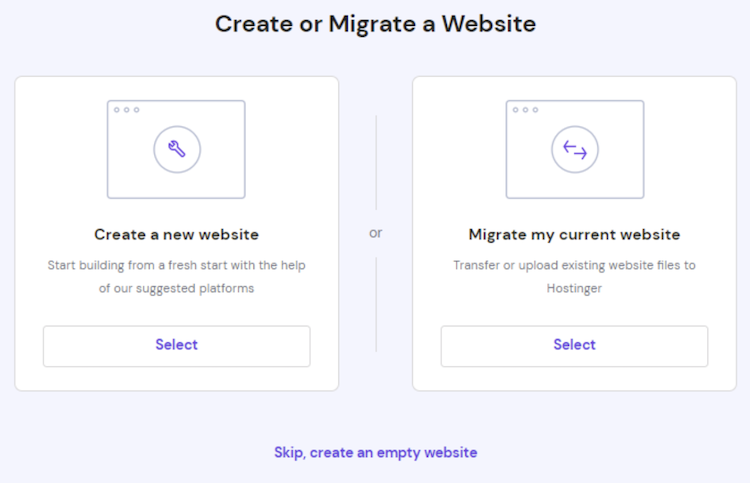
- In your Hostinger control panel (hPanel), go to Setup and click “Start Now” on the Hello page.
- Provide details about your hosting project and choose to create a new site or migrate an existing one.
- Name your site by registering a new domain or using one you already own.
- Review the setup summary and complete the process by hitting Finish up the setup.
2. Using the hPanel
HPanel and Plesk continue to dominate as the most popular hpanels. However, Hostinger has opted for a customized alternative known as hPanel. It is characterized by its user-friendly navigation.
Elements of its predecessors are evident in hPanel, making it a seamless transition for those familiar with hPanel. Users experienced with hpanel will find hPanel to be an upgraded version without feeling disoriented. Additionally, newcomers need not worry, as Hostinger provides ample guidance and support.

Functions on the Hostinger panel are well explained. For instance, users can effortlessly enhance website performance or clear the cache with just a click.
Hostinger’s commitment to its hpanel is evident over time. There are constant updates to hPanel. These updates aim at enhancing user intuitiveness and comfort. Therefore, users should not be surprised if they observe slight changes while using it. Hostinger actively seeks to refine and improve the user experience.
Hostinger uses its own custom hPanel, which is intuitive and constantly updated. Key features include:
- File Manager for accessing site files
- 1-click installs for apps like WordPress
- Tools to migrate existing sites
- Database management
- Managing domains and adding sites
- Website Builder to create new sites
- Email account creation
The interface is well-organized and easy to navigate. Speed can occasionally be slow, but otherwise, hPanel performs well for managing sites.
3. Installing WordPress
Installing WordPress is very simple through 1-click installs. Just select WordPress from the auto-installer tool and enter site details like name and admin credentials.
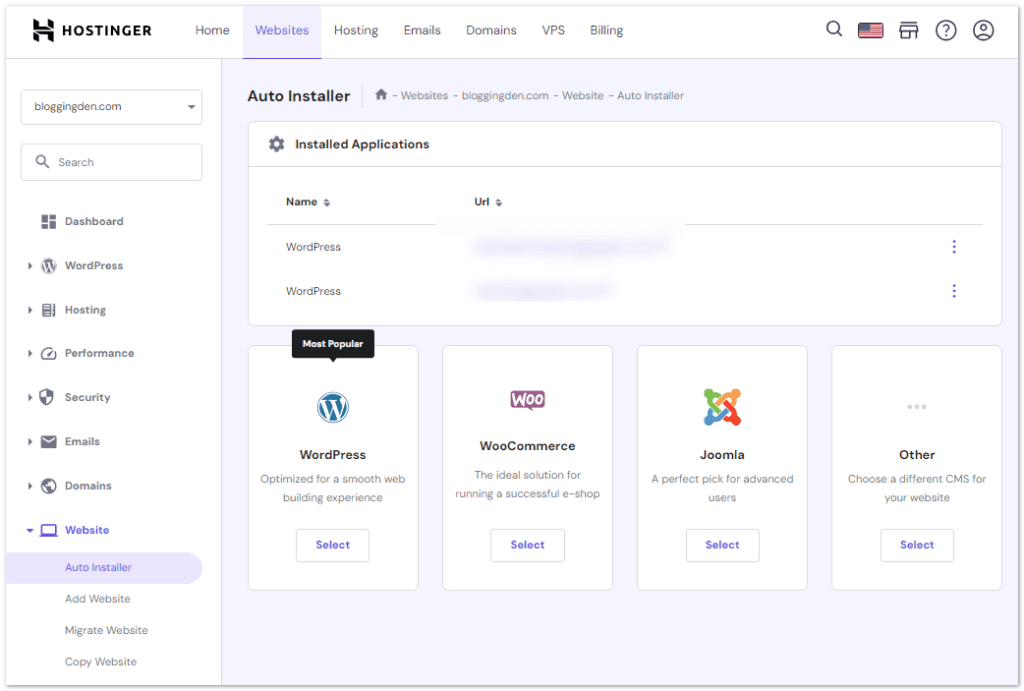
Hostinger handles downloading the latest WordPress version and setting up the database automatically. Your WordPress site will be ready in just a few minutes. You can check this post on How to Install WordPress on Hostinger in 2025.
4. Free Website Migration
Hostinger now provides free website migration right from your control panel. Just submit a request from your account profile and provide login details for the current host.
Hostinger can migrate sites from WordPress, cPanel, FTP, and most other platforms. This makes switching hosts seamless since Hostinger handles moving your site for you.

The hPanel control panel and simplified installation for platforms like WordPress make getting started with Hostinger hosting straightforward. This is true even for first-time users.
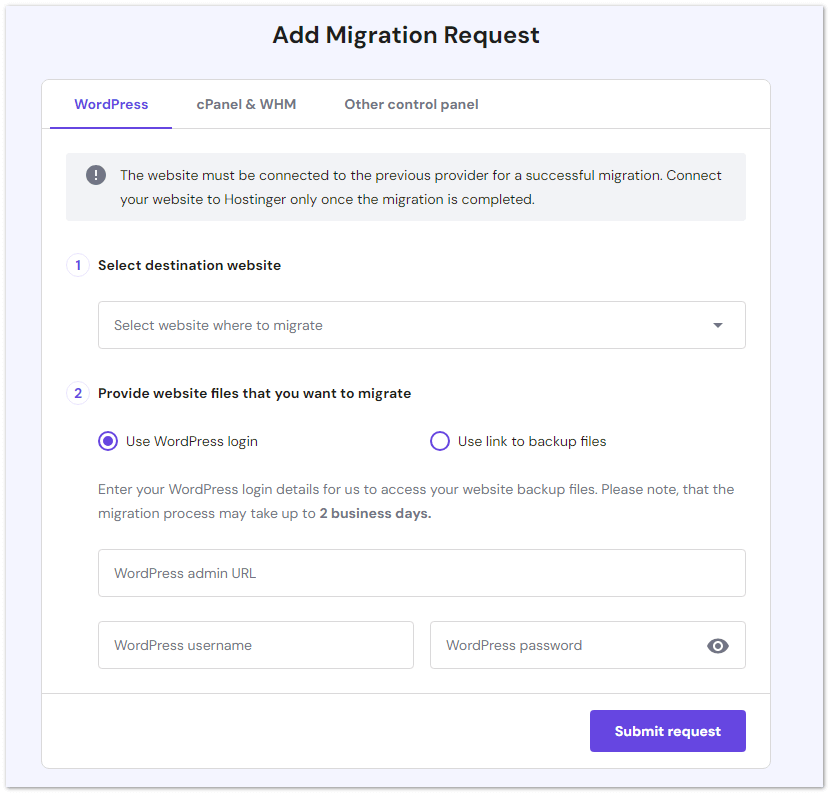
Automated migrations also simplify switching from another provider.
5. Essential Features: Free Domain, Email, and Website Builder
Hostinger includes several key features for creating and managing websites, even with their most affordable shared hosting plans.
- All shared hosting plans, except the cheapest $1.49/month tier, provide a free domain name registration. This includes popular TLDs like.com,.net,.online, and more.
- Plans also come with 100 free email accounts, an SSL certificate for security, and access to the Hostinger Website Builder. Having these essentials included means you can get started without extra expenses.
- The Website Builder provides an easy drag-and-drop editor and over 150 template designs to choose from. It uses AI to generate unique sites and content with just a few clicks. Helpful tools for blogging, SEO, analytics, and emails are built in as well.
- For those without WordPress experience, the Website Builder offers a simpler alternative to hand-coding a site. Its user-friendly editor and AI site generation make launching a professional website quick and straightforward.
By including free domains, emails, SSL, and an integrated website builder, Hostinger delivers excellent value. Even on low-cost shared hosting, you get the key features necessary for building both personal and small business sites.
6. Hostinger Business Email
Hostinger provides business email accounts that help project a professional image and boost email marketing. A custom email like ‘satish@companyname.com’ looks far better than a personal Gmail address.
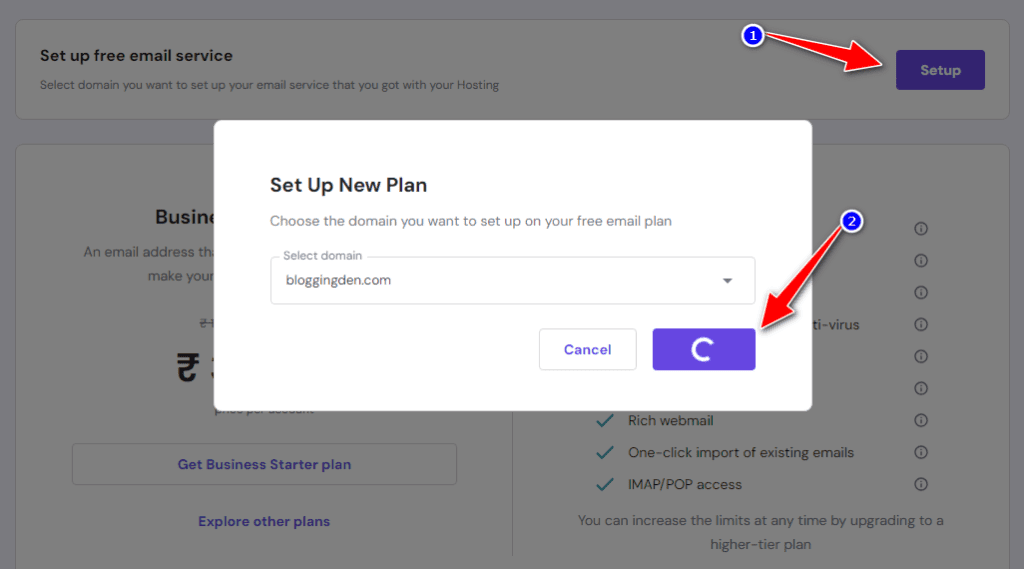
All Hostinger plans, except Single, include 100 free business mailboxes with 1GB of storage per account. Even the starter plan allows one free business email.
Setting up is straightforward:
- In your Hostinger dashboard, go to Email > Email Accounts > Setup
- Select your domain and click Manage
- Choose Create Email Account
- Enter account details and create
- Configure the email on your device or email client
An Automatic Apple Device Setup option makes connecting to iOS seamless.
Pro Tip: Using a professional custom email can increase response rates and subscriber engagement compared to personal accounts.
7. AI Website Builder and AI Tools
Hostinger’s AI Website Builder lets you generate a complete, mobile‑friendly site by answering a few questions. You can then customize pages with drag‑and‑drop, AI content suggestions, and built‑in SEO tools.
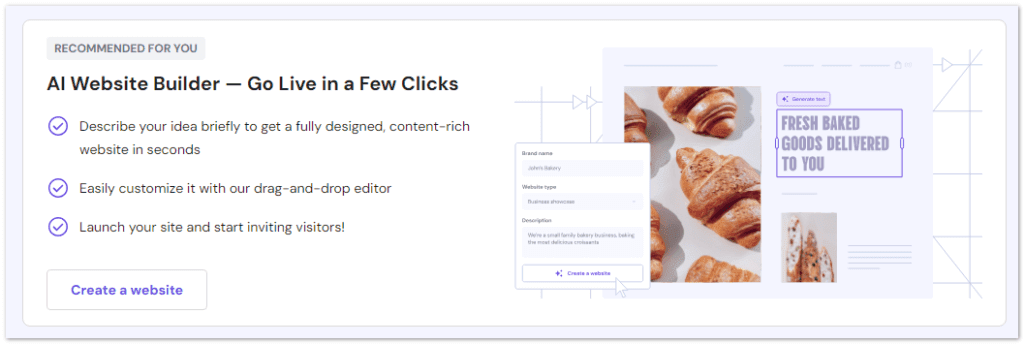
For WordPress users, Hostinger also offers AI helpers inside hPanel. They provide marketing tools like AI SEO/Reach. These tools speed up content, on‑page optimization, and basic campaign tasks.
These AI tools, combined with built‑in SEO settings, simplify the creation of search‑optimized pages. They also help with blog posts. You do not need a separate SEO plugin or tool.
Hostinger Performance: Speed, SRT & Uptime
Hostinger uses LiteSpeed Web Server with an integrated caching plugin. It also uses an object cache to speed up both static and dynamic pages. It also supports modern standards like HTTP/3 and IPv6. It runs your site on fast SSD or NVMe SSD storage on higher plans.
It connects easily to a CDN to reduce latency worldwide. These optimizations help improve server response time and TTFB. Your WordPress site loads quickly even during traffic spikes. You can further stress‑test performance with tools like a K6 stress test if needed.
For search engines and visitors, faster page load speeds mean better experiences. Sites hosted on Hostinger load faster thanks to the LiteSpeed web server they use.
Here is how Hostinger performs for speed and uptime:
1. Speed Tests
Hostinger uses worldwide data centers with cloud infrastructure to maximize speeds. These benchmarks are valid even on shared Business plans.
On LiteSpeed servers with LSCache enabled, test sites on Hostinger often load in around 1–2 seconds for nearby visitors. This speed is very competitive for budget hosting.
Hostinger uses built-in caching via Cloudflare, which improves speeds.

2. Uptime
Hostinger advertises a 99.9% uptime guarantee, and long‑term monitoring by independent testers frequently records real uptime between 99.95% and 99.99%, with only a few minutes of downtime over several months on well‑provisioned plans.
For small business sites and blogs, this level of stability is more than enough. In the rare case that uptime drops below 99.9%, Hostinger’s SLA lets you request a partial credit on your hosting fee.

For budget hosting, Hostinger delivers respectable speeds and reliability. Users wanting maximum performance may prefer plans with more resources and caching. But for basic sites, the speeds are very decent.
3. Server response time (SRT)
Server response time is the duration the server takes to answer the first request. It has a big impact on Core Web Vitals and SEO.
- On well‑configured Business/WordPress plans, independent reviewers report sub‑100 ms response times from data centers in the same region. Globally, the response times are under 600 ms. This performance is excellent for budget hosting.
- For Indian or Asian traffic, choosing the India or Singapore data center usually gives the lowest SRT. It also provides a much faster “first byte” compared to hosting in the US or Europe.
Hostinger load time
Hostinger’s fast load times can be attributed to a combination of various factors. These include reducing latency, leveraging up-to-date technology, and optimizing specifically for platforms like WordPress.
Here are some key elements that contribute to hostinger’s fast load times:
- Data Center Locations: Hostinger offers multiple data center locations. These include the India server and Singapore server options in Asia. Additionally, they have US server locations and others worldwide. Pick a server close to your audience. This choice helps WordPress users get better response times and gives WooCommerce store owners smoother checkout experiences. If you’re a developer or running custom apps, Node.js hosting on Business or Cloud plans, along with VPS options, provides more control while still using Hostinger’s global infrastructure.
- Content Delivery Network (CDN): A Content Delivery Network is designed to distribute website content across multiple servers worldwide. Hostinger may utilize CDN services to cache and deliver static content. These services use servers that are geographically closer to the user. This reduces the time it takes for data to travel.
- High-Performance Hardware: Hostinger invests in modern and high-performance hardware, including solid-state drives (SSDs) instead of traditional hard disk drives (HDDs). SSD storage offers faster read and write speeds. This significantly improves the overall speed and responsiveness of websites hosted on their servers.
- Caching Techniques: Hostinger likely implements caching mechanisms at various levels, such as server-side caching and content caching. Caching involves storing frequently accessed data in a temporary storage area. This reduces the need to generate the same content repeatedly. It also improves load times.
- Optimized Server Configurations: The hosting environment’s configurations play a crucial role in speed. Hostinger may optimize server settings. They might use the latest web server software (like LiteSpeed). They could also update PHP versions and other performance-related parameters to ensure efficient processing of requests.
- WordPress Optimization: Since WordPress is a popular content management system, Hostinger may offer specific optimizations for WordPress sites. This could include pre-configured settings. It may also include caching plugins and other tools. These tools enhance the performance of WordPress websites hosted on their platform.
- GZIP Compression: Hostinger likely uses GZIP compression. This reduces the size of files transmitted between the server and the user’s browser. Compressed files load faster, improving overall page load times.
- Resource Allocation and Scalability: Hostinger may use load balancing and resource allocation techniques. These techniques ensure that server resources are distributed efficiently among users. This helps maintain consistent performance, even during traffic spikes.
- Monitoring and Optimization: Regular monitoring of server performance allows Hostinger to identify and address any bottlenecks or issues promptly. Continuous optimization ensures that the hosting environment remains responsive and fast.
Hostinger security
Hostinger offers a comprehensive security suite. It includes features like a built‑in malware scanner. Additionally, there is a BitNinja or equivalent firewall, and DDoS protection on the network level.
Your sites benefit from automatic backups on supported plans. Hostinger’s infrastructure meets ISO 27001 standards in its data centers.
Newer tools such as dark web monitoring inside hPanel can alert you if your credentials are leaked. This helps you react quickly. It keeps your hosting account and domains safer.
- SSL Certificates: Secure Socket Layer (SSL) certificates encrypt data transmitted between the user’s browser and the server, ensuring secure communication. Many hosting providers, including Hostinger, often provide free SSL certificates to their users.
- Firewalls: Hostinger likely employs firewalls to monitor and control incoming and outgoing network traffic. Firewalls are crucial for preventing unauthorized access and protecting against various types of cyber threats.
- DDoS Protection: DDos attacks (Distributed Denial of Service attacks) can overwhelm a website by flooding it with traffic. Hostinger may implement DDoS protection measures to mitigate the impact of such attacks and ensure the website remains accessible.
- Malware Scanning and Removal: Regular malware scans help identify and remove malicious code from websites. Hostinger may provide tools or services to scan for malware and offer assistance in removing any threats detected.
- Backups: Regular backups are a fundamental aspect of website security. Hostinger likely offers automated backup solutions. These solutions allow users to restore their websites to a previous state. This is crucial in case of data loss or a security incident.
- Two-Factor Authentication (2FA): Two-factor authentication adds an extra layer of security. It requires users to provide two forms of identification before accessing their accounts. This helps prevent unauthorized access even if login credentials are compromised.
- Server Security: Hostinger takes measures to secure its servers. It includes keeping software and systems up to date with the latest security patches. This helps address vulnerabilities that could be exploited by attackers.
- 24/7 Monitoring: Continuous monitoring of server and network activities allows Hostinger to detect and respond to security incidents promptly.
Hostinger’s security suite is more than enough for most blogs and small business sites. Additionally, the newer dark web monitoring feature adds an extra safety layer for your account.
Hostinger website builder
Hostinger offers a user-friendly website builder that allows you to create professional-looking websites without any coding knowledge. It comes with a drag-and-drop interface. This makes it easy to add elements like text, images, videos, and more to your site.
The website builder provides a good selection of modern templates. They are mobile-responsive and optimized for various industries, such as business, portfolio, online store, and more. You can easily customize the templates to match your brand’s look and feel.
Hostinger’s website builder includes built-in SEO tools to help improve your site’s visibility on search engines. It also integrates with third-party apps and services. This allows you to add features like online booking, live chat, and social media feeds to your website.
Some key features of Hostinger Website Builder include:
- Drag-and-Drop Interface: Hostinger Website Builder employs a user‑friendly drag‑and‑drop interface. It makes it simple for users to add elements. Users can customize layouts and design their websites without technical expertise.
- Templates: Hostinger Website Builder offers a collection of templates that cover various industries and purposes. Users can choose a template as a starting point and then customize it to suit their specific needs.
- Mobile Responsiveness: The websites created with Hostinger Website Builder are designed to be mobile-responsive. This ensures a seamless and optimized experience for visitors using different devices.
- E-commerce Capabilities: Hostinger Website Builder includes features for building online stores. This allows users to set up and manage their e-commerce websites with ease. This includes product listings, shopping cart functionality, and payment integration.
- AI Content Generator: Hostinger Website Builder incorporates AI (Artificial Intelligence) for content creation. It can help users in generating content. This includes text and images. These elements enhance the overall design and appeal of the website.
- SEO Tools: Hostinger Website Builder includes basic SEO (Search Engine Optimization) tools. These tools help users optimize their websites for search engines. These tools improve their visibility in search engine results.
- For marketing needs: the builder includes integrations for Google Analytics, eCommerce, Google Tag Manager, and Facebook Pixel. Just connect your accounts to enable these features.
Hostinger’s Website Builder is an easy-to-use option suitable for beginners. While advanced users want more complex capabilities, it provides ample features and customization for simple sites. The AI tools and marketing integrations give a helpful boost, too.
The website builder is included for free with Hostinger’s Premium and Business web hosting plans. This makes it an affordable option for small businesses. It is also suitable for individuals looking to establish an online presence quickly.
Overall, Hostinger’s website builder is a beginner-friendly tool. It simplifies the process of creating a professional website. Users do not need extensive technical skills or a steep learning curve.
Hostinger customer support
Dealing with issues on your own can be frustrating. The quality of Hostinger customer support is crucial when choosing a budget web hosting provider. Hostinger offers several support channels. The main way to get help quickly is through their 24/7 live chat whenever you are stuck.
| Customer Support Channel | Availability |
|---|---|
| 24/7 live chat | ✅ |
| ✅ | |
| Ticketing system | ✅ |
| Phone line | ❌ (only on higher‑tier plans) |
| Knowledge base | ✅ |
| Community & Facebook group | ✅ |
Here is an overview of Hostinger’s support options:
- 24/7 live chat to get instant answers to hosting and WordPress questions.
- An email and ticketing system for in‑depth technical issues.
- A detailed knowledge base with tutorials, how‑to guides, and troubleshooting articles.
- Community discussions and a Facebook group for peer‑to‑peer support.
In real‑world use, Hostinger’s live chat usually responds within a couple of minutes. The agents are friendly and share screenshots. They often provide step‑by‑step fixes rather than generic replies. For most shared and WordPress users, this is faster and more practical than phone support.
Hostinger’s 24/7 live chat is fast and helpful for budget hosting. However, phone support is not available on shared plans. Overall, the support quality is strong for the price.

Many reviews state that overall, Hostinger is good for new website owners. While not perfect, Hostinger is the best budget hosting provider for many sites.
Is Hostinger a good option for you?
Hostinger remains a top-budget hosting provider that delivers solid performance without breaking the bank. Let’s summarize how they stack up across key criteria:
| Feature | Rating | Description |
| Pricing | ★★★★★ | Plans start at an ultra-affordable $1.79/month for shared hosting, much cheaper than competitors. This makes Hostinger a top choice for those on a tight budget. |
| Ease of Use | ★★★★★ | The hPanel is modern, intuitive, and easy to navigate. Setup wizards help launch sites quickly with little effort. Ideal for beginners. |
| Performance | ★★★★★ | Hostinger delivers consistently fast page load times under 1 second and excellent uptime averaging 99.9%. Reliability is top-notch. |
| Security | ★★★★☆ | Core protections like SSL, firewalls, and malware scanning are provided. However, security lacks more advanced features found with higher-end hosts. |
| Support | ★★★★★ | 24/7 live chat and email support is extremely responsive, with most queries answered in under a minute. Agents are friendly and helpful. |
Choose Hostinger if:
- You want cheap but fast hosting for a new blog, portfolio, or small business site.
- You like having an AI website builder and AI helpers for content and SEO tasks.
- Your audience is in India, Asia, or global, and you can pick a nearby data center.
Look for alternatives if:
- You need phone support and enterprise‑level security features.
- You require very high resources, custom server stacks, or complex compliance.
Hostinger excels as a budget-friendly option for beginners building their first websites. Performance can compete with higher-priced rivals, but advanced users may want more security and developer features.
Considering their low costs, Hostinger delivers strong value, and the extensive self‑help options are useful for DIY troubleshooting.
Many reviews state that overall, Hostinger is good for new website owners. While not perfect, Hostinger is the best budget hosting provider for many sites.
Hostinger Pricing
Hostinger’s intro pricing is very attractive. This is especially true on long‑term billing cycles. However, you should always check the renewal rates before checkout.
After the first term, the promotional discount ends. The effective monthly cost increases. Therefore, a 24–48 month plan plus a valid Hostinger coupon code usually gives the best value.
When you calculate the real cost per month over three or four years, Hostinger still stays competitive for most beginners and WordPress users on a tight budget
With plans starting under $2 per month, Hostinger provides some of the most affordable hosting solutions without compromising on quality.
Given the low prices, Hostinger is definitely worth a try. Choose your Hosting plan from the official page.
| Type of hosting | Best for |
|---|---|
| Shared hosting | Online stores, web apps, and other projects need more control. A more advanced option. |
| WordPress hosting | Optimized hosting for WordPress websites. |
| Cloud hosting | Small business owners selling online. Scalable resources. |
| VPS hosting | Online stores, web apps, and other projects needing more control. A more advanced option. |
As of late 2025, Hostinger provides specialized hosting solutions tailored to different user needs, from beginners to high-performance enterprises. Below is a breakdown of the Shared Web, VPS, WordPress, and Cloud hosting sections, including introductions, pricing, and key features.
1. Shared Web Hosting
Shared hosting is Hostinger’s most popular entry-level solution, designed for beginners, small businesses, and personal blogs. It offers a cost-effective way to get online by sharing server resources among multiple users.
Pricing
- Premium: US$ 2.99/mo (Renews at US$ 10.99/mo)
- Business: US$ 3.99/mo (Renews at US$ 16.99/mo)
- Cloud Startup: US$ 7.99/mo (Renews at US$ 25.99/mo)
Key Features
- Free Domain & SSL: Includes a free domain for one year and unlimited SSL certificates for security.
- AI Website Builder: Create sites in minutes using AI-powered design tools.
- Managed WordPress: Optimized performance and automatic updates for WordPress sites.
- Weekly Backups: Regular data recovery options are included with Premium, while Business adds daily backups.
2. VPS Hosting (KVM)
Hostinger’s VPS hosting uses KVM (Kernel-based Virtual Machine) virtualization to provide dedicated resources and full root access. It is ideal for developers and tech-heavy projects requiring high performance and control.
Pricing
- KVM 1: US$ 4.99/mo (1 vCPU, 4 GB RAM, 50 GB NVMe)
- KVM 2: US$ 7.49/mo (2 vCPU, 8 GB RAM, 100 GB NVMe)
- KVM 4: US$ 9.99/mo (4 vCPU, 16 GB RAM, 200 GB NVMe)
Key Features
- Performance: Powered by AMD EPYC processors and ultra-fast NVMe SSD storage.
- Dedicated IP: Includes a dedicated IP address to ensure better email deliverability and security.
- AI Assistant: Built-in AI support to help with server management and troubleshooting.
- Global Data Centers: Choose from multiple locations worldwide for lower latency.
3. Managed WordPress Hosting
This hosting is specifically optimized for the WordPress CMS, featuring specialized tools to enhance speed, security, and ease of use. It is recommended by WordPress.org for its seamless integration.
Pricing
- Premium: US$ 2.99/mo
- Business: US$ 3.99/mo
- Cloud Startup: US$ 7.99/mo
Key Features
- AI WordPress Tools: Includes an AI Troubleshooter to fix errors and an AI Content Creator for unique posts.
- Staging Tool: Safely test website changes and updates in a private environment before going live.
- ObjectCache: Available on higher plans to deliver maximum website speed by caching database queries.
- Managed Setup: Automatic WordPress installation, theme updates, and plugin vulnerability scanning.
4. Cloud Hosting
Cloud hosting offers the power of a dedicated server with the simplicity of shared hosting. It provides dedicated resources (CPU/RAM) on a scalable network, perfect for large-scale projects and ecommerce stores.
Pricing
- Cloud Startup: US$ 7.99/mo (Renews at US$ 25.99/mo)
- Cloud Professional: ~US$ 15.99/mo (Renews at ~US$ 34.99/mo)
- Cloud Enterprise: ~US$ 29.99/mo (Renews at ~US$ 54.99/mo)
Key Features
- Priority Support: Access to 24/7 expert support with faster response times.
- Dedicated Resources: Includes up to 100 PHP workers, 4 GB+ RAM, and dedicated IP addresses.
- Enhanced Speed: Includes a free CDN (Content Delivery Network) to load content quickly for global audiences.
- Massive Scalability: Manage up to 300 websites with 200 GB+ of NVMe storage on enterprise plans.
Compared to rivals, Hostinger is cheaper in terms of yearly costs. While basic, Hostinger is still a reliable hosting provider.
Overall, Hostinger provides tremendous value and flexibility at industry-leading low prices. The affordability makes them one of the best cheap hosting providers. Hostinger web hosting plans are very affordable, starting at just $1.49 per month.
Remember that Hostinger’s promo prices are for the first term only. On renewal, shared and WordPress plans often increase to roughly 2–3x the introductory price. Choosing a longer billing cycle gives you the lowest effective monthly cost.
For maximum savings, combine a 24–48 month plan with a Hostinger coupon code from our Hostinger discount page before checkout.
Frequently Asked Questions
Is Hostinger good for beginners?
Yes. Hostinger’s hPanel makes it easy to launch a site without technical skills. The 1‑click WordPress installer and AI Website Builder also contribute to this simplicity. Additionally, the guided setup provides support for beginners. This ease is why many independent tests recommend it for first‑time website owners.
Is Hostinger fast enough for WordPress?
On LiteSpeed servers with LSCache enabled, Hostinger can load WordPress pages in around 1 second. It can maintain stable response times under load on its Business and Cloud plans. This is a strong performance for the price.
What is Hostinger’s 99.9% uptime guarantee?
Hostinger commits to at least 99.9% monthly uptime, and if uptime drops below this, you can request partial credit on your hosting fee. Independent tracking often shows real uptime close to or above 99.95–99.99%.
How expensive are Hostinger renewals?
Promo prices start low, but most shared plans renew at roughly 3x the introductory rate. Over a 4‑year term, locking in a longer billing cycle usually gives you the lowest effective monthly cost.
Does Hostinger support Node.js hosting?
Yes. Node.js web applications can be deployed on Business and Cloud hosting plans directly from hPanel, and Node.js is also available on VPS for more control and resources.
Which Hostinger server location is best for India?
For Indian audiences, the India or Singapore data centers usually provide the lowest latency. They offer the fastest SRT. US or European locations are better for Western audiences.
Is Hostinger secure?
Hostinger offers free SSL, firewall/DDoS protection, and malware scanning. It also includes 2FA and regular backups on all plans. Additionally, it provides ISO 27001-certified data centers. For extra account protection, there is optional dark web monitoring.
Is Hostinger good for Indian websites?
Yes, Hostinger is good for WordPress. It offers LiteSpeed servers, a 1‑click installer, and the LSCache plugin. The managed WordPress plans make it easy to build fast, secure WordPress sites even as a beginner.
Conclusion on Hostinger WordPress hosting review
Hostinger is a top choice for affordable and beginner-friendly web hosting services. Their shared hosting plans start at only $1.49/month with a simple interface and helpful support. While light on advanced functionality, Hostinger excels at the basics. Many users happily host their sites with Hostinger due to low pricing.
Many users agree that Hostinger is a pretty good budget host. Significantly, Hostinger offers a 30-day money-back guarantee on all plans.
My experience is that Hostinger is a safe choice for new sites. I encourage you to review Hostinger yourself and see its value. With multiple data centers worldwide, Hostinger delivers a great uptime guarantee.
How this review was tested?
This Hostinger review is based on real usage of Hostinger shared and WordPress plans. These plans were used for multiple WordPress blogs. The review includes continuous checks on speed, uptime, and support.
For users wanting maximum control and customization, a pricier managed VPS host may be preferable. But for budget-minded sites looking for responsive support and ease of use, Hostinger is a leading contender for affordable hosting.
Hostinger Review 2025

Hostinger offers affordable web hosting plans for individuals and small businesses, catering to beginners and professionals. Their Minecraft server hosting offers RAM and storage upgrades, making them a leading budget web hosting provider. With limited configuration options, Hostinger provides quality support and a 30-day money back guarantee for new users.
Product SKU: Hostinger Inc.
Product Brand: Hostinger Web Hosting
Product Currency: USD
Product Price: 1.49
Product In-Stock: InStock
5
Pros
- Extremely low introductory pricing for long-term subscriptions.
- Free domain name and unlimited SSL security on annual plans.
- User-friendly custom dashboard (hPanel) built for ease of use.
- AI tools included for quick website building and content creation.
- High-speed performance with LiteSpeed servers and NVMe storage.
Cons
- Significantly higher renewal costs once the initial discount ends.
- No telephone support is available for technical assistance.
- The most basic hosting tier does not include a free domain.
- Daily backups are only included in higher-tier hosting plans.
- The best advertised rates require a 48-month upfront payment.
Unlock the secrets to affordable, high-quality web hosting by reading our in-depth Hostinger review now. Click here to learn more and take your website to new heights in 2025!
Limited Time Offer: Claim your Hostinger 78% Discount + Free SSL & Website Migration.