
One Kadence bundle, simple pricing. No surprises.
Kadence gives you a fast WordPress theme, powerful blocks, and 200+ starter templates in a single bundle—perfect for bloggers, creators, and agencies who want speed and design control.
Get Kadence Bundle →When I first started experimenting with WordPress themes, I tested dozens of themes that claimed to be lightweight and SEO-friendly. Some looked polished but slowed down the site, while others were fast but limited in customization.
Kadence stood out because it balances performance, flexibility, and ease of use. In 2026, it remains a strong choice for bloggers, content creators, and small business owners who want a fast, well-structured, and highly customizable WordPress theme.
Kadence Theme Review 2026: Kadence is a modern, lightweight WordPress theme built with a Gutenberg-first approach. It is designed for users who care about speed, SEO, accessibility, and design control. With its updated ecosystem now available through Liquid Web, Kadence continues to be one of the most practical theme options for WordPress sites in 2026.
In this in-depth Kadence theme review, we will examine its features, performance, speed, SEO capabilities, beginner-friendliness, and WooCommerce compatibility. We will also cover the updated pricing structure, compare it with popular alternatives like Astra and GeneratePress, and explain whether the free version is enough or the premium plans are worth it.
If you are asking whether Kadence is good for blogging, how fast it is, or whether you should choose Kadence Free or Pro, this review will answer those questions with practical, experience-based insights.
What Is Kadence Theme?
Kadence Theme is a lightweight, fast-loading, and highly customizable WordPress theme built for bloggers, businesses, and online stores. It is designed to help users create professional-looking websites without needing to code, while still keeping performance and SEO in focus.
The theme uses a block-based approach and works closely with the WordPress block editor, making it easy to build and customize pages with familiar tools. It also includes a drag-and-drop header and footer builder, global color controls, advanced typography settings, and responsive design so your site looks good on all devices.
Kadence also supports popular tools and workflows, including WooCommerce and leading page builders, which makes it flexible enough for blogs, portfolios, business websites, and membership sites. Its settings panel gives you control over layouts, headers, typography, and other design elements from one place.
In short, Kadence Theme is more than a standard WordPress theme. It is a performance-focused site-building framework that helps you create fast, secure, and future-ready websites for 2026 and beyond.
Kadence Theme Speed Test: Real PageSpeed Insights Results
Performance and loading speed are critical for SEO, user experience, and conversions. To evaluate real-world performance, I tested Kadence Theme on a clean WordPress installation with minimal plugins enabled.
I ran a fresh Kadence setup through PageSpeed Insights to check how well it performs in practical conditions. Here are the results:
Speed Test Results
- Mobile Score: 94–96.
- Desktop Score: 99–100.
Kadence loads with a lightweight CSS structure, minimal JavaScript, and no unnecessary dependencies. This helps it deliver excellent Core Web Vitals scores right out of the box.
Core Web Vitals
- Largest Contentful Paint (LCP): 1.4 seconds.
- Cumulative Layout Shift (CLS): 0.02.
- Total Blocking Time (TBT): 0 ms.
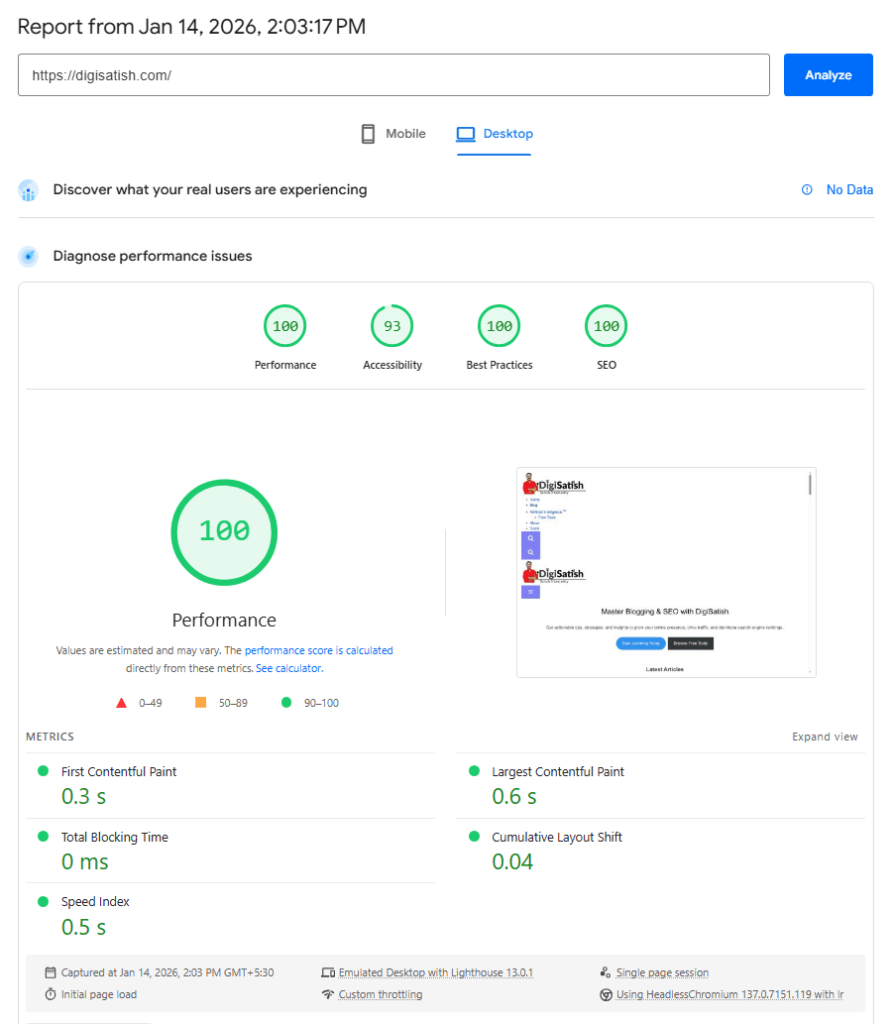
These results fall within the “Good” range for all major Core Web Vitals metrics.
What The Results Mean
Fast performance can support better SEO, improve engagement, and reduce bounce rates. A quicker site also creates a smoother mobile experience, which matters because a large share of traffic now comes from mobile devices.
Kadence’s speed advantage is especially useful for bloggers, affiliate sites, and content-driven businesses that depend on strong page experience. When a theme is lightweight and well optimized, it gives your content a better chance to perform well in search and convert visitors more effectively.
Testing Environment
It is important to note the environment used for testing, because speed results can vary depending on hosting quality. For this test, the setup included:
- Server: LiteSpeed.
- Hosting type: Business shared hosting.
- PHP version: PHP 8.x.
- Page builder: Gutenberg default editor.
This makes the test more realistic for typical bloggers and small website owners rather than relying on an idealized lab setup.
Comparison With Alternatives
In similar conditions, Kadence performs on par with GeneratePress and slightly better than Astra in mobile PageSpeed results. Its strong Gutenberg integration and reduced render-blocking resources help it maintain excellent performance while still offering more design flexibility.
Verdict: Kadence theme is a solid choice if speed, SEO performance, and Core Web Vitals are priorities in 2026. It is a free WordPress theme with premium upgrade options, and its lightweight structure makes it a strong fit for users who want a fast, modern, and search-friendly website.
Kadence Theme for SEO – Is It Really SEO-Friendly?
Kadence theme is built with modern SEO best practices in mind. It is a strong choice for bloggers, content creators, and businesses that want to improve their visibility in search results.
1. Clean and Optimized HTML Structure
Kadence uses lightweight, well-structured HTML markup that helps search engines crawl and understand your content more easily. It avoids unnecessary wrapper elements and bloated code, which improves indexing and accessibility—both important ranking factors.
2. Speed and SEO Relationship
Page speed is a direct ranking signal, especially after Google’s Core Web Vitals update. Kadence’s minimal CSS, reduced JavaScript, and optimized asset loading help pages load faster, which positively impacts:
- Crawl efficiency.
- Bounce rate.
- Mobile rankings.
Faster pages generally lead to better user engagement, which indirectly strengthens SEO performance.
3. Gutenberg-Native Advantage
Kadence is designed specifically for the WordPress block editor (Gutenberg). This native compatibility results in cleaner content output compared to heavy page builders, leading to
- Faster rendering.
- Better mobile responsiveness.
- Improved semantic structure.
Search engines prefer this streamlined approach because it produces cleaner, more readable page layouts.
4. Compatibility with Rank Math and Yoast
Kadence works seamlessly with popular SEO plugins like Rank Math and Yoast SEO. All essential SEO features function without conflicts, including:
- Meta titles.
- Meta descriptions.
- Schema markup.
- Breadcrumbs.
- XML sitemaps.
This gives you full control over on-page optimization without fighting theme limitations.
If your goal is to build a fast, clean, and SEO-friendly WordPress site in 2026, Kadence Theme is a strong choice. It provides a solid technical foundation without requiring complex customizations—making it ideal for bloggers and content-focused Web sites.
Kadence Free Theme Features
Kadence offers more design and customization options than most free themes. It fulfills the needs of most WordPress users without requiring a paid upgrade. To extend its capabilities further, the free Kadence Blocks plugin integrates seamlessly and adds powerful block-based building tools.
Kadence is available in two forms: free and Pro. While many free themes feel restrictive, the Kadence free version is already quite powerful.
1. Theme Settings
After installing and activating the Kadence theme from the WordPress.org directory, go to Appearance → Kadence. In the free version, you will see six main sections in the Kadence settings panel:

Once you click on this, you will get six different sections in the free version of the theme. Through the Kadence settings panel, users can add additional elements to their site. This includes expanded header options and menu customization.
- Global Colors.
- Branding.
- Typography.
- Header Layout.
- Page Layout.
- Footer Layout.
These settings let you control global design elements, header/footer structures, and overall page layouts.
a. Global Colors
Global Colors is one of Kadence’s most important free features. It lets you create a cohesive color scheme for your entire site in minutes—without any CSS.

You can:
- Choose from pre-made color palettes.
- Set site background, content background, and title background colors.
- Adjust content link colors.
- Set custom backgrounds for headers, menus, and content areas.
This ensures design consistency across your entire site and gives you strong creative control.
b. Branding

The Branding section lets you upload your logo and control its placement precisely. You can:
- Display the logo alone.
- Show the logo alongside your site name and tagline.
Both options help your brand identity appear clean and professional.
Pro Tip: Kadence Pro unlocks conditional headers, hooked elements, and global color palette switching (including dark mode) — giving you full brand control across your entire site. Upgrade to the Kadence bundle →
c. Typography

Kadence gives excellent control over typography. You can select fonts for:
- Body text.
- Heading levels (H1–H6).
- Breadcrumbs.
It includes full access to Google Fonts. For each element, you can adjust:
- Font size.
- Font weight.
- Letter spacing.
- Line height.
This level of control helps you fine-tune visual hierarchy and readability, giving your site a professional look even in the free version.
d. Header Layout

The header layout builder is a standout feature. It works in both free and Pro versions and gives you extensive control over your header design.
The header builder has two main tabs:
General Tab
- Drag-and-drop interface to add elements.
- Add logo, tagline, site title, navigation menu, buttons, HTML, and search icon.
- Move and resize elements easily.
- Supports multiple navigation menus, including mobile and footer menus.
Design Tab
- Set header background colors.
- Define breakpoints for mobile header activation.
- Enable sticky header (desktop).
- Enable sticky mobile header.
- Enable a transparent header for modern design effects.
Clicking on a header element in the General tab opens detailed settings for that element, allowing you to customize navigation menus, typography, colors, spacing, and borders for a cohesive look.
Pro Tip: The free header builder is great, but Kadence Pro adds 19 extra header elements, including mega menus, sticky headers, transparent headers, and conditional display rules — perfect for blogs and WooCommerce stores that need smart navigation. See what Pro unlocks →
e. Dynamic Page Layouts

Kadence’s page layout settings provide strong customization options for all pages on your site.
You can:
- Set a standard page layout for consistency.
- Create custom default page templates.
Layout controls include:
- Page Title: Show or hide page titles.
- Page Width: Define custom widths or use theme defaults.
- Sidebars: Choose left, right, or no sidebar.
- Featured Images: Show or hide featured images.
- Comments: Enable or disable comments per page.
- Page Header: Customize titles, featured images, and more.
- Advanced Controls: Adjust layout, vertical padding, backgrounds, and additional styling.
These settings give you control over the core structure of your pages: layout, sidebars, images, titles, comments, and more, ensuring both consistency and flexibility.
f. Footer Layout

The footer layout panel gives you full control over footer design:
- Drag and drop elements to arrange them.
- Add buttons, menus, text, HTML, social icons, and more.
- Use the Design tab to customize colors, spacing, and styles.
You can place common footer elements anywhere in the footer, giving you flexibility to create a footer that matches your brand and site goals.
Pro Tip: Kadence Pro unlocks 200+ premium starter templates, hooked elements for placing content anywhere on your site, and WooCommerce Shop Kit for conversion‑focused store layouts — all starting at $99/year. Get Kadence Pro →
2. Starter Templates
When you install and activate the Kadence theme, a prompt appears suggesting you install the Kadence Starter Templates plugin. This plugin gives you instant access to professionally designed website layouts that simplify the entire setup process—letting you launch a polished, fully functional site in minutes rather than days.
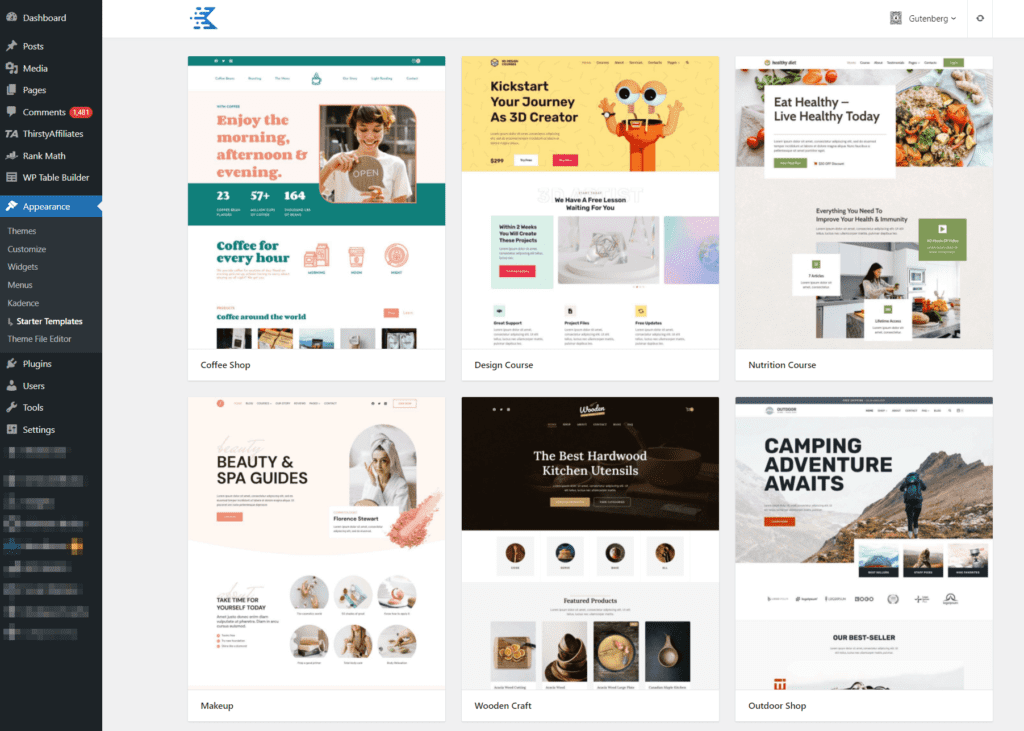
These starter templates go well beyond what most free themes offer. They are built around the Gutenberg block editor and are fully optimized for speed, SEO, and mobile responsiveness right out of the box.
How to Access the Starter Templates
After installing the Kadence Starter Templates plugin, navigate to:
Appearance → Kadence → Starter Templates
Your first step is selecting your preferred page builder. Kadence supports two options:
- Gutenberg Editor — the native WordPress block editor and Kadence’s recommended, most performance-optimized builder.
- Elementor Plugin — a popular drag-and-drop page builder for users who prefer a visual editing workflow.
For the best speed and Core Web Vitals performance, the Gutenberg-based templates are the stronger choice.
What the Starter Templates Include
Kadence offers 200+ starter templates spanning multiple industries and use cases. Each template comes with pre-styled sections and layouts tailored to specific needs, including:
- Hero image sliders and full-width banners.
- “About Us” sections with team layouts.
- Contact information bars and embedded maps.
- Service and feature highlight sections.
- Portfolio grids for creatives and agencies.
- WooCommerce-ready product and shop layouts.
- Blog layouts optimized for content-heavy sites.
- Specialized sections such as restaurant menus, course landing pages, and membership sign-up flows.
Simply import a template with one click, then replace the placeholder content with your own text, images, and branding.
📁 All 200+ starter templates are available from the Essentials plan ($99/year) — import any design in one click and customize with Kadence Blocks.
Browse Kadence Templates →Example: RESTO (Restaurant Template)
The RESTO restaurant template is a strong example of the quality and detail Kadence brings to its starter templates. It includes:
- A visually striking hero image slider as the first impression.
- A “Dishes” section to showcase menu highlights with images and descriptions.
- An engaging “About Us” section with space for your story and team.
- A contact information bar with address, phone, and hours displayed clearly.
- Custom fonts that add a polished, professional aesthetic throughout.
This ready-made layout gives your site a fully functional, restaurant-quality appearance from the moment you import it—so you can focus on adding your content rather than building from scratch.
Child Themes for Advanced Customization
For users who want to take starter templates further, creating a child theme is a reliable approach. A child theme lets you extend and personalize the design — custom CSS, template overrides, and layout changes — without the risk of losing your modifications when the parent theme updates. This is especially useful for agencies delivering custom client sites built on a Kadence starter template foundation.
Pro Tip: The free templates are a solid start, but Kadence Pro (Essentials plan) gives you access to 200+ premium conversion‑focused starter templates for blogs, WooCommerce stores, portfolios, and membership sites — import any template in one click and customize with Kadence Blocks Pro. Explore all templates →
Kadence Theme Pricing and Plans (June 2026)
Kadence has moved to a simple three-tier pricing model under Liquid Web, with one unified bundle that scales from solo creators to agencies. All plans are billed yearly and include the Kadence theme plus Kadence Blocks, with higher tiers adding security, commerce, and multi‑site tools.
| Plan | Price | Best For | Key Inclusions |
|---|---|---|---|
| Essentials | $99/year | Bloggers, creators, small sites | Kadence Theme + Kadence Blocks Pro + 200+ starter templates + core design tools |
Pro
⭐ Most Popular
| $299/year | Creators, WooCommerce stores, membership sites | Everything in Essentials + Shop Kit for WooCommerce + Kadence Security + Kadence Backups + Kadence Memberships |
| Elite | $499/year | Agencies, freelancers, multi-site managers | Everything in Pro + Kadence Central + white‑label portal + A/B testing + multi‑site management |
All three plans are sold as one Kadence bundle—you simply choose the tier that matches your security, commerce, or multi-site management needs.
Which Plan Is Right for You?
How to Buy Kadence Pro from Liquid Web (June 2026)
With the new Kadence suite under Liquid Web, the Kadence Pro plan is part of the unified pricing (Essentials, Pro, Elite). Here is a clean step‑by‑step guide you can use in your review to replace the old “Kadence Theme Kit Pro” section.
Step 1: Go to the Official Kadence Page
– First, click on this magic link to go to the Kadence official page of Liquid Web.
– Scroll down to the Pricing section, where you will see three plans: Essentials, Pro, and Elite.
Step 2: Choose the Kadence Pro Plan
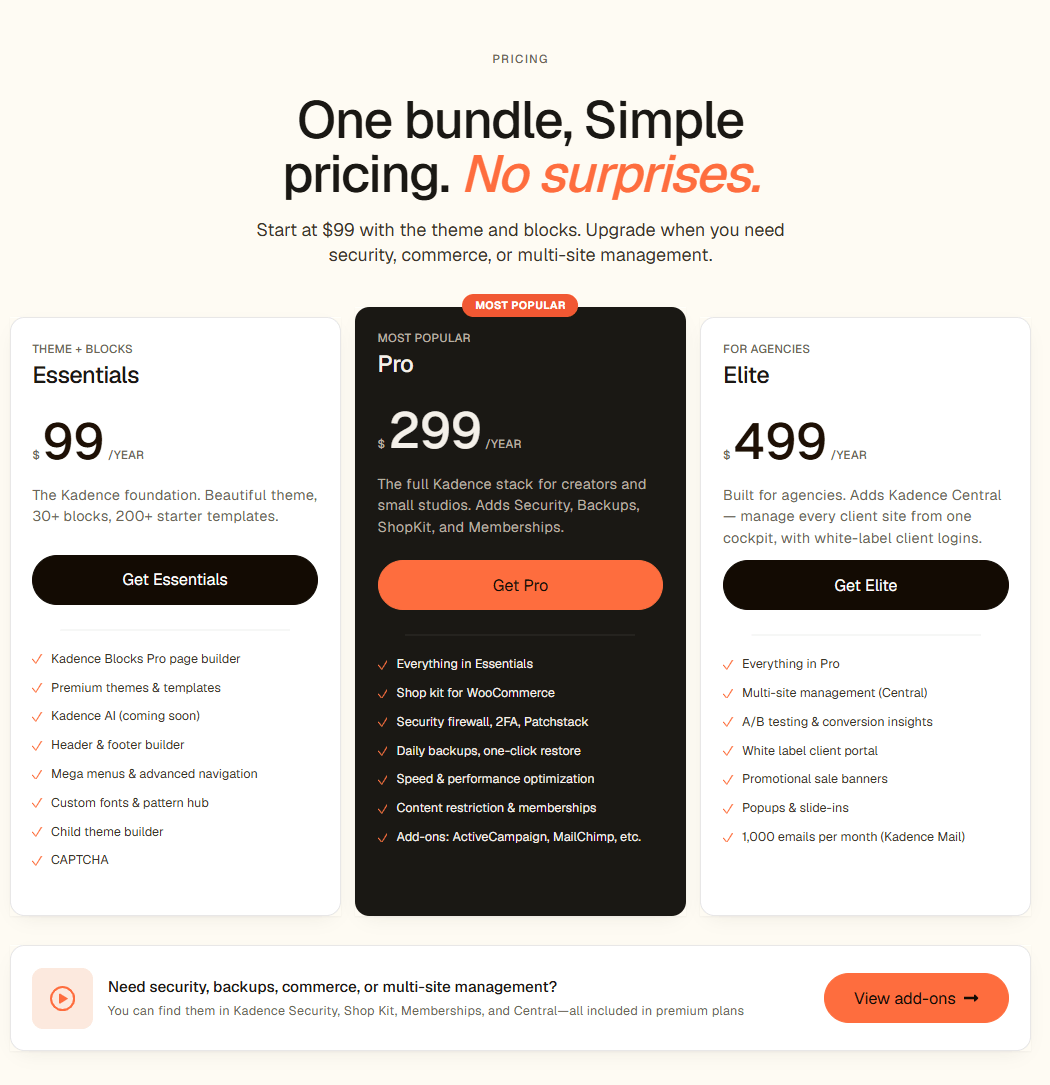
– In the pricing table, locate the Pro column (marked as “Most Popular”).
– This plan includes everything in Essentials plus Shop Kit for WooCommerce, Kadence Security, Kadence Backups, and Kadence Memberships, making it ideal for creators, WooCommerce stores, and membership sites.
– Click the Get Pro button to continue.
Step 3: Review Your Shopping Cart
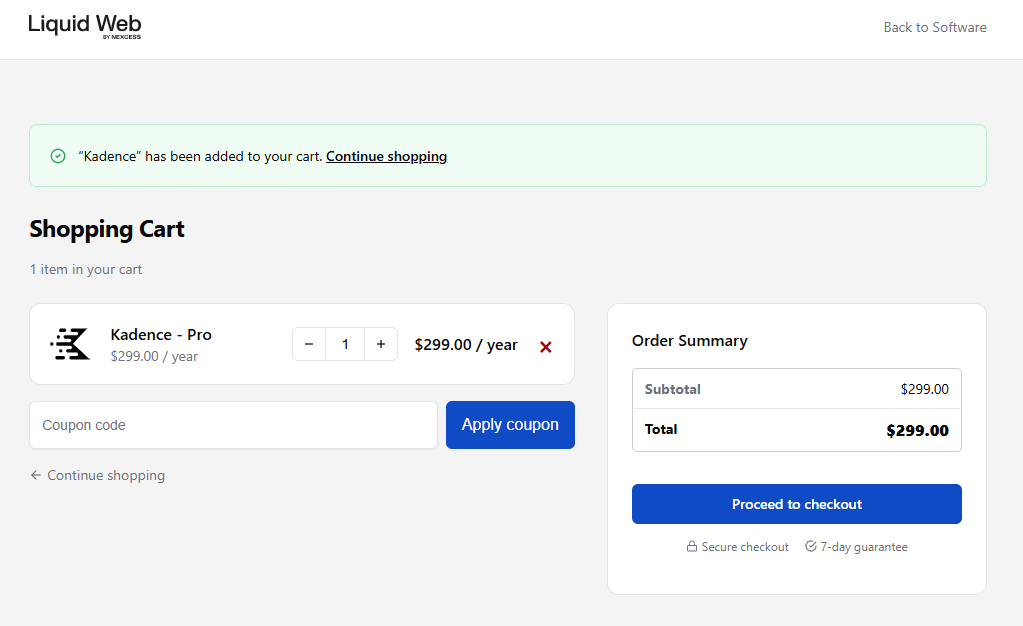
– After clicking Get Pro, you are taken to the Liquid Web shopping cart.
– Confirm that the product shows as “Kadence – Pro” with the correct yearly price.
– Adjust the quantity if needed (normally it stays at 1 for a single subscription).
– Click “Proceed to checkout” to move to the secure checkout page.
Step 4: Enter Billing Details
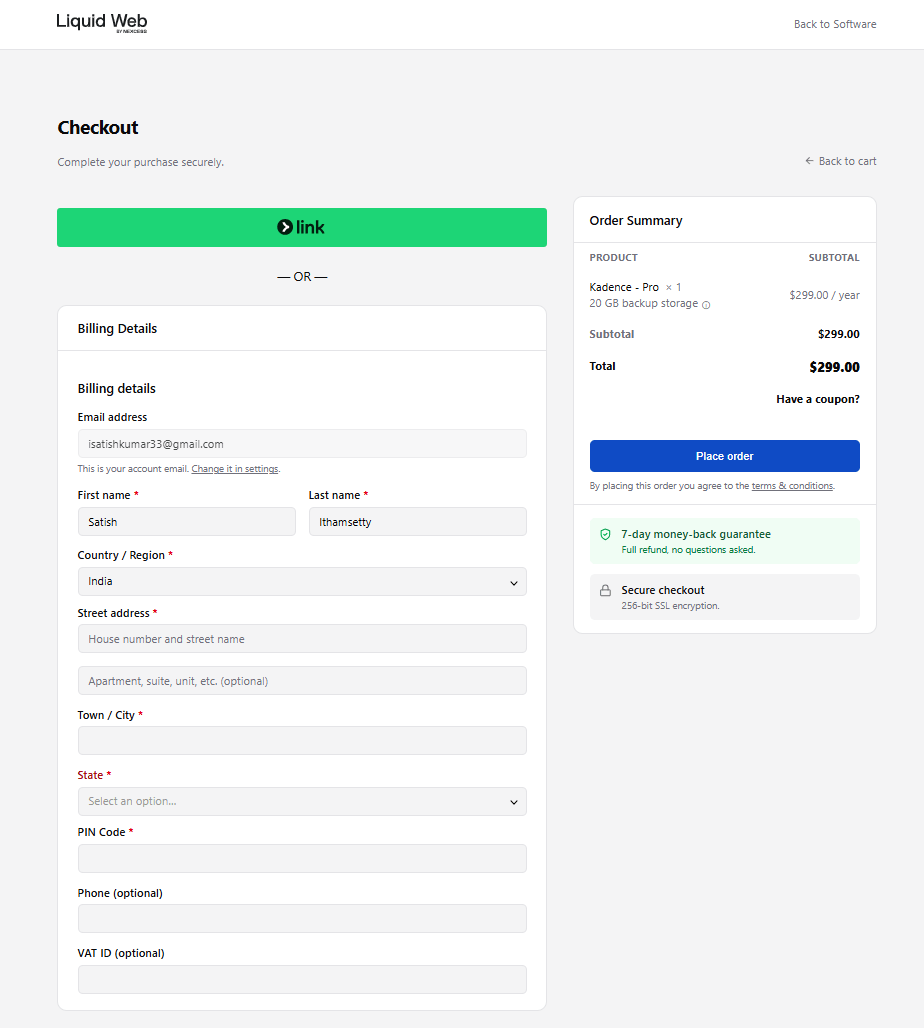
On the checkout screen, you will see a standard billing form plus an order summary on the right.
– Fill in your email address, first name, and last name.
– Select your country/region, then enter your street address, city, state, and PIN/postal code.
– Optionally, you can add your phone number and VAT ID if applicable.
– The order summary confirms Kadence—Pro and the yearly total and highlights the 7-day money-back guarantee and secure checkout.
Step 5: Choose a Payment Method
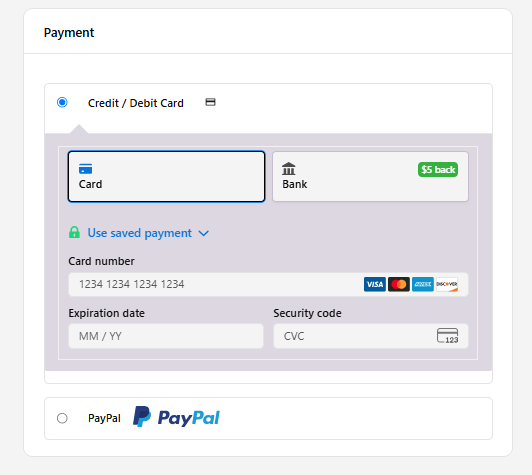
Liquid Web supports multiple payment options for Kadence Pro.
– Select Credit / Debit Card and enter your card number, expiration date, and CVC, or
– Choose Bank (where available) or PayPal as an alternative.
– All payments are processed over 256‑bit SSL encryption for security.
Step 6: Place Your Order
– Review all details once more: plan (Kadence Pro), billing information, and yearly total.
– Accept the terms and conditions if prompted.
– Click “Place order” to complete the purchase.
After successful payment, you receive:
- A confirmation email from Liquid Web/Nexcess.
- Access to your Kadence account dashboard, where you can download the Kadence plugins (Theme, Blocks, Shop Kit, Security, Backups, and Memberships) and copy your license key for activation inside WordPress.
Kadence comes with a 7‑day money‑back guarantee on all plans. If you are not satisfied for any reason, you can request a full refund — no questions asked. You get access to the full Pro stack from day one, including Kadence Blocks Pro, Shop Kit for WooCommerce, Security, Backups, and Memberships.
How to Install and Activate Kadence Pro (Premium Features)
With the new Kadence suite under Liquid Web, enabling Kadence Pro features means combining the free Kadence theme with your chosen Kadence plan (Essentials, Pro, or Elite). The process is simple: install the free theme, connect your Kadence account, and activate the premium plugins included in your plan.
Step 1: Install the Free Kadence Theme
- Log in to your WordPress dashboard.
- Go to Appearance → Themes → Add New.
- Search for Kadence in the theme search bar.
- Click Install, then Activate to enable the Kadence theme on your site.
This gives you the core, lightweight Kadence framework plus basic customization options.
Step 2: Purchase a Kadence Plan That Includes Pro Features
- Visit the official Kadence page on Liquid Web and scroll to the pricing section.
- Choose a plan based on your needs:
- Essentials – Theme + Kadence Blocks Pro + starter templates.
- Pro – Adds Security, Backups, Shop Kit for WooCommerce, and Memberships.
- Elite – Adds Kadence Central for multi‑site management.
- Click the button under your chosen plan (for example, Get Pro).
- Complete the checkout by entering your billing details and payment method.
- After purchase, you will receive login details or confirmation to access your Kadence/Liquid Web account dashboard.
Step 3: Access Your Kadence Downloads
- Log in to your Kadence / Liquid Web account dashboard.
- Open the section for Downloads or My Products.
- Locate the plugins included in your plan, such as:
- Kadence Theme (if offered as a separate download).
- Kadence Blocks Pro.
- Kadence Shop Kit, Kadence Security, Kadence Backups, Kadence Memberships, and other add‑ons depending on your tier.
- Download each plugin as a .zip file to your computer.
Step 4: Upload and Install the Kadence Pro Plugins
For each premium Kadence plugin you want to use:
- In WordPress, go to Plugins → Add New → Upload Plugin.
- Click Choose File and select the .zip file (for example,
kadence-blocks-pro.ziporkadence-shop-kit.zip). - Click “Install Now,” then “Activate” once installation finishes.
- Repeat for any other Kadence plugins included in your plan (Security, Backups, Memberships, etc.).
This step effectively replaces the old single “Kadence Pro add‑on” plugin with the modular premium plugins that come with the new Kadence bundle.
Step 5: Connect and Activate Your License
- Inside your WordPress dashboard, go to Kadence or the settings page for one of the premium plugins (e.g., Kadence Blocks Pro, Shop Kit).
- Look for a License or account tab.
- Paste your license key or sign in with your Kadence / Liquid Web account, as instructed in your dashboard or welcome email.
- Click Activate to enable automatic updates and premium support.
Once the license is active, WordPress will recognize your Kadence plan and keep all premium components updated.
You’re Ready to Build with Kadence Pro
After activation, the full suite of Kadence Pro features becomes available inside the customizer and block editor, including:
- Advanced header and footer layouts with multiple rows, sticky, and transparent options.
- Hooked elements and conditional content to display sections anywhere on your site.
- WooCommerce enhancements via Shop Kit (galleries, swatches, wishlists, upsells, checkout tools).
- Ultimate-style navigation with mega menu capabilities and richer header elements.
- Custom fonts, global color palettes, and header/footer scripts for fine‑tuned branding.
- Integrated security, backups, and memberships (on Pro and Elite plans) for a complete site stack.
With the free Kadence theme plus your Kadence Pro plan, you get a fast, SEO‑friendly, and future‑ready WordPress setup that is ideal for professional blogs, eCommerce stores, and client sites in 2026.
Kadence Pro Add-On Features
The free Kadence theme and Kadence Blocks plugin already offer impressive functionality. Upgrading to Kadence Pro unlocks a suite of advanced features and add-ons for users who need extra capabilities.
With the new pricing structure in 2026, Kadence Pro features are now bundled into three tiers under the Kadence ecosystem:
| Add-On Feature | Plan | Description |
|---|---|---|
| Kadence Theme Pro | Essentials ($99/year) | Lightweight, speed-optimized theme with advanced customization controls |
| Kadence Blocks Pro | Essentials ($99/year) | 30+ premium Gutenberg blocks for advanced page building |
| 200+ Starter Templates | Essentials ($99/year) | Pre-made website designs using WordPress block builder or Elementor |
| Header Addons | Essentials ($99/year) | 19 new header elements, conditional headers, mega menus, header/footer scripts, hooked elements |
| Infinite Scroll | Essentials ($99/year) | Enable infinite scrolling on archive pages |
| Color Palette Switch | Essentials ($99/year) | Add dark mode or color palette switcher functionality |
| Local Gravatars | Essentials ($99/year) | Load Gravatars directly from your server for better performance |
| Kadence Security | Pro ($299/year) | Real-time firewall, 2FA, Patchstack virtual patching, brute force protection, file change detection |
| Kadence Backups | Pro ($299/year) | Daily incremental backups, one-click restore, off-site cloud storage, flexible scheduling |
| Shop Kit for WooCommerce | Pro ($299/year) | 17+ WooCommerce tools: side carts, AJAX add-to-cart, visual selectors, product gallery, reviews, wishlist, upsells, delivery slots |
| Kadence Memberships | Pro ($299/year) | Unlimited membership levels, drip content, recurring billing, 30+ integrations (Mailchimp, ActiveCampaign) |
| Kadence Central | Elite ($499/year) | Unlimited connected sites, bulk updates, one-click rollback, white-label client logins, role-based access |
🏁 Bottom Line |
Great for starting out — solid features with zero investment.
Download Free →
|
Best for serious sites — more tools, more control, more results.
Get Kadence Pro →
|
Why Upgrade to Kadence Pro?
A Kadence membership grants access to all premium themes and plugins plus dedicated support. The new tiered structure makes it easier to choose the right plan:
| User Type | Recommended Plan | Price |
|---|---|---|
| Solo bloggers | Essentials | $99/year |
| Creators with WooCommerce or memberships | Pro | $299/year |
| Agencies managing client sites | Elite | $499/year |
This comprehensive solution provides everything you need for website enhancement, security, backups, e-commerce, and membership functionality—all in one ecosystem.
Key Features of Kadence Pro
1. Header Addons
The free Kadence theme already provides excellent header layout settings. Kadence Pro adds 19 new header components to the header builder, enabling unparalleled customization so you can craft professional headers with ease.
New header add-ons include the following:
- Account Icon.
- Contact Elements (phone, email, and address).
- Dividers.
- Search bar with AJAX functionality.
- Extra Buttons.
- Toggle with a Slide-Out Panel.
- Widget Area.
- Additional HTML Areas.
The drag-and-drop interface simplifies adding elements like social media links, search bars, and contact information—eliminating the need for manual coding.
2. Hooked Elements
Gain unparalleled flexibility by conditionally placing content or blocks anywhere on your site. This enables dynamic content displays for advanced use cases.
Examples:
- Custom 404 pages.
- Targeted promotional banners.
- Replacing entire header/footer sections based on specific user roles or page types.
Capabilities of Hooked Elements:
- Display content in any location.
- Show elements only to specific user roles.
- Schedule content with expiration dates.
- Replace headers, footers, or other sections dynamically.
- Add promotional banners or fixed content.
- Insert custom code using hooks and conditional logic.
3. Ultimate Menu
The Ultimate Menu add-on transforms your navigation with advanced menu options for mega menus, custom dropdowns, icons, and more.
Advanced Menu Features:
- Multi-Column Dropdowns.
- Custom Content and Backgrounds for Dropdowns.
- Icons in Menu Item Labels.
- Highlight Tags for Key Items.
These features are perfect for websites with complex navigation needs, such as e-commerce stores or large blogs.
4. Fixed Elements
This extension of Hooked Elements allows for fixed content on your site, such as banners or footers, that remain static as users scroll.
Applications of Fixed Elements:
- Fixed footers.
- Persistent Call-to-Actions (CTAs).
- Device-Specific Display (mobile vs. desktop).
5. Header/Footer Scripts
Kadence Pro makes it easy to manage custom scripts without needing additional plugins. Add code snippets directly in the customizer for greater flexibility.
Script options include the following:
- Header Scripts.
- After Opening Body Scripts.
- Footer Scripts.
This is ideal for adding analytics, tracking pixels, or custom JavaScript without installing extra plugins.
6. E-commerce Power with WooCommerce Addons
For online stores, Kadence Pro provides cutting-edge WooCommerce functionality that surpasses many competitors. The Kadence WooCommerce Add-on plays a key role in enhancing e-commerce features.
It offers conversion-focused features designed to enhance the shopping experience and boost sales:
- Auto-Open Side Cart: Instantly displays the cart when a product is added.
- Flexible Shop Pages: Build engaging shop layouts using blocks or popular page builders.
- AJAX Add-to-Cart: Seamlessly add products to the cart on single product pages without full page reloads.
- Dynamic Widget Areas: Toggle specific widget areas for unique shop page designs.
- Custom WooCommerce Features: Access advanced options like quick view, sticky add-to-cart banners, and custom shop layouts.
For those seeking advanced WooCommerce customization, the Kadence Shop Kit (included in the Pro plan at $299/year) offers premium tools and templates to create a professional online store.
Updated Note for 2026:
In the new Kadence ecosystem under LiquidWeb, many of these Pro features are now bundled into the Essentials plan ($99/year) for header addons and basic customization, while the full WooCommerce suite (Shop Kit) is part of the Pro plan ($299/year). Make sure to check the current pricing page at liquidweb.com/software/kadence/ for the most up-to-date feature breakdown.
Kadence Theme WooCommerce Compatibility: Is It Good for Online Stores?
Kadence remains a strong choice for WooCommerce in 2026, but the official positioning has shifted: instead of just “WooCommerce compatible theme,” Kadence is now marketed as a full WordPress site builder with a dedicated Shop Kit for WooCommerce that is included in the Pro and Elite plans.
1. Built-In WooCommerce Styling and Controls
Kadence Theme still offers native WooCommerce styling, allowing you to customize product, shop, cart, and checkout layouts without heavy page builders. You can handle much of this through theme controls and Kadence Blocks, keeping the store lightweight and fast.
However, the Shop Kit for WooCommerce now provides the advanced store-specific controls that used to require multiple plugins:
- Advanced product gallery with video and variation images.
- Visual color, image, and size selectors for variations.
- Product reviews with photos, stars, and verified badges.
- Product configurator for customizable products.
- Customer wishlist.
- Smart upsells, cross-sells, and order bumps.
- Delivery slot options for customers.
These features are bundled in Kadence Pro (Shop Kit) instead of being scattered across separate WooCommerce extensions.
2. Performance-Optimized for eCommerce
The Kadence ecosystem is built around clean, efficient code and is explicitly marketed for “lightning-fast performance” across devices.
For WooCommerce stores, this translates into:
- Minimizing unnecessary CSS and JavaScript.
- Using modular tools (Shop Kit) instead of stacking multiple third-party plugins.
- Maintaining Core Web Vitals-friendly performance from product grid to checkout.
Combined with a solid host, this helps your WooCommerce store load quickly, support better SEO, and provide a smoother checkout experience on mobile and desktop.
3. Gutenberg-Based Product Layouts
Kadence is positioned as the #1 WordPress site builder and relies heavily on Kadence Blocks plus WooCommerce blocks for layout.
You can use Gutenberg to design:
- Custom product sections.
- Feature highlights and comparison blocks.
- Trust badges, guarantees, and CTAs.
- Cart, checkout, and sales sections enhanced by Shop Kit modules.
This block-based approach avoids bulky page builders, giving you better performance, cleaner markup, and an SEO-friendly structure for your eCommerce content.
4. Ideal Use Cases for WooCommerce
With the new Shop Kit for WooCommerce bundled into Pro and Elite, Kadence is especially suitable for:
- Bloggers adding a small or medium WooCommerce store.
- Digital product websites and course creators (paired with Kadence Memberships).
- Affiliate-focused stores that need fast, flexible product layouts.
- Small to mid-sized online businesses that want conversion-focused tools without building a plugin stack.
For very large or highly complex enterprise stores, you may still add specialized WooCommerce extensions, but Kadence + Shop Kit gives a powerful base to start from.
Who Should Use Kadence for eCommerce?
Kadence is ideal for:
- Bloggers selling digital downloads or courses.
- SEO-focused WooCommerce stores that care about Core Web Vitals.
- Small to medium online shops that want integrated upsells, wishlists, and optimized product pages.
- Membership and subscription-based businesses using Kadence Memberships plus WooCommerce.
In 2026, Kadence Theme plus Kadence Shop Kit is an excellent choice for SEO-friendly WooCommerce websites that need both speed and advanced eCommerce features, especially for users who prefer a Gutenberg-first, block-based customization workflow instead of heavy page builders
Why Choose Kadence Pro in 2026?
If you are serious about creating a professional WordPress website in 2026, upgrading to Kadence Pro (now part of the unified Kadence suite under Liquid Web) can be a major advantage. The free version remains powerful, but the premium tiers unlock advanced customization, eCommerce tools, security, backups, and membership features that save significant time and effort.
Kadence is now offered as a single all‑in‑one product with features spread across three tiers: Essentials, Pro, and Elite. Each tier adds more tools on top of the fast, block-based Kadence Theme and Kadence Blocks.
Key Reasons to Choose Kadence Pro
- Advanced Design System and Global Controls: Set site-wide color schemes, fonts, and layouts using Kadence’s global design system. This ensures consistent branding across your entire site and aligns with accessibility standards.
- Header, Footer, and Layout Control: Use the advanced header and footer builder, hooked elements, and conditional display rules to create dynamic layouts, transparent headers, sticky navigation, and context-specific sections—without touching code.
- Shop Kit for WooCommerce: Unlock a full WooCommerce optimization toolkit: advanced product galleries, variation swatches, wishlists, upsells, order bumps, and checkout enhancements designed to improve conversions and revenue.
- Kadence Security and Backups: Protect your site with real-time firewall rules, virtual patching, brute-force protection, and automated daily backups with one-click restore—built directly into the Kadence suite so you do not need multiple separate plugins.
- Kadence Memberships: Build membership sites with content restriction, recurring billing, and 30+ integrations, allowing you to sell courses, digital products, and gated content in the same ecosystem.
- Kadence Central: Manage unlimited sites from a single dashboard with bulk updates, pattern distribution, and white-label features—ideal for agencies and freelancers managing multiple client websites.
- Performance-Optimized and SEO-Friendly: Kadence continues to emphasize lightweight performance, Core Web Vitals, and clean code, helping your site load fast and rank better in search engines.
Who Is Kadence Pro Best For?
Kadence Pro (and higher tiers) are ideal for
- Bloggers and creators who want pixel-perfect control without coding.
- Entrepreneurs and small businesses who need a fast, conversion-focused website.
- WooCommerce store owners who want an integrated Shop Kit instead of multiple separate plugins.
- Agencies handling multiple client sites that need centralized management and white-labeling.
In short, Kadence Pro empowers you to build a high-converting, future-proof WordPress site that is fast, secure, and easier to manage. Whether you are switching from another theme or starting from scratch, the unified Kadence suite under Liquid Web is designed to give you everything you need in one toolkit.
After setting up a fast, SEO-friendly theme like Kadence, you can further improve your content optimization with tools like NeuronWriter for semantic SEO and content planning, which you already cover in your NeuronWriter review.
Kadence Free vs Kadence Pro—Which One Should You Choose?
Kadence offers a powerful free version, but the Pro tiers (now part of the unified Kadence suite under Liquid Web) unlock advanced features that significantly improve design flexibility, scalability, and WooCommerce readiness.
Use the free version if you are just starting and need a fast, SEO-friendly WordPress theme with solid basics. Move to Pro (Essentials/Pro/Elite) when you need deeper control over design, headers/footers, eCommerce, security, and memberships.
When Kadence is free, it is enough.
Kadence Free is best if:
- You are just starting a blog or simple business site.
- You need a lightweight, SEO-friendly theme with clean code.
- Basic customization (colors, typography, single header/footer) is enough.
- You want to test Kadence and Gutenberg before investing in premium tools.
When Kadence Pro Is Worth It
Kadence Pro (Essentials and higher) is worth it if
- You want advanced header and footer builders with conditional logic.
- You need global fonts, colors, and layout controls at scale.
- You plan to build or manage multiple websites.
- You want premium starter templates, WooCommerce enhancements, security, and backups in one stack.
Kadence Free vs Kadence Pro – Feature Comparison
| Feature | Kadence Free | Kadence Pro (Essentials / Pro / Elite) |
|---|---|---|
| Core Theme | Lightweight, SEO-friendly theme with basic customizer controls | Kadence Theme Pro with advanced layout controls, extra options in customizer, and deeper integration with Kadence Blocks |
| Header Builder | Basic header builder with limited elements and layouts | Advanced header builder with 19+ elements, conditional headers, transparent & sticky headers, and multiple header layouts |
| Footer Builder | Standard footer widgets and simple layout | Drag-and-drop footer builder with multiple rows/columns, advanced widgets, and design controls |
| Global Colors & Typography | Limited global color and font options | Full global design system with site-wide color palettes, typography presets, and accessibility-aligned settings |
| Starter Templates | Access to a basic set of free starter templates | 200+ professionally designed starter templates for blogs, business, portfolios, WooCommerce, and memberships |
| Kadence Blocks | Core Kadence Blocks (free) for basic Gutenberg layouts | Kadence Blocks Pro with advanced content blocks, forms, post grids, carousels, dynamic content, and design extras |
| Layout Control | Good basic control over page layouts, sidebars, and spacing | Fine-tuned control over spacing, responsive behavior, container widths, and additional layout options across the site |
| WooCommerce Integration | Basic WooCommerce compatibility and styling | Shop Kit for WooCommerce: advanced product galleries, variation swatches, wishlists, upsells, order bumps, and enhanced cart/checkout tools |
| Memberships & Content Restriction | Not included | Kadence Memberships for gated content, recurring billing, and 30+ integrations (email, payments, etc.) |
| Security & Backups | Depends entirely on external plugins | Kadence Security and Kadence Backups for integrated protection, firewall rules, virtual patching, daily backups, and one‑click restore |
| Site Management (Agencies) | Manage each site individually via WordPress admin | Kadence Central (Elite) for managing unlimited sites, bulk updates, pattern distribution, and white-label options |
| Support | Community resources and documentation | Priority premium support from the Kadence/Liquid Web team plus ongoing feature updates |
Which One Should You Choose?
- Choose Kadence Free if you want a fast, modern, and SEO-friendly theme to get started, and you are comfortable with basic customization.
- Choose Kadence Pro (Essentials/Pro/Elite) if you are serious about blogging, SEO, eCommerce, or client work and want complete control over design, performance, and monetization features in one integrated toolkit
Start with Kadence Free
Download directly from WordPress.org—no credit card needed. Includes the core theme, basic header/footer builder, and starter templates.
- Core Kadence theme
- Basic header & footer builder
- Global colors & typography
- Free starter templates
- WooCommerce compatible
Upgrade to Kadence Pro
Unlock the full Kadence ecosystem—advanced design tools, WooCommerce Shop Kit, security, backups, and memberships. Plans from $99/year.
- Kadence Blocks Pro (30+ blocks)
- 200+ premium starter templates
- Conditional headers & hooked elements
- Shop Kit for WooCommerce
- Security, backups & memberships
Kadence Theme vs Astra vs GeneratePress – Which Is Better in 2026?
Choosing the right WordPress theme comes down to performance, customization flexibility, and ease of use. Here is a practical comparison of Kadence Theme, Astra, and GeneratePress to help you decide which fits your needs best.
Feature-by-Feature Comparison
| Feature | Kadence Theme | Astra | GeneratePress |
|---|---|---|---|
| Performance & Speed | Excellent — lightweight, modular CSS, optimized for Gutenberg and Core Web Vitals | Very fast, modular code structure | Extremely fast, minimal footprint |
| Page Builder Support | Gutenberg (native), Elementor, full block-based workflow | Elementor, Beaver Builder, Gutenberg | Gutenberg-first, limited styling for third-party builders |
| Customization Options | Advanced — header/footer builder, global colors, typography, hooked elements, conditional headers | Good — most advanced options need Astra Pro add-ons | Minimal in free version, better with GeneratePress Premium |
| Starter Templates | 200+ professionally designed, conversion-focused starter templates | Large library with industry-specific templates | Smaller library, clean and minimal designs |
| SEO-Friendliness | Strong semantic HTML, Core Web Vitals ready, rated #1 for web accessibility | SEO-friendly with clean code | Developer-focused, extremely clean and SEO-minimal |
| WooCommerce Support | Advanced — Shop Kit for WooCommerce with 17+ tools (variation swatches, wishlists, upsells, order bumps) | Good WooCommerce support, needs extra plugins for advanced features | Basic WooCommerce styling, limited native tools |
| Security & Backups | Built-in Kadence Security and Kadence Backups on Pro/Elite plans | Not built-in — requires third-party plugins | Not built-in — requires third-party plugins |
| Membership Features | Built-in Kadence Memberships on Pro/Elite plans | Not built-in | Not built-in |
| Multi-Site Management | Kadence Central (Elite plan) for agencies | Not included natively | Not included natively |
| Ease of Use for Beginners | Beginner-friendly with intuitive drag-and-drop controls | Very beginner-friendly | Slight learning curve — better for developers |
| Pricing (Premium Entry) | $99/year (Essentials) — includes theme, blocks, and 200+ templates | Higher entry pricing for equivalent feature set | Premium required for most design features |
Best balance of speed, customization, and built‑in tools. Starts at $99/year — Get Kadence Pro →
Which Theme Should You Choose?
- Choose the Kadence theme: if you want the best balance of speed, deep customization, and a Gutenberg-native workflow. Kadence is the strongest all-in-one option in 2026, especially now that the Pro and Elite plans include built-in security, backups, WooCommerce tools, and memberships that other themes do not offer natively. It is ideal for bloggers, content creators, affiliate marketers, and small business owners focused on SEO and long-term scalability.
- Choose Astra if you prefer building with Elementor and need a large library of niche-specific starter templates. Astra is a solid choice for visually driven websites that rely heavily on a drag-and-drop page builder experience.
- Choose GeneratePress if you want the most minimal, developer-friendly foundation possible. It is an excellent option if you prefer to add functionality through individual plugins and prefer absolute speed over out-of-the-box design flexibility.
Bottom Line
Kadence Theme delivers the best overall value in 2026 for most WordPress users. It combines a lightweight performance base with advanced design controls, a growing ecosystem of built-in tools (security, WooCommerce, memberships, and multi-site management), and an accessible, beginner-friendly interface—all under one unified pricing structure starting at $99/year.
Kadence — The #1 WordPress Site Builder
Pros and Cons of Kadence Theme
Here is an honest look at what Kadence delivers and what to keep in mind before upgrading, based on the latest 2026 updates under the new Liquid Web suite.
Pros of Kadence Theme
- Blazing fast and SEO-friendly — lightweight codebase delivers excellent Core Web Vitals scores, faster page loads, and stronger search rankings right out of the box.
- Deep customization without code — advanced control over headers, footers, layouts, global colors, and typography using an intuitive drag-and-drop interface.
- Kadence Blocks Pro included — supercharges the Gutenberg editor with advanced blocks, dynamic content, pro gallery layouts, advanced forms, and animate-on-scroll effects (included from the Essentials plan upward).
- Built-in WooCommerce tools — Kadence Shop Kit on the Pro plan adds variation swatches, advanced product galleries, wishlists, upsells, order bumps, and checkout enhancements to boost store conversions.
- Integrated security and backups — Kadence Security (firewall, 2FA, and Patchstack virtual patching) and Kadence Backups (daily incremental backups and one-click restore) are built into the Pro and Elite plans, removing the need for separate security plugins.
- Built-in membership platform — Kadence Memberships on the Pro plan allows you to gate content, set up recurring billing, and connect 30+ integrations without a third-party membership plugin.
- 200+ premium starter templates — launch a professional, niche-specific website in minutes using block-based starter templates included from the Essentials plan.
- Agency tools on Elite — Kadence Central for multi-site management, white-label client portal, A/B testing, conversion insights, promotional banners, popups, and slide-ins for professional client work.
- Rated #1 for web accessibility — Kadence is designed with accessibility standards built in, which supports both inclusivity and SEO.
- 7-day money-back guarantee on all plans, making it a low-risk purchase to test before committing long-term.
- Premium support and regular updates included with all paid plans, backed by documentation and an active user community.
Cons of Kadence Theme
- Annual billing only — all plans are billed yearly with no monthly payment option, which may not suit users who prefer short-term flexibility.
- Learning curve for advanced features: Pro features like conditional headers, hooked elements, dynamic content blocks, and multi-site management via Kadence Central take time to learn, especially for beginners.
- Gutenberg-first approach — users who rely on third-party page builders like Elementor or Divi may not get the full value from Kadence’s native features, as the ecosystem is optimized around the WordPress block editor.
- Pro and Elite pricing may be high for beginners—the Pro plan at $299/year and Elite at $499/year can feel like a significant investment for solo bloggers or small site owners who only need basic theme and block features.
- WooCommerce and membership tools require the Pro plan — Shop Kit for WooCommerce and Kadence Memberships are not available on the Essentials plan ($99/year), so eCommerce and membership capabilities require a higher investment.
- Kadence Central is Elite-only—agencies and freelancers who want centralized multi-site management must upgrade to the $499/year Elite plan.
Kadence is a lightweight, feature-rich WordPress theme with outstanding customization options and a growing suite of built-in tools for security, WooCommerce, and memberships. It delivers excellent value for bloggers, content creators, and business owners in 2026. The right plan depends on your specific needs—Essentials is ideal for most bloggers, Pro suits creators with WooCommerce or membership requirements, and Elite is designed for agencies managing multiple client sites.
Who Should Use the Kadence Theme?
Not sure if Kadence is the right WordPress theme for you? Here is a concise breakdown of who benefits most from using it in 2026.
1. Bloggers Focused on Google Rankings
Kadence is one of the best WordPress themes for bloggers who want to rank higher on Google. Its lightweight codebase delivers fast load times, strong Core Web Vitals scores, and clean semantic HTML that search engines can crawl efficiently. The mobile-first responsive design and consistent global typography controls make it especially effective for content-heavy blogs aiming for Page 1 visibility.
2. WooCommerce Store Owners
Running an online store? Kadence’s Shop Kit for WooCommerce (included in the Pro plan) is built to convert visitors into customers. Key features include variation swatches, advanced product galleries, wishlists, AJAX add-to-cart, upsells, order bumps, and optimized checkout pages—all designed to reduce cart abandonment and increase revenue on both desktop and mobile.
3. Digital Agencies and Freelancers
Kadence’s Elite plan is built for agencies managing multiple client sites. Kadence Central lets you handle bulk updates, push patterns globally, and manage unlimited sites from one dashboard. The white-label client portal, A/B testing, conversion insights, and promotional tools help you deliver and prove results to clients efficiently.
4. Beginners with No Coding Skills
Kadence is widely regarded as one of the most beginner-friendly lightweight WordPress themes available. The intuitive visual customizer, 200+ starter templates, comprehensive documentation, and active user community make it easy to launch a professional website without writing a single line of code.
5. Membership and Course Creators
Building a membership site or online course platform? Kadence Memberships (Pro plan) handles gated content, recurring billing, drip schedules, and 30+ email and payment integrations natively. Hooked Elements and conditional display rules let you show different content to free and paid members without extra plugins.
6. Performance-Focused Digital Marketers
For marketers running SEO campaigns, paid ads, or content funnels, Kadence provides a strong performance foundation. Core Web Vitals optimization, fast page speeds, and conversion-focused design tools — including popups, slide-ins, and A/B testing on the Elite plan — support both ranking and conversion goals across all traffic sources.
When NOT to Use Kadence
Kadence is not the right fit if:
- You need thousands of pre-built premium templates—Divi or Elementor offers larger template libraries.
- You prefer a CSS-first, developer-controlled setup—GeneratePress is a better choice.
- You rely heavily on Elementor or Divi and want deep page-builder integration rather than a Gutenberg-native workflow.
- You need enterprise-level custom theme support for very large, complex organizations.
Frequently Asked Questions (FAQs) – Kadence Theme 2026
What is Kadence Theme?
Kadence is a WordPress site builder that combines a premium theme, page builder, WooCommerce tools, security, backups, and memberships in one unified ecosystem. Backed by Nexcess (Liquid Web), it is designed for anyone who wants full control over their WordPress site without stitching together plugins from multiple vendors. It has powered 600,000+ websites worldwide.
Is Kadence Theme free?
Yes, Kadence offers a powerful free version available on WordPress.org with solid customization options, starter templates, and Gutenberg support. For advanced features like conditional headers, Shop Kit for WooCommerce, built-in security, backups, and memberships, upgrading to the Essentials ($99/year), Pro ($299/year), or Elite ($499/year) plan is recommended.
How fast is Kadence Theme compared to other themes?
Kadence is one of the fastest WordPress themes available. In real-world testing, it scores 94–96 on mobile and 99–100 on desktop in Google PageSpeed Insights. It performs on par with GeneratePress and slightly better than Astra, especially on mobile — thanks to its modular CSS, minimal JavaScript, and Gutenberg-native code structure.
Is the Kadence theme good for SEO?
Yes. Kadence is built with clean semantic HTML, optimized asset loading, and Core Web Vitals performance in mind. It is rated #1 for web accessibility among WordPress themes and works seamlessly with Rank Math and Yoast SEO. Its lightweight codebase directly contributes to faster crawl efficiency, lower bounce rates, and stronger Google rankings.
Does Kadence Theme work with WooCommerce?
Yes. Kadence Pro and Elite plans include Shop Kit for WooCommerce, which provides purpose-built store enhancement tools covering product galleries, variation swatches, wishlists, upsells, order bumps, checkout optimization, and more. It is built for stores that need to perform — not just look good — and removes the need for multiple separate WooCommerce plugins. [Get Kadence Pro with Shop Kit →]
What is the difference between Kadence Free and Kadence Pro?
Kadence Free gives you a solid theme with a header/footer builder, starter templates, and basic customization. Kadence Pro (Essentials and above) unlocks advanced header controls, conditional logic, Kadence Blocks Pro, 200+ starter templates, Shop Kit for WooCommerce, built-in security, daily backups, and memberships—delivering far more value in one integrated platform. [Compare plans on the official page →]
Do I need coding skills to use Kadence?
No. Kadence is built for visual customization without writing a single line of code. The drag-and-drop header/footer builder, global color and typography controls, and starter templates make it accessible for beginners. For developers and agencies, advanced options and deeper controls are available — but never required to build a professional, high-performing website.
Can I use Kadence Theme for client websites?
Yes, and it is built for it. The Kadence Elite plan includes Kadence Central for multi-site management, a white-label client portal, bulk plugin updates, A/B testing, and conversion insights—making it the ideal tier for agencies and freelancers managing multiple client sites efficiently from one centralized dashboard.
How does Kadence compare to Astra and GeneratePress?
Kadence offers the best balance of speed, customization, and built-in tools. Astra is better suited for Elementor-based workflows with a larger template library, while GeneratePress is a developer-friendly minimal framework. Kadence stands out in 2026 by bundling WooCommerce tools, security, backups, and memberships natively—features the others require separate plugins to replicate.
Is the Kadence theme worth it in 2026?
Yes, absolutely. Kadence delivers exceptional value for bloggers, eCommerce store owners, course creators, and agencies. Starting at $99/year for the Essentials plan and scaling to $499/year for Elite with full agency tools, it is one of the most cost-effective all-in-one WordPress platforms available. Its speed, accessibility, and growing ecosystem make it a strong long-term investment.
Final Verdict: My Personal Take on Kadence Theme
After thoroughly analyzing its features, performance, and real-world usability, Kadence Theme stands out as one of the best all-around WordPress themes available in 2026. It delivers outstanding results across speed, SEO, customization, and scalability — all within a single unified ecosystem.
Kadence is an excellent choice if you want the following:
- A fast-loading, Core Web Vitals–friendly theme that scores near-perfect on PageSpeed Insights.
- Strong SEO foundations with clean semantic HTML, accessibility-first design, and Gutenberg support.
- Advanced customization over headers, footers, layouts, and global design — without relying on heavy page builders.
- A versatile theme suitable for blogging, business websites, WooCommerce stores, and membership platforms.
- Built-in security, backups, and membership tools that eliminate the need for multiple third-party plugins.
For beginners, Kadence offers a smooth entry point through 200+ starter templates and an intuitive visual customizer. Advanced users benefit from powerful design controls, conditional logic, hooked elements, and the full suite of add-ons available on higher plans.
The free version is more than enough to start, but upgrading to the Essentials plan ($99/year) for advanced design tools or the Pro plan ($299/year) for WooCommerce, security, and memberships is well worth the investment for serious website owners.
From my own experience, switching to Kadence was one of the best decisions I made for my websites. It improved site speed, simplified customization, and gave me the creative freedom I had always been looking for — without the bloat that comes with piecing together tools from multiple vendors.
Whether you are a blogger building your first content site, a digital marketer optimizing for conversions, or an agency managing multiple client websites, Kadence has a plan that fits your stage and scale — from Essentials at $99/year all the way to Elite at $499/year for full agency capabilities.
In short, Kadence Theme is not just a WordPress theme. It is a complete, performance-optimized, future-ready website building experience designed to grow with you in 2026 and beyond.
Kadence Theme (Kadence WP)
Kadence is a fast, SEO‑optimized WordPress theme and site builder now developed under Liquid Web, offering a lightweight core, powerful header/footer builder, and deep integration with Kadence Blocks for Gutenberg.
Product Brand: Kadence
Product Currency: USD
Product Price: 99
Price Valid Until: 2027-01-31
Product In-Stock: InStock
4.8
Pros
- Very fast and lightweight; Core Web Vitals friendly
- Powerful header and footer builder with global controls
- Deep Kadence Blocks integration for Gutenberg users
- Large starter template library for blogs, business sites and stores
- Clean SEO‑friendly code and flexible hooks
Cons
- No lifetime plan in current official pricing
- Annual bundles can be expensive for single‑site users
- Some advanced features locked behind higher‑tier bundles
- Learning curve for new WordPress beginners
Ready to Build a Faster, Better WordPress Site?
Kadence is the #1 WordPress site builder trusted by 600,000+ websites. It delivers fast performance, deep design control, and a growing ecosystem of built‑in tools — without unnecessary bloat. Whether you are a blogger, store owner, or agency, there is a Kadence bundle built for your needs.



This Kadence Theme review is comprehensive and well-written. I love how it covers all the important aspects of the theme, from design to functionality. The in-depth analysis of the features is especially helpful in understanding the capabilities of the theme.
Kadence Theme offers a wide range of customization options that allow you to tweak the look and feel of your website to suit your brand or personal style. I’m having a little trouble getting the header to look exactly how I want. Anyone have any tips or resources for customizing the header area in Kadence? Overall, I’m happy with the theme, just need to tweak this one thing.