
Keyword research for SEO is one of the most important foundations for achieving higher search engine rankings. Search engines process an enormous number of queries every day. The keywords you select influence your entire SEO strategy — including content creation, on-page optimization, link-building campaigns, blog structure, and even press releases.
Without proper keyword research, it becomes difficult to drive targeted organic traffic or build authority in your niche.
Google alone handles millions of searches every minute and more than trillions of searches every year. Users rely on search engines like Google, Bing, and Yandex to find information, products, services, and solutions. Every one of those searches begins with a keyword.
That is why keyword research is a primary task in search engine optimization (SEO). It helps you understand what your target audience is searching for, how competitive a term is, and whether it has enough search volume to generate meaningful traffic. When done correctly, keyword research can contribute significantly to your online marketing success.

In this guide, you will learn:
- What keyword research tools are and how they work
- How to do keyword research for SEO step by step
- How to identify blog topics based on search intent
- Why keyword research is crucial for bloggers and affiliate marketers
- How to evaluate keyword competition and search volume
- How to do keyword research for SEO in 2026 using both classic tools and AI assistants
Before selecting any keyword, you must analyze two critical factors: competition level and search volume. Ideally, you should target keywords with lower competition and reasonable search demand, especially if your website is new or has low domain authority.
Your niche also plays a vital role. A niche is a highly specialized segment within a broader category. The more focused your niche, the easier it becomes to discover profitable long-tail keywords with manageable competition.
If you are looking for a detailed breakdown of the best keyword research tools for SEO, check my dedicated tools guide, where I compare free and premium options in depth.
It’s also important to understand that keyword competition metrics often reflect advertiser competition (such as in Google Ads). However, as a content publisher, you can simplify your approach by categorizing keywords into three levels:
- High competition
- Medium competition
- Low competition
The main goal of this process is keyword research for organic traffic, so you attract visitors who are already searching for your solutions.
By consistently targeting the right keywords within your niche, you significantly improve your chances of ranking higher, attracting organic traffic, and building a sustainable blogging business in 2026 and beyond.
In this guide, you will learn exactly how to do keyword research for SEO so you can consistently find topics that rank and convert.
This tutorial explains keyword research for SEO beginners using simple examples, screenshots, and beginner‑friendly tools.
Semrush fits perfectly into modern keyword research strategies 2026 by combining competitor analysis, keyword gaps, and intent filtering in one place.
How to Do Keyword Research for Better SEO in 2026?
Keyword research in 2026 is no longer just about finding high-search-volume terms. It’s about identifying low-competition keywords, understanding search intent, analyzing SERP competition, and selecting profitable opportunities that align with your niche and monetization strategy.
Whether you’re a beginner who has never opened a keyword tool or an experienced blogger refining your strategy, this keyword research for SEO beginners to advanced users will walk you from basics to 2026‑level tactics like AI, semantic search, and voice search optimization.
So, where can you do Keyword Research for Better SEO in 2026?
Today, there are dozens of keyword research tools available online. However, most professional bloggers, SEO experts, and affiliate marketers rely on trusted platforms such as:
- Google Keyword Planner
- Semrush
- KWFinder
- ChatGPT
These tools help analyze search volume, keyword difficulty, CPC (cost per click), competition level, and user intent, which are critical factors for ranking and profitability.
Follow this keyword research step-by-step process to move from seed ideas to a complete, data‑driven content plan.
What Is Keyword Research for Profitable Keywords?
Keyword research is the process of discovering and evaluating search terms that people use in search engines. In simple terms, keyword research for SEO means finding the exact phrases your audience types into Google and using them to shape your content, structure, and offers.
Modern semantic keyword research for SEO also looks at related entities, questions, and synonyms so your content can rank for an entire topic, not just one exact match phrase.
If you monetize with affiliate links, keyword research for affiliate marketing focuses on buyer‑intent phrases like ‘best’, ‘review’, ‘vs’, and ‘discount’ that are more likely to convert.
The goal is to find keywords that:
- Have sufficient monthly search volume
- Show clear informational or commercial intent
- Have manageable SEO difficulty
- Match your niche and content strategy
- Offer monetization potential (AdSense, affiliate marketing, services, etc.)
Profitable keywords are not always the ones with the highest search volume. In fact, targeting long-tail keywords with low competition and strong buying intent often delivers better ROI.
When you apply these methods, keyword research for higher rankings becomes a repeatable framework instead of guesswork.
How to Analyze Keywords for Better Results
In 2026, effective keyword analysis includes:
- Checking keyword difficulty (KD score)
- Reviewing top-ranking competitors in SERPs
- Analyzing the domain authority of ranking pages
- Understanding search intent (informational, commercial, transactional)
- Evaluating CPC for monetization value
- Identifying content gaps
This analysis turns basic keyword research into keyword research for higher rankings, because you’re matching intent, difficulty, and commercial value instead of chasing only volume.
Instead of targeting random keywords, focus on building topical authority around a niche-specific keyword cluster.
For each main phrase, list one primary keyword and 3–5 semantic or related keywords. This simple semantic keyword research for SEO approach helps you naturally cover subtopics and win long‑tail traffic.
How Do I Start Keyword Research for SEO (Step‑by‑Step)?
This is the core keyword research step-by-step workflow I personally use before publishing any article. As a blogger, I personally use a structured approach:
- Generate seed keywords based on niche ideas.
- At this stage, you should generate both broad and long tail keyword research for SEO ideas so you can mix easy wins with future authority plays.
- Filter by low competition and decent search volume.
- Validate intent and SERP competition.
- Create SEO-optimized content around selected keywords.
Use this simple keyword research step-by-step process before you write any blog post or landing page.
In this section, I explain how to use three powerful tools step by step to find ranking keywords and profitable blog topics.
If you follow these basic keyword research strategies consistently, you will build a strong foundation for organic traffic growth, affiliate conversions, and long-term blogging success.
Throughout this guide, I’ll show you how to use different keyword research tools for SEO, from free options to advanced suites like Semrush and Ahrefs.
Who this guide is for
- Bloggers who want to master keyword research for blog posts and turn random ideas into a strategic content calendar that ranks in Google.
- Affiliate marketers who need keyword research for affiliate marketing to consistently find buyer‑intent keywords that generate clicks, leads, and sales.
- Website owners and SEO beginners who want to use keyword research for organic traffic to attract the right visitors and grow their search visibility in 2026 and beyond.
How to Do Keyword Research for SEO beginners with Google Keyword Planner?
Google Keyword Planner is one of the most trusted keyword research tools for SEO beginners and advertisers because it pulls data directly from Google. It is part of Google Ads and helps you discover keyword ideas, search volume data, competition level, and CPC (cost per click) metrics.
Since it pulls data directly from Google’s search engine, it provides highly relevant keyword suggestions based on real user search queries. If you already have a Gmail account, you can access it easily.
Although the tool is free, you need to create a Google Ads account to unlock its full potential and access complete keyword metrics.
If you are just starting keyword research for SEO beginners, combining Google Keyword Planner with a simple spreadsheet is enough to build your first batch of SEO‑optimized blog posts.
Using this step‑by‑step process, you’ll learn how to do keyword research for SEO so you can plan content that ranks on Google in any country.
Step 1: Sign Up and Access Keyword Planner
- Sign in to your Google Ads account.
- From the dashboard, click on Tools & Settings.
- Select Keyword Planner under the Planning section.
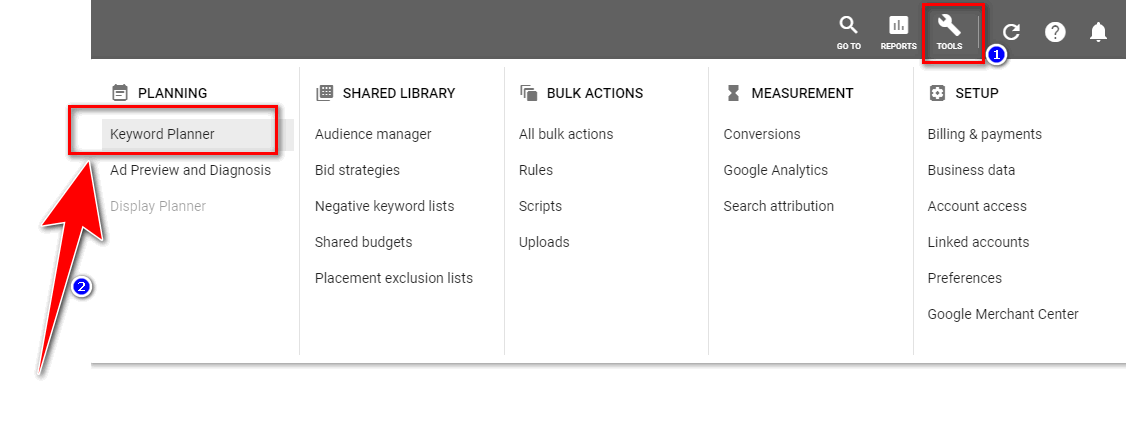
Once the platform loads, you will see two main options:
- Discover New Keywords – Generate keyword ideas from a seed keyword.
- Get Search Volume and Forecasts – View historical data, search trends, and performance estimates.
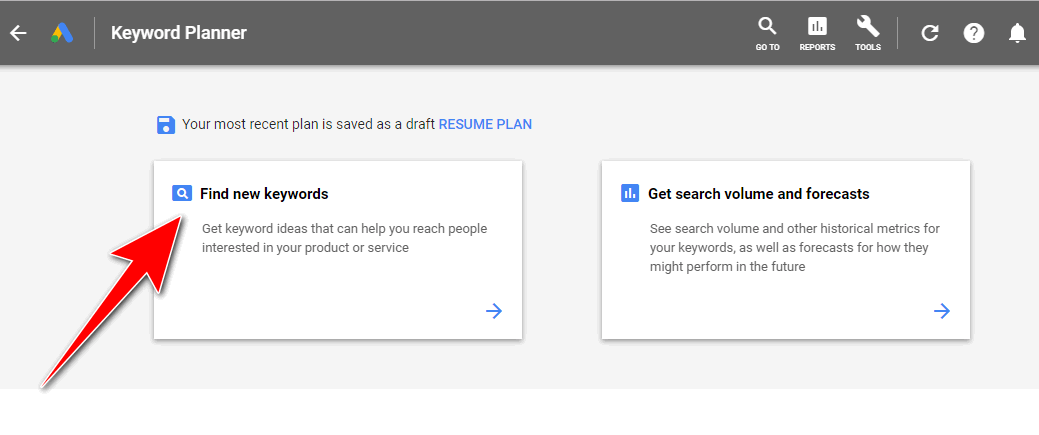
For keyword research and blog topic generation, choose Discover New Keywords.
Step 2: Enter Your Seed Keyword
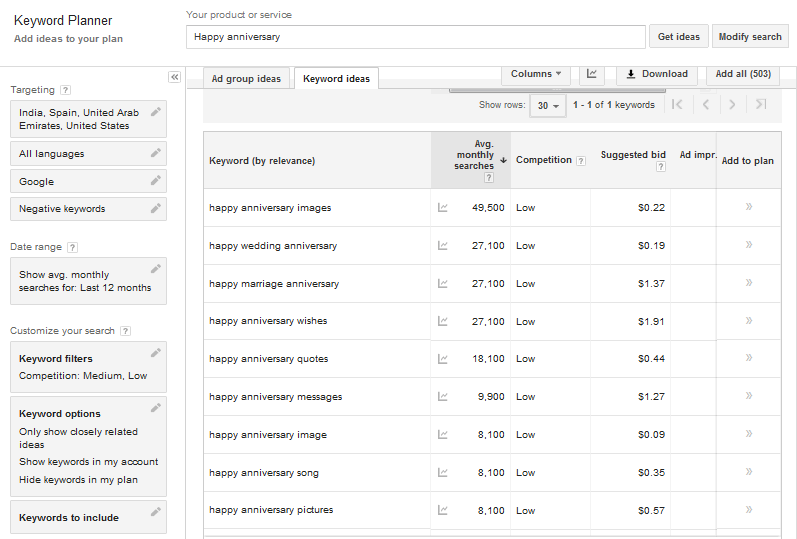
Enter your main keyword (for example, “Happy Anniversary”) in the “Your product or service” box and click Get Results.
Within seconds, Google Keyword Planner will generate:
- Related keyword ideas
- Average monthly searches
- Competition level (Low, Medium, High)
- CPC bid estimates
- Search trends over time
You can also filter by:
- Country or location (important for local SEO)
- Language
- Date range
- Competition level
This helps you find geo-targeted keywords and niche-specific search queries.
Step 3: Understand the Key Metrics
To rank content effectively, you must analyze these metrics carefully:
- Average Monthly Searches – Indicates keyword demand.
- Competition – Reflects advertiser competition (useful for understanding commercial intent).
- Top of Page Bid (CPC) – Shows how valuable the keyword is for advertisers and affiliate marketers.
- Search Trend Graph – Displays seasonal keyword trends.
For example, if a keyword shows 100K–1M monthly searches with Low competition, it indicates strong traffic potential with manageable competition.
Browser extensions like Keyword Everywhere may also display additional metrics such as search volume, CPC, and competition directly within the results.
Step 4: Download and Filter Keyword Ideas
Click on Download Keyword Ideas to export the data in Excel or CSV format. This allows you to sort, filter, and analyze keywords more efficiently.
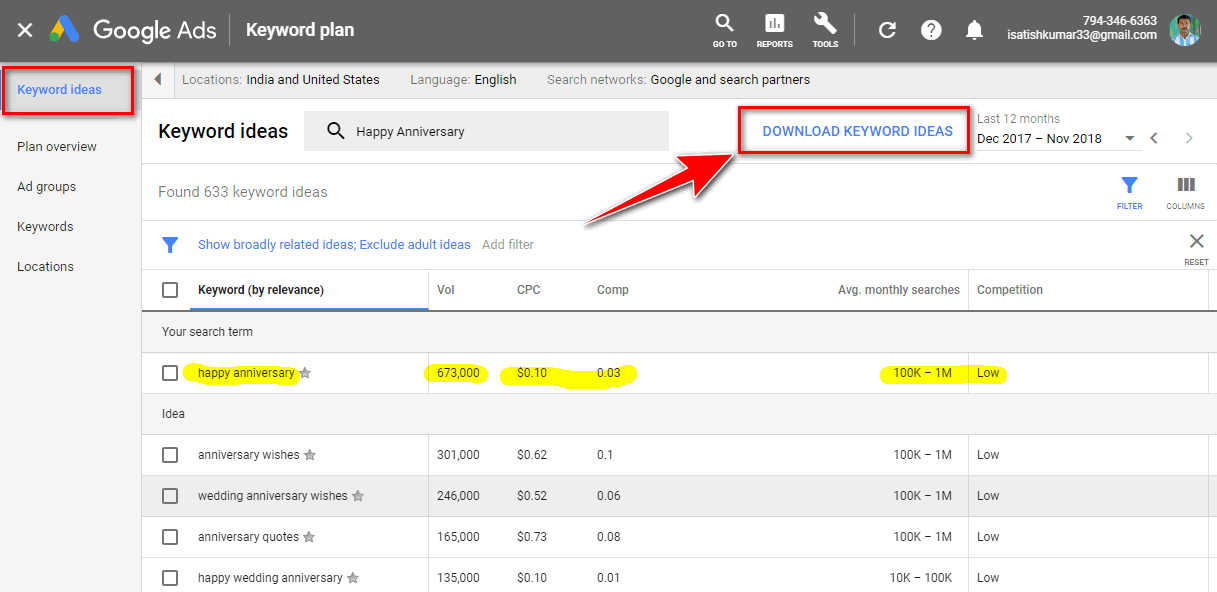
Now focus on identifying:
- Long-tail keywords (3–7 words)
- Keywords with consistent monthly searches
- Low to medium competition
- Strong commercial or informational intent
Examples of long-tail keywords:
- happy anniversary images
- Happy wedding anniversary wishes
- Happy anniversary messages for parents
You can repeat the same workflow with any niche, from keyword research for blog posts to commercial affiliate keywords.
Long-tail keywords usually have lower competition and are easier to rank compared to broad keywords.
Step 5: Analyze Keyword Data for Better SEO
To improve your search engine rankings and organic traffic:
- Prioritize long-tail keywords with 1,000–7,000 monthly searches (depending on your niche).
- Choose keywords with Low or Medium competition.
- Avoid highly competitive keywords if your website has low domain authority.
- Check search intent before creating content.
- Build topic clusters around related keyword variations.
Remember, ranking for a high-volume keyword with strong competition is much harder than targeting multiple low-competition keywords with decent search volume.
A smart keyword strategy combines:
- Low competition
- Relevant search intent
- Good search volume
- Monetization potential (CPC value)
By consistently applying these keyword research strategies using Google Keyword Planner, you can improve your on-page SEO, increase organic traffic, and build a profitable blog in 2026 and beyond.
For brand‑new sites, this simple workflow alone can drive your first keyword research for organic traffic wins.
How to do Keyword Research for Better SEO with SEMrush?
Semrush is an all-in-one SEO and digital marketing tool used for advanced keyword research, competitor analysis, backlink analysis, rank tracking, and complete website SEO audits.
If you write regularly, keyword research for blog posts helps you turn random ideas into a structured content calendar that Google can understand.
It is widely trusted by bloggers, affiliate marketers, eCommerce businesses, and SEO agencies for discovering high-ranking keywords, low-competition keywords, and profitable search terms.
If your goal is to improve organic traffic, keyword rankings, domain authority, and online visibility, Semrush provides powerful data-driven insights. It helps you analyze competitor websites, identify content gaps, and find commercial-intent keywords with strong CPC value.
Semrush was developed by the team behind SEOquake, a popular SEO browser extension. Today, Semrush has one of the largest keyword and domain databases globally, making it one of the most reliable tools for professional keyword analysis.
You can also install the Semrush browser extensions:
These extensions allow you to analyze competitor keywords, search volume, keyword difficulty, and domain metrics directly from your browser.
Why Use Semrush for Keyword Research?
Semrush is perfect for competitor keyword research SEO, because it shows you exactly which queries send traffic to rival sites.
Competitor keyword research for SEO methods helps you reverse‑engineer what is already working in your niche and quickly find proven topics.
Semrush is essential if you want to:
- Discover long-tail keywords with high search volume
- Find low keyword difficulty (KD) terms
- Analyze competitor ranking keywords
- Identify high CPC keywords for affiliate marketing and AdSense
- Track keyword rankings in different countries
- Perform technical SEO audits
It is especially useful for finding commercial and transactional keywords that convert well.
For readers who want an in‑depth Semrush walkthrough beyond this tutorial, I have a separate Semrush SEO toolkit review that covers pricing, pros, cons, and real‑world use cases.
How to Use Semrush for Profitable Keyword Research
SEMRUSH is essential for all bloggers and serious Internet marketers. For affiliate marketers, this is where keyword research for affiliate marketing becomes powerful: you can discover product‑focused keywords that already drive sales for competitors.
Let’s get started on the research…
Step 1: Create a Free or Premium Account
Sign up for a Semrush account. It offers both free access (with limited searches) and premium plans for advanced SEO research.
First signup SEMRUSH free account. It has both free and premium plans available.

Step 2: Enter a Keyword or Competitor URL
After logging in:
- Enter your target keyword or competitor website URL into the search bar.
- Select your preferred country database (e.g., Google US, India, UK, etc.).
- Click Search.
This will generate a comprehensive keyword overview report.
Step 3: Analyze the Keyword Report
Click on “View Full Report” under Phrase Match Keywords to see detailed keyword variations.
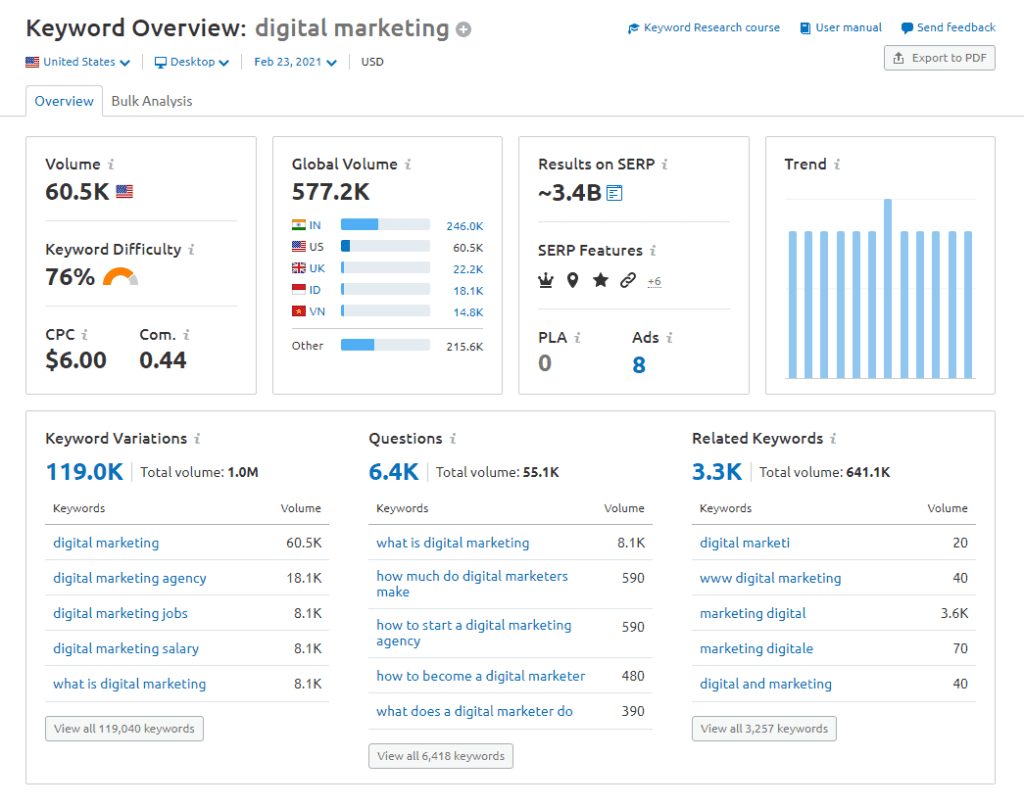
You can now filter keywords based on:
- Search volume
- Keyword difficulty (KD%)
- CPC (Cost Per Click)
- Competitive density
- Search trend
- SERP features
Export the top-performing keywords into a spreadsheet or notepad for further SEO planning.
Quick Competitor Keyword Research Workflow
- Enter a top competitor’s domain into Semrush and start with a simple competitor keyword research SEO overview to see which pages and keywords drive most of their organic traffic.
- Export their top-ranking keywords into a spreadsheet, focusing on terms that match your niche and content strategy.
- Filter the list by keyword difficulty, search intent, and country so you can isolate realistic opportunities instead of chasing every high‑volume phrase.
- Highlight gaps where competitors rank but you do not yet have content, then create targeted articles or update existing posts to close these content gaps and capture that traffic.
Understanding Semrush Keyword Metrics
Here’s how to interpret the most important fields in the Semrush keyword report:
- Keyword: Shows the exact search query that generates traffic for a website or appears in search engine results.
- Position: Displays the ranking position of a keyword in Google’s search results. You can switch between different country databases for local SEO analysis.
- Volume: Indicates the average monthly search volume for that keyword. Higher volume means more potential traffic, but often higher competition as well.
- Keyword Difficulty (KD%): Estimates how hard it is to rank on the first page. Lower KD% is ideal for new blogs and niche websites.
- CPC (Cost Per Click): Shows the average advertising cost per click. Higher CPC keywords often indicate strong commercial intent and monetization potential.
- Trend: Displays the keyword’s popularity over the last 12 months. Useful for identifying seasonal keywords and trending topics.
How to Select Profitable Keywords Using Semrush
To improve search engine rankings and generate organic traffic:
- Focus on low to medium keyword difficulty
- Choose keywords with consistent monthly search volume
- Prioritize high CPC keywords for affiliate marketing
- Analyze competitor ranking keywords
- Target long-tail keyword variations
- Build content clusters around related topics
Instead of targeting extremely competitive head terms, choose keywords that offer a balance of search volume, ranking potential, and commercial value.
By consistently using Semrush for keyword research and competitor analysis, you can create data-backed content strategies that drive traffic, improve SEO performance, and increase affiliate conversions in 2026 and beyond.
How to do Keyword Research for SEO with KWFinder
KWFinder is a powerful SEO keyword research tool designed to help bloggers, affiliate marketers, and small business owners discover high-traffic keywords, low-competition keywords, and profitable long-tail opportunities.
It is especially popular for its accurate keyword difficulty analysis, clean interface, and actionable SEO metrics.
Although KWFinder is a premium tool, it offers a limited free version (3 searches per day), which is useful for beginners who want to explore keyword ideas before investing.
KWFinder is especially effective for long tail keyword research for SEO because its KD metric makes it easy to spot low‑competition phrases.
If you prefer long‑tail focused tools, my KWFinder review explains how I use it to uncover low‑competition keywords for new blogs.
If your goal is to increase organic traffic, improve search engine rankings, and find keywords with real ranking potential, KWFinder provides data-driven insights like search volume, CPC, PPC competition, and SEO difficulty — all in one dashboard.
Step 1: Enter Your Seed Keyword
Open KWFinder and type your primary keyword into the “Find keywords” search box.
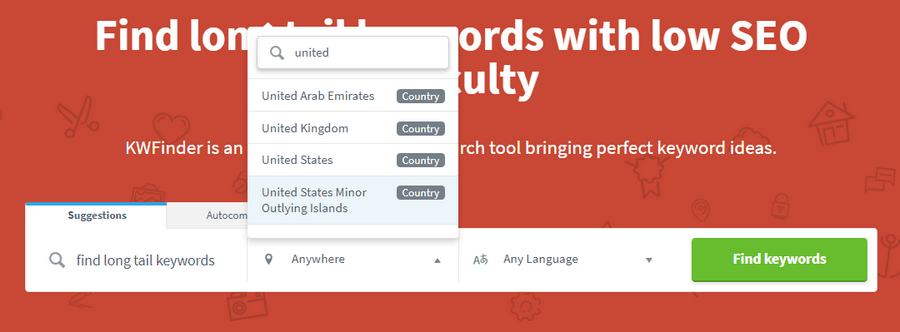
Before clicking the search button, make sure to:
- Select the correct location (for local SEO or geo-targeted traffic)
- Choose the appropriate language
- Adjust filters if needed
This is especially important if you are targeting local search engine results, affiliate marketing keywords, or country-specific search queries.
Click “Find Keywords” to generate keyword suggestions.
Step 2: Analyze the Keyword Metrics
Within seconds, KWFinder will display a list of related keywords along with important SEO metrics. These metrics help you evaluate keyword profitability and ranking difficulty.
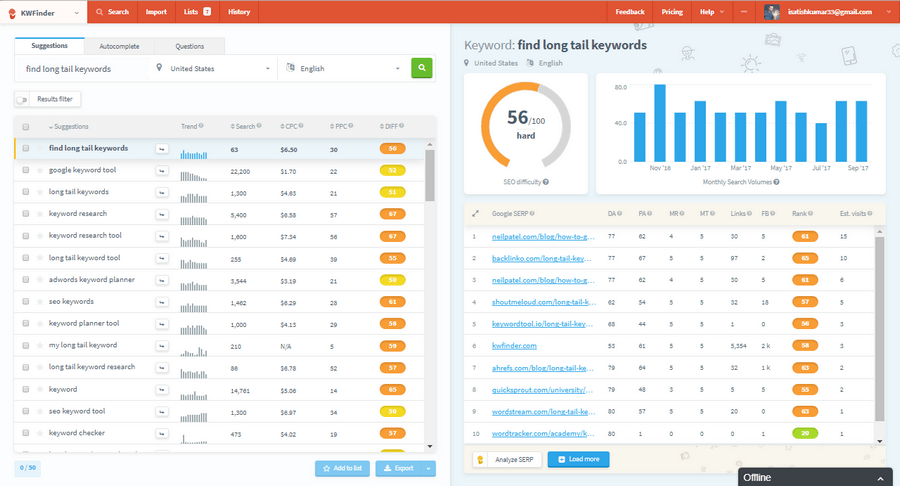
You will see:
- Trend – Search interest over time
- Search – Average monthly search volume
- CPC (Cost Per Click) – Value for advertisers (useful for AdSense and affiliate marketing)
- PPC – Paid competition level
- Keyword Difficulty (KD) – SEO competition score
These metrics are essential for selecting keywords that have a good balance of search volume, low competition, and commercial intent.
Understanding Keyword Difficulty (KD Score)
The Keyword Difficulty (KD) score ranges from 0 to 100 and estimates how hard it is to rank on the first page of Google.
- 0–29 → Easy keywords (ideal for new blogs and niche sites)
- 30–49 → Possible with strong on-page SEO and quality content
- 50–69 → Competitive; requires backlinks and domain authority
- 70+ → Highly competitive; usually dominated by authority websites
The KD score is calculated based on SERP analysis, backlink profiles, and the domain authority of top-ranking pages. However, remember that your actual ranking difficulty also depends on your:
- Website authority
- Content quality
- Internal linking strategy
- On-page SEO optimization
- Backlink profile
So, while the KD score provides a reliable benchmark, your SEO skills and strategy play a major role in ranking success.
Why KWFinder Is Effective for SEO Strategy
For smaller blogs, focusing on long tail keyword research for SEO with KWFinder is often enough to reach the first page without a big backlink profile.
KWFinder helps you:
- Discover long-tail keywords with low SEO difficulty
- Identify high CPC keywords for monetization
- Perform quick SERP competitor analysis
- Improve your keyword selection strategy
- Build content around data-backed keyword opportunities
When used correctly, KWFinder can significantly improve your content planning, blog writing strategy, and affiliate marketing performance.
Long tail keyword research for SEO lets smaller sites compete by targeting specific, low‑competition phrases with clear intent.
How to check the Keyword Difficulty in KWFinder?
Checking Keyword Difficulty (KD) in KWFinder is simple and helps you decide whether a keyword is worth targeting.
First, enter your target keyword into KWFinder and review the results page. You’ll see a Keyword Difficulty (KD) score, usually displayed on a scale from 0 to 100. This score estimates how hard it will be to rank on the first page of Google for that keyword.
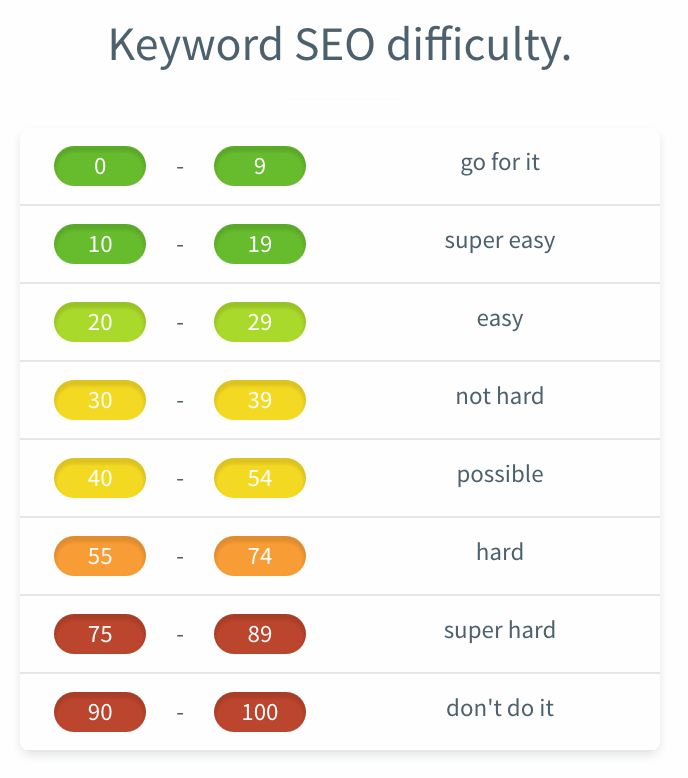
Here’s how to interpret it:
- KD below 30 – Easy to rank. Great choice for new blogs and low-authority websites.
- KD between 30–55 – Moderate difficulty. Possible with strong content and proper on-page SEO.
- KD above 55 – Difficult to rank. Requires high authority, backlinks, and strong competition analysis.
If you consistently target keywords with very high difficulty scores (above 55), ranking can become extremely challenging and time-consuming — especially for new or small websites.
For steady organic growth, focus on low to moderate KD keywords that match your niche and search intent. KWFinder makes it easy to identify these opportunities quickly.
If KWFinder doesn’t fit your budget or requirements, you can also explore other keyword research tools as alternatives based on your needs and SEO strategy.
Both tools play a key role in keyword research for higher rankings by helping you balance search volume, difficulty, and commercial intent.
How to Do Keyword Research with ChatGPT (Step-by-Step Guide)
In 2026, AI keyword research tools for SEO, including ChatGPT, Gemini, and built‑in AI features inside Semrush or Ahrefs, can dramatically speed up ideation, clustering, and semantic expansion.
Keyword research has evolved. While traditional tools like Ahrefs, SEMrush, and Google Keyword Planner are still powerful, ChatGPT has become a smart assistant for idea generation, clustering, and search intent analysis.
It doesn’t replace SEO tools completely, but it dramatically speeds up brainstorming and content planning.
Let’s see how to use ChatGPT for keyword research effectively.
1. Start With a Seed Keyword
Every successful keyword research process begins with a clear seed keyword. A seed keyword is the main topic or broad term that represents your niche or blog post idea. It acts as the foundation from which all related keyword variations, subtopics, and long-tail phrases are generated. When using ChatGPT, starting with a well-defined seed keyword ensures the output stays focused, relevant, and aligned with your content goals.
Begin with your main topic.
For example:
- “WordPress SEO”
- “Keyword research tools”
- “Affiliate marketing for beginners”
Use a prompt like:
“Generate 50 long-tail keywords related to ‘WordPress SEO’ for beginners.”
ChatGPT will generate variations such as:
- How to improve WordPress SEO
- best WordPress SEO plugins 2026
- WordPress SEO checklist for beginners
- on-page SEO for WordPress blog
- WordPress SEO tips for small websites
This helps you quickly expand your keyword list without manual brainstorming.
2. Generate Long-Tail Keywords
Long-tail keywords are specific, multi-word phrases that usually have lower competition and higher conversion potential. Instead of targeting broad and highly competitive terms, focusing on long-tail variations allows you to rank faster and attract more qualified traffic. ChatGPT makes it easy to quickly generate dozens of long-tail keyword ideas that would otherwise take significant manual research time.
Long-tail keywords are easier to rank for and bring targeted traffic.
Use prompts like:
“Give me low competition long-tail keywords for ‘blogging for beginners’ with informational intent.”
You can also ask:
“Create question-based keywords for ‘SEO audit’.”
Example output:
- How to do an SEO audit step by step
- What is a technical SEO audit
- free SEO audit checklist PDF
- How long does an SEO audit take
These are perfect for blog posts, FAQs, and featured snippets.
3. Identify Search Intent
Keyword research is not just about finding phrases — it’s about understanding why users are searching. Search intent determines whether someone wants information, is comparing products, or is ready to make a purchase. By identifying the intent behind each keyword, you can create content that perfectly matches user expectations, increasing your chances of ranking higher and improving engagement metrics.
Understanding search intent improves rankings.
Ask:
“Classify these keywords by search intent: informational, transactional, commercial, navigational.”
Or:
“Explain the search intent behind ‘best keyword research tools 2026’.”
ChatGPT can categorize keywords into:
- Informational – how to do keyword research
- Commercial – best keyword research tools
- Transactional – buy SEO software
- Navigational – Ahrefs login page
This helps you align content with user expectations.
4. Create Keyword Clusters (Topical Authority Strategy)
Modern SEO is no longer about ranking a single page for a single keyword. Search engines favor websites that demonstrate topical authority through structured content clusters. By grouping related keywords into a pillar-and-cluster model, you build stronger internal linking and deeper coverage of a subject. ChatGPT can help organize scattered keyword ideas into logical topic clusters in seconds.
Modern semantic keyword research for SEO focuses on covering related entities, questions, and subtopics instead of repeating one exact phrase.
Google now prefers topic clusters over isolated keywords.
Prompt example:
“Create a topic cluster for ‘keyword research’ including pillar topic and supporting subtopics.”
You’ll get something like:
Pillar Page:
- Ultimate Guide to Keyword Research
Cluster Content Ideas:
- How to find low competition keywords
- Keyword research for beginners
- Free keyword research tools
- Keyword research mistakes to avoid
- Semantic keyword research strategy
This structure strengthens topical authority and improves internal linking.
5. Generate Semantic Keywords (LSI & NLP Terms)
Search engines have become smarter. They no longer rely only on exact-match keywords but instead analyze contextual relevance using semantic relationships and NLP-based understanding. Adding related terms, variations, and conceptually connected phrases helps your content rank more naturally. ChatGPT can quickly generate these semantic keyword suggestions to strengthen on-page optimization without keyword stuffing.
To optimize content naturally, ask:
“Give me semantic keywords and related NLP terms for ‘on page SEO’.”
Example output:
- meta title optimization
- keyword density
- internal linking
- content optimization
- search engine ranking factors
- page speed optimization
These help you avoid keyword stuffing and improve contextual relevance.
Combining AI with semantic keyword research for SEO ensures your content matches how modern search engines understand topics, not just exact phrases.
You can review my on‑page SEO checklist to make sure each article fully uses your chosen keywords.
6. Find Content Gaps
One of the smartest ways to outperform competitors is to identify what they are missing. Content gap analysis helps you discover overlooked subtopics, unanswered questions, and underserved search queries. Instead of guessing what to write next, you can use ChatGPT to brainstorm missing angles and expand your content into a more comprehensive resource.
You can also use ChatGPT for competitor-based analysis.
Example prompt:
“Suggest content gaps for a blog about ‘affiliate marketing’ targeting beginners.”
Or:
“What subtopics are often missing in articles about local SEO?”
This helps you create more comprehensive and valuable content.
7. Turn Keywords into Blog Titles
Finding keywords is only half the work — transforming them into compelling, click-worthy titles is equally important. A well-crafted headline improves click-through rate (CTR), user engagement, and overall performance in search results. ChatGPT can help convert raw keyword lists into optimized blog titles that are both SEO-friendly and attractive to readers.
Once you have keywords, convert them into clickable headlines.
Prompt:
“Turn these keywords into SEO-optimized blog titles with power words.”
Example:
- 15 Proven Keyword Research Tips for Beginners
- Complete Guide to Keyword Research in 2026
- 10 Common Keyword Research Mistakes You Must Avoid
This improves CTR and engagement.
8. Validate Keywords with SEO Tools (Important)
While ChatGPT is excellent for idea generation and structuring, it does not provide real-time search volume, keyword difficulty, or competitive data. That’s why validation is a critical final step in the keyword research process. After generating ideas with AI, you should verify them using professional SEO tools to ensure you’re targeting keywords with realistic ranking potential.
ChatGPT is excellent for:
- Idea generation
- Clustering
- Intent understanding
- Semantic expansion
However, it does not provide accurate search volume, keyword difficulty, or real competition data.
So after generating keywords:
- Verify search volume
- Check keyword difficulty
- Analyze SERP competition
- Evaluate CPC (if targeting affiliate/ads)
Use tools like:
- Google Keyword Planner
- Ahrefs
- SEMrush
- Ubersuggest
ChatGPT + SEO tools = Smart strategy.
You will also see how AI keyword research tools 2026 can speed up ideation, clustering, and topical map creation without replacing real search data.
Best AI Keyword Research Tools 2026 (and How to Use Them)
In 2026, several AI‑powered platforms make keyword research faster and more data‑driven. These AI keyword research tools 2026 help you generate topical maps, group keywords into clusters, and uncover question‑based opportunities that you can later validate with traditional SEO metrics.
- Semrush AI features for expanding seed keywords, generating keyword clusters, and refining topics based on real search data.
- Ahrefs Keywords Explorer with AI‑assisted suggestions for related queries, questions, and long‑tail variations in multiple languages.
- Dedicated AI tools like WriterZen or LowFruits focus on topical mapping, SERP analysis, and low‑competition keyword discovery.
- Content optimization suites such as Surfer SEO or NeuronWriter, which use AI to recommend semantic keywords and on‑page improvements based on top‑ranking pages.
Best Prompts for Keyword Research with ChatGPT
You can copy and use these directly:
- Generate 100 long-tail keywords for [topic].
- Find low competition keywords for beginners in [niche].
- Group these keywords into topic clusters.
- Classify keywords by search intent.
- Provide semantic keywords for SEO optimization.
- Suggest blog post ideas targeting featured snippets.
Using ChatGPT for keyword research can save hours of manual brainstorming. It helps you:
- Discover long-tail keywords
- Understand search intent
- Build topic clusters
- Find semantic variations
- Create better content structures
But always combine it with real SEO tools for data validation.
When used strategically, ChatGPT becomes a powerful assistant in building high-ranking, traffic-driving content.
Keyword Research for Voice Search and AI Overviews
Keyword research for voice search focuses on conversational, question‑based queries like ‘how to do keyword research for SEO step by step’ that users speak into assistants like Google Assistant, Siri, or Alexa.
Voice queries are longer, more conversational, and often answered directly in snippets or AI overviews, so your keyword research for SEO should explicitly account for how people speak, not just how they type.
- Focus on conversational, question‑based queries
- Target natural questions like “how to do keyword research for SEO step by step” that users speak into Google Assistant, Siri, or Alexa.
- Include phrases that start with “how”, “what”, “why”, and “where”, because these dominate voice search patterns.
- Prioritize local and long‑tail intent
- Collect long‑tail question keywords, “near me” phrases, and other natural language variations that signal strong intent.
- Mine Google Search Console, People Also Ask boxes, and real customer questions to find the exact wording people use in everyday speech.
- Optimize for AEO and featured snippets
- Structure key answers in short, clear paragraphs and FAQ blocks so search engines can extract them easily.
- This approach combines keyword research for SEO with answer engine optimization (AEO), boosting your chances of winning featured snippets and People Also Ask results, and appearing in AI overviews.
When you treat keyword research for SEO as a continuous process, you can adapt to algorithm updates, AI overviews, and changing user behavior without losing traffic.
Final words on Keyword Research for SEO
When you master keyword research for SEO at this level, every new article starts with clear intent, realistic difficulty, and measurable business value.
Keyword research remains the foundation of successful blogging and affiliate marketing. Without the right keywords, even the best content struggles to attract traffic.
But when you identify profitable, low-competition keywords with clear search intent, you create a strong base for consistent organic growth.
The tools discussed in this guide — along with modern methods like using ChatGPT for idea generation and clustering — make the process faster and more strategic.
Keyword research for voice search and AI overviews focuses on question‑based, conversational phrases that users speak into mobile assistants and smart devices.
By combining keyword research for blog posts, keyword research for affiliate marketing, and keyword research for organic traffic, you cover every stage of the search journey from discovery to conversion.
Instead of guessing what your audience wants, you can rely on data-driven insights to plan content that ranks, converts, and builds authority in your niche.
Once you discover a valuable keyword, your next step should be smart implementation. Optimize your content properly with strong on-page SEO, internal linking, and semantic keyword usage.
You can also strengthen your understanding by reviewing core SEO principles and improving content structure across your site.
If the keyword represents a powerful micro-niche opportunity, checking domain availability and securing an exact-match or partial-match domain can still provide branding advantages.
While Exact Match Domains (EMDs) alone don’t guarantee rankings today, combining a relevant domain, high-quality content, and proper SEO can create a strong competitive edge.
In the end, keyword research is not just about finding search terms — it’s about identifying opportunities. When done correctly, it drives targeted traffic, builds authority, and helps you promote your products or services organically for long-term success.







This is one of the best posts I read about to drive traffic.
I will implement these tips to increase my traffic.
Thanks for sharing
Hello, Satish!
That’s really useful guide.
Mostly, I uses GKP for keyword research and its the best. However, I also tried Long Tail Pro and SEMrush. Both tools saved my time.
Thanks 🙂