

If you already know you want a fast, SEO‑friendly theme you can use on up to 500 sites, grab GeneratePress Premium today and start with a proven high‑performance foundation.
- Best For: Speed-focused bloggers, SEO professionals, and Agencies (500-site license).
- Speed Score: 98/100 (Mobile) | 100/100 (Desktop)
- My Rating: ⭐⭐⭐⭐⭐ (5/5)
Affiliate Disclaimer: We only recommend tools we use and trust. Affiliate earnings help keep our blog running at no extra cost to you. The reviews are based on our experiences, which they did not pay us for. The next is an affiliate disclaimer.
Choosing the right WordPress theme in 2026 is more than just picking something that looks good. It’s about speed, SEO, flexibility, and long-term reliability.
The primary reason I recommend generatepress seo is its focus on schema markup. It also provides clean code right out of the box. This is an honest GeneratePress review 2026. My goal is to give you a transparent, unbiased look at what this theme offers.
GeneratePress is an excellent option if you want a WordPress theme that is fast. It is also clean and built for Core Web Vitals. It is one of the most reliable choices in 2026 for speed, SEO, and long-term stability.
It combines a lightweight codebase with powerful layout controls, starter sites, and deep integration with the block editor and GenerateBlocks.
If you prioritize blazing speed, clean code, and SEO performance, then GeneratePress is the top choice. It is the #1 option for WordPress in 2026. It is the most stable and lightweight theme I have ever used. This makes it perfect for bloggers and agencies who want to pass Core Web Vitals with ease.
You can build virtually any site without sacrificing speed. This honest GeneratePress theme review for 2026 walks through performance tests, real pricing, pros and cons, and who should use or skip it—so you can decide in a few minutes if it is the right theme for your blog, business, or WooCommerce store
Let’s explore the reasons why GeneratePress is still one of the best WordPress themes in 2026. We will discuss whether it’s the right fit for your website goals.
What is GeneratePress and Why I Use It
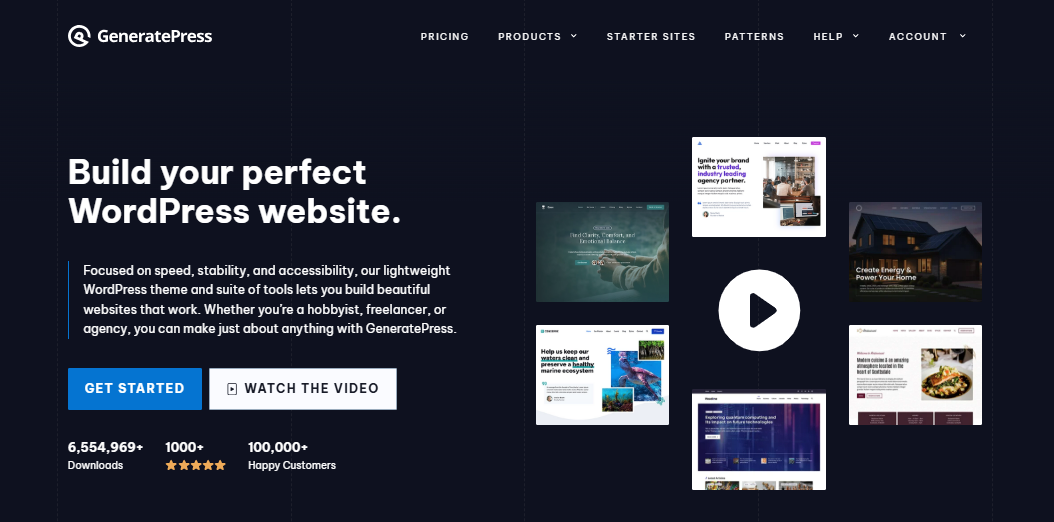
If you are still wondering what GeneratePress is, it is essentially a performance-first framework designed for the modern web.
Before I discovered GeneratePress, I tried many popular WordPress themes. They looked great and came with lots of features, but they made my site slow and hard to manage.
Every update caused issues, and my site performance kept getting worse. It started affecting my Google rankings, and I was spending more time fixing problems than creating content.
Then I found GeneratePress—and everything changed.
GeneratePress is a lightweight and fast WordPress theme developed by Tom Usborne. It’s designed for speed, simplicity, and full control.
Many developers consider GeneratePress the gold standard for lightweight WordPress foundations.
GeneratePress Review 2026

This GeneratePress Premium Review and setup, in my opinion, is beneficial. So start spreading the word about this article on social media. Your love and support are appreciated.
Product SKU: GP-PREMIUM-2026
Product Brand: GeneratePress
Product Currency: USD
Product Price: 59
Price Valid Until: 2026-02-28
Product In-Stock: InStock
5
Pros
- Extremely fast loading speeds and lightweight codebase
- Highly customizable without coding knowledge
- Beginner-friendly with easy WordPress Customizer
- Excellent SEO performance and mobile responsive
- Works perfectly with block editor and WooCommerce
- One license covers up to 500 websites
- Reliable updates with no plugin conflicts
- Access to Site Library templates in premium
Cons
- Free version lacks pre-built demo sites
- Limited design options compared to feature-heavy themes
- No drag-and-drop builder (needs external plugins)
- Premium subscription required for advanced features
- Basic default design needs customization
- No lifetime license option available
🟢 “Recommended for Agencies: Get GP Premium for up to 500 sites. Risk-Free Guarantee/Bonus
At first glance, it looked simple. However, when I installed the free version and ran a speed test, the difference was clear.
GeneratePress is a free WordPress theme. It offers essential features and customization options without cost. It is a practical choice. Anyone can build or customize their website without investing in a paid theme.
The layout was smooth, and there was no extra bloat. I quickly upgraded to GP Premium, and that’s when the real power of the theme unlocked.
Without writing a single line of code, I was able to customize everything—headers, footers, blog layout, fonts, spacing, and colors.
I stopped using bulky page builders. GenerateBlocks gave me all the design tools I needed. It kept my site fast and responsive.
Here’s why I love GeneratePress in 2026:
- It’s incredibly lightweight—just 30–60KB in size
- Fully mobile-responsive and works great on all screen sizes
- Comes with clean code and built-in SEO features like schema markup
- One premium license lets you use it on up to 500 websites
- Works seamlessly with GenerateBlocks to build any layout
- The free version is great to start with, but GP Premium adds much more control
Some users prefer GeneratePress over other themes because of its superior performance, advanced customization options, and clean code.
Since switching to GeneratePress, my website has improved in speed, performance, and Google rankings.
My bounce rate dropped, and visitors stay longer. Best of all, I can now manage and design everything myself—no need to hire a developer for every small change.
The GeneratePress Dashboard makes it easy to access all theme features. This includes the Site Library and premium modules. Everything is accessible from one central place.
Below, we break down the key features of GeneratePress. We explore its pros and cons. This way, you can decide if it fits your needs and budget.
This GeneratePress review and guide covers everything from installation to advanced customization options, helping you make an informed choice.
If you’re struggling with a slow or bloated WordPress theme, I highly recommend trying GeneratePress.
It’s the best lightweight WordPress theme I’ve used, and it’s helped me grow faster with less effort.
Key Features of GeneratePress in 2026
As a GeneratePress WordPress user, you gain access to a theme. This theme prioritizes the native block editor. It does so over bulky page builders.
I have used it for several years. Here are the main reasons why I recommend GeneratePress. It is suitable for bloggers, freelancers, developers, and online business owners.
- Super lightweight theme with a base size under 60KB
- Loads extremely fast and improves Core Web Vitals
- Fully responsive and mobile-first design
- Works great on all devices—desktop, tablet, and mobile
- Built-in schema markup for better search engine visibility
- Clean and valid HTML code that supports strong on-page SEO
- Customize layouts, colors, fonts, and spacing using the WordPress Customizer
- Seamless integration with Gutenberg and GenerateBlocks
- Modular structure—only activate the features you need
- Full support for developers with hooks, filters, and layout controls
- Accessibility-ready and compliant with WCAG 2.0 standards
- Premium license allows use on up to 500 websites
Then, GeneratePress Premium in 2026 is a smart choice. It’s ideal for bloggers, businesses, e-commerce stores, and anyone who wants to build a professional website without sacrificing performance.
GeneratePress Free vs Premium – Full Comparison
Understanding the differences in generatepress free vs premium is crucial. It helps decide which version fits your current budget. It also meets your project needs.
Choosing a WordPress theme requires understanding what you get for free. You should also know what features are unlocked with the premium version.
GeneratePress offers both options, and each is designed for speed, simplicity, and full compatibility with the WordPress block editor.
As a free WordPress theme, GeneratePress provides essential features at no cost, while the premium upgrade unlocks advanced tools.
A careful analysis of the GeneratePress free vs premium reveals that the free version covers core needs.
However, the premium upgrade unlocks advanced features and customization. These are essential for serious bloggers and agencies.
Let’s break it down so you can decide what’s best for your needs.
What You Get with the Free Version
The free GeneratePress theme is available directly from the WordPress.org repository. It’s fast, stable, and well-coded. It’s perfect for beginners who want to launch a blog or basic business website without extra bells and whistles.
The free version of GeneratePress is perfect if you’re just starting a blog or creating a basic website. It gives you a fast, lightweight foundation with clean code, responsive design, and strong SEO performance. You can use it confidently without any technical skills.
If you’re just starting a blog or small website, the free version will absolutely get the job done. You don’t need advanced customization. In fact, it’s one of the best free SEO-optimized WordPress themes available today. Compared to other free versions of popular themes, GeneratePress stands out for its performance and reliability.
Why Upgrade to GeneratePress Premium
The GP Premium plugin is what unlocks the full power of GeneratePress. It’s not a separate theme. It is a plugin that sits on top of the free version.
To install GeneratePress Premium, upload and activate the plugin through your WordPress dashboard. Then, enter your license key to enable all features.
To access these advanced features, purchase GeneratePress Premium. It gives you a license for up to 500 websites. It also unlocks additional modules, templates, and support.
How the Premium Version Impacts SEO and Speed
Because Premium only adds modular functionality (you can toggle modules on or off), it keeps the theme lightweight and performance-friendly.
Features like the script manager allow you to control which scripts load on your site.
This further optimizes performance and page load times. I’ve tested sites with and without GP Premium.
There’s no performance penalty. This is rare for a premium plugin.
You still get the best-in-class Core Web Vitals performance. You enjoy ultra-fast page load times. There are also benefits of a minimal CSS footprint.
GeneratePress Free vs Premium: Which One Should You Choose?
When evaluating generatepress premium vs free, the addition of the Elements module is often the deciding factor for power users.
| Feature | GeneratePress Free | GeneratePress Premium (GP Premium) |
|---|---|---|
| Theme Speed & Performance | ✅ Fast & lightweight | ✅ Super-fast & optimized |
| Mobile Responsive Design | ✅ Included | ✅ Included |
| Block Editor Support (Gutenberg) | ✅ Full support | ✅ Full support |
| Custom Layouts (Headers/Footers) | ❌ Not included | ✅ With a dedicated module |
| Colors, Fonts & Spacing Control | ❌ Basic | ✅ Full customization |
| WooCommerce Integration | ❌ Not included | ✅ With dedicated module |
| Site Library (Pre-built Templates) | ❌ Not available | ✅ 100+ importable starter sites |
| Dynamic Page Headers & Hooks | ❌ No | ✅ Yes |
| Premium Support & Updates | ❌ Community only | ✅ 1 year of premium support |
| Support/License scope | ❌ No | ✅ Up to 500 websites |
| Pricing | 💰 Free forever | 💰 $59/year or $149/year (bundle) |
Here’s my personal take:
- Choose the free version if you need a fast and reliable theme for a simple website or personal blog.
- Go with GP Premium if you want full design flexibility and advanced layout features. It offers professional tools for customization. This is especially useful for client projects or business websites.
Pro Tip: If you’re considering other themes, like Astra or Kadence. Be aware that most of their advanced features require a paid version. However, GeneratePress Premium often excels in performance tests. It is also easy to use, especially for WordPress users who prefer the native block editor.
GeneratePress remains one of the best WordPress themes in 2026 for speed. It excels in SEO and ease of use.
GeneratePress Free Version Review 2026
One thing I really like about GeneratePress is how easy it is to customize your website. You don’t need to know any code.
Anyone can use it—whether you’re a beginner or have built websites before.
In 2026, websites need to look clean, work well on phones, and match your brand.
GeneratePress helps you do all of that using the built-in WordPress Customizer.
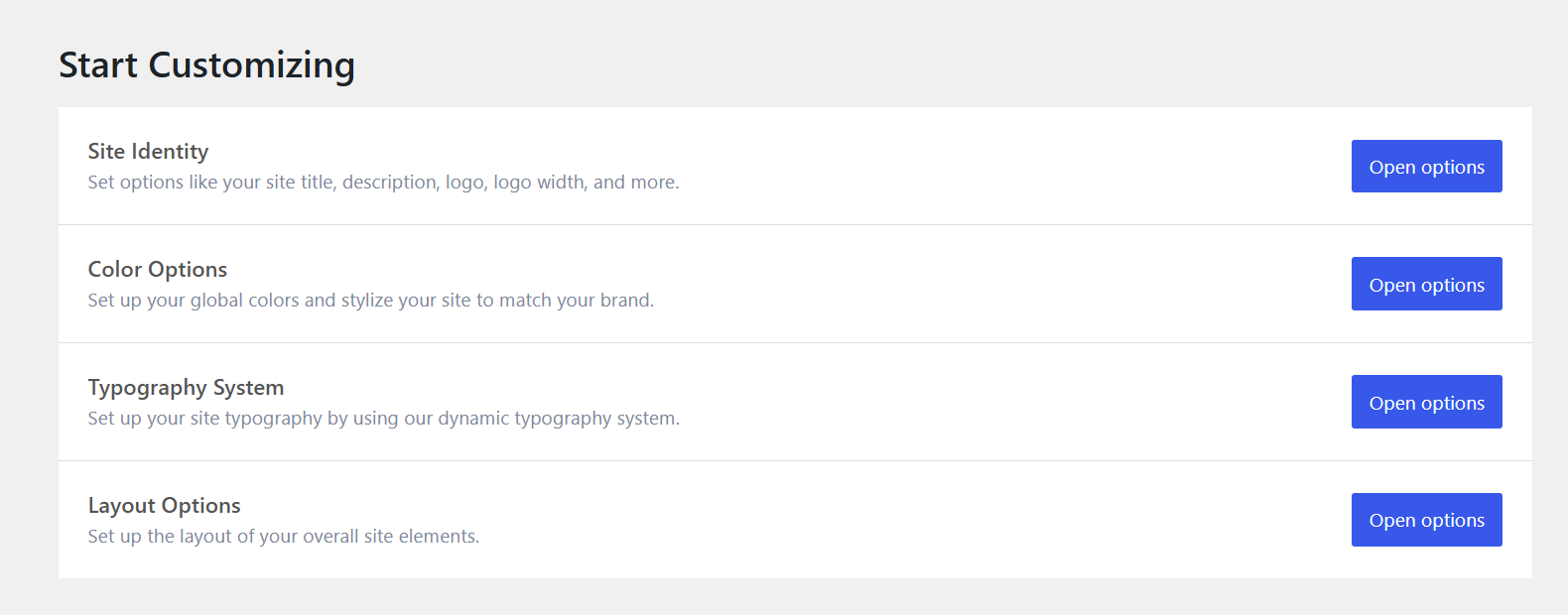
You can change your layout, fonts, colors, and spacing with just a few clicks. For even more control, you can use the Additional CSS section to customize specific elements.
You can also modify your site’s appearance and optimize performance. This customization option lets users with CSS knowledge create beautiful websites tailored to their needs.
You don’t need extra tools or a developer to make your site look the way you want.
If you want a simple and flexible WordPress theme that’s easy to customize, GeneratePress is a smart choice. It works great on all devices.
1. Site Identity
The theme’s site identity layout options offer easy ways to set your logo. You can also configure your title and tagline. Control their visibility for a professional look. These elements define your website’s branding. You can manage all of this from one place.
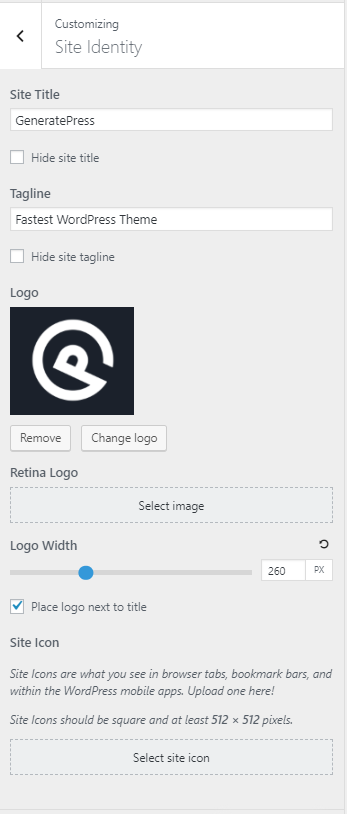
Located under Customize > Site Identity, this panel allows you to easily configure:
- Site Title: Your blog or business name that appears in the browser tab and header.
- Tagline: A short description or slogan that summarizes your site’s purpose.
- Logo: Upload your logo image for both desktop and mobile views.
- Logo Width: Adjust how large your logo appears, so it looks great across all screen sizes.
- Site Icon (Favicon): Set the small icon that appears in browser tabs and bookmarks.
These settings are crucial for creating a consistent visual identity. They help in improving recognition and ensure your site looks professional from the moment someone lands on it.
Whether you’re just starting a blog or launching a brand, begin with the Site Identity settings. They are the first step to making your site feel personal and polished.
2. Color Options
The Color Options section in GeneratePress gives you complete control over your site’s color scheme. You can create a consistent look that matches your branding.
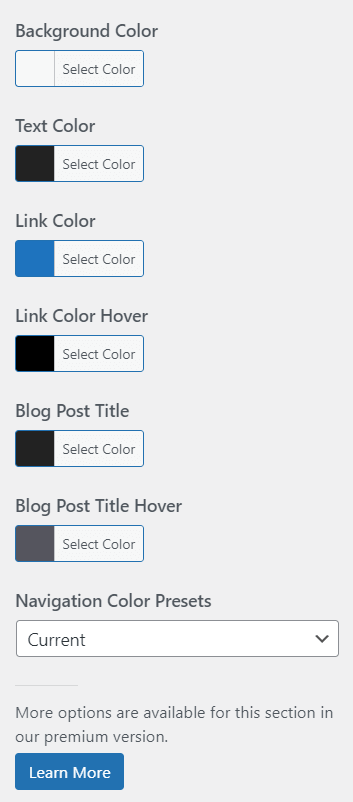
You can find this feature under Customize > Colors, where you’ll be able to:
- Set global colors for text, links, backgrounds, borders, and buttons
- Apply color settings across headers, navigation menus, footers, sidebars, and blog content
- Preview changes instantly using the live Customizer
- Use GeneratePress Global Colors to maintain consistency across your site with just a few clicks
You can choose a bold, colorful style or a clean, minimal design.
The Color Options in GeneratePress make it easy to bring your visual identity to life.
You can do this without any coding.
It’s a simple but powerful tool that helps your website look polished, professional, and aligned with your brand’s tone.
3. Typography System
The Typography System in GeneratePress allows you to easily manage your site’s fonts, sizes, weights, and spacing. This system gives you full control over how your content looks and reads.
For optimal performance and a lightweight design, consider using a system font stack. System font stacks use fonts already installed on users’ devices, which can significantly improve site speed.
You can access it under Customize > General > Typography, where you’ll find a dynamic, block-based system that lets you:

Set global typography rules for body text, headings, buttons, navigation, and more
Choose from Google Fonts, local fonts, or upload your own custom fonts via the Font Library
Adjust font size, line height, letter spacing, and font weight individually for each element
Preview changes live across desktop, tablet, and mobile
This system ensures your site stays clean and consistent. It remains easy to read. This also enhances your overall branding and user experience.ugins.
Your site will not only look clean—it will also feel consistent across all pages.
Whether you’re designing a personal blog or a business site, the dynamic typography system assists you. It helps you create a visually polished website. It also ensures the website is readable. You can achieve this without needing any CSS.
4. Layout Options
The Layout Options in GeneratePress give you complete control over the structure and spacing of your entire site. This allows you to design your pages exactly how you want. You do not need a page builder or to write custom code.
You can find these settings under Customize > Layout, where you’ll be able to configure layout choices for:
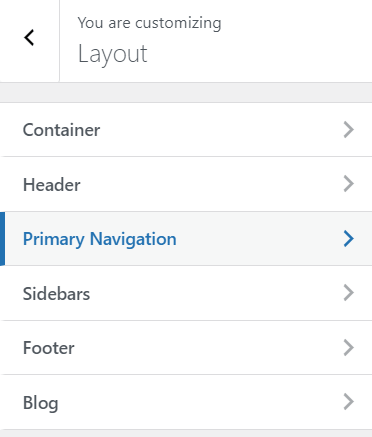
- Header – Adjust width, padding, and alignment. You can set the header width for a full or boxed layout. Fine-tune the inner header width to control the spacing of header elements.
- Navigation – Control menu positioning and spacing
- Sidebar – Choose sidebar position, modify the sidebar layout for individual pages or posts, or remove it entirely
- Footer – Customize columns, widgets, and spacing
- Container – Set the overall site width and content padding
- Blog posts and archives – Control featured image position, meta layout, and more
These layout tools make it easy to create a clean and organized website layout. The design is responsive and looks great on both desktop and mobile devices.
You might want a full-width design, a boxed layout, or a unique blog structure. The Layout Options module helps you build a site that fits your content. You can even create custom theme layouts to match your specific design goals. It also ensures that your site aligns perfectly with your brand.
Want Total Control Over Your Website Design?
GeneratePress lets you customize everything—without touching a single line of code. Try it today and experience the difference.
GeneratePress Premium modules
One of the best reasons to upgrade to GeneratePress Premium is its smart modular design. Many bloated WordPress themes load every feature whether you use it or not. However, GeneratePress lets you activate only the features you need. This keeps your website fast, lightweight, and well-optimized—right from the start. For even better performance, GP Premium includes script management features. A script manager is included, allowing you to control which scripts load on your site. This helps further optimize speed.
Each feature comes in the form of a standalone module, giving you a plug-and-play experience. Once you install the GP Premium plugin, you unlock all the tools needed for advanced site building. There are over a dozen options to customize and enhance your site. You can do this—all without touching a line of code.
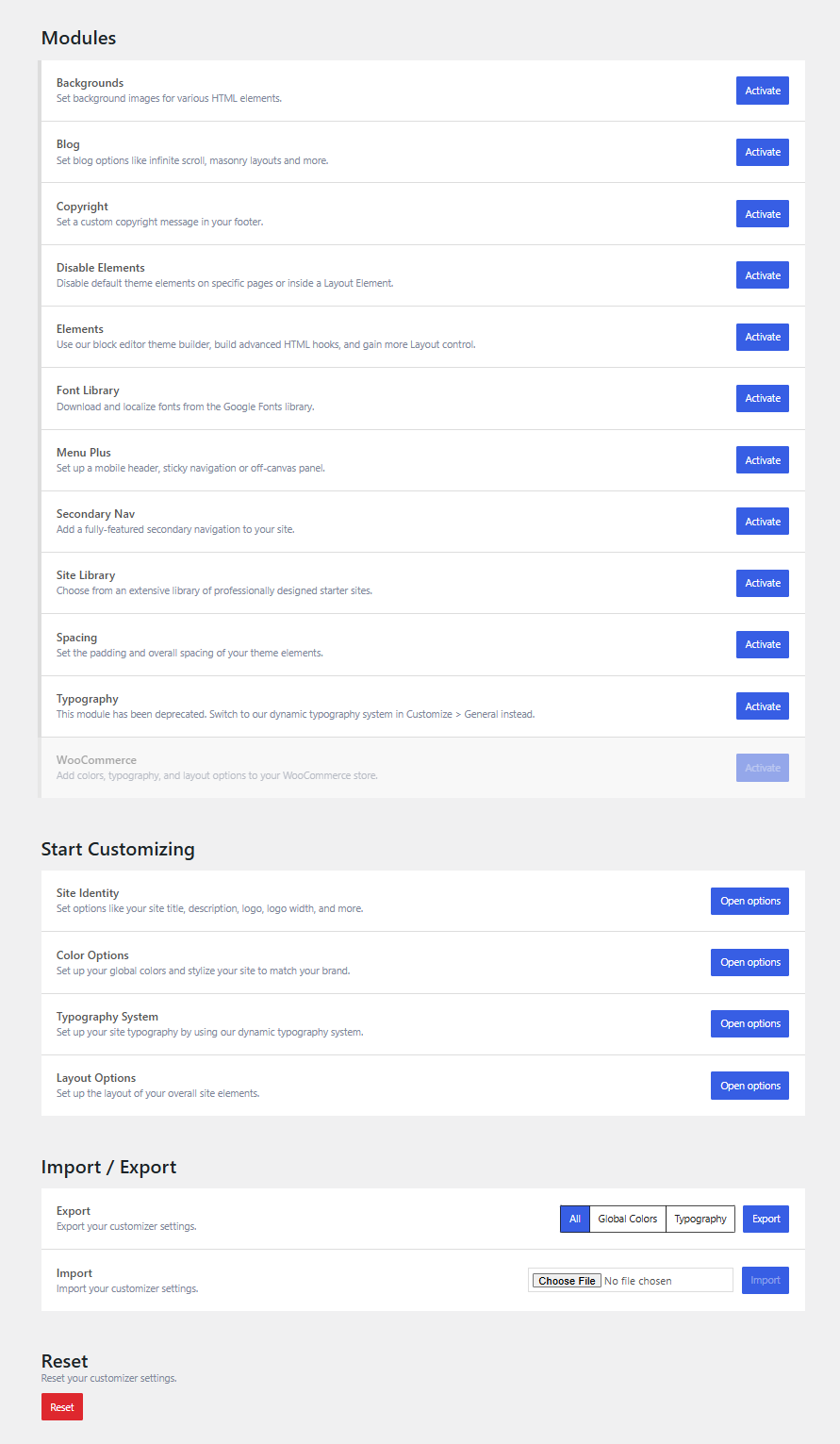
Let’s take a closer look at what each module does. Each one can help you build a cleaner, faster, and more professional website.
1. Background Module
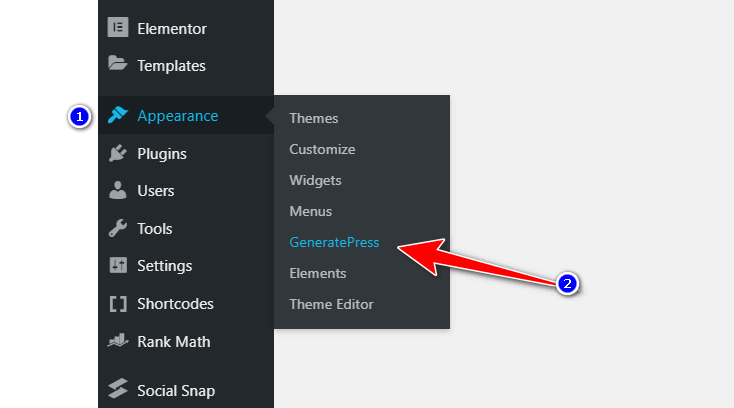
The Background module in GeneratePress Premium gives you full control over background images across different parts of your website. Activate the module by navigating to Appearance > GeneratePress > Modules. Then, the options will appear in your WordPress Customizer > Background Images.
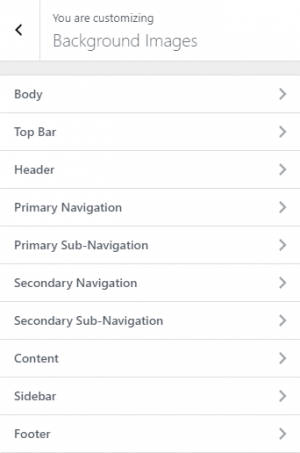
From there, you can apply custom background images to various site elements—like the header, body, footer, sidebar, or content areas. Each section includes flexible settings so you can match your design needs easily.
Here’s what you can customize:
- Repeat Options: Choose how the image repeats—horizontally, vertically, both, or not at all. This is ideal for background patterns or gradients.
- Size Options: Control how the image fits:
- Auto keeps the image at its original size.
- 100% width stretches it across the full width.
- Cover fills the entire section, cropping if needed.
- The ‘Contain’ option fits the image within the section without cropping it.
- Attachment Settings: Choose how the background behaves when scrolling:
- Scroll moves with the page.
- The fixed element remains in place as you scroll.
- The element’s content scrolls locally.
- Inherit copies the setting from its parent container.
With just a few clicks, you can enhance your site’s visual style—without touching a single line of CSS.
2. Blog Module
The Blog module in GeneratePress Premium gives you powerful layout and display options for your blog posts and archives.
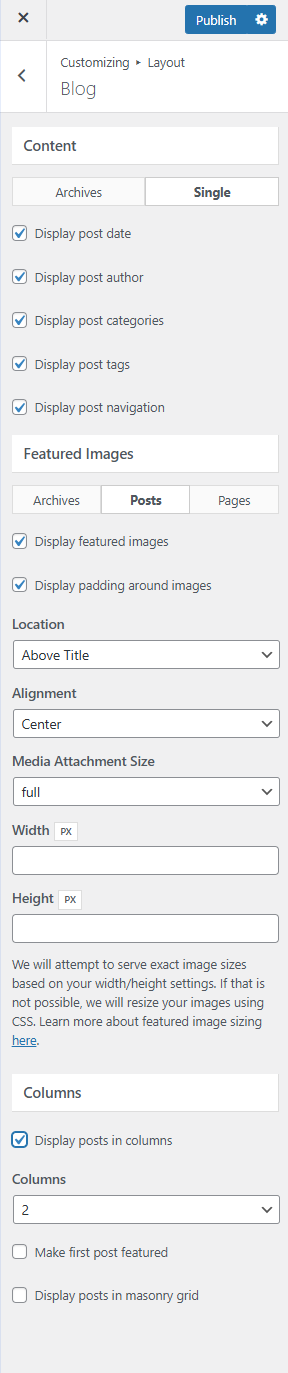
Once activated, it unlocks a new panel under Customizer > Layout > Blog. There, you can control how your blog looks. No extra plugins are needed. With this module, you can easily adjust:
- Post Layouts—Choose between classic or grid-style (masonry) layouts for your blog archive.
- Column Control – Display blog posts in multiple columns to create a more engaging layout.
- Infinite Scroll – Let readers load more posts as they scroll, without clicking “Next.”
- Post Meta Display – Show or hide details like date, author, categories, tags, and more.
- Featured Images – Choose where and how your post thumbnails appear (above or beside the title).
- Content Type—Display full posts, excerpts, or remove text entirely to create a clean visual grid.
These options are perfect if you’re a blogger, content creator, or affiliate marketer. You will have more control over your blog’s appearance.
You can do this without using a page builder or writing custom code.
With just a few clicks, you can create a modern, fast-loading, and user-friendly blog layout. It will match your content style. It will also match your branding.
Tired of Slow-Loading Themes?
Switch to one of the fastest WordPress themes available. GeneratePress is built for Core Web Vitals and blazing speed.
3. Footer Module
The Copyright module in GeneratePress Premium allows you to change the default footer message easily. You don’t need to edit any code.

Once the module is activated, you can go to Customizer > Layout > Footer. There, you’ll see a field to enter your custom copyright text. You can personalize this area with:
- Your brand name or business details
- A copyright symbol and the current year
- Links to privacy policies or terms pages
- Even short HTML if needed (like a heart icon or external link)
This is especially helpful for agencies, freelancers, or business owners who want to brand their website professionally and legally.
Whether you want a simple © 2026 message or a fully branded footer, the Copyright module makes it fast. It is flexible, and you don’t need to touch your theme files.
4. Disable Elements
The Disable Elements module in GeneratePress Premium provides complete control. You can manage what appears on each individual page or post. With just a few clicks, you can hide specific theme elements. These include the header, navigation, title, footer, and featured image.
You can do this without writing any code. You can also target specific elements to hide on individual pages. You can customize these elements as well. This gives you even more flexibility in tailoring your website’s appearance.
Once you activate the module, you’ll find a “Disable Elements” panel inside the editor when editing any post or page. Just check the boxes next to the elements you want to remove for that specific page.
This feature is especially useful when:
- You want to build a custom landing page without a header or footer
- You need a distraction-free layout for sales or lead capture pages
- You’re designing a unique homepage with blocks and don’t want the default post title or featured image
It works wonderfully alongside GenerateBlocks, allowing you to create clean, custom layouts while keeping the rest of your site consistent.
Whether you’re a designer, marketer, or blogger, Disable Elements is useful for simplifying your pages. You can focus on the content that matters most.
5. Elements
The Elements module is one of the most powerful features in GeneratePress Premium. It acts as a lightweight theme builder. It gives you full control over headers, footers, layouts, hooks, and more. You don’t need a page builder or custom code.
Once activated, you’ll find the Elements panel inside your WordPress dashboard. From there, you can create four types of elements:
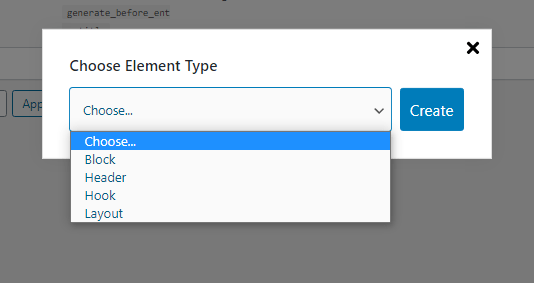
Creating custom GeneratePress layouts for specific categories or tags is a breeze with the Display Rules feature
- Block Element—Build custom templates and dynamic sections using the block editor + GenerateBlocks
- Hook—Insert content (text, ads, code, etc.) anywhere in your theme using built-in hook locations
- Layout—Apply custom layouts to specific pages, posts, or categories
- Header—Design custom hero sections or banner areas for different pages
What makes it so powerful is the Display Rules feature. This lets you choose exactly where and when each element appears—on specific pages, categories, devices, or user roles.
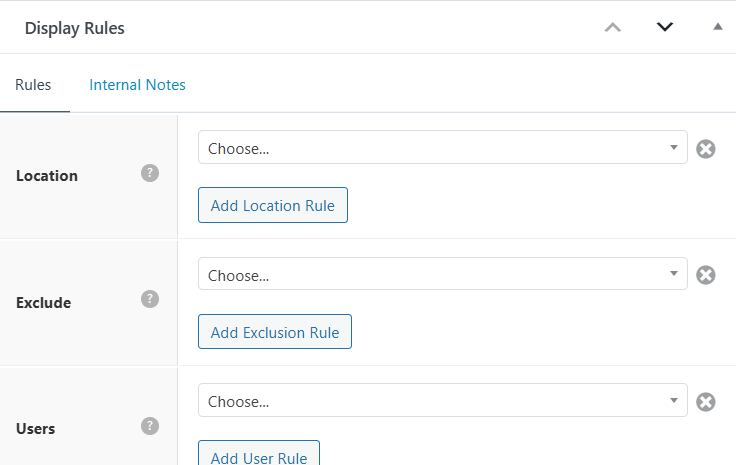
You may be creating a custom blog header or a dynamic CTA box. You could also be designing a special layout for your WooCommerce shop page. The Elements module provides you with flexibility. It helps you design smarter. You can also design faster and cleaner.
6. Font Library
The Font Library module in GeneratePress Premium lets you add and manage fonts locally. You do not need to rely on third-party servers like Google Fonts. This improves site speed and helps with privacy compliance (like GDPR).
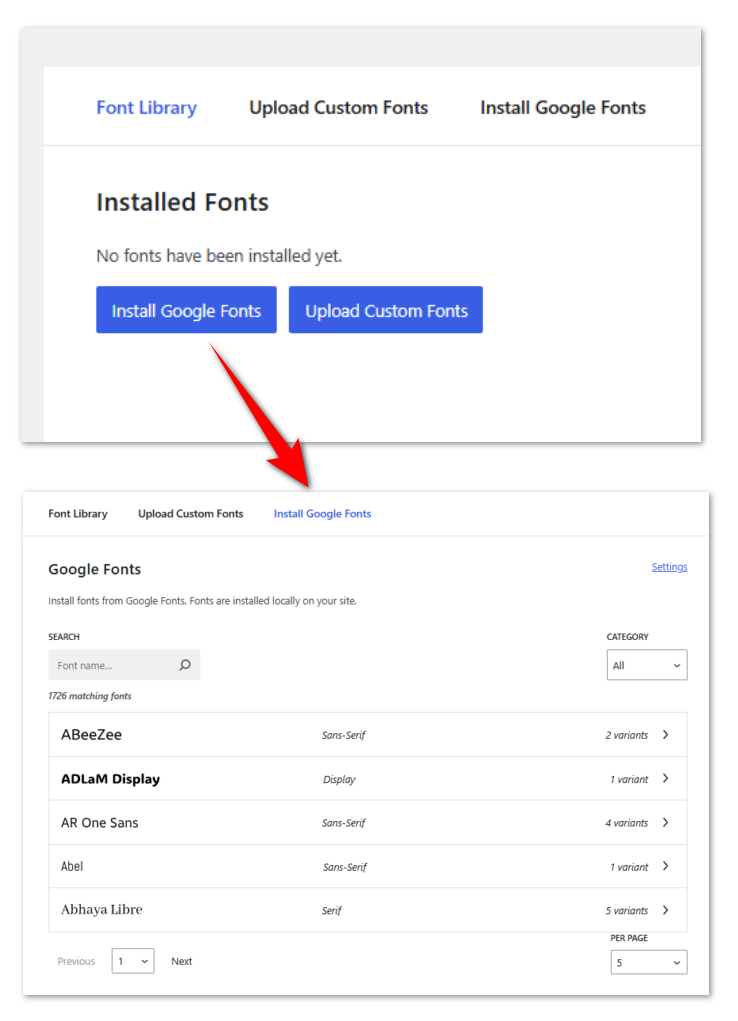
After activating the Font Library module, navigate to Appearance > Font Library. Here, you can browse and download fonts directly to your site. You can use these fonts across your headings, body text, and buttons. Just like any other font, you can apply it in the Customizer.
7. Menu Plus
The Menu Plus module in GeneratePress Premium helps you create a modern, mobile-friendly navigation experience with just a few clicks. It adds extra features to your site’s menu, making it more flexible and user-friendly—especially on mobile devices.
All of the Menu Plus options are added in Customize > Layout inside their respective sections.
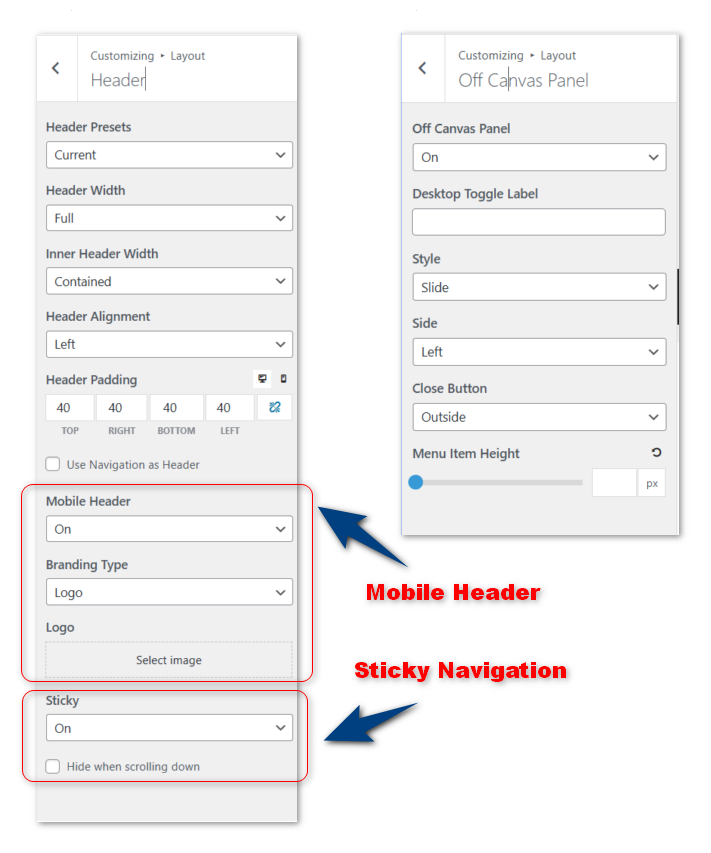
Once activated, you can enable options like
- Mobile Header—Create a separate logo and layout just for mobile users.
- Sticky Navigation—Keep your menu visible at the top of the screen as users scroll.
- Off-Canvas Panel—Add a slide-out menu or widget area that appears on click (great for small screens).
You might be designing a business site, blog, or eCommerce store. This module makes your site easier to navigate. No extra plugins or coding are needed. It’s all about giving visitors a smooth, responsive menu experience across all devices.
8. Secondary Nav
The Secondary Nav module in GeneratePress Premium lets you add a second, fully customizable menu to your site. It’s perfect for websites that need extra navigation. For example, it can be used for a top bar with contact links. It can also feature a language switcher or quick-access categories.
Once you activate the module, you can manage it from Appearance > Menus. You can fine-tune its look and placement under Customizer > Layout > Secondary Navigation.store. This module makes your site easier to navigate. No extra plugins or coding are needed. It’s all about giving visitors a smooth, responsive menu experience across all devices.

You’ll have full control over:
- Mobile Menu Label – Set a custom label for your mobile menu (like “Menu,” “Explore,” or anything you prefer).
- Navigation Width – Choose whether the menu stretches full width or matches your site container.
- Inner Navigation Width – Adjust the inner menu container for better alignment.
- Navigation Alignment – Align the menu to the left, center, or right.
- Navigation Location – Decide if it appears above or below the header or content area.
- Dropdown Direction – Control whether submenu items open down or to the right.
This feature is ideal for blogs, news sites, agencies, and businesses that want more flexible navigation—without cluttering the main menu. With just a few clicks, you can create a professional, responsive secondary menu that works perfectly across all devices.
9. Site Library
The Site Library module in GeneratePress Premium provides instant access to a collection of professionally designed starter sites. This allows you to launch your website faster.
You can find stunning GeneratePress premium examples in the Site Library that demonstrate the theme’s incredible versatility.
You can do this even without any design skills. The Site Library offers a variety of GeneratePress templates.
These are pre-designed, importable website demos and layouts. This feature makes it easy to set up your site quickly with just a few clicks.
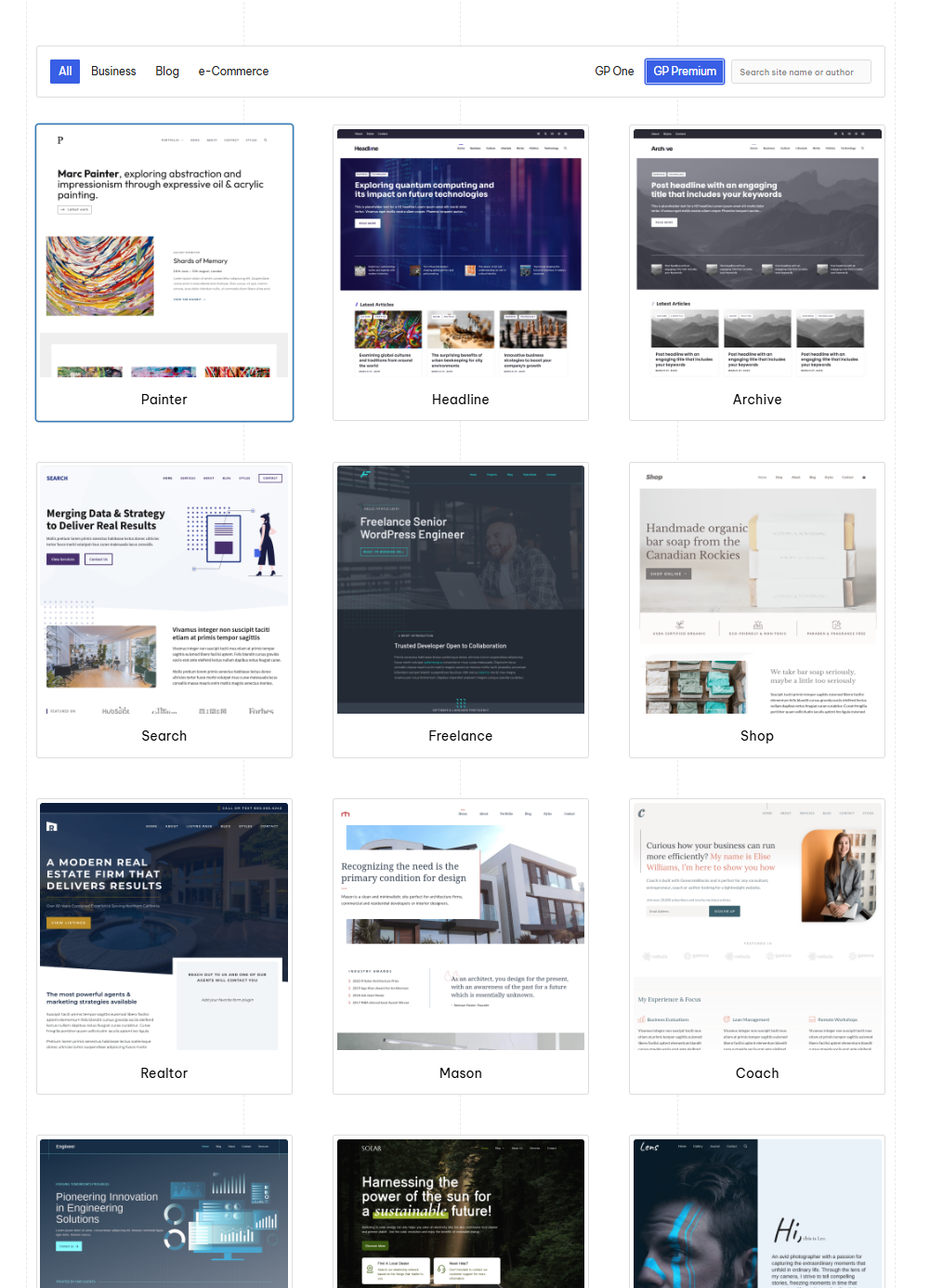
Once activated, you can browse the Site Library directly from your WordPress dashboard under Appearance > GeneratePress > Site Library. You’ll find a wide range of ready-made templates built with GeneratePress and GenerateBlocks that are clean, lightweight, and fully customizable.
Starter sites are organized into three helpful categories:
- Business – Perfect for service-based websites, agencies, consultants, and small businesses.
- Blog – Great for personal blogs, niche content sites, lifestyle writers, or affiliate marketers.
- eCommerce – Built for online stores using WooCommerce with fast, responsive layouts.
Each site comes with pre-designed pages, headers, footers, and styling. You can import and tweak these in minutes using the WordPress block editor.
You can:
- Import a full website demo with a few clicks
- Use it as a base for your own layout
- Replace text and images without needing to design from scratch
It’s a huge time-saver, especially for freelancers or beginners who want to build a site quickly and professionally.
Whether you’re starting from scratch or revamping your existing site, the Site Library helps you save time. It allows you to avoid design headaches. You can launch with confidence—all without touching a single line of code.
Start with a Pre-Built Template and Launch Faster
Pick from 100+ starter sites in the Site Library. Import, edit, go live.
10. Spacing
The Spacing module in GeneratePress Premium gives you full control over the padding. You can also manage the margins and spacing between various elements of your website.
Elevating your GeneratePress web design becomes much easier when you master the Spacing and Typography modules.
It’s perfect for creating a clean, well-structured layout that looks great on all screen sizes.
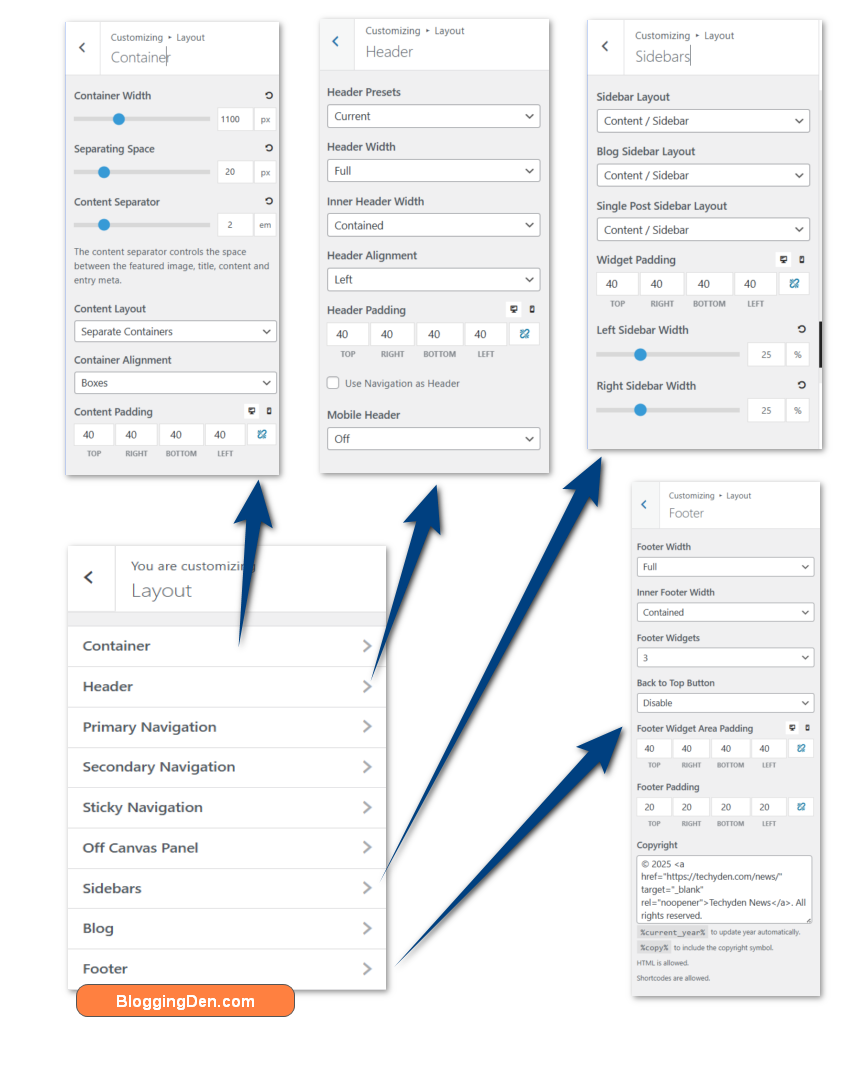
Once enabled, you’ll find spacing options inside the Customizer under Customize > Layout. From there, you can adjust the spacing for key areas like:
- Header and navigation padding
- Sidebar and content spacing
- Footer padding and widget gaps
- Container width and inner element spacing
- Blog post spacing (title, meta, featured image, content)
This module helps you fine-tune your site’s layout without writing any CSS. You can choose a minimal, wide-open design. Alternatively, you can select a compact, content-focused look. The Spacing module makes it easy to control how everything is positioned—on desktop, tablet, and mobile.
With just a few tweaks, you can make your site feel more polished, readable, and user-friendly.
11. Typography
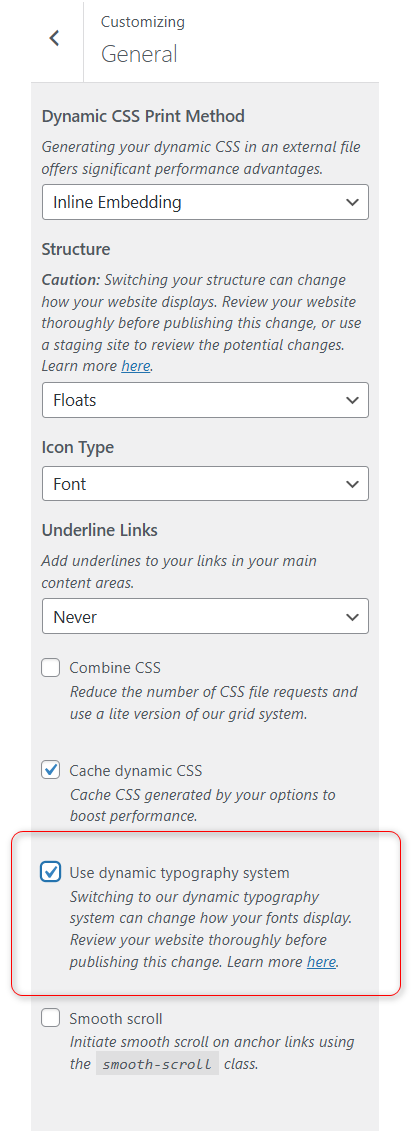
The original Typography module in GeneratePress Premium has been replaced by a more advanced and flexible dynamic typography system.
This new system is located under Customize > General > Typography. It provides better performance and easier font customization. You also gain more control over typography site-wide.
You can set global font styles for headings, body text, buttons, and menus all in one place. No complex settings or extra plugins are needed.
It works smoothly with the integrated Font Library, allowing the use of local or custom fonts effortlessly.
If you are building or updating a site in 2026, use the dynamic typography system. It is the recommended and modern approach to font management.
This change replaces the old module to give users a more streamlined and powerful typography experience with less hassle.
12. WooCommerce
If you’re running an online store, the WooCommerce module in GeneratePress Premium offers full control over your shop’s appearance. You don’t need extra styling plugins.
Once activated, this module adds new customization options under Customize > Layout > WooCommerce, allowing you to adjust:
- Product and archive page layouts
- Button styles (add to cart, buy now, etc.)
- Product image alignment and spacing
- Typography and colors for prices, titles, and labels
- Cart and checkout layout settings
You may be building a small shop. Alternatively, you might be scaling a full eCommerce business. This module lets you create a fast, clean, and user-friendly WooCommerce site. It matches your brand.
With lightweight code and smart layout options, your store will look better. It will load faster. It will also offer a smoother experience for shoppers across all devices.
Power Your WooCommerce Store Without the Bloat
GeneratePress helps your online shop load faster and convert better—without slowing down.
13. Easily Export, Import, or Reset Your Site Settings
One of the features I personally appreciate in GeneratePress is the Import / Export / Reset tool. It’s a small section. However, it saves a lot of time. This is especially true if you build multiple sites or like to experiment with different designs.
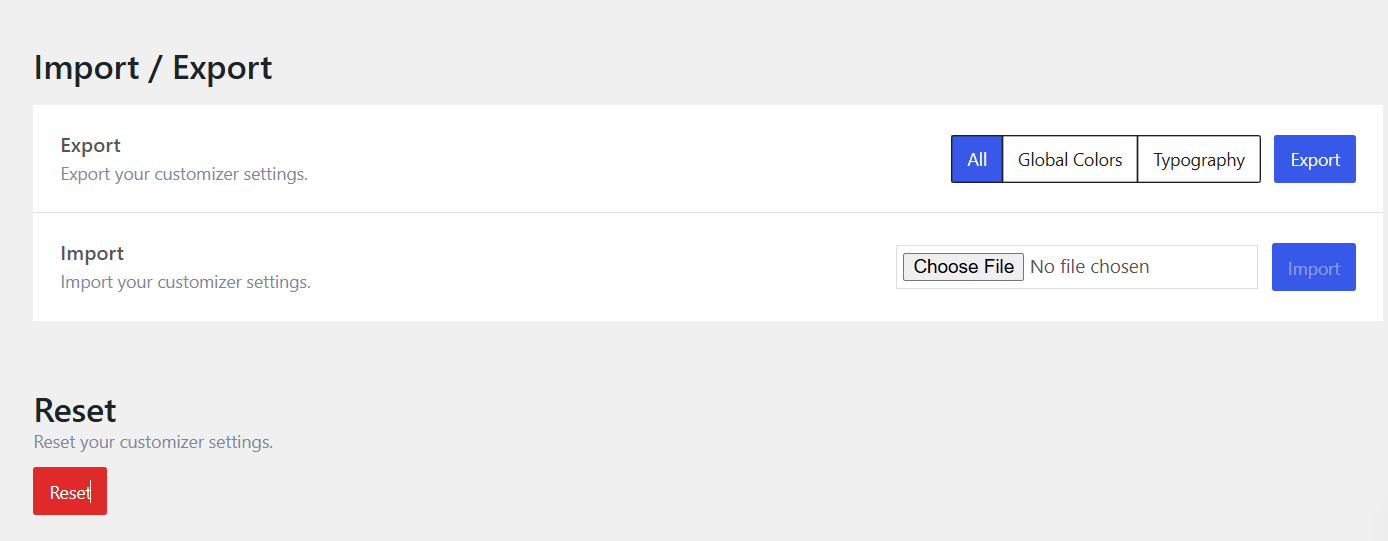
Every GeneratePress WordPress designer appreciates the ability to export and import settings to maintain consistency across client sites.
Under Customize > Import / Export, you’ll find three simple but powerful options:
- Export – You can instantly download all your current customizer settings. I do this every time before making major changes—just in case I want to roll back.
- Import – If you’ve saved settings from another site or layout, you can upload them here. You can apply the entire setup in seconds. It’s a huge time-saver for agencies or freelancers.
- Reset – Not happy with how your layout turned out? One click, and you can reset everything back to the default settings. No stress, no mess.
I’ve used this feature to clone designs between client sites. It helps me safely test new layouts. I can also undo experiments that didn’t work out. It’s simple, smart, and gives you peace of mind while customizing your site. It saves a lot of time. It also ensures I don’t lose my work if I want to roll back changes.
If you like to work smart, this feature will become a favorite. It will help you stay organized as well.
Need a Theme That’s SEO-Friendly by Default?
GeneratePress includes built-in schema, valid HTML, and mobile-first design—so you rank better without extra plugins.
GeneratePress Performance Test
My recent GeneratePress test on a clean installation showed a load time of just 582ms, proving its incredible efficiency.
When it comes to WordPress themes, performance isn’t just a buzzword—it’s a key ranking factor and user experience driver. In my experience, GeneratePress consistently delivers on speed.
This reliability is one of the main reasons I switched to it in the first place. GeneratePress belongs to the category of lightweight themes, which are designed to prioritize speed, minimal code, and efficient performance.
To give you a real-world look at how GeneratePress performs, I ran multiple speed tests. I used common tools like Google PageSpeed Insights, GTmetrix, and Pingdom for these tests.
These tests were performed on a clean installation with minimal plugins to measure the theme’s raw performance.
Speed Test Results
Here is the GeneratePress performance test result from Google Lighthouse, GTmetrix, and Pingdom on a clean install:
| Tool | Load Time | Page Size | Requests |
|---|---|---|---|
| GTmetrix | 582ms | 35 KB | 6 |
| Google PageSpeed (Mobile) | 98/100 | – | – |
| Pingdom (US server) | 690ms | 40 KB | 7 |
The site used only the default WordPress block editor. It also used GeneratePress without a caching plugin or CDN. Once you add caching, such as WP Rocket or FlyingPress, you can implement a CDN. This allows you to easily achieve sub-500ms load times.
Core Web Vitals Compliance
GeneratePress also excels when it comes to Core Web Vitals. Since it’s built with clean code and avoids unnecessary JavaScript or CSS, the theme performs well across all three key metrics:
- Largest Contentful Paint (LCP): Less than 1.5 seconds
- First Input Delay (FID): Practically zero
- Cumulative Layout Shift (CLS): Near zero (thanks to stable layout structure)
If your site is struggling with Core Web Vitals scores using other themes, switch to GeneratePress. This alone can dramatically reduce your LCP and CLS scores. You won’t need any complicated optimization techniques.
GeneratePress vs Other Popular Themes
Tools like Google Lighthouse and GTmetrix are essential for measuring real-world website performance. They help identify areas for speed optimization with themes like GeneratePress.
| Theme | Load Time | Page Size | Score (Lighthouse Mobile) |
|---|---|---|---|
| GeneratePress | 582ms | 35 KB | 98/100 |
| Astra | 742ms | 55 KB | 93/100 |
| OceanWP | 935ms | 89 KB | 89/100 |
As you can see, GeneratePress leads the pack when it comes to speed and minimal footprint. It doesn’t try to wow you with bloated animations or heavy scripts—it focuses on what matters: performance, stability, and flexibility.
What Makes GeneratePress So Fast?
Here are a few reasons why GeneratePress beats other themes in performance:
- Lightweight CSS and JavaScript files
- Modular design (you load only the features you need)
- Clean, well-documented code
- No dependency on jQuery (improves interaction and responsiveness)
- Works seamlessly with caching plugins and CDNs
If site speed is a priority for your business, blog, or online store, then you should consider GeneratePress. It offers one of the fastest and most stable foundations for your WordPress project.
GeneratePress is one of the best WordPress themes you can use in 2026. It’s fast, stable, and gives you full control—without slowing your site down.
Need a Theme That’s SEO-Friendly by Default?
Your hosting isn’t the problem—your theme might be. Switch to GeneratePress and feel the difference.
GenerateBlocks Plugin
GenerateBlocks is a lightweight WordPress plugin made by the same developer as GeneratePress. It works inside the block editor (Gutenberg). It provides you with simple tools to design custom layouts. You don’t need a page builder like Elementor or Divi.
Instead of giving you too many elements you’ll never use, GenerateBlocks keeps things simple and powerful with just a few essential blocks:

- Container: For creating layouts, sections, and structure
- Headline: For advanced typography and content formatting
- Buttons: For clean, responsive calls-to-action
- Image: For advanced image styling
- Grid: For responsive column layouts
- Query Loop: For dynamic post displays
These are more than enough to build full sections. Examples include hero areas, blog layouts, pricing tables, and call-to-action boxes. All these are integrated while keeping your site fast and clean.
If you want a block-based page builder alternative that’s fast, simple, and powerful, try GenerateBlocks. And when you use it with GeneratePress, you get a complete website-building toolkit that’s hard to beat in 2026.
GenerateBlocks + GeneratePress = Complete Site Building Toolkit
The Pro version of GenerateBlocks adds even more useful features. You get access to a large library of templates, global styles (for fonts, colors, etc.), animations, visibility settings, and dynamic content tools.
It’s great if you’re building websites for clients or want more advanced control without the bulk of a page builder.
If you’re using GeneratePress, adding GenerateBlocks makes the experience even better. Together, they provide a fast, flexible, and block-based way to design any kind of WordPress site. You can create blogs and landing pages.
You can also design product sections and affiliate boxes. All this is done without slowing things down.
Want more design power without slowing down your site?
Build faster, smarter, and more professional WordPress pages—without a bulky page builder.

GenerateBlocks Pro gives you:
- Access to 200+ ready-made templates
- Global styles for fonts, colors, and effects
- Custom animations and visibility controls
- Dynamic content blocks and advanced layout options
Before you start the premium version of the GeneratBlocks plugin, start using the free version. Perfect for bloggers, freelancers, and agencies who want clean, fast, and fully customizable designs.
GeneratePress Pricing 2026 – Is It Still Worth It?
Yes—especially when you see what you get for the price.
The core GeneratePress theme is completely free and gives you a solid, fast foundation for any WordPress website. If you want full customization, you’ll want to purchase GeneratePress Premium.
Upgrading to GeneratePress Premium unlocks advanced features, access to the full starter site library, and additional modules.
After purchase, you can easily install GeneratePress Premium by uploading the plugin. Activate it and enter your license key to enable all premium features.
Here’s a quick overview of current GeneratePress pricing:
|
Product |
Price (Per Year) |
Key Features |
Action |
|---|---|---|---|
|
GP Premium |
$59 |
Full theme customization, 100+ starter sites, updates, and support | |
|
GenerateBlocks Pro |
$99 |
Advanced block controls, 200+ design patterns, flexible layouts | |
|
GenerateCloud |
$99 |
Sharing design libraries across sites requires GenerateBlocks Pro | |
|
$149 |
Bundle of GP Premium, GenerateBlocks Pro, GenerateCloud + future products |
While many WordPress themes overpromise and underdeliver, GeneratePress takes a different approach. It offers simple pricing, honest features, and performance you can count on.
Whether you’re a solo blogger or a web agency, you will find it a cost-effective solution. It is a lightweight option that helps you build faster websites without the bloat.
If you’re fed up with bloated builders, sluggish themes, or costly subscriptions, GeneratePress Premium is a smart choice. It offers significant improvements in both performance and comfort.
How to Install and Set Up GeneratePress (Free + Premium)
If you’re wondering how to install and set up GeneratePress on your WordPress site, don’t worry, the process is incredibly simple. You can use either the free version or upgrade to GP Premium. The setup takes just a few minutes. It requires no coding knowledge.
In this step-by-step guide, I’ll walk you through the entire process. We’ll start with installing the theme. Then, we’ll show you how to install GeneratePress Premium as a plugin.
Next, activate premium modules. Finally, customize your layout. You can access and manage all features and modules from the GeneratePress Dashboard. It serves as the central hub for site customization.
Step 1: Install the Free GeneratePress Theme
The first step is to install the free GeneratePress theme, which serves as the base for the Premium plugin.
Navigate to Appearance > Themes > Add New, and enter “GeneratePress” in the ‘Search themes’ bar.

The theme will show up in the results box shortly after your search.
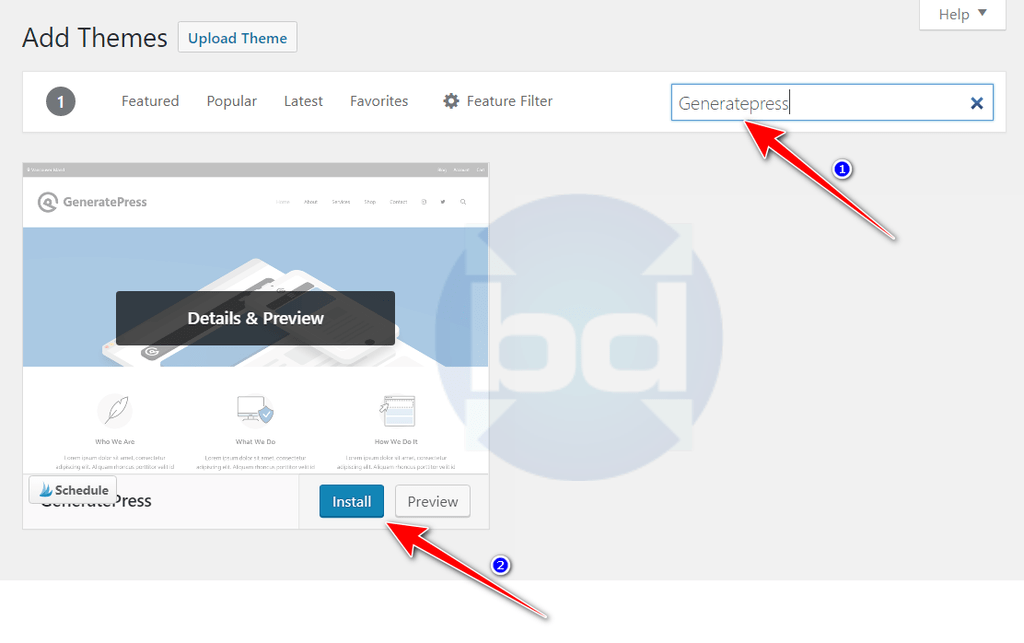
To continue with the installation, click the “Install” button and then Activate the theme.
At this point, you’re running the free version of GeneratePress—one of the most lightweight and SEO-friendly WordPress themes available.
Step 2: Purchase and Download GP Premium
To get the most secure version of the plugin, always download it directly from the official generatepress.com account dashboard.
To unlock advanced features, you need to purchase GP Premium.
First, you need to click this link to purchase GeneratePress Premium from the official site.
This optional upgrade unlocks premium features. These features include advanced layout control, the Site Library with pre-built demo sites, WooCommerce integration, and Elements.
These features are available from the official GeneratePress website. This purchase also allows WooCommerce integration and Elements.
Scroll down to the GP pricing section.

Choose one of the GeneratePress plans. Note that GeneratePress does not offer any lifetime deals; only yearly plans are available.
After making your choice, click on “Buy Now.”
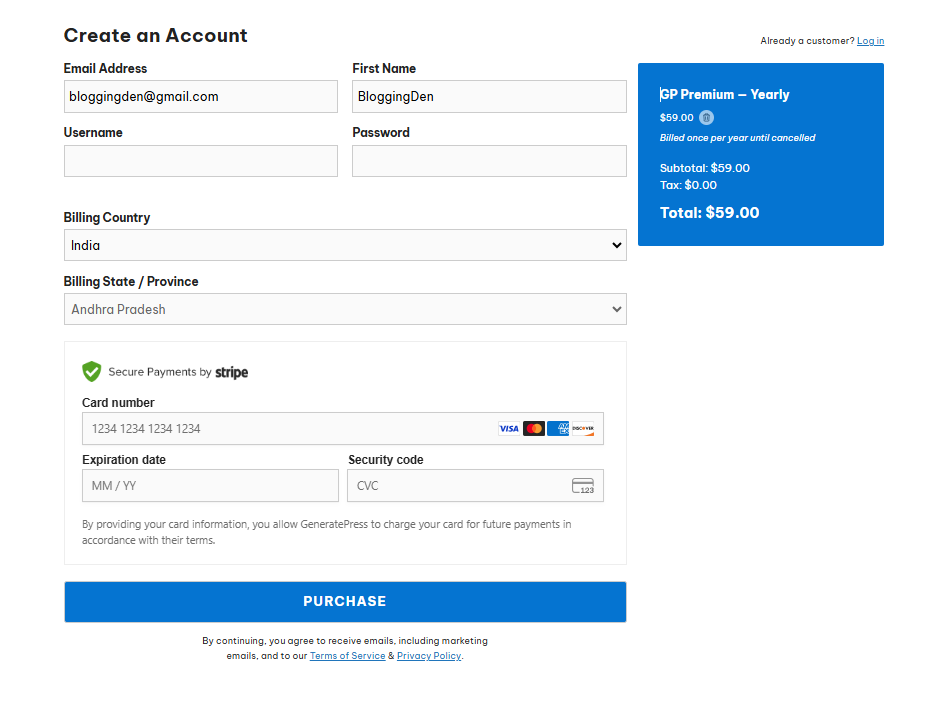
- On the checkout page, please create an account and choose a payment method.
- Use Stripe or another supported payment gateway to enter your credit card information.
- Click “PURCHASE” to finish the payment process.
- After you finish your payment, a confirmation email will be sent to you with details for activating your account.
- Use your username and password to log in to your GeneratePress account.
- In your dashboard, navigate to the “Accounts” section and select “Downloads.
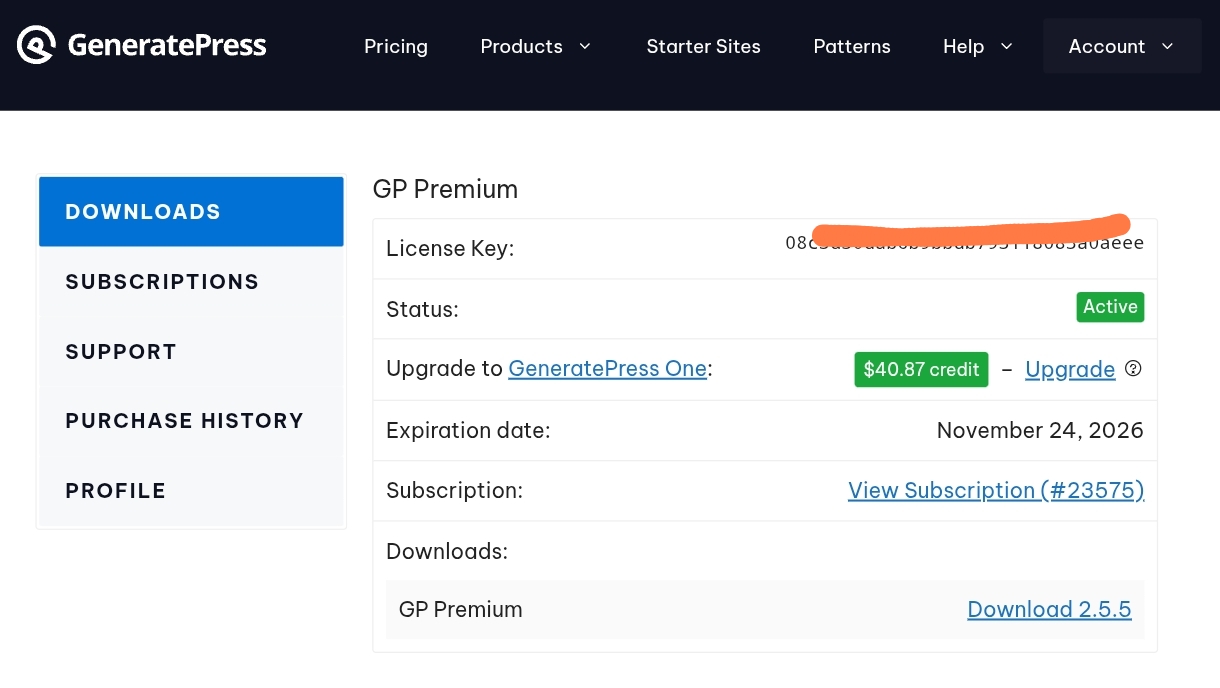
- Go to the Downloads section of your GeneratePress account.
- Click on the Download button to get the latest version of the GP Premium plugin.
This plugin is what transforms the free theme into a fully customizable powerhouse.
Step 3: Upload and Activate GP Premium Plugin
You can customize menus, layouts, widgets, SEO, and social media integration with the help of the GeneratePress Premium plugin.
Once you have the plugin ZIP file, follow these steps to install GeneratePress Premium as a plugin:
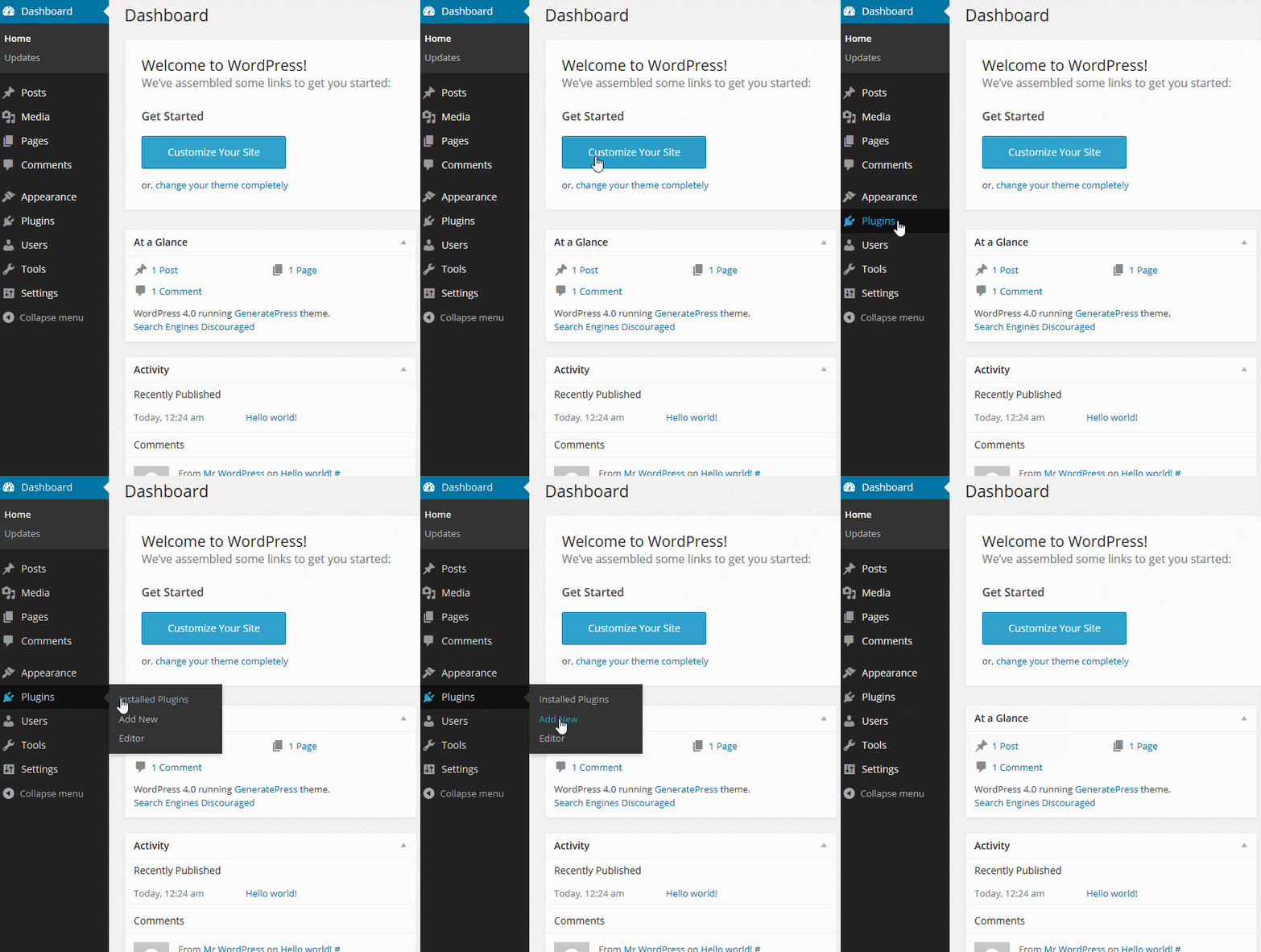
- Log in to your WordPress dashboard and navigate to Plugins > Add New > Upload Plugin.
- Click the Upload Plugin button and select the “GeneratePress-premium.zip” file from your computer.
- Click Install Now to install GeneratePress Premium, then activate the plugin.
If you encounter any issues during installation, ensure you upload the correct ZIP file. Check that your WordPress installation allows plugin uploads.
Step 4: Enter Your GP Premium License Key
To receive updates and support, activate your license:
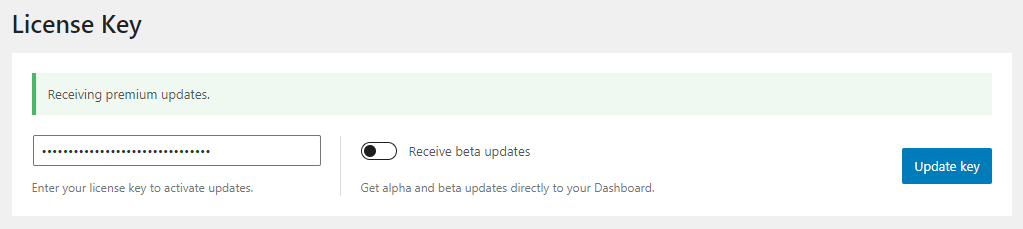
- After activation, go to Appearance > GeneratePress in your WordPress dashboard.
- In the Updates section, paste your license key (provided upon purchase).
- Save the changes to activate and enable all premium features.
You now have access to updates, priority support, and the full suite of GeneratePress Premium features.
Note: Don’t delete or deactivate the free GeneratePress theme—it must stay installed as the base framework.
Step 5: Activate the Modules You Need
One of the best things about GeneratePress Premium is its modular structure. You can activate only the features you plan to use, keeping your website lean and fast.
Navigate to: Appearance > GeneratePress > Modules
Simply toggle the switch to activate or deactivate each module.
Step 6: Customize Your Theme Using the WordPress Customizer
GeneratePress integrates deeply with the native WordPress Customizer, allowing you to see changes live as you make them.
Go to: Appearance > Customize
Go to: Appearance > Customize
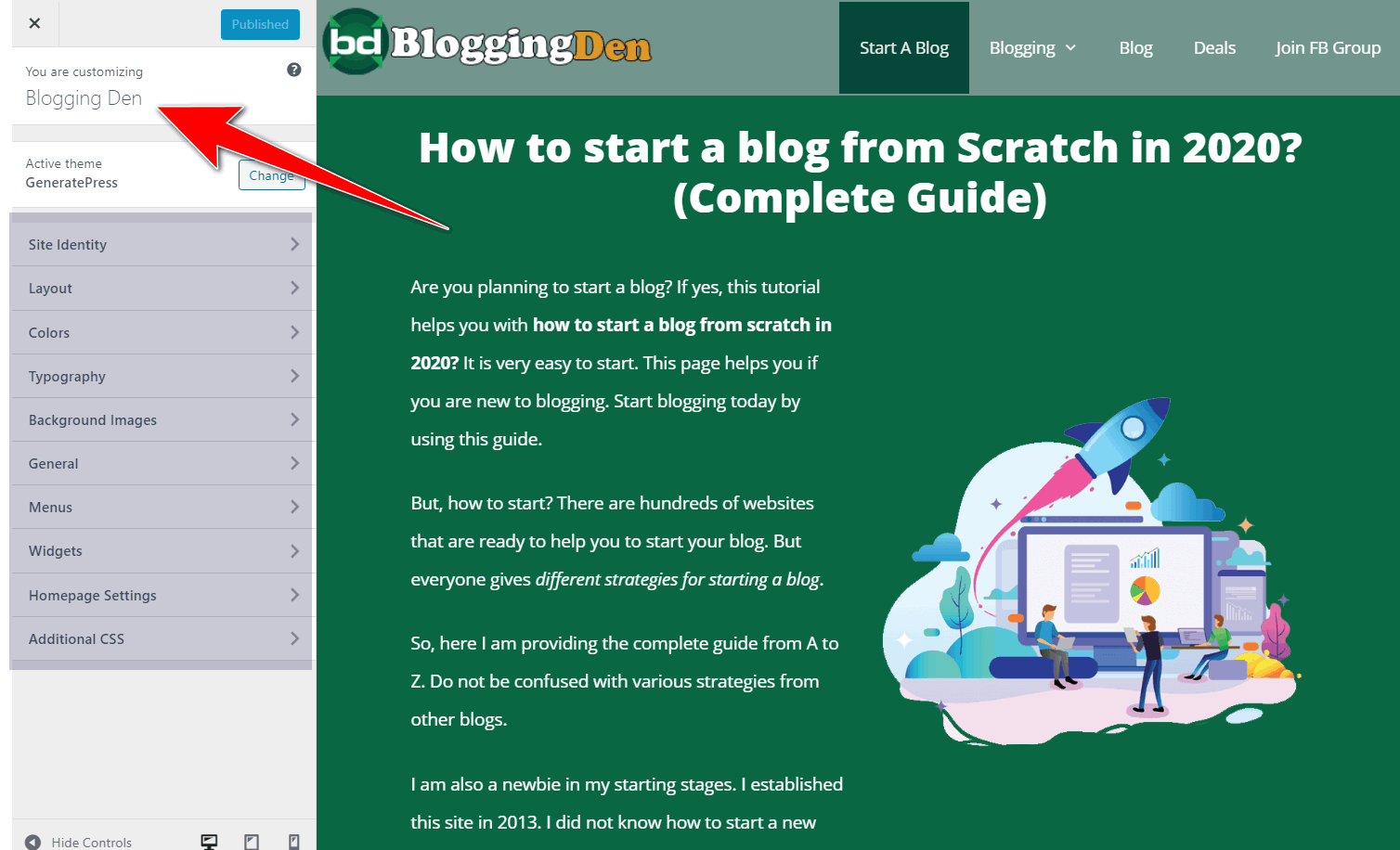
Here you can manage:
- Site identity (logo, tagline)
- Header & footer layouts
- Global colors & typography
- Blog archive settings
- Sidebar placement
- Mobile menu design
- Button styles
- Spacing and padding
For advanced design tweaks, use the Additional CSS section in the Customizer. This lets you add custom CSS code to modify your website’s layout.
You can style specific elements and gain more control over your site’s appearance.
For those using WooCommerce, you’ll also find customization options for product pages, checkout, and shopping carts.
Step 7: Install and Use GenerateBlocks (Optional, But Highly Recommended)
To create beautiful, responsive layouts, you don’t need a page builder. Simply install GenerateBlocks. It is a lightweight block plugin built by the same developer.
Install it from the dashboard:
- Go to Plugins > Add New
- Search for GenerateBlocks
- Click Install Now and Activate
You now have powerful blocks like:
- Container for layout structure
- Grid for columns
- Headline for typography control
- Buttons for CTAs
This plugin pairs seamlessly with GeneratePress. It helps you build everything from landing pages to content boxes using the WordPress block editor.
Step 8: Import a Starter Site (Optional)
Don’t want to build from scratch? Import a professionally designed GeneratePress starter site from the Site Library. You have many GeneratePress templates to choose from.
These are pre-built, niche-specific website demos. They are easy to set up and compatible with popular page builders.
- Make sure the Site Library module is activated.
- Go to Appearance > GeneratePress > Site Library
- Choose a template (Block Editor, Elementor, or Beaver Builder)
- Click Preview, then Import Site
Once you are happy with the site design, you can hit the “Publish” button. It will make the design live to the public.
This gives you a complete website design—including header, footer, blog layout, and styling—ready for customization.
Bonus: Recommended Settings for Performance & SEO
- Use a caching plugin like WP Rocket or FlyingPress
- Set Global Fonts and Colors to ensure consistency
- Optimize images with ShortPixel or Imagify
- Connect to Google Search Console and verify structured data (built-in schema)
- Use Rank Math SEO to manage titles, meta descriptions, schema, and XML sitemaps. This ensures your GeneratePress site stays fully optimized for search engines.
- If you are looking for even more speed, use a flyingpress coupon alongside GeneratePress. This combination can result in a blazing-fast website.
By enabling these features, your site will be fast and SEO-optimized. It will also be mobile-friendly and easy to manage. This is exactly what you need in 2026.
Ready to Build a Lightning-Fast WordPress Site?
GeneratePress Premium is trusted by 100,000+ website owners for its speed, simplicity, and unmatched customization power.
Do not settle for a bloated theme. Upgrade your site’s performance today with one of the fastest and most flexible WordPress themes in 2026!
Just $59/year
Use on up to 500 Sites!
GeneratePress for Bloggers, Agencies, and Ecommerce Sites
GeneratePress is a great choice for building a quick, tidy, and manageable WordPress website, even without advanced design skills. It provides the tools you need without impeding progress for bloggers, agencies, and ecommerce sites.
- For Bloggers: GeneratePress helps you focus on writing content without fixing slow-loading pages or dealing with bloated themes. It works perfectly with the block editor. It creates a distraction-free reading experience. This experience loads fast and ranks well in search engines.
- For Freelancers and Agencies: GeneratePress is a huge time-saver. It offers one license for up to 500 websites. The Site Library templates are easy to adjust for clients. You can create custom theme layouts for headers, sidebars, footers, and blog sections reliably without update breakages. Being a GeneratePress designer means you can focus more on creativity and less on troubleshooting theme conflicts.
- For WooCommerce Stores: GeneratePress is lightweight and responsive. It is optimized to increase sales. The product pages are quick and clean, which boosts SEO and speed. This results in a better shopping experience.
This WordPress theme is very flexible and truly multipurpose. It works well for personal blogs, small businesses, online stores, and service-based sites. It performs well on all devices.
GeneratePress stands out as one of the best WordPress themes of 2026. It excels in writing blog posts. It’s great for selling things and managing multiple client sites.
What Real Users Say About GeneratePress (Testimonials)
Looking at global GeneratePress ervaringen (experiences), users consistently praise its stability and support team.
When it comes to choosing a WordPress theme, real-world experience matters. That’s why we took a closer look at what actual users say about GeneratePress Premium.
From bloggers and freelancers to developers and agencies, the feedback is consistent—GeneratePress delivers on speed, flexibility, and ease of use.
In this section, you’ll find honest testimonials from people who’ve built a variety of sites. These genuine user experiences are essential for anyone seeking an honest GeneratePress review.
They highlight both the strengths and weaknesses shared by real users. They’ve created everything from personal blogs to complex client sites using GeneratePress.
Pros and Cons of GeneratePress
No WordPress theme is perfect, but GeneratePress comes pretty close—especially if you value speed, simplicity, and customization without the clutter.
That said, it’s important to look at both sides before making a decision. Below, I’ve outlined the key advantages of using GeneratePress in 2026. I have also highlighted its drawbacks. These insights are based on real-world experience and community feedback.
Pros of GeneratePress
- It’s super lightweight and loads incredibly fast, even on shared hosting.
- Helps boost SEO with clean code, built-in schema, and mobile-friendly design.
- You only enable the features you need, so there’s no unnecessary bloat.
- You can customize layouts, fonts, and colors easily without writing any code.
- Developers can use hooks and filters to customize the site even more.
- The support team is fast, helpful, and the theme gets regular updates.
- One license covers up to 500 websites—great for freelancers and agencies.
- It meets accessibility standards, making your site usable for everyone.
Cons of GeneratePress
- There’s no lifetime license anymore; it’s a yearly subscription.
- The default design might feel too simple if you want flashy visuals.
- Some advanced features, like hooks and Elements, need a bit of learning.
- There aren’t as many starter templates as Astra or Kadence.
- For full design flexibility, you’ll need to install GenerateBlocks separately.
- If you need more built-in design features, consider a different theme. You might want to choose a theme like Astra or Kadence for specific integrations.
GeneratePress vs Other Popular WordPress Themes (2026)
GeneratePress offers a lightweight and user-friendly experience. Genesis Framework stands out for its seamless integration with page builders. It also provides a robust foundation for custom development. Both themes are excellent.
In the debate of GeneratePress vs Genesis, GeneratePress often wins on ease of use and modern block integration.
When selecting the best WordPress theme, it’s easy to feel overwhelmed by the numerous options available. Over the years, I’ve used many of the leading themes.
Your choice may depend on whether you prioritize ease of use, like GeneratePress. Alternatively, you might prefer advanced customization and developer resources, which the Genesis Framework offers.
| Feature | GeneratePress | Astra | Kadence |
|---|---|---|---|
| Base Theme Size | ~30KB (Lightest) | ~50KB | ~90KB |
| Speed/Performance | 🥇 Best-in-Class | 🥈 Excellent | 🥉 Good |
| Customizer Style | Simple & Fast | Feature-Rich | Visual & Intuitive |
| Agency License | Up to 500 Sites | Up to 1,000 Sites | Unlimited Sites |
| Best For | Performance Purists | Beginners/Pre-built Sites | Modern Visual Design |
| 2025 Pricing | $59/Year | $49/Year | $69/Year |
After using these GeneratePress theme alternatives on my online projects, I keep coming back to GeneratePress. Its performance stands out. It is simple and has modular flexibility.
These features make it the best WordPress theme for 2026 if your focus is speed, SEO, and long-term reliability.
Do You Still Need a Page Builder with GeneratePress in 2026?
I get this question a lot. People ask if they still need to use a page builder like Elementor or Divi with GeneratePress. In all honesty, I say no. Not anymore.
Since I started using GeneratePress along with GenerateBlocks, I haven’t felt the need for any traditional page builder. These two provide all the tools needed for most website projects, covering everything required to build attractive and functional sites.
The WordPress block editor is far more powerful in 2026 than it was in the past.
With just GeneratePress and GenerateBlocks, I’ve built everything from homepages to landing pages. I’ve also created service layouts, all without slowing down my site.
Back in the day, page builders were a lifesaver because WordPress had limited layout options. But now, they often add extra code and slow down performance.
What I love about GenerateBlocks is how clean and lightweight it is.
I can design custom hero sections, pricing boxes, call-to-actions—pretty much anything I need—right inside the block editor. No bloat. No lag. There is no need for a complex setup process.
Unless you’re building something super complex with many animations or dynamic widgets, this setup is more than enough.
If you care about speed, SEO, and simplicity, like I do, choose the GeneratePress + GenerateBlocks combo. It is one of the best lightweight page-building solutions available today.
It truly makes WordPress feel user-friendly once more.
Who should use the WordPress theme (and who should skip it)
Here’s a quick checklist to help you decide if GeneratePress fits your needs
Who should use GeneratePress
- Bloggers and content creators who want a clean, distraction-free layout and super-fast loading times without dealing with bloated page builders. If you are building a GeneratePress portfolio, the lightweight code ensures your high-quality images load without delay.
- Affiliate marketers have a main priority to improve Core Web Vitals. SEO-focused users aim to achieve better scores with Google Lighthouse and GTmetrix. These improvements help in achieving higher rankings and a better user experience.
- Agencies and freelancers manage multiple client sites. They need a stable, lightweight theme. This theme can be used on up to 500 websites with one premium license.
- WooCommerce store owners who prefer speed, simple product layouts, and compatibility with popular plugins over fancy animations.
- WordPress users enjoy working with the block editor (Gutenberg). They want deep control using GenerateBlocks and the theme builder. This allows them to avoid relying on heavy page builders.
Who should skip GeneratePress?
- Users who want drag-and-drop visual design can benefit from themes with built-in animations, sliders, and flashy effects. These features are available directly in the theme, eliminating the need for extra tools.
- Beginners who prefer a “design-first” theme will find dozens of ready-made templates. These templates are niche-specific and come with styling presets. They work out of the box with minimal tweaking.
- People seek a one-time lifetime license at a low price. They prefer this over an annual subscription model like GeneratePress Premium or GeneratePress One.
- Creators rely heavily on advanced page builders. They don’t want to switch to a more performance-focused block + hooks workflow.
Frequently Asked Questions – GeneratePress Review 2026
Is GeneratePress free or paid?
The core GeneratePress theme is 100% free in the WordPress repository. You can build a basic but fast site with it. GP Premium unlocks advanced layout controls, Elements, more styling options, and the full Site Library.
What makes GeneratePress so fast?
GeneratePress belongs to the lightweight themes category. It has clean code, minimal scripts, and no bloat. The theme loads under 60KB, making it one of the fastest WordPress themes.
Is GeneratePress good for SEO?
GeneratePress is SEO-friendly because it follows a clean HTML structure. It includes schema-ready markup and supports Core Web Vitals. It works perfectly with popular SEO plugins like Rank Math and Yoast.
Is GeneratePress worth buying in 2026?
Absolutely. It’s fast, SEO-optimized, easy to use, and great for any WordPress project—especially if you care about performance. As a multipurpose theme, GeneratePress is flexible enough for all types of websites.
Is GeneratePress One worth it?
Yes, GeneratePress is still worth it in 2026. It remains one of the fastest and most stable WordPress themes. It features clean code and excellent Core Web Vitals performance. The theme also offers deep customization via the block editor and GenerateBlocks.
Is GeneratePress good for beginners?
GeneratePress is beginner‑friendly because the customizer is simple. You get starter sites. You can build professional layouts without touching code. There is still room to grow with advanced options when you are ready.
How much does GeneratePress Premium cost?
GeneratePress Premium is typically priced around $59 per year. It can be used on up to 500 websites, including client projects. This makes it very affordable compared to many single‑site themes. While many search for a GeneratePress Premium license key for free, it’s safer and more ethical to support the developers for continued updates
What is GeneratePress One?
GeneratePress One is a bundle. It includes GP Premium, GenerateBlocks Pro, and GenerateCloud access. The bundle also offers starter sites, patterns, and priority support under one subscription. It is designed for power users, agencies, and serious bloggers.
How fast is GeneratePress in real‑world tests?
GeneratePress is engineered for performance with very small file sizes and minimal requests. Sites built with it can easily achieve excellent scores in tools like Google PageSpeed Insights and GTmetrix. This is possible when paired with good hosting and basic optimization.
How many sites can I use GeneratePress on?
A single GeneratePress Premium license can be used on up to 500 websites, so agencies and freelancers can build many client sites without buying separate theme licenses
Is GeneratePress good for WooCommerce stores?
Yes, GeneratePress works well with WooCommerce. It keeps product pages fast and lightweight. It gives you enough layout and typography control to create clean, conversion‑focused shop designs.
GeneratePress free vs Premium – which should I choose?
Choose the free version if you only need a simple, fast blog. Go for Premium if you want full control over layout, hooks, Elements, and advanced typography. It also provides access to starter sites that speed up your builds.
Is GeneratePress better than Astra in 2026?
GeneratePress is generally faster and has cleaner code, while Astra offers more pre-built starter templates. If speed is your priority, choose GeneratePress; if you want more “out-of-the-box” designs, Astra is a strong rival.
Can I use GeneratePress for free?
Yes, the free version of GeneratePress is available on the WordPress repository and is great for basic blogs. However, you will need GP Premium to unlock the Site Library, Elements, and advanced layout controls.
Is GeneratePress worth it for WooCommerce?
Absolutely. The GeneratePress WooCommerce module is highly lightweight. This ensures your store loads quickly. Fast loading is critical for reducing bounce rates and increasing sales.
Final Conclusion – Should You Use GeneratePress in 2026?
GeneratePress remains one of the best choices in 2026. It excels if your top priorities are speed, stability, and clean design. This applies to designs that work with modern WordPress tools.
It is not the flashiest theme. Its lightweight code, block-first workflow, and flexible layout system make it ideal for bloggers, agencies, and store owners. They care more about long-term performance and SEO rather than short-term visual tricks.
Use GeneratePress if you:
- Want your website to load fast and rank higher
- Like using the WordPress block editor
- Build websites for yourself or clients
- Run an online store and care about speed
- Need flexibility without complicated tools
Skip it if you:
- Rely heavily on page builder effects like sliders and animations
- Want a theme with a one-time payment (no lifetime deal now)
- Prefer themes with lots of built-in design features
If you are tired of slow, bloated themes, GeneratePress Premium (or GeneratePress One) is a smart investment. It provides a straightforward way to build fast, professional websites. This investment quickly pays for itself across multiple projects.
My Honest Opinion: After years of testing themes, GeneratePress stands out as simple, fast, reliable, and constantly improving.
If you’re tired of slow or complicated WordPress themes, GeneratePress is exactly what you need in 2026—this honest GeneratePress review confirms it based on real-world experience
I hope this comprehensive GeneratePress review helps you understand why it remains a top-tier choice for bloggers in 2026.
Click the button below to get GeneratePress now and start building a faster WordPress site from today’s page load.