
Semrush Review 2026: Is It Still the Best All‑in‑One SEO Tool?
One all-in-one SEO platform for research, audits, rankings, and growth.
Semrush combines keyword research, competitor analysis, backlink tools, rank tracking, technical SEO audits, and reporting in one platform for bloggers, marketers, and agencies.
Start Semrush Free Trial →Looking for an honest Semrush Review 2026 before investing in SEO software? I’ll walk you through how Semrush has evolved from a simple keyword tool into a complete SEO and AI visibility platform—and whether it’s still worth your money today.
Semrush is no longer just another all‑in‑one marketing tool. In 2026, it has become a powerhouse that combines classic SEO features (keyword research, competitor analysis, content optimization, rank tracking, and backlink audits) with brand‑new AI tools, Semrush One bundles, and re‑imagined toolkits for SEO, content, local, social, and market analysis.
I’ve used Semrush for several years across my own blogs and client projects, watching it grow from a basic SEO suite into a full digital marketing and AI search visibility platform. Whether you’re managing a personal blog or running a full‑scale digital agency,
Semrush now gives you the edge to find better keywords, fix technical issues, track AI overviews, and outsmart your competitors faster.
What’s new in Semrush 2026? You now get AI Overview tracking for Google’s AI results, enhanced real-time position tracking, daily and weekly traffic data via Semrush Trends, and a revamped Content Toolkit with AI writers, clustering, and topic discovery built on Semrush’s massive keyword database.
On top of that, Semrush One bundles multiple toolkits together, so you can manage SEO, content, market research, and AI visibility in one place instead of juggling separate tools.
Affiliate Disclaimer: We only recommend tools we use and trust. Affiliate earnings help keep our blog running at no extra cost to you. The reviews are based on our experiences, which they did not pay us for. The next is an affiliate disclaimer.
This Semrush review is for anyone who wants real business results—not just pretty dashboards—from their online presence.
- If you’re a blogger, you’ll see how to use Semrush to uncover low‑competition keywords, build topic clusters, and optimize posts for top rankings.
- If you’re a small business owner or eCommerce brand, you’ll learn how Semrush can analyze competitors, refine your traffic funnel, and boost local and organic visibility.
- If you’re part of a marketing agency, you’ll discover how the toolkits, reports, and integrations make it easier to audit sites, prove ROI, and manage multiple clients at scale.
By the end of this Semrush Review 2026, you’ll know:
- What Semrush is and how the new AI tools, Semrush One, and expanded toolkits actually work
- Which features matter most for your type of business (SEO, content, local, social, PPC)
- How Semrush pricing and plans in 2026 break down, including add‑ons like Trends and Traffic Analytics
- How Semrush compares with alternatives like Ahrefs and SE Ranking
- And finally, my honest verdict on whether Semrush is still worth it in 2026, based on real usage, data, and clear pros and cons.
What is Semrush?

At its core, Semrush is an all‑in‑one digital marketing and SEO platform that helps you grow traffic, uncover competitor strategies, and dominate search results across both classic and AI‑driven search. It brings keyword research, site audits, competitor analysis, content optimization, rank tracking, PPC insights, and backlink analytics into a single, connected dashboard.
I like to think of Semrush as the Swiss Army knife of SEO and marketing tools—it truly does it all. What started in 2008 as a focused SEO toolkit for keyword and domain analytics has, by 2026, evolved into a full growth platform for SEO, PPC, content marketing, social media, local SEO, and deep competitive research.
What really sets Semrush apart today is how fast it adapts to new search realities. Every year, the Semrush team ships updates to keep up with Google changes, new SERP features, and now AI‑powered search.
In 2026, that means smart capabilities like AI Overview and AI visibility tracking, enhanced real‑time position tracking, richer daily traffic and market data, and a revamped Content Toolkit that uses machine learning and user‑behavior signals to give sharper content insights.
On top of that, Semrush One bundles these toolkits together so you can manage SEO, content, local, social, and AI visibility as one integrated system instead of stitching together separate tools.
What are Semrush Toolkits?
Over the years, I’ve watched Semrush evolve from a keyword research tool to a full digital marketing ecosystem. What impressed me the most in 2026 was their reimagining of core toolkits. They focus on user pain points, real-world use cases, and AI-driven automation.
Let me walk you through the new and improved Semrush toolkits. They are designed to help you do more with less time. You will need less effort and guesswork.
There are 7 different useful toolkits introduced by Semrush. Here’s a quick overview of each.
| S.No. | Toolkit | Description |
|---|---|---|
| 1. | AI Visibility Toolkit | Track how often your brand appears in AI Overviews and AI‑generated answers, and see what to improve to win more AI mentions. |
| 2. | Semrush One | Unified bundle that combines all major Semrush toolkits (SEO, content, local, social, traffic, AI visibility) into one integrated platform. |
| 3. | SEO Toolkit | Helps you find and fix technical and on‑page SEO issues so you can boost your search engine rankings. |
| 4. | Traffic & Market Toolkit | Analyze audience behavior and competitors, and discover new growth opportunities in your niche or industry. |
| 5. | Content Toolkit | Plan and create high‑performing content that ranks in search and converts visitors into leads or customers. |
| 6. | Local Toolkit | Optimize for local SEO to attract more foot traffic, calls, and local leads for your business. |
| 7. | Social Toolkit | Manage, publish, and analyze all your social media accounts from a single, unified dashboard. |
1. AI Visibility Toolkit

The AI Visibility Toolkit helps you see not only where you rank in Google, but also how often your brand appears inside AI Overviews and AI‑generated answers.
Features of the AI Visibility Toolkit
- Shows an overall AI Visibility Score for your brand across AI search experiences
- Tracks when your pages appear in Google AI Overviews and other AI‑generated answers
- Lists prompts and questions that trigger your site, plus competing pages that get recommended instead
- Identifies which of your URLs are cited as sources inside AI answers
- Surfaces content gaps, missing entities, and weak coverage that reduce AI trust in your pages
- Connects with Position Tracking and Site Audit so you can link AI visibility issues to rankings and technical health
Why it stands out:
Most rank trackers still treat AI Overviews as just another SERP feature—or ignore AI assistants entirely.
Semrush differentiates itself by actually quantifying AI visibility, tying it to specific prompts, competitors, and pages.
Instead of guessing how AI sees your brand, you get measurable scores and actionable tasks, so you know exactly what to improve to win more AI‑generated recommendations.
Who it’s for:
The AI Visibility Toolkit is ideal for SEOs, brands, and agencies who don’t want to lose visibility as more users rely on AI answers instead of organic listings.
It’s especially valuable if you operate in competitive niches, manage multiple sites, or drive serious revenue from organic traffic and need to understand how AI is reshaping your funnel.
If you report on visibility and brand presence to clients or stakeholders, this toolkit gives you concrete AI‑era metrics to include.
2. Semrush One
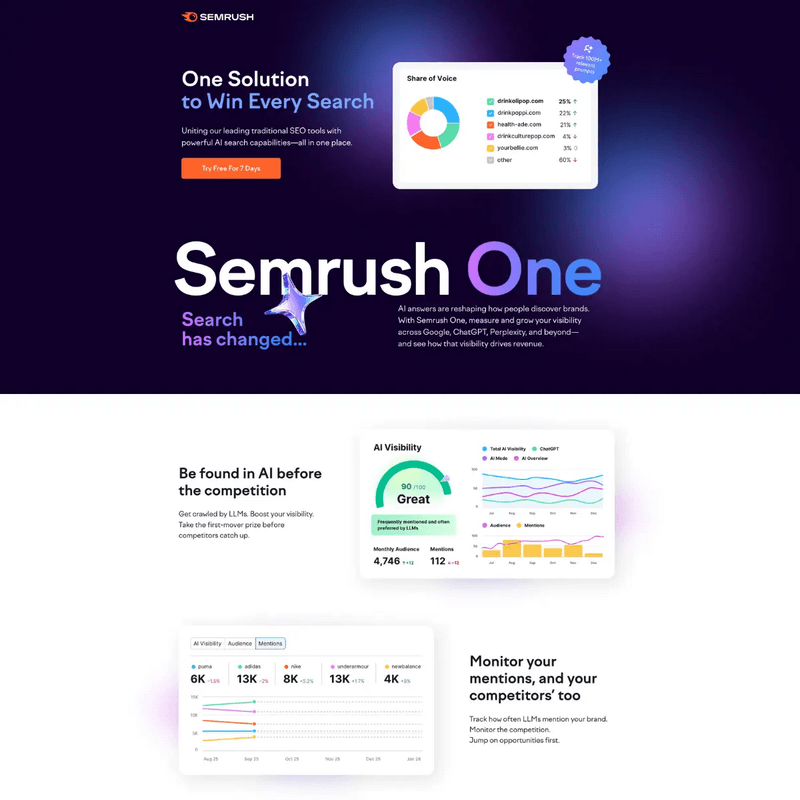
Semrush One is the bundled version of Semrush that unifies all major toolkits—SEO, Content, Local, Social, Traffic & Market, and AI Visibility—under one subscription.
It turns Semrush into a single command center for search, content, and competitive intelligence.
Features of Semrush One
- Bundles multiple toolkits (SEO, Content, Local, Social, Traffic & Market, AI Visibility) under one subscription
- Uses shared projects and limits so all tools work on the same sites, keywords, and data
- Let’s you move seamlessly from keyword research to topic clustering, audits, AI Overview tracking, and reporting
- Offers unified dashboards and reports that pull from a single data layer instead of separate tools
- Includes collaboration options for teams, making it easier to standardize workflows and access
- Provides advanced reporting to present SEO, content, and AI visibility results in one place
Who it’s for
Semrush One is designed for serious bloggers, in‑house marketing teams, and agencies that regularly work across multiple channels or manage several sites and clients.
If you only need occasional keyword checks, the full bundle may be too much; but if you handle SEO, content, local, and social together, or report on performance across these areas, Semrush One is a strong fit.
It’s particularly useful for teams that want everyone—from content writers to SEO specialists and PPC managers—working from the same source of truth.
Why it stands out
Many marketers stitch their stack together from separate tools for SEO, content, rank tracking, competitor analysis, and social media, which leads to data silos and duplicated work.
Semrush One stands out by centralizing these workflows and letting all reports draw from a single, consistent dataset.
That means less time spent jumping between tools, fewer integration headaches, and a clearer view of how every channel contributes to growth—ultimately improving both your results and the ROI of your tool stack.
3. Semrush SEO Toolkit

The Semrush SEO Toolkit is an AI-powered, data-rich solution designed to help marketers—from beginners to experts—optimize their websites with confidence. It brings together everything you need for keyword research, competitive analysis, and technical SEO, all within a single, intuitive platform.
Features of Semrush SEO Toolkit:
- Competitive Research: Track over 40 SERP features, observe AI Overviews, and analyze competitor authority.
- Keyword Research: Access the largest keyword database with AI-backed difficulty scores, topical authority, and a smart Keyword Strategy Builder.
- Backlink Analysis: Discover links faster with access to the world’s largest backlink database and accurate Authority Scores.
Why It Stands Out
- All-in-One SEO Platform: There is no need to switch between different tools. Everything from audits to keyword strategies lives here.
- Unmatched Data Coverage: Over 20 to 25 billion keywords and 43 trillion backlinks, with AI-enhanced insights. This is one of the largest keyword and backlink databases in the industry.
- Scalable for Any Market: Use geo-specific data to build global or local SEO strategies with precision.
Who It’s For
- SEO specialists juggling multiple clients
- In-house marketers trying to hit growth KPIs
- Full-stack marketers who need SEO without the overwhelm
The Value It Delivers
You could be optimizing for a blog, business website, or eCommerce store. This toolkit empowers you to cut through the noise. It allows you to build smarter campaigns. You’ll see measurable results without burning time or budget.
New in 2026: AI-generated organic search topics, ChatGPT search tracking, and enhanced topical authority scoring.
4. Local SEO Toolkit

If you manage a local business, the Semrush Local Toolkit is a must-have. It’s also essential if you work with clients who rely on local foot traffic. It helps you get found on Google Maps. It increases foot traffic. It converts more local searches into actual visits, calls, and leads.
Features of Semrush Local SEO Toolkit
- Google Business Profile (GBP) Optimization: Automatically generate AI-powered posts and insights to improve local visibility.
- Listing Management: Keep business info precise across all directories, without the manual work.
- Map Rank Tracker: Track how well you rank on Google Maps by zip code, region, or custom area.
Why It’s a Game-Changer
- All-in-one local marketing dashboard
- Automates repetitive tasks like review replies and listings
- It provides competitor insights and map-based rank tracking
This toolkit is Built For
- Local business owners are struggling to get seen online
- Agencies handling local SEO at scale
- Marketers are tired of tedious local listing updates and review management
Real Value
Semrush Local takes the heavy lifting out of local SEO. With smart automation and precise data, you can finally focus on growth—not spreadsheets, directories, or review tabs.
New in 2026: AI-generated GBP posts, map tracking upgrades, and review response automation.
5. Traffic & Market Toolkit

Understanding your market isn’t optional—it’s essential. The Semrush Traffic & Market Toolkit provides a powerful edge. It offers deep, actionable insights into your competitors. It also reveals audience behavior and industry trends.
Features of Semrush Traffic & Market Toolkit
- Traffic & Market Analysis: Track traffic sources, conversion impact, and page-level performance.
- Trends API: Access real-time market shifts, keyword trends, and consumer interest data.
What Makes It Stand Out
- Full-funnel visibility into traffic sources and conversion impact
- Benchmarks across 190+ global markets for smart positioning
- Audience profiling by behavior, income, education, and interest
This toolkit is ideal for
- CMOs and marketing directors leading strategic campaigns
- Agencies seeking ROI clarity for clients
- Consultants crafting data-driven growth plans
With real-time alerts, top competitor page tracking, and audience overlap maps, this toolkit transforms data into strategy. It helps you maximize ROI, discover new market opportunities, and stay ahead of competitors without drowning in spreadsheets.
New in 2026: Conversion intent modelling and audience overlap mapping for partnerships.
6. Social Media Toolkit

Tired of struggling to keep your social media consistent, creative, and conversion-focused? The Semrush Social Toolkit eliminates the guesswork from social media management. It provides you with everything you need to plan, post, and perform in one place.
Features of Semrush Social Media Toolkit
- Social Poster & Scheduler: Easily create and schedule content across platforms.
- Social Content AI: Generate content ideas based on trending topics and audience interests.
- Influencer Analytics: Discover the right influencers and track their impact.
Why Marketers Love It
- One dashboard for posting, tracking, and analyzing across all channels
- Built-in AI content creation to keep your posts fresh and relevant
- Social listening + competitor tracking to stay ahead of trends
This toolkit is perfect for
- Small business owners who aren’t social media pros
- Social media managers handling multiple clients or brands
- Marketing teams looking to streamline and scale their efforts
Real Value
Whether you’re posting once a week or managing five brands daily, Semrush Social Toolkit provides tools to boost engagement. It helps simplify scheduling and gain strategic insights. You can achieve this without spending hours online.
New in 2026: AI trend analysis, content suggestion engine, and influencer performance reports.
7. Semrush Content Toolkit
Creating SEO content that actually ranks doesn’t have to be overwhelming. The Semrush Content Toolkit makes it easy—even if you’re a team of one. With smart AI and real-time SEO data, you can plan, write, and optimize content effectively. You don’t need a full marketing department.
Features of Semrush Content Toolkit
- AI Article Generator: Craft high-ranking content in minutes, powered by Semrush’s massive SEO database.
- Content Optimizer: Instantly improve readability, tone, and on-page SEO.
- Topic Finder: Discover trending, low-competition ideas tailored to your niche and audience.
Why It’s a Game-Changer
- SEO-ready articles with zero guesswork
- Brand-aligned tone powered by AI
- Real-time optimization feedback for every post
This is Perfect For
- Entrepreneurs, solopreneurs, and time-strapped marketers
- SEO teams looking to scale content without sacrificing quality
- Writers who want to blend creativity with search performance
Real Value
You might be writing your next blog post. You could also be building a content hub. The Semrush Content Toolkit helps you move from idea to published. It provides confidence, speed, and SEO clarity.
New in 2026: Custom tone settings, branded voice AI writing, and GPT-powered outline builder.
Why These Semrush Toolkits Matter
In 2026, Semrush isn’t just offering features—it’s delivering focused, AI-enhanced solutions tailored to specific user goals:
- Bloggers → Content Toolkit + SEO Toolkit
- Local agencies → Local + Traffic & Market
- Social‑heavy brands → Social + Content
Each toolkit now feels more like a purpose-built assistant than a generic tool. And that’s what makes Semrush stand out in today’s crowded SEO software space.
What’s New in Semrush in 2026?
In 2026, Semrush introduced major upgrades focused on AI integration, unified toolkits, smarter analytics, and workflow efficiency.
The platform is clearly evolving beyond traditional SEO and positioning itself as a complete marketing intelligence ecosystem. Below are the most important updates that impact bloggers, businesses, and agencies this year.
1. Semrush One – Unified Marketing Platform
Semrush launched ‘Semrush One’ to consolidate its tools into a more unified ecosystem. Instead of jumping between isolated features, users now experience smoother cross-tool workflows and better data integration.
This update simplifies campaign management and improves reporting efficiency. For agencies and multi-site bloggers, this means faster decision-making and clearer performance insights.
Key Highlights:
- Unified dashboard across toolkits
- Integrated reporting system
- Improved team collaboration
2. Expanded AI Integration Across Tools
AI now plays a much bigger role inside Semrush. The platform has enhanced its AI-driven suggestions across keyword research, content optimization, and competitive analysis. These upgrades align with the rise of AI-powered search results and Google’s evolving ranking systems. The goal is to help users create smarter, intent-driven content faster.
Key Highlights:
- AI-powered content outlines
- Improved keyword intent clustering
- Smarter SEO Writing Assistant recommendations
3. Toolkit Expansion & Feature Reorganization
Semrush reorganized its product structure into clearer toolkits, making navigation more intuitive. Instead of overwhelming users with scattered features, the platform now categorizes tools into logical groups. This update improves usability and helps beginners understand which tools serve specific marketing goals.
Key Highlights:
- SEO Toolkit enhancements
- Content Toolkit upgrades
- Competitive Research Toolkit improvements
4. Enhanced Traffic Analytics & Competitor Intelligence
Traffic Analytics has become more accurate and visually refined in 2026. The update improves traffic source estimation, audience behavior tracking, and competitor benchmarking. For bloggers and agencies, this means deeper insights into competitor strategies and more data-driven decision-making.
Key Highlights:
- Improved traffic source breakdown
- Better audience segmentation insights
- Enhanced competitor comparison reports
5. Smarter Position Tracking & SERP Monitoring
Ranking volatility and AI-powered search features have made position tracking more complex. Semrush upgraded its tracking system to provide clearer insights into SERP features and ranking changes. This helps users respond quickly to algorithm shifts and maintain visibility.
Key Highlights:
- Improved local rank tracking
- Ranking volatility insights
- Historical performance comparisons
6. Dashboard & UX Improvements
Semrush has streamlined its interface to reduce clutter and improve navigation speed. The dashboard redesign makes switching between tools smoother and exporting reports easier. These refinements improve overall user experience, especially for beginners who previously found the platform overwhelming.
Key Highlights:
- Cleaner dashboard layout
- Faster navigation between tools
- Simplified reporting exports
Why These Features Matter
These 2026 updates aren’t just minor tweaks—they’re strategic enhancements that reflect how fast SEO and content marketing are evolving. Semrush has clearly listened to its users. It has responded to Google’s changing landscape. The company has invested in tools that actually move the needle.
In the next section, we’ll dive deep into Semrush’s core features. The foundation is just as impressive as the latest additions.
Semrush Features 2026
1. Domain Overview
The Domain Overview tool is one of the first tools I use in Semrush. It’s a goldmine, I promise. Any website, whether it’s yours or a rival’s, may be viewed from above.
I used to manually gather traffic, backlinks, and keyword data from multiple sources when I initially started researching my competition. It was messy and time-consuming. I now only need to enter the domain into the Domain Overview to obtain a comprehensive summary of:
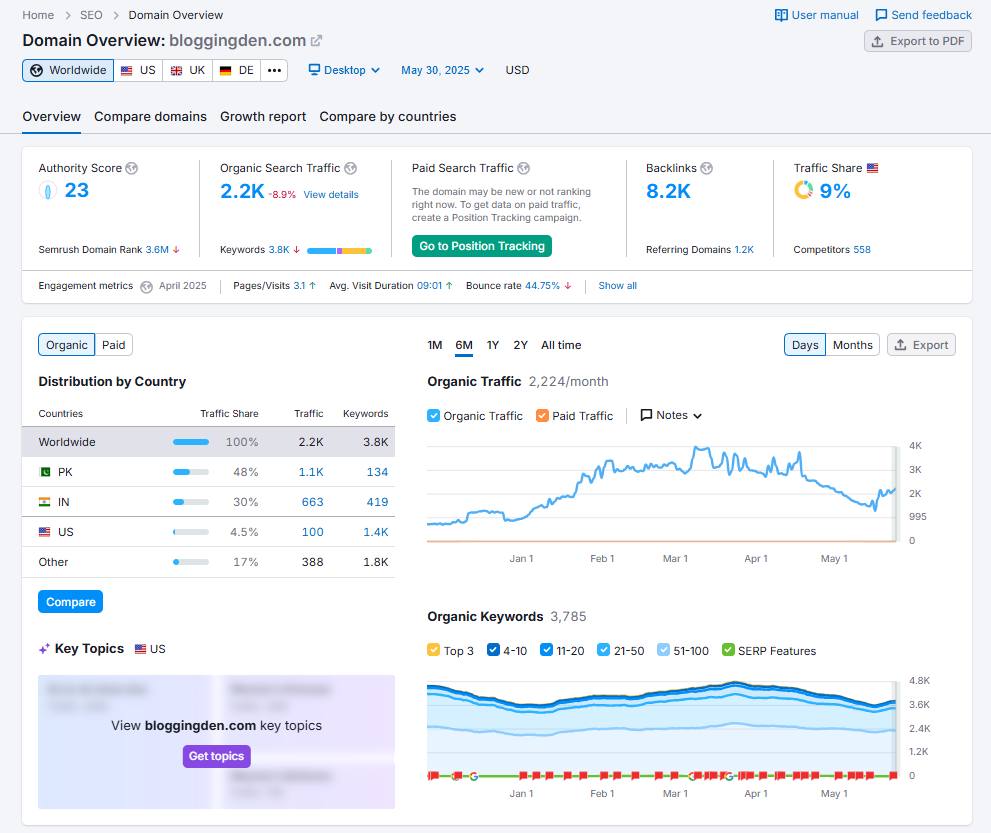
Trends in organic search traffic (yes, if you’re on the Guru plan, historical statistics as well)
- Authority score, which is a reliable indicator of domain trust
- Top-performing keywords
- PPC information and ad copy
- Backlink profile with referring domains and anchors
- Geography-based traffic
- Principal rivals in the SERPs
The actual kicker? Up to five domains can be compared side by side. When I’m preparing my next content campaign or making a pitch to clients, I often use this.
It enables me to examine how my website compares to others in terms of backlink expansion, lost/gained keywords, and growth.
Traffic numbers are modeled estimates, not exact analytics, but they’re usually close enough to guide strategy.
Additionally, I enjoy using this tool along with the Growth Report. This report displays the performance of a domain over time. It is ideal for establishing reasonable SEO objectives.
Pro Tip: You can view historical data if you’re on the Guru plan or higher. This information goes all the way back to 2012. When monitoring seasonal trends or long-term growth, this is particularly helpful. (Yes, this is omitted from the Pro plan; bear that in mind.)
The new Traffic & Market Analysis toolbox includes Traffic Analytics, which is located just beneath the Domain Overview section.
It’s almost like having SimilarWeb built into Semrush. You get in-depth insights into where a competitor’s traffic comes from—paid, organic, social, direct, or referral.
In my workflow, Domain Overview is always the first step. It sets the stage for deeper SEO research and helps me prioritize which competitors to monitor closely.
2. Traffic Analytics
This is one of my favorite tools in Semrush for spying on how competitors are getting traffic. With Traffic Analytics, I can easily check:
- Total unique visitors
- Traffic sources (organic, referral, social, direct, etc.)
- Engagement metrics like average visit duration, bounce rate
- Even estimated conversion behavior (how many users might actually be buying something)

Summary Metrics
You can view the domain’s high-level performance statistics:
- Visits: total visits over time
- Unique Visitors: how many distinct users visited the site
- Pages per Visit: average number of pages viewed
- Avg. Visit Duration: time spent per session
- Bounce Rate: percentage of sessions with no interaction
Now, is the traffic data 100% accurate? Not always. For example, I checked the estimated traffic for Amazon. Semrush showed over 650.1M visitors.
However, the actual Google Analytics figure was different. But that’s still close enough to make smart, informed decisions.
What I really love is how Traffic Analytics also shows non-Google sources, like YouTube or social media. This gives me a clear picture of where my competitors are winning outside of SEO. It helps me shape my own multi-channel strategy.
3. Organic Research
If you’re serious about SEO (like me), Organic Research is your best friend. This tool reverse engineers your competitor’s success. This app is one of my secret weapons for stealing competitor keywords.

Just type in a domain, and boom—you’ll see:
- Which keywords are driving traffic
- Ranking positions for each keyword
- Keyword fluctuations over time
- High-traffic pages that you can target and improve upon
One strategy I use a lot is going to the “Pages” tab. It helps me see which URLs are pulling the most traffic. I plug that URL into Semrush. Then, I extract the keywords it ranks for. I start planning a better piece of content targeting the same topics.
This isn’t just smart—it’s efficient. You’re not guessing what works; you’re following proven data.
4. Keyword Magic Tool
I’ll be honest—Keyword Magic Tool is the reason I subscribed to Semrush in the first place.
Semrush’s keyword database is now over 20–25 billion keywords across markets, one of the largest among SEO tools. Whether I’m researching for blog content, YouTube videos, or even PPC campaigns, this is my go-to.
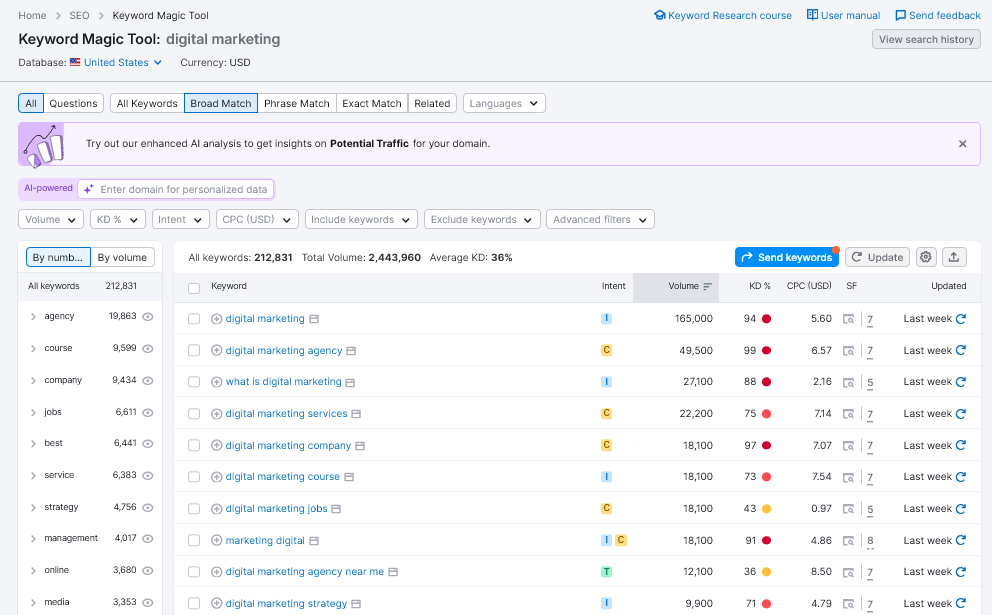
Here’s how I use it:
- First, add the seed keyword in the tool.
- Apply filters like search intent, volume, difficulty, and word count
- Explore long-tail keywords, question-based keywords, and exact-match terms
- Export selected keywords to a custom list for planning
And the AI-powered personalized keyword difficulty? Absolute game-changer in 2026 and upgrades that many competitors still lack.
Just add your domain, and Semrush tells you how tough it is for you specifically to rank for that keyword.
That’s something no other tool nailed until now.
Quick tip: Semrush doesn’t yet support extracting “auto-suggest” keywords like Google Suggest. However, the Keyword Magic Tool still provides a treasure trove of actionable data.
5. Backlink Analytics
Let’s talk backlinks. After all, without solid backlinks, SEO success is a tough climb.
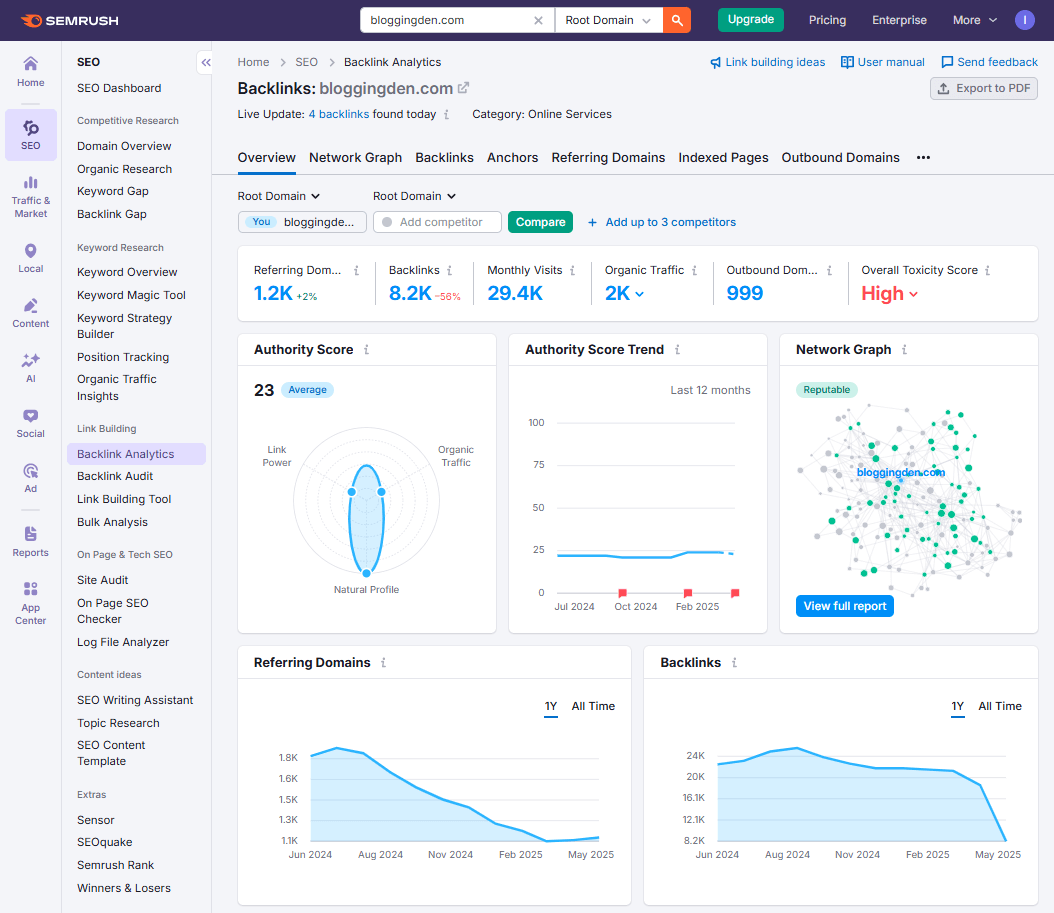
Semrush’s Backlink Analytics tool gives you a complete overview of:
- Competitor backlink sources
- Anchor texts and link types (nofollow, dofollow, etc.)
- Referring to domains by industry category
- Gained or lost backlinks over time
- Toxicity score for existing backlinks
One unique feature I love? Semrush breaks down referring domains by niche. Examples include marketing or SEO. This helps me know exactly which industries are linking to my competitors or me.
In my tests, Semrush’s backlink database is competitive with (and often richer than) many mid‑tier tools, though Ahrefs still has a slight edge in some link‑heavy niches.
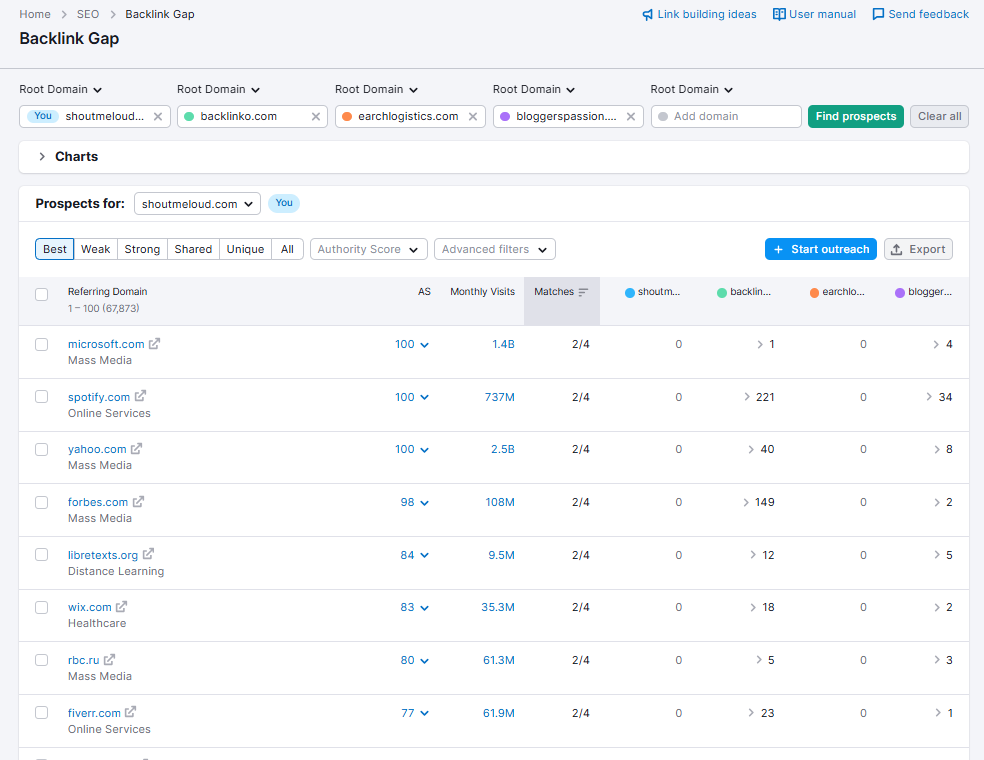
Then there’s the Backlink Gap tool. Enter your domain and up to five competitors, and Semrush uncovers domains that are linking to them but not you.
This alone has helped me find hundreds of potential link-building opportunities I’d have never spotted manually.
If you’re serious about link hygiene, use the Backlink Audit tool. It helps track toxic backlinks. You can export a disavow file for Google in just a few clicks.
Lastly, there’s the Link Building Tool—it suggests relevant websites you can pitch to and even provides contact details. Personally, I prefer doing outreach manually, but having a curated list ready is a massive time-saver.
6. Advertising Research
Most SEO tools throw in PPC features just to check the box. But with Semrush, it’s different. From day one, they’ve treated advertising research as a first-class citizen.
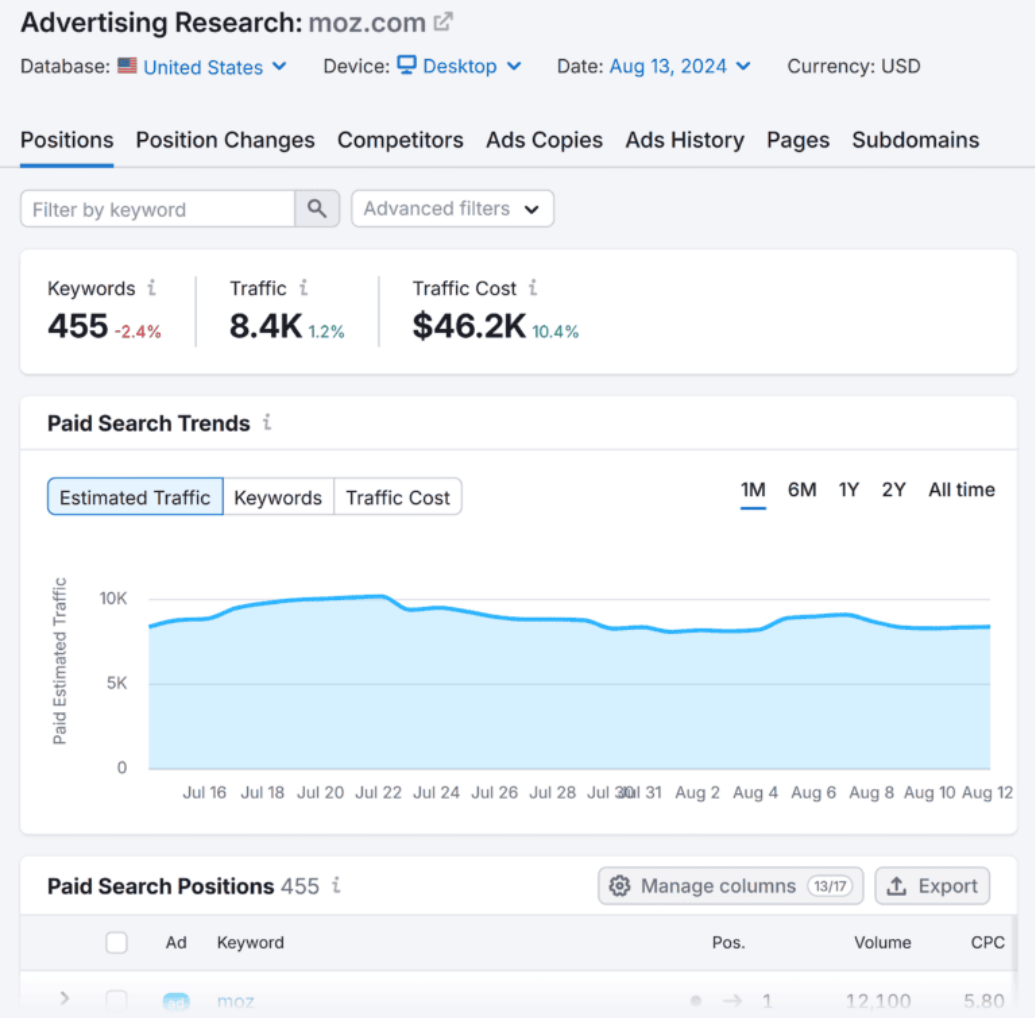
This is my secret weapon for PPC competitor spying.
Personally, I’ve found it incredibly helpful to peek into the exact ads my competitors are running. Whether it’s Google Ads or display ads, Semrush gives me the full picture—including estimated traffic, CPCs, and even ad longevity.
If a competitor has been running an ad for months, it’s a strong sign that it’s converting. I use that insight to craft higher-performing ads without starting from scratch. One of my favorite tools here is the Ads History tab, which shows exactly how long an ad has held the top spot.
Even better, with AdClarity from the Semrush App Center, I can dive deeper into display advertising. I can literally see the sites where my competitors are running ads. That’s pure gold for planning media buys and PPC strategy.
If you’re serious about paid traffic, this section alone justifies your Semrush subscription.
7. Market Explorer
When I start working in a new niche—or onboard a client in an unfamiliar space—Market Explorer is my first stop.
Instead of spending hours Googling and mapping out competitors, Semrush provides a quick overview. It shows me the top players. I also see the game changers and emerging sites in seconds. It even breaks down traffic share and audience overlap.
Recently, I popped into a known SEO blog. Boom—I saw exactly who dominated that space. I also saw who was rising fast. This kind of intel helps me build more targeted strategies without the guesswork.
8. Keyword Overview
This tool is where I start any solid keyword research process.
The Keyword Overview tool gives me a full breakdown of a keyword’s volume, CPC, and keyword difficulty. It also shows trends and even SERP competition. You also get content ideas categorized by variations, questions, and even pillar strategy suggestions.
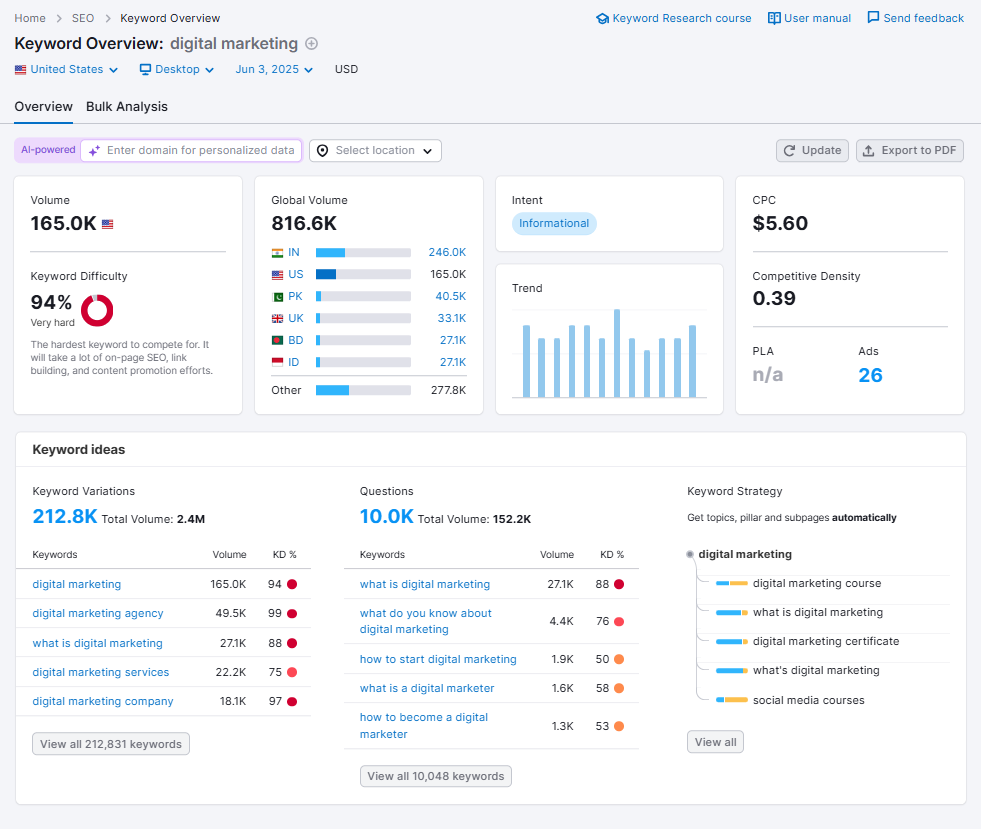
One underrated gem? The question-based keyword suggestions. These spark blog post ideas and help me structure content that directly answers what my audience is searching for.
It’s like having a content strategist and SEO expert rolled into one dashboard.
9. Keyword Gap
Want to know which keywords your competitors are ranking for that you aren’t? That’s what Keyword Gap is all about.
I use it often to uncover hidden content opportunities. Just drop in a few competitors, and you get a clear view of shared vs. missing keywords. It’s especially helpful when you’re trying to close the gap in organic search visibility.
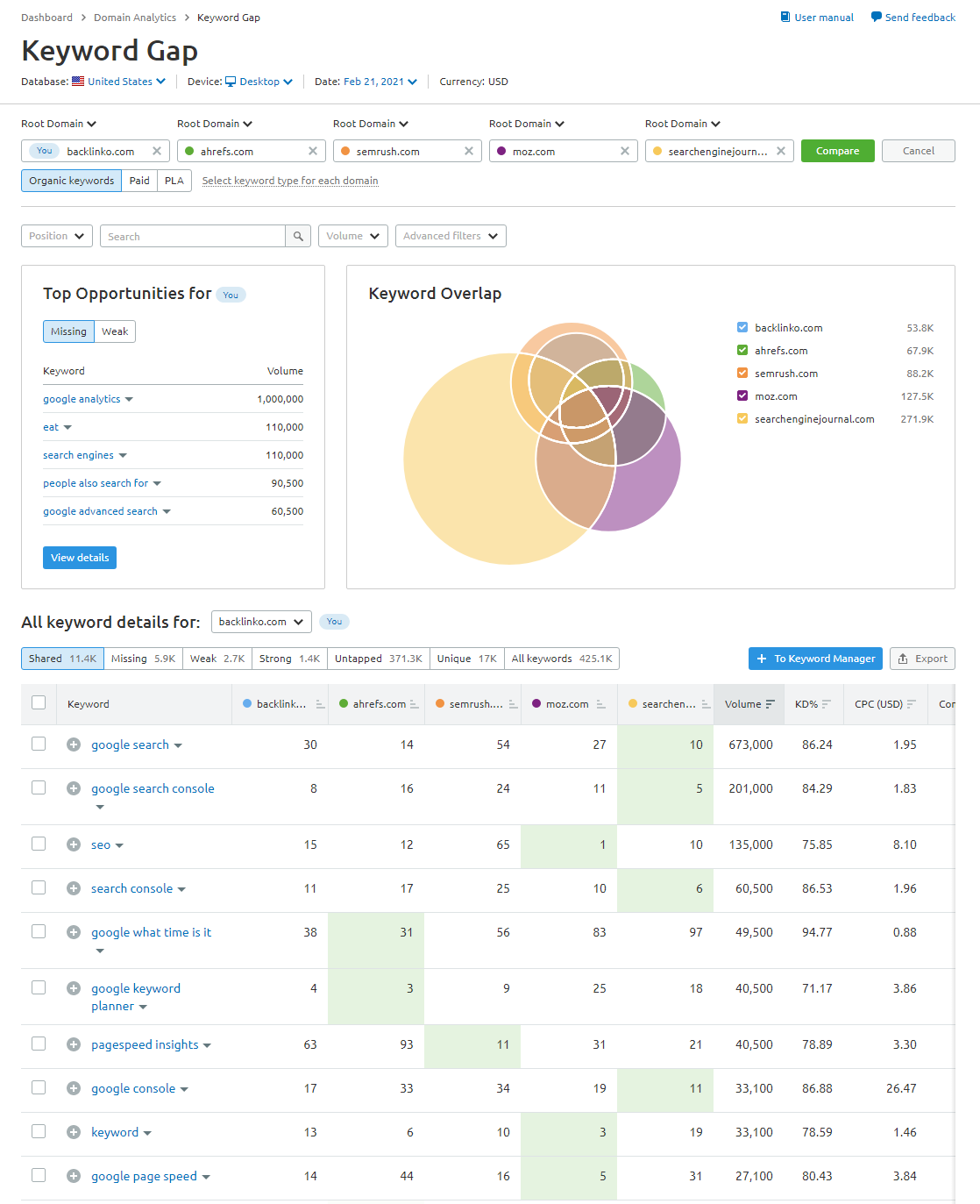
Even better—this tool also shows me keywords I already rank for. I could climb higher with a little on-page tuning. Fresh backlinks would help too.
10. Topic Research
Whenever I’m stuck brainstorming content ideas, I turn to the Topic Research tool.
You enter a broad topic, and Semrush hands you clusters of subtopics, headlines, common questions, and more. It’s a goldmine for blogging inspiration or planning entire content hubs.
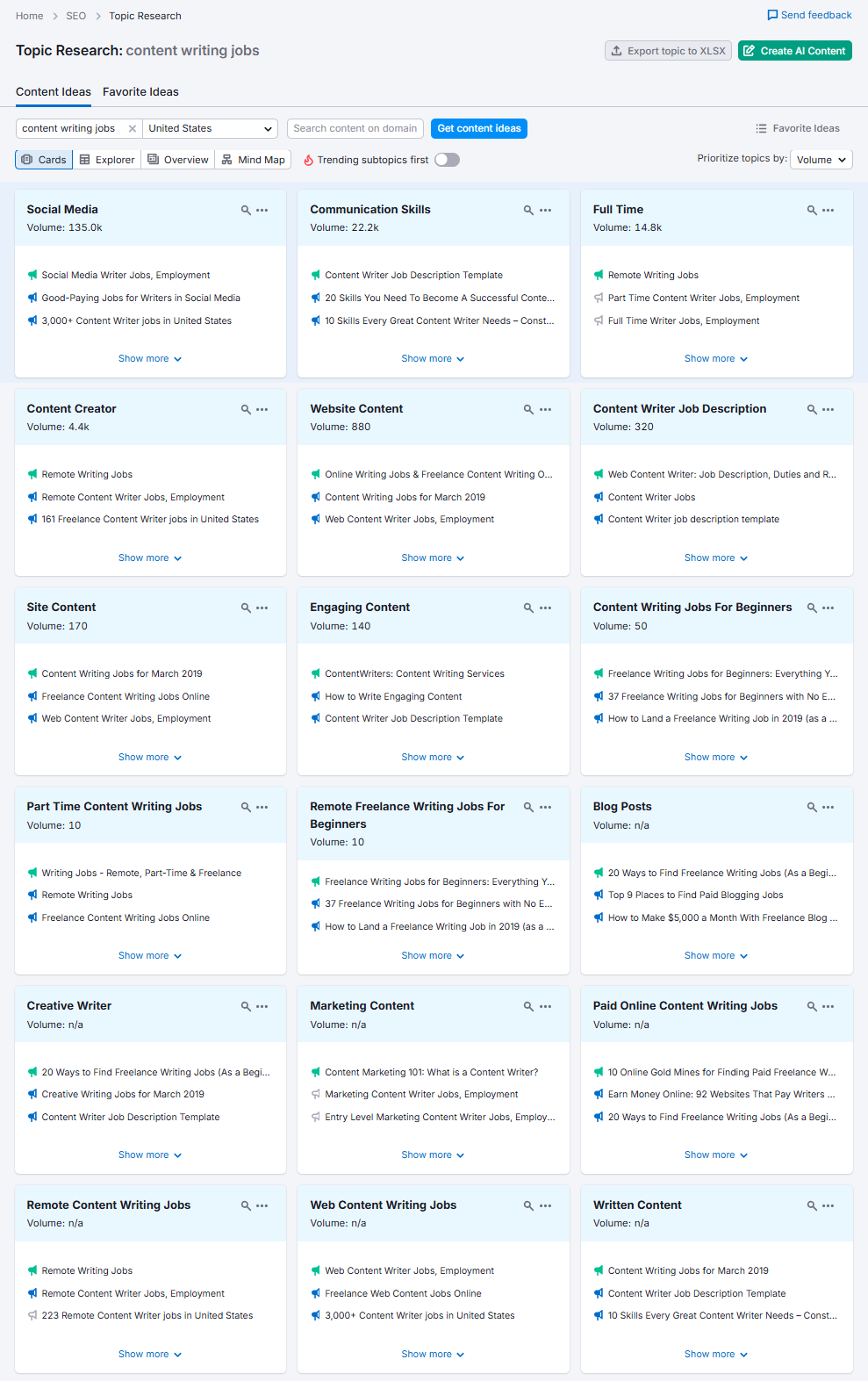
For instance, I once typed in “indoor plants.” Within minutes, I had dozens of subtopics ready. I also had headline templates ready to go.
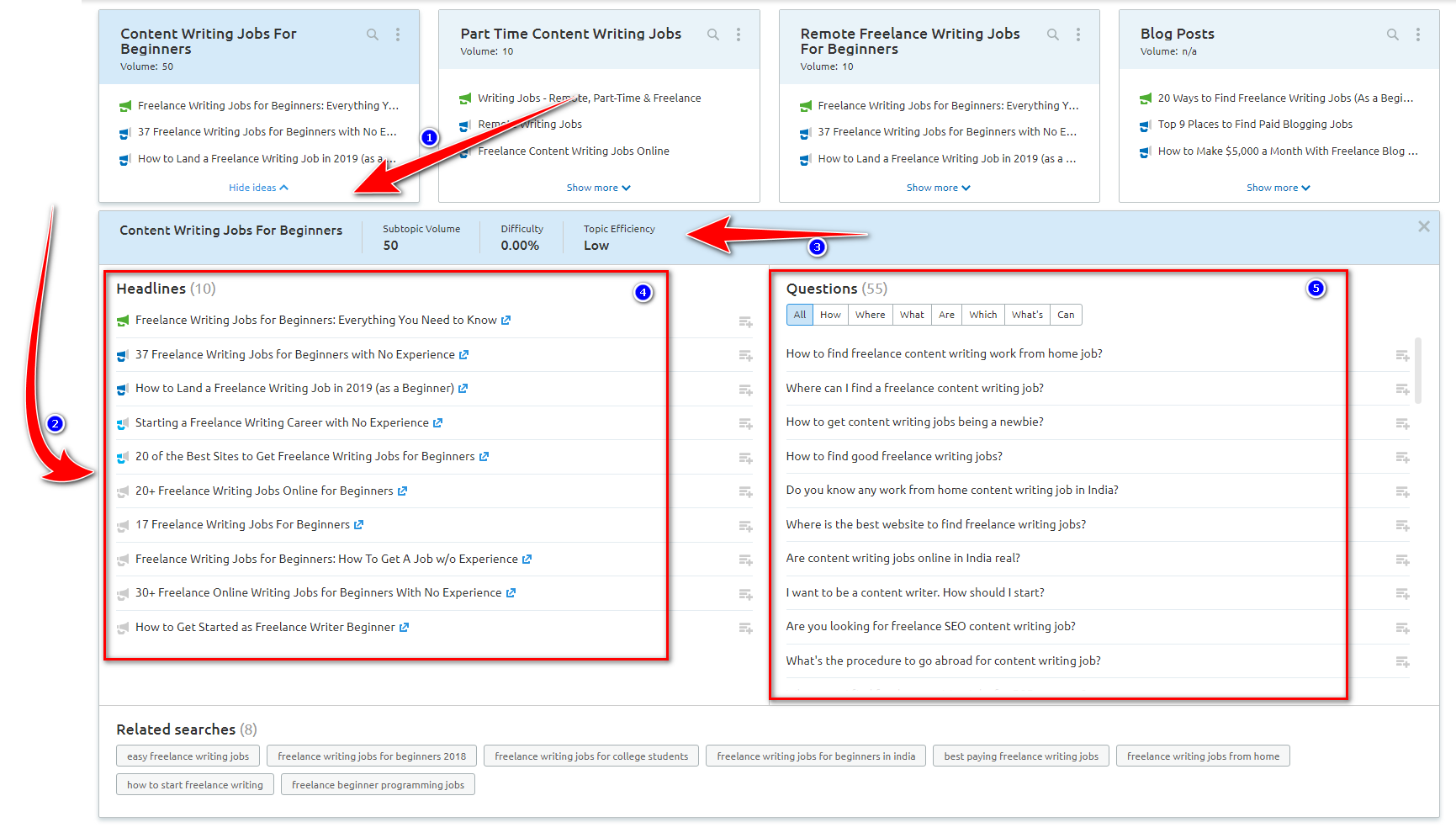
It saves time and helps me stay ahead with relevant, engaging content ideas my audience actually cares about.
11. SEO Content Template
Writing content that ranks isn’t just about stuffing keywords anymore—it’s about covering topics deeply and using the right supporting terms.
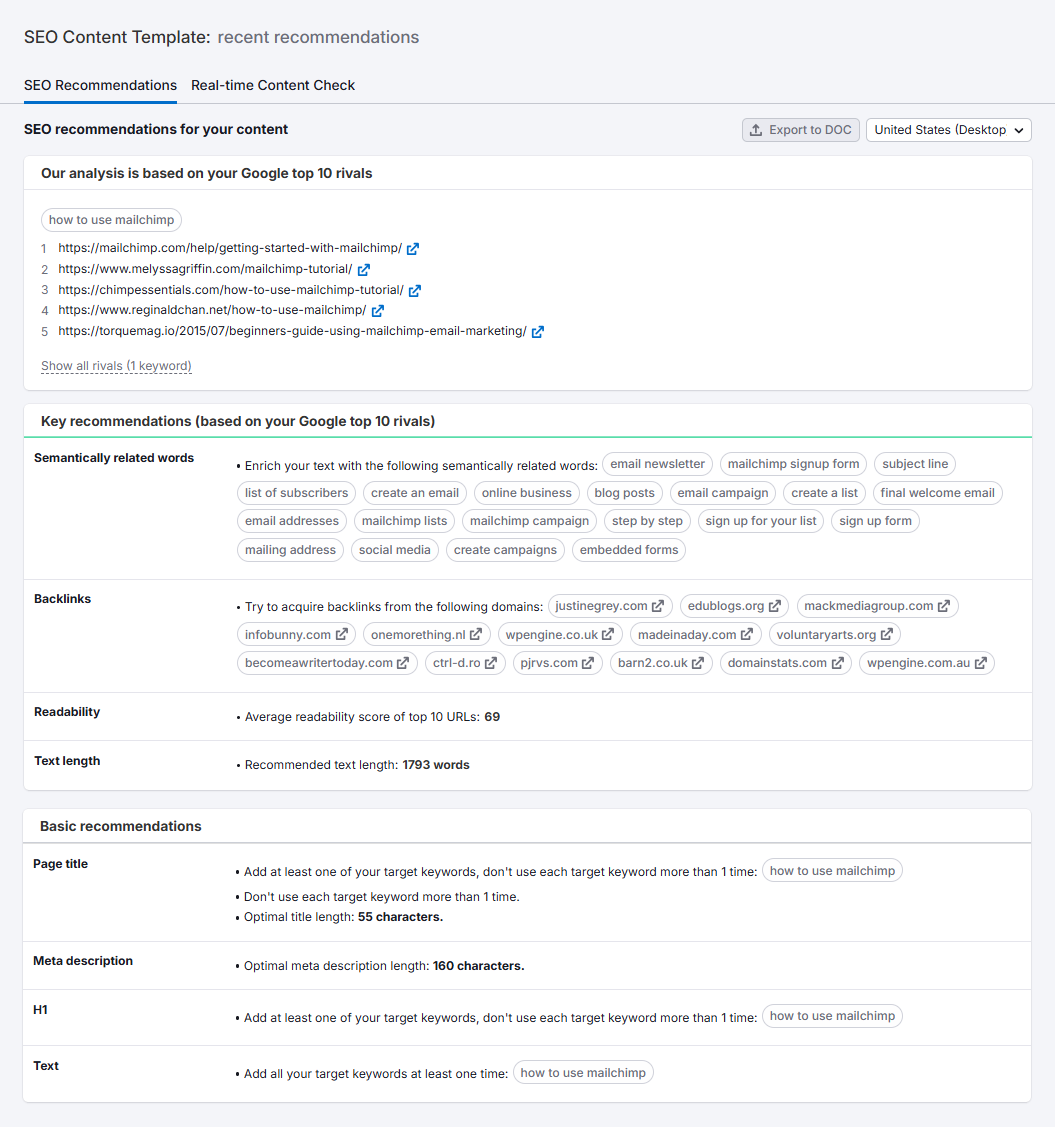
That’s where the SEO Content Template shines. It scans the top-ranking pages for your keyword and recommends LSI keywords, readability targets, backlink sources, and basic recommendations.
I personally love the integration with the SEO Writing Assistant. It checks my content in real-time for tone, originality, structure, and more.
If you’re looking for a content workflow that’s both smart and efficient, this combo is hard to beat.
12. Position Tracking
The Position Tracking tool is my daily dashboard for SEO health.
I use it to monitor keyword positions, visibility scores, and even Google Ads performance. Their cannibalization report helps me identify when two or more of my pages compete for the same keyword. This issue can be a silent killer for rankings.

Whether you’re focused on organic SEO or running paid campaigns, this tool keeps you in the loop and alerts you so you can react quickly when rankings shift.
13. Site Audit
You can write the most brilliant content in your niche, but if your website has technical SEO issues—slow loading, crawl errors, broken links, or poor internal linking—Google won’t care.
This is where Semrush’s Site Audit tool steps in. Trust me, it’s a total game-changer for keeping your site in shape.
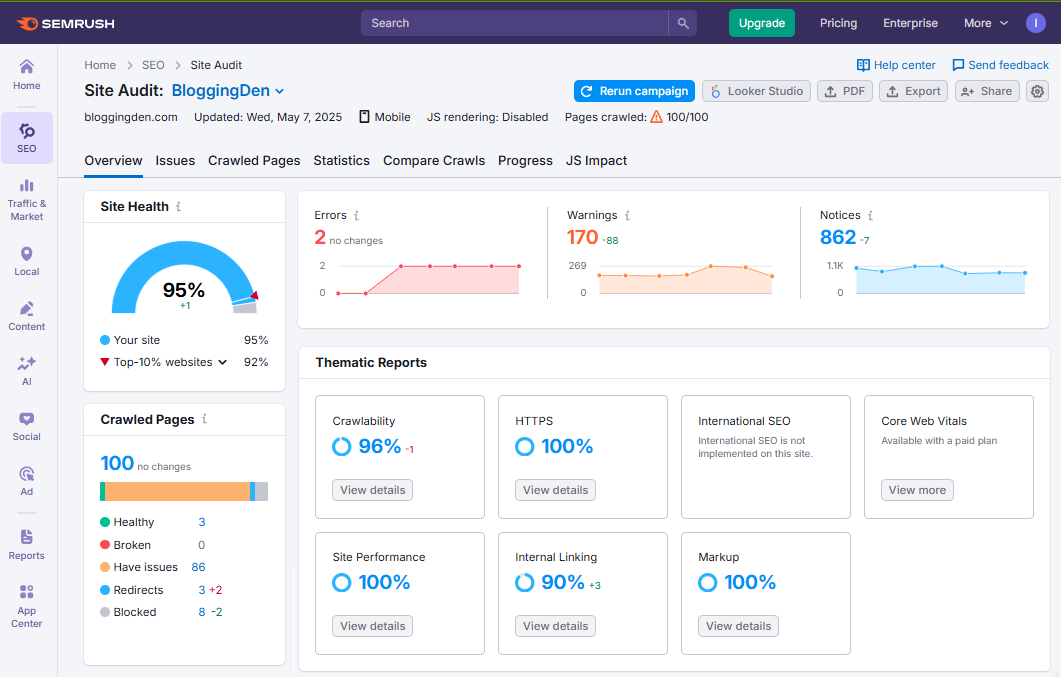
When I first got started, I relied on Google Search Console’s reports. They were useful—but limited. Mobile usability, Core Web Vitals, maybe some indexing alerts… and that’s about it.
So I switched to Semrush’s Site Audit, and I haven’t looked back since.
All I had to do was pop in my domain, and Semrush began crawling my site like a pro auditor. What I got back wasn’t just a checklist of issues—it was a comprehensive breakdown of:
- Overall Site Health score
- Crawlability and indexability errors
- Broken outbound links
- internal links issues
- Core Web Vitals insights
- HTTPS & SSL problems
- Robots.txt misconfigurations
- Schema markup validation issues
Each issue comes with clear, beginner-friendly solutions, which is huge. You don’t need to be a developer to understand or act on these suggestions.
Combined with Core Web Vitals and helpful content updates, I use Semrush Site Audit monthly to stay ahead of technical issues before they hurt rankings.
Personal insight: I resolved around 80% of the issues Semrush highlighted, and the results were clear—faster site speed, better crawl efficiency, and noticeable ranking improvements on several key pages.
Built-in On-Page SEO Checker = Double Value
Semrush takes it a step further with its On-Page SEO Checker, which gives tailored optimization ideas for individual pages.
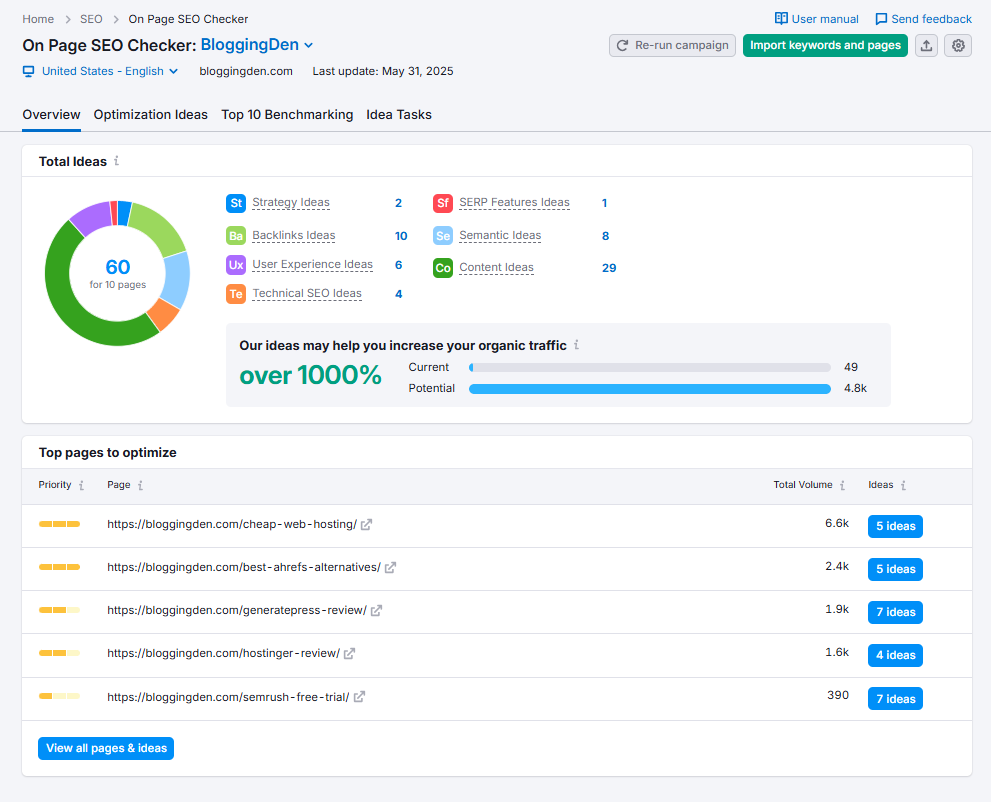
These insights are categorized into
- Strategy
- SERP features
- Content
- Technical SEO
- User experience
- Backlinks
- Semantic (LSI) keywords
Here’s what I personally found most useful:
- Keyword optimization tips (including meta tag gaps)
- Internal linking opportunities I totally missed
- Warnings about keyword cannibalization
- Content length recommendations
- Backlink targets to strengthen page authority
Semrush even suggests how to better optimize for featured snippets. This is a nice bonus if you’re aiming for position zero.
What impressed me most was how flexible and CMS-friendly this tool is. Whether you’re on WordPress, Wix, Shopify, or anything in between, it works smoothly across platforms.
Absolutely. If I had to rate Semrush’s Site Audit system, I’d confidently give it a 9 out of 10.
No, it won’t fix every issue for you. And yes, it can be overwhelming if you’re auditing a large site like mine. Even fixing just a few high-priority issues can make a real difference in rankings. This also improves site performance.
In my opinion, every serious site owner or SEO agency should make this audit tool part of their regular workflow.
Because when it comes to technical SEO, proactive beats reactive—every single time.
14. Link Building Tool
Let’s be real—building backlinks is hard.
Most SEO tools out there throw a massive list of backlinks and referring domains at you and say, “Good luck!”
But here’s where Semrush stands out—their Link Building Tool doesn’t just tell you what to do. It actually helps you do it.
I’ve personally used many link-building tools over the years—some are great for research, others excel at tracking outreach. Semrush, however, combines both strengths into a single, streamlined workflow.
A Smarter Way to Build Links
Instead of flipping between spreadsheets, email clients, and SEO dashboards, the Semrush Link Building Tool lets you:
- Identify relevant link prospects based on your niche and target keywords.
- Vet each domain’s authority before pitching.
- Send outreach emails directly from within Semrush.
- Track open rates, replies, and conversions—all in one place.
It’s like having your own mini-CRM built just for link building.
Semrush helped when I ran a campaign around one of my cornerstone blog posts. It pulled in a list of potential sites. These sites were already ranking or linking to similar content.
I could filter them by authority score, relevance, and location. No more guessing. No more messy spreadsheets.
Built-in Email Outreach System
One of my favorite things about this feature is its convenience. I didn’t have to jump between tools. This made starting my outreach easy.
You can connect your email (like Gmail or Outlook) to Semrush and manage all your communications right inside the platform.
- Preload email templates
- Customize messages for each prospect
- Set follow-up reminders
- Monitor replies and link status
This tight integration saves hours of manual effort—especially if you’re running large-scale outreach or managing clients.
Real Conversations, Real Results
What makes the Link Building Tool so powerful isn’t just the data—it’s how personalized and truly actionable it is.
It doesn’t just give you a list of sites to chase. It walks you through every step:
- Enter your target keywords.
- Semrush generates a list of relevant, high-authority websites.
- Vet those domains, save them to your campaign.
- Start reaching out and tracking conversations without ever leaving the dashboard.
There’s even a “Conversations” tab. You can see your ongoing email threads there. It is similar to a lightweight email client but tailored to SEO link building.
Does It Work?
Yes—but with a caveat.
Semrush won’t magically land you backlinks if your content isn’t link-worthy. But it will eliminate 80% of the grunt work. It handles finding opportunities, organizing them, sending emails, following up, and measuring success.
You still need to offer real value. But if you’ve already published great content, Semrush helps amplify it in the smartest way possible.
Pro Tip: Use this tool alongside Semrush’s “Backlink Audit” to clean up toxic links and build new, high-quality ones—giving your off-page SEO a balanced boost
Semrush Integrations
The biggest advantage I’ve found in using Semrush is how easily it connects with other platforms. These include Google tools, social media accounts, and my WordPress site.
These integrations don’t just save time. They unlock deeper insights. They also streamline reporting. Additionally, they make your entire SEO and marketing workflow more efficient.
Let me walk you through the core Semrush integrations and why they matter.
a. Google Analytics & Google Search Console Integration
If you want to go beyond basic keyword tracking, this is a must.
By connecting Google Analytics (GA4) and Google Search Console (GSC) with Semrush, I can:
- Pull real traffic data and combine it with Semrush’s keyword research tools.
- Analyze which keywords are actually driving traffic—and which pages need help.
- Identify keyword cannibalization and fix underperforming content.
This integration turns your keyword tracking into revenue-focused insights, helping you prioritize updates that actually matter.
SEO Tip: If you’re doing content audits, this combo reveals low-hanging fruit—pages with good impressions but poor CTR or traffic.
b. Google Ads Integration
If you run PPC campaigns, Semrush and Google Ads are the perfect pair.
Once connected, I get:
- Access to my paid keyword data directly inside Semrush.
- Competitor ad research alongside my own campaign metrics.
- Optimization suggestions based on performance trends and keyword gaps.
This integration is especially powerful when managing both SEO and PPC strategies. It helps ensure your paid and organic efforts work together, not against each other.
c. Social Media Integrations
Managing multiple social accounts? Semrush integrates with:
- Twitter (now X)
These integrations allow me to:
- Schedule and publish posts directly from the Semrush Social Poster.
- Track engagement, follower growth, and content performance.
- Analyze competitors’ top-performing social content.
What do I love most? Semrush provides trend-based content suggestions. I never run out of ideas and can keep my social media alive on a single platform.
d. WordPress & CMS Platform Integration
If your website runs on WordPress, you’ll love this.
Semrush’s SEO Writing Assistant integrates directly with WordPress (as well as Google Docs), allowing me to:
- Optimize blog posts in real time as I write.
- Get readability scores, tone suggestions, and keyword density feedback.
- Ensure my content hits both user experience and SEO standards—before I even hit publish.
For content creators and bloggers, this integration alone is worth the price of admission.
Why These Integrations Matter
What makes Semrush such a powerhouse is not just the data. It’s the ability to connect that data with your real-world content, ad campaigns, and audience behavior.
These integrations transform Semrush from a standalone SEO tool into the central hub of your digital marketing strategy.
Whether you’re
- Tracking keyword performance through GA4 + GSC
- Fine-tuning ad copy based on Semrush + Google Ads insights
- Managing social media with unified analytics
- Writing content inside WordPress with SEO Writing Assistant
…you’re making smarter decisions, faster.
Semrush User Experience
When I started using Semrush, one of the first things I noticed was how much data it offered. It could also be easy to feel overwhelmed.
Fast forward to 2026, and I can confidently say SEMrush has made huge strides in user experience.
The platform feels smarter, smoother, and more intuitive than ever before. Whether you’re a beginner or a seasoned SEO pro, navigating Semrush in 2026 feels effortless.
This is due to major improvements in the UI, dashboard customization, and mobile accessibility.
Here’s a closer look at what it’s like to actually use Semrush in its latest form:
a. Simple User Interface
Semrush’s new interface is a huge win in 2026. They’ve redesigned key workflows to make the experience more user-friendly without dumbing it down.
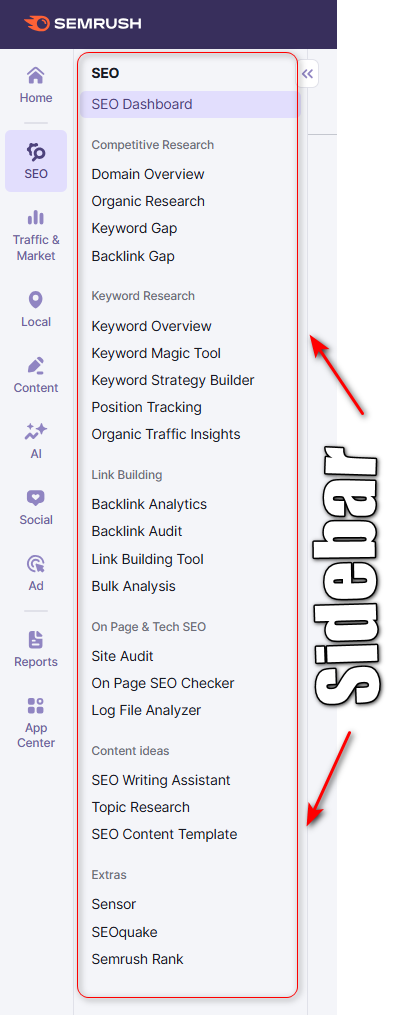
Now, I can:
- Easily switch between toolkits without clutter or confusion
- See important metrics upfront—like keyword rankings, traffic spikes, and site audit warnings—without digging through menus
- Access help documentation and live chat without losing my place
Whether I’m doing a deep site audit or running a quick keyword check, everything feels faster and more efficient. The interface is sleek, responsive, and laser-focused, ensuring you can accomplish tasks with minimal friction.
b. Dashboard Customization
This is one of my favorite updates. Semrush now lets you customize your dashboard based on your role, goals, or workflow.
As someone who manages both blogs and client sites, I’ve set up multiple dashboards:
- One for tracking keyword growth and rankings
- Another for backlink audits and toxic link alerts
- And one dedicated to local SEO performance and Google Business Profile rankings
You can add or remove widgets. You can reorder tools. You can even integrate real-time data from connected platforms like Google Analytics or GSC.
If you dislike uniform dashboards, this feature will ensure you feel at ease.
c. Mobile Usability
Let’s acknowledge that SEO is no longer solely a desk-based task. That’s why I was glad to see Semrush really improve its mobile experience in 2026.
The mobile interface is
- Fast-loading, even on mid-range devices
- Optimized for touch navigation, with clean, collapsible menus
- Powerful enough to run keyword reports, check rankings, and view audits while you’re on the move
I often review my keyword tracking reports and backlink status right from my phone—and I no longer feel like I’m using a stripped-down version of the desktop app.
For digital nomads, freelancers, or even agency SEOs working on-site with clients, the mobile usability upgrade offers significant benefits. It serves as a serious productivity booster.
Is Semrush User-Friendly in 2026? My Honest Take
Yes—Semrush is now more beginner-friendly and workflow-focused than ever. You don’t need to be a tech wizard to use it. Seasoned SEOs will still find all the power they’ve become accustomed to.
The customizable dashboard strikes a great balance between depth and simplicity, making the experience feel more like using a polished SaaS platform and less like navigating a complex data jungle.
Whether you’re
- Running a blog
- Managing client SEO accounts
- Handling eCommerce optimization
- Or just starting out with keyword research
…the Semrush interface in 2026 will help you stay productive, focused, and in control.
Semrush Pricing 2026
When I started using Semrush, I had a simple question: Is it worth the price? I have used it across several websites and client projects. Now, I can confidently affirm—yes, provided you select the appropriate plan for your needs.
Semrush offers four primary pricing tiers, plus a free plan so you can experiment before committing. On top of that, it provides powerful add-ons for deeper traffic insights, trend tracking, and multi-user access.
Let’s break each option down so you can decide which Semrush plan is the best fit for you.
9 different plans are running on the semrush pricing page. But here we are discussing the SEO Classic Plan as per the Semrush review 2026.
Here is the Semrush Classic Plans
Semrush Free Plan Features
If you’re just starting out, the Semrush Free Plan is an excellent starting point. It’s ideal for anyone who wants to explore the platform and its features before making a commitment.
Here’s what you get for $0/month:
- Limited keyword and domain research (10 results per day)
- Site audit for up to 100 pages
- Basic SEO Writing Assistant access
- Position tracking for up to 10 keywords
It’s not enough for full-time SEO work. It’s perfect for beginners who want to get a feel for Semrush’s capabilities before upgrading.
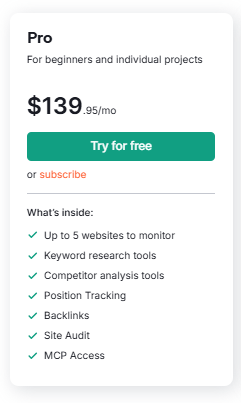
Semrush Pro Plan
$139.95/month or $117.33/month billed annually
This is where most serious bloggers and freelancers should start.
Why It Converts Well:
If you manage 1–3 websites and publish content regularly, this plan pays for itself quickly through:
- Better keyword targeting
- Faster technical issue detection
- Competitor keyword discovery
💡 This is the plan I personally started with.
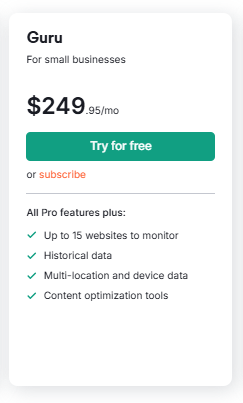
Semrush Guru Plan
$249.95/month or $208.33/month annually
This is ideal if you’re running multiple content sites or managing clients.
Why Upgrade to Guru?
If you:
- Run content-heavy sites
- Need trend analysis
- Use the Topic Research & Content Template frequently
- Manage multiple domains
The historical data alone justifies the upgrade for serious marketers.
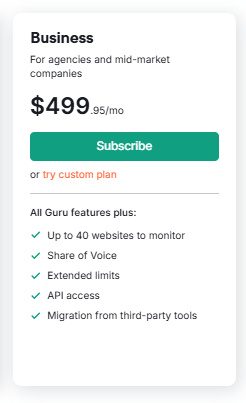
Semrush Business Plan
$499.95/month or $416.66/month annually
Designed for agencies, eCommerce brands, and enterprise SEO teams.
Who Needs This?
- Agencies managing many clients
- High-volume SEO teams
- Businesses relying heavily on organic + PPC
If SEO is mission-critical to your revenue, this plan delivers full firepower.
Here’s my honest recommendation:
- Beginner testing SEO → Free Plan
- Blogger / Freelancer → Pro Plan
- Content team / Growing agency → Guru Plan
- Enterprise / Large agency → Business Plan
Once you start using it seriously, it stops feeling like an expense — and starts feeling like an investment in predictable traffic growth.
| Feature | Pro (entry) | Guru (growth) | Business (enterprise) |
|---|---|---|---|
| Monthly Price | $139.95 | $249.95 | $499.95 |
| Annual Price | $117.33/mo | $208.33/mo | $416.66/mo |
| Projects | 5 | 15 | 40 |
| Tracked Keywords | 500 | 1,500 | 5,000 |
| Historical Data | ❌ | ✅ | ✅ |
| Content Toolkit | ❌ | ✅ | ✅ |
| API Access | ❌ | ❌ | ✅ |
| Best For | Bloggers & Freelancers | Growing Agencies | Large Agencies & Enterprises |
5. Add-ons and Feature Limits
Semrush also offers add-ons you can tack onto any plan. These are particularly helpful when your business needs deeper data, more users, or advanced reporting:
Additional Users – starting at $45/mo
- Add colleagues to your Semrush account
- Collaborate on shared projects without sharing one login
- Keep your account secure with individual roles and permissions
Lead Generation – $90/mo
- Branded profile on the Semrush Agency Partners platform
- Semrush verified badge for your agency or marketing profiles
- 1,000 outreach credits in Lead Finder to contact potential clients
Base Report – $10/mo
- Data pulled from 20+ Semrush tools into one report
- Integrations with Google Analytics and Google Search Console
- Monthly/weekly/daily scheduling options
- PDF export for easy sharing
- Report sharing with other Semrush users
Pro Report – $20/mo
- Everything in the Base Report
- 20+ external integrations (e.g., BI and reporting tools)
- Delivery at a specific time instead of just by frequency
- Branding and white‑label options for agencies
- AI‑generated summaries for faster insights
- Sharing by public link for clients and stakeholders
Pro Tip: Start with a core plan and only add the extras you’ll actually use weekly—otherwise costs can add up fast
Semrush isn’t cheap—but it’s worth every cent if you use the right tools consistently. I started small and scaled up as my SEO knowledge and client base grew.
Whether you’re a solo blogger, startup founder, or agency lead, there’s a plan that fits your needs. There’s also room to grow as your goals expand.
If you’re unsure, I recommend starting with the Free Plan. You can also try a 7-day Semrush Pro Trial to test drive the platform.
Once you see how powerful it is, upgrading feels less like a cost—and more like an investment in smarter marketing.
Semrush Pros and Cons in 2026 (My Experience)
I use Semrush almost daily for content audits, keyword research, competitor analysis, and even social media scheduling, so I’ve seen both its strengths and its limits over many years.
Here’s my honest, hands‑on view of the real pros and cons of Semrush in 2026.
Pros of Semrush
- In my tests, Semrush consistently discovered more backlinks than any other SEO tool I’ve tried, especially in content and marketing niches.
- It includes PPC keyword research and advertising insights, which many “SEO‑only” tools don’t offer at the same depth.
- I can track keyword rankings daily and compare them against competitors without burning through extra credits or needing a separate rank tracker.
- It tracks keywords not only on Google but also on Bing and other major search engines for broader visibility.
- Finding and fixing broken inbound and outbound links is fast thanks to Site Audit, Backlink Audit, and internal link reports.
- With so many built‑in modules (SEO, content, backlinks, PPC, social, local, AI visibility), I rarely need additional third‑party SEO tools.
- I can run both technical and on‑page SEO audits from the same dashboard, then push fixes into my content workflow.
- Most reports can be exported as CSV or PDFs, which makes sharing data with clients or importing into other systems very easy.
- I like being able to manually refresh keyword data to get updated numbers when I’m making an important decision.
Cons of Semrush
- For SERP analysis, it doesn’t show traffic per ranking position as clearly as some competitors like Ahrefs, which can make estimating traffic potential slightly harder.
- I’d love to see a built‑in “traffic potential” estimate for top positions inside the keyword tools, instead of only volume and difficulty.
- Historical keyword data is locked behind Guru and Business; in my opinion, limited history on Pro would make the entry plan much more attractive.
- There’s no simple estimate of “backlinks needed to rank” for a given keyword, which would be very helpful for planning link‑building campaigns.
- The interface can feel overwhelming at first—there’s a lot of data and menus, which can intimidate beginners.
- Pricing is quite high if you’re just starting out, and you’re realistically looking at around $1,300+ per year for a Pro plan if you pay monthly.
- Extra user seats cost more on every plan, so even small teams need to budget for additional users instead of getting at least two by default.
- If you’re brand‑new to SEO and on a very lean budget, the learning curve plus price might be too much; in that case, I recommend starting with the free plan or a short trial before committing.
If you’re new to SEO, expect a significant learning curve—especially if you’re working with a very lean budget. Consider starting with the free plan or a Trial before committing to a full subscription.
Top Semrush Alternatives 2026
Semrush is a powerful all‑in‑one platform, but it’s not the only serious SEO tool in town. Depending on your budget, feature needs, and workflow, tools like Ahrefs, SE Ranking, Serpstat, Ubersuggest, and Moz can be a better fit for some users
I’ve personally used many other SEO tools over the years. Here are the most popular Semrush alternatives 2026 to Semrush based on hands-on experience.
| Tool | Best for | Where it beats Semrush | Where Semrush wins |
|---|---|---|---|
| Ahrefs | Link‑building‑focused SEOs and technical SEOs who live in backlink data | Lower pricing, generous keyword tracking limits, simple UI, flexible plans, solid rank tracking and keyword tools without expensive bundles. | More advanced AI visibility tools, broader marketing suite (PPC, social, content, local), deeper site audit workflows, daily rank tracking, and stronger all‑in‑one reporting. |
| SE Ranking | Budget‑conscious bloggers, SMBs, and small agencies | Very low cost, beginner‑friendly interface, simple keyword ideas, and basic site audit features. | Larger keyword and backlink databases overall, deeper competitive research, more advanced toolkits (Traffic & Market, Content, AI Visibility), and better integrated reporting. |
| Serpstat | Small- to mid-size sites needing a “good enough” all‑in‑one SEO suite | An affordable all‑round platform with keyword research, site audit, rank tracking, and competitor analysis. | More mature AI search and visibility tools, bigger global data coverage, better integration with content and PPC workflows, and more polished UX for large projects. |
| Ubersuggest | New bloggers and very small projects with tight budgets | Lower pricing, generous keyword tracking limits, simple UI, flexible plans, solid rank tracking, and keyword tools without expensive bundles. | Enterprise‑grade toolkit, much larger datasets, multi‑channel features (SEO, PPC, content, social, AI visibility), and scalable workflows for agencies and big sites. |
| Moz Pro | Brand‑focused marketers and teams who like simple, “classic” SEO tooling | Clean interface, solid link metrics (Domain Authority), easy‑to‑understand reports, good for basic audits and keyword tracking. | Very strong backlink index and link discovery, clean UI for link analysis, and excellent broken link and link intersect reports. |
SE Ranking is a strong budget alternative.
1. Semrush vs Ahrefs
If you’re just starting with SEO or want something easier to navigate, Ahrefs is a solid pick. It’s slightly cheaper than Semrush, starting at $129/month.
Here’s what I liked about Ahrefs:
- The user interface is cleaner and simpler—less overwhelming than Semrush.
- It’s not just focused on Google—you can track data from other search engines too.
- You can add more projects under their plans (a plus for agency folks like me).
- It skips the fluff—no unnecessary features to get lost in.
- Adding team members is cheaper (great for collaboration).
- The core features, like keyword research and backlink analysis, are just as powerful.
Consider Ahrefs if backlinks are your primary focus and you prefer a smoother user interface. It might be the tool for you.
2. Semrush vs SE Ranking
If you’re looking for maximum value at a lower cost, then SE Ranking is absolutely worth checking out.
It starts at around $65/month, and honestly, it covers everything a small business, blogger, or solo marketer would need.
Here’s why I love SE Ranking:
- The dashboard customization feature offers affordable pricing along with generous limits on reports and tracked keywords.
- Their rank tracking module is one of the best I’ve used—it’s super accurate and easy to understand.
- SE Ranking gives you core features without the bloat—perfect for small to mid-sized projects.
- Semrush offers a wide range of services, including auditing, backlink monitoring, and keyword research, all at an affordable price.
If you’re not ready to invest heavily in Semrush just yet, SE Ranking is a smart starting point.
3. Semrush vs Moz
One of the first SEO tools I ever tried was Moz, and I still hold a special place for it. Its pricing starts at $49/month, and it’s still a popular choice for many marketers.
Here’s what stands out:
- Enterprise-level websites benefit greatly from its generous crawl limits, which allow you to audit up to 8 million pages.
- Moz has all the core SEO features you’d expect—keyword tracking, site audit, backlink analysis, and more.
- Their higher-tier plans include more users by default, and the cost to add extra users is lower than that of Semrush.
- The database is huge—with over 1.25 billion keywords and 44.8 trillion links.
Moz might not be as flashy as Semrush. It continues to perform effectively. This is especially true for large websites that need deep crawl coverage.
4. Semrush vs Ubersuggest
Let’s look at one of the most popular budget SEO tools—Ubersuggest by Neil Patel. It’s especially popular with beginners thanks to its freemium model and super clean interface.
But how does it compare to Semrush in real-world usage?
I’ve used both, and here’s my personal take:
- Ubersuggest is great if you’re just getting into SEO. You don’t require a complex learning curve or a substantial financial investment.
- There’s even a one-time lifetime pricing option, which makes it attractive for hobby bloggers or personal projects.
- But once you start managing multiple websites, client campaigns, or deeper SEO work, you’ll feel the limits.
Here’s where Semrush pulls ahead for me:
- Semrush offers a massive AI-powered keyword database—way ahead of Ubersuggest.
- Its site audit capabilities are advanced, customizable, and built for pros.
- Semrush’s backlink tools provide real-time data and in-depth analysis, while Ubersuggest’s backlink data is relatively limited.
- Semrush encompasses PPC, social media, and content marketing tools, rendering it a comprehensive platform.
In short:
- Ubersuggest is a decent place to start if you’re managing a small personal blog or testing SEO.
- If you are serious about SEO, content, and traffic growth, Semrush offers far more value. It also contributes to long-term success, even though it comes at a higher price.
Which Semrush Alternative Should You Choose?
Here’s my quick recommendation based on use cases:
- Go with Semrush if you need an all-in-one solution for SEO, content, PPC, and social media.
- Choose Ahrefs if you’re focused on link building and competitor SEO analysis.
- Pick Moz Pro if you’re a beginner or prefer a simpler tool with strong educational support.
- If you seek flexible pricing and robust SEO tools at an affordable price, consider SE Ranking.
- Try Ubersuggest if you’re starting a blog or managing a small site and want basic SEO data.
Is Semrush Worth It? My Semrush Review 2026 Verdict
If you’ve made it this far in the review, you’re probably still wondering—is Semrush really worth the investment in 2026? I get it. There are so many SEO tools on the market.
Choosing the right one can feel overwhelming. This is especially true when you’re looking at premium pricing.
I have used Semrush at various stages of my business. This ranges from personal blogging to managing SEO for clients. I’ll break it down in the most practical, real-world terms.
Who Should Use Semrush?
Semrush isn’t just for SEO professionals. It’s built to support a wide range of digital marketers, including:
- Bloggers and Content Creators: If your goal is to publish content that ranks, Semrush gives you the tools to do it—keyword research, topic ideas, content optimization, and rank tracking to drive steady, passive traffic.
- Small Business Owners: Monitor your competitors, improve local search visibility, and run in‑depth technical audits—all from a single dashboard.
- Marketing Teams and Agencies: Whether you’re reporting to clients or managing multi-channel campaigns, Semrush delivers the data, automation, and integrations you need to scale efficiently.
- Ecommerce Sellers and SEOs: If you rely on organic traffic or paid ads, Semrush helps you uncover valuable keyword gaps, optimize product listings, and audit key pages for conversions.
In short: If your business lives (or grows) online, Semrush can play a critical role in your strategy.
When It Makes Sense to Invest in Semrush
I always tell people, “Don’t pay for SEO tools until you’re ready to use them consistently.” Semrush is 100% worth the money. If you:
- Publish or optimize content regularly
- Track keyword rankings for multiple pages or domains
- Perform monthly or quarterly SEO audits
- Run paid search or display campaigns
- Analyze competitors and market trends to gain an edge
- Manage clients and need reliable reporting
If your SEO is a “set it and forget it” strategy, you may not get the full value. If you’re actively striving to increase your traffic, you must enhance your rankings.
To surpass your competitors, investing in Semrush is an obvious choice.
ROI Potential and Long-Term Value
Here’s where things get intriguing.
Semrush doesn’t just save you time—it can also make you money. Here’s how I’ve personally seen ROI from using it:
- Content ROI: Posts optimized with Semrush tools consistently rank higher, attract more traffic, and generate more leads or affiliate income.
- Time Savings: Tasks that used to require more than 5 tools now need only one streamlined platform. Manual research that took hours is no longer necessary. It saves 10–20 hours per month.
- Client Deliverables: The professional-grade reports and keyword insights make it easier to close deals and retain clients.
- Market Advantage: AI Overview Tracking, Content Toolkit, and Backlink Gap Analysis are key features. They give me a competitive edge. This is especially true in tough niches.
You will see tangible results quickly in a client campaign. This is true even if you’re only using Semrush to improve a single website. You will notice improvements in rankings.
There will also be gains in visibility or revenue. The dashboard customization allows for improvements in rankings, visibility, and revenue.
Is Semrush Worth It in 2026? My Honest Verdict
If you’re serious about SEO and content, Semrush is still worth it in 2026—as long as you actually use what you’re paying for.
It shines for bloggers with multiple sites, in‑house teams, and agencies that rely on keyword research, technical audits, content planning, competitor analysis, and now AI search visibility regularly.
In these scenarios, Semrush becomes a true “command center” for growth and easily justifies its price over time.
However, Semrush can be overkill if you’re running a single small blog, just learning SEO, or have a very tight budget.
The learning curve plus the yearly cost might be too much if you only need basic rank tracking and occasional keyword checks. In that case, you’re better off starting with free tools or a cheaper alternative.
In short, this Semrush review 2026 comes down to this: if SEO and organic traffic are core to your business and you’ll use multiple toolkits every week, Semrush is an investment—not an expense.
Frequently Asked Questions about Semrush review 2026
Is Semrush good for beginners?
Yes, Semrush is beginner-friendly, especially with its guided projects, clean interface, and helpful tutorials. It has a learning curve. However, beginners can start with keyword research. They can also start with site audits and basic SEO tracking right away.
How reliable is Semrush data?
Very reliable. Semrush pulls data from trusted sources and updates it regularly. It has over 20 to 25 billion keywords and 43 trillion backlinks in its database. The tool provides accurate and actionable insights for SEO, PPC, and content strategy.
Can I use Semrush for free?
Yes, Semrush offers a free plan with limited features. You can run basic keyword and domain searches and even perform a small site audit. It’s a great way to explore the platform before committing to a paid plan.
Does Semrush support local SEO?
Absolutely. Semrush offers a local SEO toolkit. It helps businesses manage their Google Business Profile. The toolkit also allows them to monitor Google Maps rankings and respond to reviews. It’s perfect for local businesses looking to boost visibility.
What are the most promising applications of Semrush in 2026?
In 2026, keyword research and clustering are the most effective uses of Semrush. It is also valuable for AI-enhanced content creation and competitor-market analysis. Local SEO and backlink audits (outreach) are other key uses. Additionally, SEMrush supports social media scheduling, tracking, and PPC ad strategy planning. Whether you’re a solo creator or a marketing team, SEMrush helps you grow smarter and faster.
Is Semrush still worth it in 2026?
Yes. Semrush is still worth it in 2026 if you’re serious about SEO and use at least a few of its core tools like keyword research, site audit, competitor analysis, and rank tracking. For bloggers, businesses, and agencies who rely on organic traffic and data‑driven decisions, the value easily justifies the price. It may be overkill only for very small or hobby sites with a tight budget.
What is Semrush One?
Semrush One is Semrush’s unified, all‑in‑one platform that bundles multiple toolkits into a single subscription. Instead of paying for separate tools, you get SEO, content, local, social, advertising, traffic, and market analysis and AI visibility features under one roof.
Does Semrush track Google AI Overviews and AI search visibility?
Yes. Semrush can track Google AI Overviews and AI search visibility through its AI Overview tracking, position tracking reports, and the AI Visibility Toolkit. You can see which keywords trigger AI overviews, when your site appears in them, and how your visibility in AI-generated answers changes over time.
Which Semrush plan is best for bloggers?
For most bloggers, the Semrush Pro plan is the best starting point. It gives you enough projects, keyword limits, and access to core tools like Keyword Magic, Site Audit, and Position Tracking. If you run multiple content‑heavy sites and rely heavily on content marketing features like Topic Research and the Content Toolkit, upgrading to the Guru plan makes more sense.
Which Semrush plan is best for agencies?
For agencies, the guru or business plan is usually the best choice. Guru works well for small- to mid-size agencies that need more projects, historical data, and content marketing tools. Larger agencies or teams managing many clients, higher volumes of keywords, and advanced reporting should consider the Business plan for its higher limits, API access, and more robust reporting options.
Final Verdict: My Honest Opinion on Semrush review 2026
After years of using Semrush for everything from keyword research to content creation, backlink audits, local SEO, and even social media scheduling, I can confidently say this:
Semrush is one of the most powerful and complete digital marketing platforms on the market in 2026.
It’s not perfect (what tool is?), but its strengths far outweigh its downsides. Whether you’re a blogger trying to grow your organic traffic, you have the tools with Semrush. It helps a digital agency juggling multiple clients. For a business owner looking to boost their online visibility, SEMrush gives you the data you need to succeed.
Let’s Recap the Key Benefits
- All-in-one toolkit for SEO, content marketing, PPC, social media, and market research
- Real-time, reliable data with one of the largest keyword and backlink databases in the world
- AI-powered features like Keyword Strategy Builder, SEO Writing Assistant, and Topic Finder
- Customizable dashboards and in-depth reporting for smarter decision-making
- Seamless integrations with Google Analytics, Google Ads, GSC, WordPress, and social platforms
- Advanced Local SEO and Market Intelligence capabilities to dominate your niche or region
It’s a true time-saver that replaces multiple standalone tools—and helps you make better decisions, faster.
Semrush Review 2026

Semrush is an all-in-one digital marketing platform trusted by marketers, bloggers, and SEO professionals worldwide. SEMrush provides tools for keyword research and site audits. It also offers competitor analysis and backlink tracking. These features help you grow your online visibility, all in one dashboard. Whether you’re a beginner or an expert, it is a powerful tool for enhancing your SEO strategy. It also strengthens your content strategy.
Product SKU: SEMRUSH
Product Brand: Semrush
Product Currency: USD
Product Price: 139
Price Valid Until: 2026-04-30
Product In-Stock: InStock
9.4
Pros
- Tracks keyword rankings daily without using extra credits
- Offers in-depth site audits for technical and on-page SEO
- Powerful backlink analysis tool
- Includes tools for PPC, social media, and content marketing
- Reliable keyword data with CPC and search intent
Cons
- The learning curve can be steep for beginners
- Higher pricing may not suit small budgets
- Extra cost for adding more users
- Lacks traffic estimates for individual SERP positions
- Some features are locked behind premium plans
💡Use Semrush Site Audit to find Core Web Vitals issues before the next update.
Ideal Use Cases for Semrush in 2026
Semrush excels in the following areas:
- Bloggers & Content Creators: Find profitable long-tail keywords, optimize articles, and track ranking progress.
- Small Businesses: Improve visibility with local SEO tools, technical audits, and competitor insights.
- Agencies: Streamline client reporting, market research, and campaign management—all in one place.
- eCommerce Brands: Analyze competitors, optimize product pages, and improve SEO + PPC synergy.
- Marketing Teams: Use a single platform for SEO, content planning, paid search, and social campaigns.
If your business relies on search traffic, and you’re serious about growth, Semrush is a smart investment.
Here’s how I’d rate Semrush based on my experience:
If you’re prepared to dedicate yourself to SEO, content strategy, and digital marketing, Semrush is a valuable investment in 2026. Start with a free trial, explore the tools, and you’ll quickly understand why top marketers worldwide trust it.
If this Semrush review 2026 matches your needs, start the free trial and test it on your own audits, keywords, and AI Overviews before you decide.
BloggingDen & Semrush Special Offer: 7-Day PRO Trial
If you fit the ‘worth it’ profile above, use the free trial to run a site audit, keyword research, and AI Overview visibility check on your current site. Try this tool 7 days before buy.


Your blog post on SEMrush was quite insightful. I appreciated how you explained the various features and benefits in a clear and concise manner. It helped me understand the tool better and how I can leverage it for my own projects. Thanks for sharing your expertise!