A WordPress page builder called Elementor has gained significant prominence in the world of WordPress web design. It’s the most powerful and user-friendly feature set. You can build the most feature-rich free pages with Elementor. Getting the Pro add-on also gives you access to an additional developer feature.
Elementor is the most popular WordPress page builder in the world, powering over 12 million websites and holding a 40–50% share of the entire WordPress page builder market. With 10 million+ active installs and a strong 4.6/5 rating on WordPress.org, it remains the top choice for designers, developers, marketers, and business owners who want professional results without writing a single line of code.
Beyond its drag‑and‑drop editor, Elementor has evolved into a full website creation platform in 2026. The newly launched Editor V4 brings CSS-first design workflows, global style variables, reusable components, and micro‑animation tools.
Angie, Elementor’s agentic AI assistant, helps you set up pages, manage hosting, and generate layouts using simple prompts. The platform also includes managed cloud hosting, an AI-powered accessibility tool called Ally, real-time collaboration for teams, and deep WooCommerce support for scalable online stores.
Affiliate Disclaimer: We only recommend tools we use and trust. Affiliate earnings help keep our blog running at no extra cost to you. The reviews are based on our experiences, which they did not pay us for. The next is an affiliate disclaimer.
If you are wondering whether Elementor is the right WordPress page builder for your site in 2026, this review covers everything you need to know — features, performance, pricing, pros and cons, and who it works best for. Read on and decide for yourself whether it deserves a place in your WordPress toolkit.
What is Elementor?

Elementor is a visual drag-and-drop page builder plugin for WordPress. This description consists of two sections. Therefore, let us analyze each of them:
- Visual means you see precisely what your viewers see when designing your content. It’s never unclear how your page looks as soon as it’s published.
- Drag and Drop implies that you can drag and drop various design elements—such as buttons, shapes, or photos. There is no need for a code!
A result is a tool that assists you in customizing the appearance of your WordPress site. You don’t need to learn any coding languages. You also don’t need to hire a developer.
Why choose Elementor Pro?
Elementor is a WordPress plugin. It allows you to easily add complex styling and layout. You can enhance design features to your WordPress content without knowing any coding. Additionally, with the new Elementor Pro version, you can design your full WordPress theme without knowing any coding.
Elementor Pro gives you more control over the design and layout of your site than any other page builder. This means you can really experiment with how your site looks and feels. The Elementor Pro add-ons are a huge resource for creating stunning designs on your site and getting creative with your content.
Even just starting with the free version of Elementor gives you tons of power over your page. You can explore various ways to use Elementor. Check out the tutorials and videos on their site for more information.
Is Elementor Pro worth it?
Speaking, Elementor Pro may be overkill for a simple blog. If you want to develop something more complex, Elementor Pro will make your life easier. It would be well worth your investment in terms of both time and money.
Basic features of Elementor
Elementor has become one of the best feature-rich page builders on the market. You can personalize your website with the ‘drag and drop feature.
There are numerous ‘widgets’ and approximately 300 incredible ‘templates’ to choose from. Also, some of the basic features of Elementor include the essentials.
- Drag & Drop Editor – The Elementor editor is the quickest and easiest to use for WordPress
- Smooth workflow with live preview and inline editing
- Coding not required
- Availability of global fonts
- Use different Marketing techniques and create lucrative Landing Pages.
- Option for Typography.
- Easy to customize
- Change Layout, Section Width & more
- Available for Mobile Editing.
- Create 100% Responsive pages in minutes
- Includes a Theme Builder.
- Step-by-Step Visual Guide.
What’s New in Elementor 4.0?
Elementor 4.0 is a major overhaul of the editor that makes it easier to design, scale, and maintain WordPress sites of any size. Instead of styling every widget separately, the new version uses an atomic design system with variables, classes, and components, so you can control your whole site from a few centralized settings.
Key improvements in Elementor 4.0
- Atomic design foundation with reusable Variables, Classes, and Components for consistent styling across the entire website.
- New Classes system lets you design something once (like a primary button style) and reuse it everywhere; changes to the class update all instances automatically.
- Visual control over element States (normal, hover, focus, active) plus a central Class Manager to organize and edit styles faster.
- Global Variables for colors, fonts, and sizes act like brand design tokens, so one change can update dozens of elements in one go.
- Elementor Pro Components turn sections such as hero banners, CTAs, feature grids, and pricing boxes into reusable, synced blocks that stay consistent across the site.
- Redesigned editor sidebar with a unified Style tab, so all typography, color, spacing, and border options live in one predictable place.
- Cleaner HTML output with a single DIV wrapper per element, reducing DOM bloat and improving rendering speed and Core Web Vitals.
- Per‑device control for nearly every style property, making it easier to fine‑tune layouts for desktop, tablet, and mobile without custom CSS.
- New Atomic Forms in Elementor Pro, where every label, field, and button is a separate element you can arrange and style freely for advanced form layouts.
- Enhanced Interactions in Elementor Pro with new triggers and motion effects for scroll, hover, and click, all configurable per breakpoint to keep animations smooth and lightweight on mobile.
Our Elementor Review
Elementor has become the most popular visual page builder for WordPress, even as new competitors and Gutenberg’s Full Site Editing keep evolving. As of 2026, the free Elementor plugin has 10+ million active installations and powers more than 12 million websites worldwide, giving it an estimated 40–50% share of the entire WordPress page builder market.
On WordPress.org, Elementor holds a strong 4.6 out of 5 rating based on thousands of reviews, which shows that most users are very happy with the editor, templates, and overall workflow. From beginners building their first blog to agencies managing dozens of client projects, a huge portion of the WordPress community now relies on Elementor to design and launch sites faster.
But popularity alone doesn’t guarantee it is the right tool for you. With lightweight builders like Bricks and the rapidly improving Gutenberg block editor, many people are asking a simple question: is Elementor still the best WordPress page builder in 2026, and is Elementor Pro worth the price?
In this Elementor review, we take a closer look at the real pros and cons, performance, pricing, and best use cases so you can decide whether it deserves a place in your WordPress stack.
Elementor Review 2026
Elementor Pro unlocks the full power of Elementor and turns WordPress into a complete visual website builder. With the Pro version, you get advanced widgets, the Theme Builder, Popup Builder, WooCommerce Builder, and built‑in marketing tools so you can create landing pages and sales funnels in minutes instead of hours.
You still get all the standard WordPress widgets, and Elementor works well with popular third‑party widgets like Google Maps, email opt‑in forms, and analytics tools. You can also build reusable global sections and widgets, update them once, and reuse them across your entire site for consistent CTAs, pricing tables, and lead‑generation blocks.
The free version of Elementor is already one of the most powerful drag‑and‑drop page builders in the WordPress plugin directory. It is perfect for testing the interface and designing basic pages without any upfront cost. However, if you want custom headers and footers, blog archives, product pages, and high‑converting popups, you will quickly outgrow the free version and need Elementor Pro.
A major advantage of Elementor Pro is its support for dynamic content. You can pull data from custom fields created with tools like ACF, Pods, or Toolset and use that data inside any widget. Then you design a template with the visual editor, and every new post of that type automatically uses the template and displays the correct information.
This mix of an easy editor, a large template library, marketing‑ready popups, WooCommerce tools, and dynamic content support makes Elementor Pro a strong choice for bloggers, agencies, and eCommerce stores that want to launch professional pages faster and turn more visitors into leads and customers.
Elementor vs Elementor Pro: What’s the Difference?
Elementor Free is a beginner-friendly drag-and-drop WordPress page builder that helps you design pages and posts visually without coding. It is ideal for creating basic landing pages, blog layouts, homepage sections, and simple marketing pages using the standard Elementor widgets and templates. For many new bloggers, freelancers, and small business owners, the free version is enough to get started.
Elementor Pro is the premium upgrade that turns Elementor into a complete website builder and conversion-focused marketing tool. It adds advanced features like Theme Builder, Popup Builder, WooCommerce Builder, Form Builder, dynamic content, premium widgets, global styles, display conditions, and custom CSS.
In short, Elementor Free is good for basic design, while Elementor Pro is built for people who want complete control over their website, stronger branding, better conversions, and faster workflow.
Elementor Pro Features
Here are the Elementor Pro features. Elementor Pro takes this a step further in two distinct ways:
1. Theme Builder

The Elementor Theme Builder is one of the biggest reasons people upgrade to Elementor Pro. It allows you to design the most important parts of your WordPress site visually, including your header, footer, single blog post template, archive pages, search results, and even 404 pages.
Instead of being limited by your WordPress theme, you can build your own layouts exactly the way you want. This is especially useful for bloggers, agencies, and marketers who want full control over branding and user experience.
You can also set display conditions, so a template only appears on certain pages, categories, or post types. If you run an online store, the Theme Builder also works closely with WooCommerce Builder to customize shop pages and product templates without code.
2. Popup Builder
Elementor Pro includes a built-in Popup Builder, which means you can create popups using the same drag-and-drop editor you already use for pages.
This makes it easy to design email opt-in popups, exit-intent offers, announcement bars, login forms, welcome popups, discount popups, and lead capture forms without installing a separate popup plugin.
The real power comes from the targeting and trigger settings. You can decide when a popup should appear, such as on page load, scroll, click, exit intent, or after a time delay.
You can also control where it appears, for example on specific posts, pages, products, or categories.
This makes Elementor Popup Builder a strong tool for conversion optimization, email list building, and promoting limited-time offers directly inside WordPress.
“Elementor popups are truly a game changer. The number of use cases are seemingly endless, replacing the need for a whole load of other tools or services! I’m giddy with excitement at the possibilities.”

Dave Foy, WordPress Educator & Marketer
3. Elementor Pro User Interface

Elementor’s interface is one of the main reasons it became so popular in the WordPress ecosystem. The editor is visual, fast, and designed to show changes in real time, so you can drag widgets into place and instantly see how your page looks.
This live editing experience helps beginners learn faster and allows advanced users to build pages more efficiently. Elementor Pro improves this experience by unlocking more advanced controls for layout, spacing, motion effects, responsive design, custom positioning, and global styling.
Even though there are many settings, the interface is still easier to understand than most traditional WordPress customization methods.
Once you spend a little time with it, building pages becomes much quicker. For agencies and freelancers, this user interface can save hours of design time compared to editing templates manually or working with multiple plugins
4. Elementor Pro Templates

Elementor Pro gives you access to a large library of professionally designed templates and blocks, which can save a lot of time when building a new website. Instead of creating every page from scratch, you can import landing pages, homepages, about pages, service pages, pricing sections, testimonials, FAQs, and contact layouts with just a few clicks.
This is especially useful for beginners, affiliate marketers, bloggers, and agencies that want to launch websites faster. You can start with a ready-made design and then customize the text, images, colors, spacing, and widgets to match your brand.
Elementor also supports reusable blocks and section templates, so you can mix and match different parts to create unique layouts.
In 2026, this template-driven workflow remains one of Elementor Pro’s biggest time-saving advantages for high-converting website design
5. Pro Widgets
Elementor Pro adds a large collection of premium widgets that go far beyond what the free version offers. These include useful design and marketing widgets such as Forms, Posts, Slides, Media Carousel, Price Table, Price List, Testimonials, Call to Action, Countdown Timer, Login, Nav Menu, and many WooCommerce widgets.
These widgets help reduce plugin bloat because you no longer need separate plugins for many common features. For example, instead of installing another countdown plugin or contact form plugin, you can use Elementor Pro’s built-in widgets directly inside the editor.
This makes site building faster, cleaner, and more manageable. For bloggers and marketers, these widgets are especially useful for building sales pages, lead generation pages, blog archives, product promotions, and conversion-focused landing pages without relying too much on third-party add-ons
6. WooCommerce Builder

If you run an online store, WooCommerce Builder is one of the best reasons to upgrade to Elementor Pro. It allows you to visually design your single product pages, shop pages, product archives, cart sections, and checkout-related layouts without touching PHP or template files. This gives you much more flexibility than relying on your theme’s default WooCommerce design.
With WooCommerce Builder, you can highlight product images, pricing, badges, trust signals, reviews, upsells, and calls to action in a more conversion-friendly layout.
It is especially useful for eCommerce sites that want a unique look and a smoother shopping experience.
Since layout and product presentation directly affect sales, this feature is valuable for store owners who want to improve conversions and create branded WooCommerce pages that stand out from standard theme templates
7. Global Design System
Elementor Pro includes a Global Design System that helps you manage your website’s branding from one place. You can set global fonts, colors, button styles, and other design settings once, and Elementor will apply them across your pages and templates.
This creates a more consistent visual identity and reduces repetitive editing. For example, if you decide to change your brand color or heading font later, you do not need to edit each page manually.
You can simply update the global setting, and the changes will reflect throughout your website. This is very useful for agencies, brand-focused businesses, and large websites where design consistency matters.
It also speeds up workflow because you spend less time making repeated style changes and more time focusing on content, conversion optimization, and user experience
8. Global widget

Global Widgets allow you to create a widget once and reuse it across multiple pages while keeping it connected. If you update the original widget, all other instances update automatically as well.
This is a huge time-saver for websites that use the same call-to-action, contact block, pricing box, author bio, banner, or offer section in multiple places.
This feature is especially useful for affiliate marketers, bloggers, agencies, and business websites that need consistent messaging across the site. Instead of editing the same widget one page at a time, you can control everything from one central version.
It also reduces the chance of inconsistent CTAs or outdated content appearing on some pages.
For conversion-focused sites, Global Widgets are a smart way to maintain brand consistency and update sales messaging quickly.
9. Custom CSS

Elementor Pro includes Custom CSS support, which is helpful for users who want more control over design details without editing theme files.
You can apply CSS directly to a widget, column, container, or template, which makes it easier to fine-tune layouts, spacing, hover effects, animations, and advanced styling.
This feature is useful for designers and developers who want to go beyond the standard Elementor controls while still working inside the visual builder.
Even if you are not an advanced coder, small CSS tweaks can help you achieve a cleaner or more polished design.
Since the CSS can be added exactly where you need it, it is often easier to manage than placing everything inside a separate stylesheet.
For Pro users, this adds flexibility while keeping the workflow simple and visual.
10. Motion Effects
Motion Effects help you create more dynamic and engaging page designs inside Elementor Pro. You can add entrance animations, scrolling effects, sticky elements, mouse effects, parallax movement, and other interactive styling options to make your pages feel more modern and professional.
When used carefully, these effects can improve visual storytelling and draw attention to important sections such as hero banners, product highlights, testimonials, and call-to-action buttons. This is especially useful for landing pages, portfolio sites, SaaS websites, and promotional campaigns where presentation matters.
However, the key is balance. Too many animations can slow down a page or distract the user, so the best approach is to use motion effects strategically.
For marketers and designers, Elementor’s built-in animations make it easier to create visually appealing pages without using extra plugins
11. Form Widget

The Form Widget is one of the most valuable Elementor Pro features because it removes the need for a separate contact form plugin in many cases.
You can create contact forms, lead generation forms, newsletter signup forms, booking forms, feedback forms, and multi-field marketing forms directly inside the Elementor editor.
You also get full design control over labels, input fields, buttons, spacing, columns, and success messages, which helps you build forms that match your website branding.
More importantly, Elementor Forms are useful for conversion optimization because you can place them inside landing pages, popups, sidebars, and service pages exactly where users are most likely to take action.
For bloggers, agencies, coaches, and businesses, this feature is a major convenience because it combines design and form building in one tool
12. Countdown Widget

The Countdown Widget is a simple but effective tool for adding urgency to your marketing campaigns. You can use it on product launches, discount promotions, webinar registrations, holiday sales, affiliate offers, and limited-time landing pages to encourage visitors to act before the deadline ends.
Urgency and scarcity are proven conversion techniques, and Elementor makes them easy to implement without a separate plugin. You can fully style the countdown timer to match your page design and place it anywhere using drag and drop.
For marketers and affiliate bloggers, this widget can improve click-through rates and increase conversions when used on offer pages or promotional banners.
It is a small feature, but it can make a big difference in sales-focused designs when combined with strong copy and a clear call to action.
13. Action links
Action Links are designed to make it easier for visitors to contact you or take the next step instantly. Elementor Pro allows you to connect buttons and elements to actions like phone calls, emails, WhatsApp chats, Google Calendar events, Waze directions, and similar mobile-friendly tools.
This is especially useful for local businesses, consultants, service providers, coaches, and mobile-focused websites. Instead of just linking to another page, you can guide users directly into an action that matters, such as calling your business, starting a WhatsApp conversation, or booking an appointment.
From a conversion perspective, this can reduce friction and improve engagement because the user does not have to search for contact details manually.
For service-based websites, these quick action links can noticeably improve lead generation and customer response rates.
14. Custom Fonts and Adobe Fonts
Typography has a huge impact on branding, readability, and conversion, and Elementor Pro gives you more control over it through Custom Fonts and Adobe Fonts integration.
You can upload your own font files directly into Elementor or connect Adobe Fonts to access a wider design library without editing theme files manually.
This is particularly useful for businesses and agencies that want their website to match an exact brand style.
Instead of relying only on default Google Fonts, you can use premium fonts that make your website look more unique and professional.
Better typography also improves readability, which can increase engagement and time on page.
For designers and marketers, this feature is not just about looks — it also helps create a more polished brand experience that supports trust and conversion optimization
15. Text path widget

The Text Path Widget is a creative design feature that allows you to place text along a curve or custom path.
This can be used for unique hero sections, eye-catching headings, circular text effects, logo-style text, and more experimental visual layouts.
While it is not an essential feature for every site, it can be very useful for designers, portfolio websites, creative agencies, and brands that want to stand out visually.
Elementor makes this easy by letting you apply styles, spacing, and effects inside the editor instead of writing code manually.
If used in moderation, the Text Path Widget can add personality to a page and improve visual interest.
It is best suited for modern design projects where brand expression matters more than simple minimal layouts.
16. Typekit integration
A service like Typekit provides access to numerous typefaces. You can use these to create a consistent and professional-looking website.
This plugin allows you to embed and use Typekit fonts on your WordPress site. You don’t need to make any changes to your theme’s header or CSS files. In the Elementor Dashboard, all TypeKit fonts that are available in your Adobe Typekit account are available for quick access.
17. Display conditions
Display Conditions allow you to control where specific templates, sections, or content appear across your website.
Instead of showing the same content everywhere, you can decide that a template should only appear on certain posts, categories, pages, products, or user scenarios. This helps you create a more targeted and personalized user experience.

For example, you can show one call to action on blog posts, a different offer on product pages, and a special message during a promotion period.
Elementor has also expanded these conditional options in newer updates, making them more useful for marketers, agencies, and eCommerce stores.
This is a powerful feature for conversion optimization because it helps you show the right content to the right audience at the right time, which can improve engagement and sales.
18. Form integrations
Elementor Pro Forms do more than collect names and email addresses. They also support integrations with popular email marketing tools, CRMs, and automation services, which makes them much more useful for lead generation and sales funnels.
You can connect form submissions to your email list, send notifications, trigger automations, or redirect users to a thank-you page after submission.
This is important because a form is rarely the end of the process. In most cases, you want the user to be added to your marketing workflow immediately.
Elementor makes this much easier by combining design and integrations in one place. For bloggers, affiliates, agencies, SaaS businesses, and course creators, this feature is a practical way to build lead capture pages and connect them directly to email marketing systems without adding extra form plugins.
Which Subscription plan is perfect for you?
Elementor is available in both free and premium versions. The free edition provides over 30 modules to enhance your website’s appearance. It offers over 100 widgets.
A page editor is included to let you edit any element of your website. When it comes to website builder plugins, Elementor offers a wide variety of options to pair with your WordPress themes.
Elementor provides two different plans at affordable prices. They are
Elementor Pro Pricing 2026
Depending on the number of websites using the plugin, this is divided into five affordable Elementor Pro pricing plans.

1. Essential Plan
The Essential plan is now aimed at users who need all the core Pro features for a single website, such as new bloggers, small business sites, or simple service sites.
- Price: 4.99 USD/month, billed annually ($60 per year).
- Sites: 1 site license.
- Features:
- 57 Pro widgets.
- 10 cloud templates.
- Theme Builder.
- Dynamic Content.
- Form Builder.
- Popup Builder: not included.
- Custom Code & CSS: not included.
- Ecommerce features: not included.
- Collaborative Notes: not included.
- Support included (1 year with active subscription).

2. Advanced Solo Plan
The Advanced Solo plan is designed for one professional or ecommerce site that needs full marketing and WooCommerce capabilities.
- Price: 6.99 USD/month, billed annually ($84 per year).
- Sites: 1 site license.
- Features:
- 86 Pro widgets.
- 20 cloud templates.
- Theme Builder, Dynamic Content, Form Builder.
- Popup Builder included.
- Custom Code & CSS included.
- Ecommerce features and full WooCommerce capabilities included.
- Collaborative Notes included.
- Support included.

3. Advanced Plan
The Advanced plan targets users managing multiple professional or ecommerce websites and need the same feature set as Advanced Solo but for more sites.
- Price: 8.25 USD/month, billed annually ($99 per year).
- Sites: Up to 3 sites.
- Features:
- 86 Pro widgets.
- 30 cloud templates.
- Theme Builder, Dynamic Content, Form Builder.
- Popup Builder, Custom Code & CSS, ecommerce features, and Collaborative Notes are all included.
- Support included.

4. Expert Plan
The Expert plan is now focused on freelancers and professionals who manage many client sites.
- Price: $16.99/month, billed annually ($204 per year).
- Sites: Up to 25 sites.
- Features:
- 86 Pro widgets.
- 5,000 cloud templates.
- Theme Builder, Dynamic Content, Form Builder.
- Popup Builder, Custom Code & CSS, ecommerce features, and Collaborative Notes are all included.
- Support included.

5. Agency tier
From the feature comparison table, there is also an Agency tier in the plugin context, aimed at large agencies needing scaling and team support.
- Price: $33.25/month ($339/year)
- Sites: Up to 1000 sites
- Pro widgets: 86.
- Cloud templates: 50,000.
- Support: included, plus team support for 3 team members.
- All advanced features (Theme Builder, dynamic tags, ecommerce, collaborative notes, role manager, etc.) are included.
Ready to upgrade? Use our latest Elementor Pro discount to save money on your plan.
How to buy the Elementor Pro plugin? (Step – by – Step)
Elementor offers a free plan and other subscription plans (monthly or yearly). You can create an amazing user experience on your site with the free version of the website builder. It has a drag-and-drop editor, 40 basic widgets, and 30 Elementor themes.

You can upgrade to the pro version to gain access to more advanced features. These features include adding forms and customizing CSS. Here are the prices:
- For one site on the Essential plan, the cost is $60 per year ($4.99/month billed annually).
- For one professional or ecommerce site on the Advanced Solo plan, the cost is $84 per year ($6.99/month billed annually).
- For up to 3 sites on the Advanced plan, the cost is $99 per year ($8.25/month billed annually).
- For up to 25 sites on the Expert plan, the cost is $204 per year ($16.99/month billed annually).
We have discussed the features of Elementor and Elementor Pro. We learned how to install Elementor. Now, we’ll discuss how you can buy and create an account with Elementor.
Step 1: Getting Started
To buy this plugin for WordPress, you must first visit Elementor.com and then go to the pricing section by clicking Pricing in the main navigation.

Step 2: Choose the Plan
The Elementor pricing page can be accessed directly by clicking this link.
It will display Elementor’s pricing and plans, and you can select from 3 options.
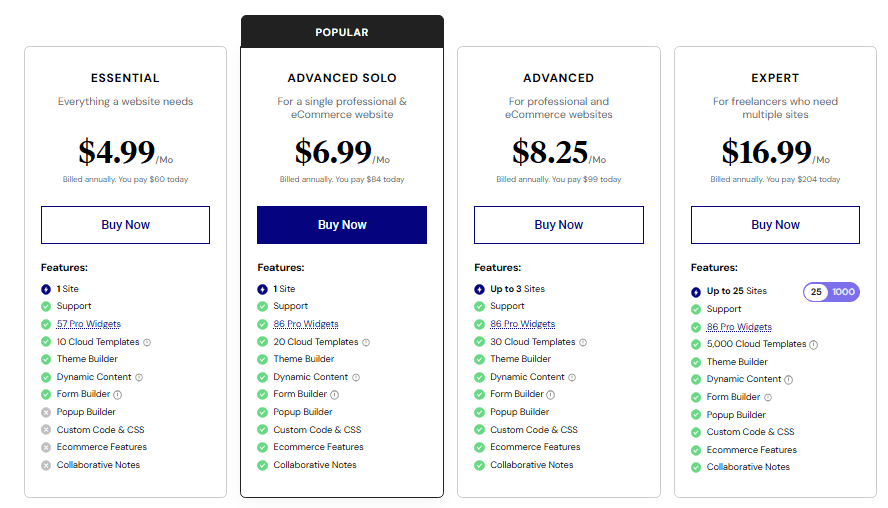
When purchasing Elementor Pro, you must choose a plan based on your needs. Remember that all plans, except free, have the same features and functionalities. Then click on the BUY NOW button.
Step 3: Select a Billing Cycle
Once you choose the plan, click on the “BUY NOW” button, and you will be redirected to the Billing cycle page. Now, from here, there are three billing cycle options, which are given below.
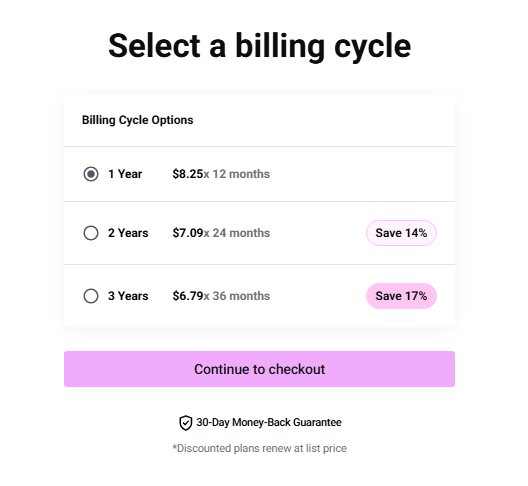
When you reach the Select a billing cycle screen, choose how long you want your Elementor Pro Advanced license to run.
You can pay yearly, or prepay for 2 or 3 years at a lower effective monthly price, where the 2‑year and 3‑year options show a percentage saving compared to the regular 1‑year billing.
After selecting your preferred billing cycle, click Continue to checkout to move to the payment page.
Step 4: Complete Your Purchase
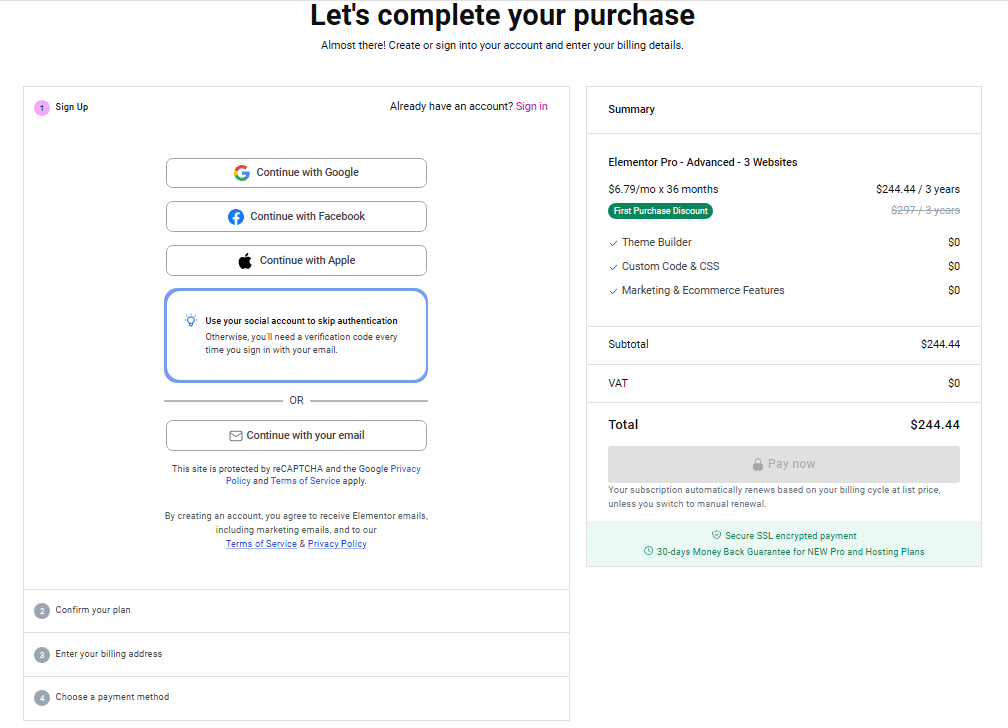
After selecting the 3‑year Elementor Pro Advanced plan (save 17%), you’ll see the Checkout page with your order details on the left side.
Then create a new account using the social or Google login options and confirm your plan.
Finally, enter your billing address and payment method details, and complete the payment process.
How to install and activate the Elementor Pro plugin?
Elementor makes it easy to design a custom WordPress page with a visual drag‑and‑drop editor, even if you are not a developer. Follow these simple steps to build and publish your first Elementor page in a structured, SEO‑friendly way.
Step 1: Install and activate Elementor
- Go to Plugins → Add New in your WordPress dashboard and search for “Elementor Website Builder”.
- Click Install, then Activate to enable the drag‑and‑drop page builder on your site.
Step 2: Choose an Elementor‑friendly theme
- Navigate to Appearance → Themes and install a lightweight theme like Hello, Kadence, or GeneratePress.
- Activate the theme so your Elementor pages load fast and stay fully responsive.
Step 3: Create a new page and open Elementor
- Go to Pages → Add New, give your page a name (for example, “Homepage”), and click “Edit with Elementor”.
- In Page Settings, set the layout to “Elementor Full Width” or “Elementor Canvas” for full control over your design.
Step 4: Build your layout with sections and widgets
- Click the plus icon to add a section, choose a column structure, and drag widgets like Heading, Text Editor, Image, and Button into place.
- Use the Content, Style, and Advanced tabs to adjust text, colors, spacing, and motion effects while keeping a clean heading structure for SEO.
Step 5: Use templates and Elementor AI
- Open the template library to insert pre‑designed blocks, landing pages, or full website kits and customize them for your brand.
- Use Elementor AI to generate or rewrite on‑page copy and images inside the editor, aligning text with your target keywords.
Step 6: Optimize for mobile and responsive design
- Switch to tablet and mobile views and fine‑tune font sizes, margins, and column stacking for smaller screens.
- Hide non‑essential elements on mobile and ensure buttons are large and easy to tap for a better user experience.
Step 7: Publish and connect the page
- Click Publish (or Update) to make your Elementor page live and review it on the front end.
- Go to Appearance → Menus to add the new page to your navigation, then check SEO basics like titles, meta description, URL slug, and internal links.
Pros and Cons of Elementor Plugin
Elementor has clear strengths for visual WordPress site building, but also some trade‑offs to consider.
Pros of Elementor Plugin
- Visual drag‑and‑drop builder makes it easy to design pages, sections, and whole sites without writing code, with a large collection of widgets and styling controls.
- Built‑in marketing tools like Elementor AI, forms, popups, and landing pages help you capture leads and create funnels without extra plugins.
- Tight WooCommerce, PayPal, and Stripe integrations let you build branded eCommerce storefronts directly inside the builder.
- Native Theme Builder, dynamic content, and workflow tools make it suitable for professional sites, agencies, and complex client projects.
- A large ecosystem (Hello theme, add‑ons, tutorials, and developer resources) plus an active community and expert support provide strong learning and support options.
Cons of Elementor Plugin
- Heavy designs and too many widgets on a page can impact performance if you do not follow best practices for optimization and good hosting.
- Lock‑in is a concern: switching away often leaves layout issues that may require redesign in the new builder or theme.
- Many advanced capabilities (full Theme Builder, advanced WooCommerce, and some workflow tools) are reserved for paid Pro plans, which adds recurring cost for freelancers and agencies.
- The growing product scope (plugin, hosting, AI tools, extra services) can feel complex for beginners who just need a simple page builder.
FAQs on Elementor Review
What is an Elementor plugin?
Elementor is a leading WordPress website platform that combines a drag‑and‑drop builder, AI tools, and managed cloud hosting to help you design, build, and grow websites without coding.
Is Elementor still free?
Yes, Elementor offers a free plugin with core widgets and basic page‑building features, while advanced design, marketing, and ecommerce tools are available in Elementor Pro.
What makes Elementor different from other page builders?
Elementor stands out through its intuitive visual editor, 100+ widgets, Theme Builder, WooCommerce integration, and an ecosystem that includes hosting, AI, and extensive learning resources.
Does Elementor offer hosting?
Yes, Elementor provides managed cloud hosting optimized for WordPress, with fast performance, automatic scaling for traffic spikes, security monitoring, and 24/7 expert support.
Can I build an online store with Elementor?
Yes, you can create full ecommerce storefronts using Elementor’s native WooCommerce, PayPal, and Stripe integrations, including product pages, carts, and custom checkout designs.
Is Elementor good for beginners?
Elementor is beginner‑friendly thanks to its visual drag‑and‑drop editor and templates, although the growing number of features can feel overwhelming at first.
Is Elementor suitable for agencies and professionals?
Yes, Elementor is widely used by agencies and freelancers, offering Theme Builder, dynamic content, workflow tools, and higher‑tier plans that support multiple client sites.
Does Elementor impact site speed?
Elementor can perform well when combined with good hosting, optimized images, and sensible use of widgets, but very heavy designs may require extra optimization.
Can I switch away from Elementor later?
You can switch themes or builders, but complex layouts usually need to be rebuilt, so some level of “builder lock‑in” should be expected.
Is Elementor still worth it in 2026?
Elementor is worth it if you want a flexible visual builder with integrated marketing, ecommerce, AI, and hosting options, and you are comfortable paying for Pro plans as your site grows.
Final words on the Review of the Elementor page builder plugin
Elementor remains one of the most powerful and user‑friendly WordPress page builders for bloggers, small businesses, and agencies who want full design control without coding.
With the addition of Elementor AI, AI Site Planner, and ongoing performance and theme‑builder improvements, it is still a strong choice in 2026 and beyond for creating landing pages, blogs, and WooCommerce stores.
For most users, Elementor Free is enough to experiment with the drag‑and‑drop editor and basic website design, while Elementor Pro unlocks the full theme builder, WooCommerce builder, popup builder, and advanced marketing widgets that make it a complete website building solution.
If you pair Elementor with a lightweight theme and good hosting, optimize your images and scripts, and follow basic SEO best practices, you can build fast, SEO‑friendly Elementor websites that rank and convert well in 2026.
Elementor Pro Review 2026

Elementor makes it easy for anyone to build beautiful, mobile-ready WordPress websites, without any coding experience. With over a million users worldwide, it’s the most popular WordPress page builder. Check out Elementor Pro here.
Product SKU: Elementor – Best Page Builder
Product Brand: Elementor Pro
Product Currency: USD
Product Price: 60
Price Valid Until: 2026-09-30
Product In-Stock: InStock
5
Pros
- Visual drag-and-drop editor makes it easy to build pages without coding
- Theme Builder lets you design headers, footers, archives, and single post templates
- 100+ Pro widgets and 300+ templates speed up website creation
- Popup Builder removes the need for a separate popup plugin
- Built-in Form Builder with email and marketing tool integrations
- Full WooCommerce Builder for custom product and shop pages
- Works with custom fields and dynamic content from ACF, Pods, and similar plugins
- Flexbox Containers and improved asset loading reduce bloat compared to older versions
- Integrates well with SEO plugins like Rank Math and Yoast
- Huge ecosystem of third-party add-ons and tutorials
- Regular updates and new features with active development in 2026
- Suitable for freelancers, agencies, and nontechnical users building client sites
Cons
- No lifetime license or renewal discount, only annual subscription pricing
- Adds extra page weight and DOM elements, which can slow sites if not optimized
- Interface can feel overwhelming for beginners because of many options
- Complex layouts may need careful responsive tweaks for mobile devices
- Performance depends heavily on good hosting and additional optimization plugins
- All advanced features are locked behind Elementor Pro, free version is limited
- Requires frequent updates and occasional fixes because it is a large plugin