Boost your internal links and rankings in minutes with Link Whisper’s smart AI suggestions – no more manual hunting for internal link opportunities. Fix orphan posts, improve topical authority, and grow your organic traffic with AI‑powered internal linking.
Coupon DEN gives you $15 OFF on any plan. (details below)
Internal linking has become one of the most important on-page SEO factors in 2026. With Google focusing more on topical authority, content relationships, and crawl efficiency, a strong internal linking structure is no longer optional—it’s essential. This is where Link Whisper stands out as a powerful solution for WordPress users.
Instead of adding links manually, the plugin analyzes your content and suggests contextual internal links based on keywords, relevance, and existing URLs—making internal link building faster and more accurate.
As SEO becomes more competitive, AI-driven internal linking tools like Link Whisper simplify the linking process, reduce orphan pages, and improve link distribution across your site.
Affiliate Disclaimer: We only recommend tools we use and trust. Affiliate earnings help keep our blog running at no extra cost to you. The reviews are based on our experiences, which they did not pay us for. The next is an affiliate disclaimer.
In this Link Whisper review 2026, we’ll explore how the plugin works, its features, SEO benefits, pricing, pros and cons, and whether it’s truly worth using for bloggers and content-heavy WordPress sites.
Quick Verdict – Is Link Whisper Worth It in 2026?
Best for blogs with 50+ posts, agencies, and affiliate sites that want faster internal link building. Use my Link Whisper coupon with $15 OFF (DEN) on any plan.
What Is Link Whisper?
Link Whisper is an AI-powered internal linking plugin for WordPress that suggests relevant internal links directly in the post editor and a dedicated linking report.
It scans your posts and pages, recommends anchor texts and target URLs for your approval or rejection, and lets you add links in bulk—eliminating manual searches, copy‑paste, and missed linking opportunities that create orphaned content.
Because it works natively in your dashboard, all internal linking happens where you write and edit. Its AI-driven contextual suggestions go beyond simple keyword rules, making it especially useful for bloggers and larger sites.
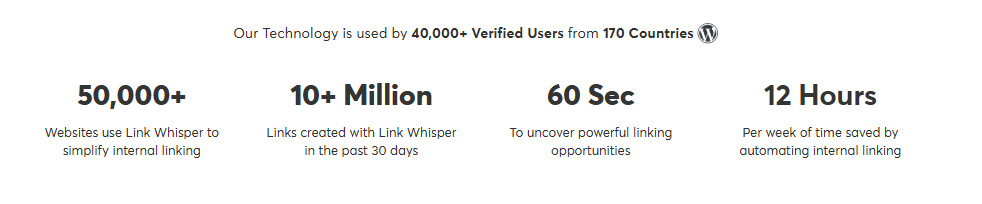
Trusted by 40,000+ users across 170 countries, Link Whisper has created over 10 million internal links in the past 30 days, helping websites save an average of 12 hours per week on internal linking tasks.
Link Whisper is often compared to tools like Internal Link Juicer, but stands out for its AI-based contextual matching and built-in workflow inside WordPress.
How Link Whisper Works for Internal Link Building
Understanding how Link Whisper works is key to seeing why it’s considered one of the most effective internal linking tools for WordPress in 2026.
The plugin is built to automate and optimize the internal linking process while still giving you full control over every link it suggests.
How Link Whisper Scans URLs and Content
After installation, using Link Whisper starts with a site-wide scan. The plugin analyzes:
- Existing posts, pages, and custom post types
- Target keywords and topic relevance
- URLs, anchor text patterns, and existing internal links
This scan helps the plugin understand your internal linking structure, identify pages with no internal links, and detect gaps in link distribution.
Unlike manual internal linking, this automated process ensures no relevant page is overlooked.
How the Plugin Suggests Relevant Internal Link Opportunities
Once the scan is complete, Link Whisper automatically generates internal link suggestions inside the WordPress editor. These suggestions are based on:
- Keyword context within your content
- Topical relevance between related posts
- Existing link opportunities across your site
The plugin highlights relevant internal linking opportunities, allowing you to add links with a single click.
This makes it easy to build internal links at scale and maintain a consistent internal link-building strategy—something that’s extremely difficult to achieve manually.
Role of Anchor Text Relevance and Keyword Context
One of the strongest features of Link Whisper is how it handles anchor text. Instead of randomly adding links, the plugin suggests anchors that match:
- Primary and secondary keywords
- Semantic relevance
- Natural sentence flow
This focus on keyword context helps search engines better understand content relationships, improves relevance, and avoids over-optimization.
Each suggested anchor text can be edited, ensuring that every link added fits naturally within the content.
Inbound Internal Links and Outbound Internal Links Overview
Link Whisper also provides detailed reports on:
- Inbound internal links (links pointing to a page)
- Outbound internal links (links going out from a page)
These reports help you identify weak pages with few internal links and strengthen them by adding relevant internal links from authoritative content.
By improving inbound internal links, you can enhance link equity flow, boost crawlability, and support better SEO performance across your site.
Overall, Link Whisper simplifies the entire process of building internal links—from scanning URLs to suggesting relevant internal links—making it a powerful AI-driven solution compared to manual internal linking or basic internal linking plugins.
Link Whisper Features
The real strength of Link Whisper lies in how its features support a strategic internal linking structure without turning the process into manual, time-consuming work.
Instead of acting like a basic related posts plugin, Link Whisper functions as a comprehensive internal linking plugin built specifically for SEO-focused WordPress sites.
Below is a clear breakdown of its core and advanced features, explained in a practical, non-overloaded way.
Core Internal Linking Features
- AI-based internal link suggestions: Link Whisper uses AI to analyze your content and suggest relevant internal links based on keyword context and topical relevance. These suggestions appear directly in the WordPress editor, making it easy to add links while writing or updating content. This approach helps uncover internal linking opportunities that are often missed when links are added manually.
- Automatic anchor text recommendations: Instead of forcing generic anchors, the plugin suggests natural anchor text aligned with your content keywords. You can edit or skip suggestions, ensuring each internal link fits naturally and follows internal linking best practices.
- Inbound internal links report: One of the most valuable Link Whisper features is its inbound internal links report. This report shows how many internal links point to each page, helping you quickly identify weak pages that need stronger internal link support. Improving inbound internal links plays a key role in distributing link equity across your site.
- Orphan pages detection: Pages with no internal links are bad for SEO. Link Whisper automatically detects orphan pages and highlights them inside the dashboard. This makes it easier to fix internal linking gaps and ensure every important URL is part of your site’s internal linking structure.
- Broken link detection & link report: Link Whisper includes basic broken link reporting, allowing you to spot outdated or broken internal URLs. While it’s not a full-blown link checker, it’s useful for maintaining a clean internal link profile and improving user experience.
Advanced & 2026 Updates
- Smarter keyword relevance matching: In 2026, Link Whisper’s AI has improved its ability to match keywords with context. Instead of suggesting random links, it focuses on semantic relevance, helping search engines better understand how your content is connected.
- Improved link distribution & link equity flow: The plugin helps balance link distribution by strengthening pages with fewer internal links and reducing over-linking to already strong pages. This supports better internal link building and more efficient link equity flow across your site.
- Plugin automatically adds internal links (with control): Link Whisper can automatically add internal links, but only within limits you define. You control how many links are added, where they appear, and which content types are included—preventing over-optimization while still saving time.
- Better compatibility with SEO plugins like Rank Math: Link Whisper works smoothly alongside popular SEO plugins such as Rank Math, without conflicts. This makes it easier to manage internal links as part of a broader SEO strategy rather than treating internal linking as a separate task.
Overall, these Link Whisper features make it more than just another internal linking tool.
It’s a comprehensive link automation solution designed to help WordPress users build relevant internal links, improve SEO structure, and manage internal links efficiently—without relying entirely on manual internal linking.
What Link Whisper Offers
Link Whisper is an AI‑powered internal linking plugin that scans your entire site and suggests highly relevant internal links as you write or update content.
Once the Link Whisper plugin is activated and operational within your WordPress blog environment, it offers and makes available five key and significant core features designed to enhance your website’s internal linking strategy and overall SEO performance.
1. Link Whisper Reports
These are the main navigation tabs for Link Whisper’s reporting area, plus one action button. Each one opens a different view of your site’s internal link data or triggers a fresh scan.
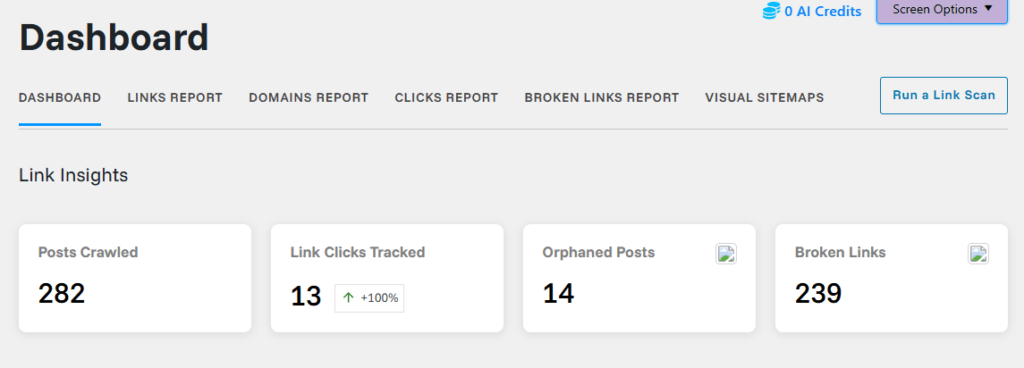
- Dashboard: Gives a high-level overview of your internal linking status (posts crawled, orphaned posts, broken links, link coverage, etc.). Best used as your starting point to see overall health and quickly jump to problem areas.
- Links Report: Shows link metrics per post/page, including how many internal links each has and which are orphaned. You use this to find weakly linked or orphaned content and add new internal links.
- Domains Report: Groups links by domain so you can see which sites (internal and external) receive the most links. Helpful for checking whether you are over-linking to certain external domains or properly interlinking your own properties.
- Clicks Report: Lists tracked link clicks so you can see which internal links users actually click. Useful for optimizing anchor placement and identifying high-performing link paths.
- Broken Links Report: Filters and lists all detected broken or problematic links with various error codes.
- This is where you fix or remove bad URLs to maintain a clean internal link structure and better UX.
- Visual Sitemaps: Displays a visual representation of how your content is connected via links.
- Good for understanding site architecture and spotting isolated sections.
- Run a Link Scan: Triggers Link Whisper to re-crawl your posts and links so all reports use the most recent data. You typically click this after publishing many new posts, doing bulk edits, or migrating content.
a. Link Health
The Link Health section in Link Whisper summarizes how strong and balanced your internal linking structure is, using four key metrics.
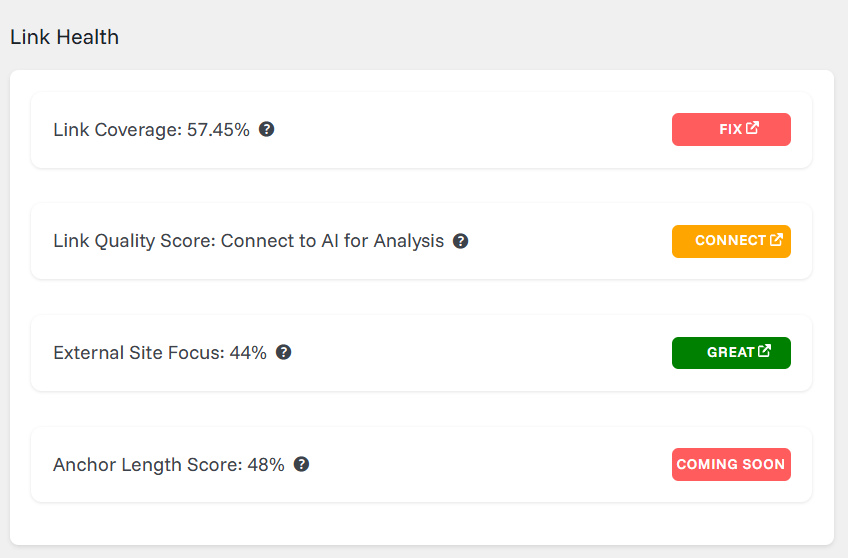
- Link Coverage: Link Coverage shows the percentage of your content that has an adequate number of internal links. It helps you quickly see how well your posts are interconnected across the site.
- Link Quality Score: Link Quality Score represents the overall strength and relevance of your internal links. It is designed to work with AI assistance to evaluate how contextually appropriate your linking patterns are.
- External Site Focus: External Site Focus displays what portion of your total links point to external domains instead of your own website. This metric highlights the balance between internal links and outbound links to other sites.
- Anchor Length Score: The Anchor Length Score indicates how optimized your anchor texts are in terms of length across the site. It gives a percentage score so you can understand whether your anchors are typically too short, too long, or within a recommended range.
b. Most Linked To Domains
The Most Linked to Domains feature shows which domains receive the highest number of links from your site’s content.
It exists to give you quick visibility into where your links are pointing most frequently, so you can understand which domains—your own properties or external sites—are getting the majority of your link equity and attention.
2. One Click Setup
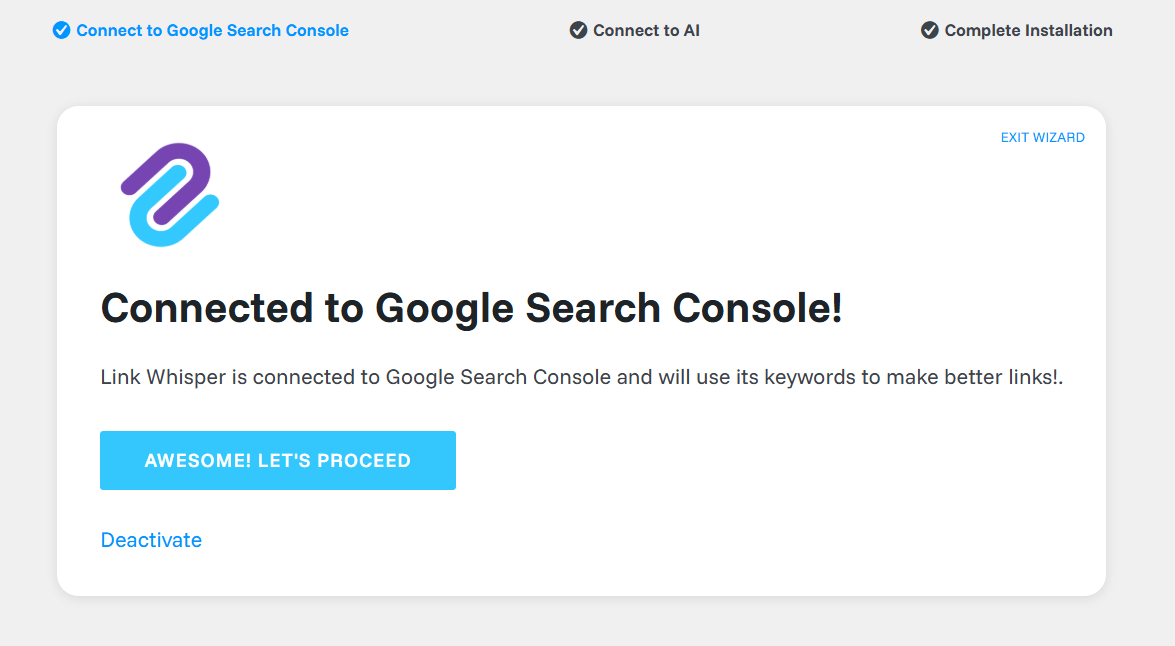
The One-click setup wizard in Link Whisper is designed to get the plugin fully ready in just three simple steps.
- Connect to Google Search Console: In the first step, you connect your site to Google Search Console, so Link Whisper can pull in your verified data and keywords. Once connected, the wizard confirms the integration and lets you move to the next step with a single proceed button.
- Connect to AI: The second step links your site to Link Whisper’s AI service. This connection enables AI-powered features inside the plugin, such as smarter link suggestions and enhanced link-related insights.
- Complete Installation: The final step completes the installation and exits the wizard so you can start using all Link Whisper features from the main Reports, Settings, and other plugin pages. After this, the plugin runs with your chosen connections active and ready for regular use.
3. AI Subscription
The AI Subscription feature in Link Whisper lets you supercharge internal linking using AI credits.
It delivers smarter link suggestions that are more focused and relevant to each article, flags when you’re linking between unrelated posts, and generates relational sitemaps to highlight content clusters.
It also creates post-specific target keywords to uncover better linking opportunities and detects products mentioned in your content so you can quickly link to important product pages.
4. Target Keywords
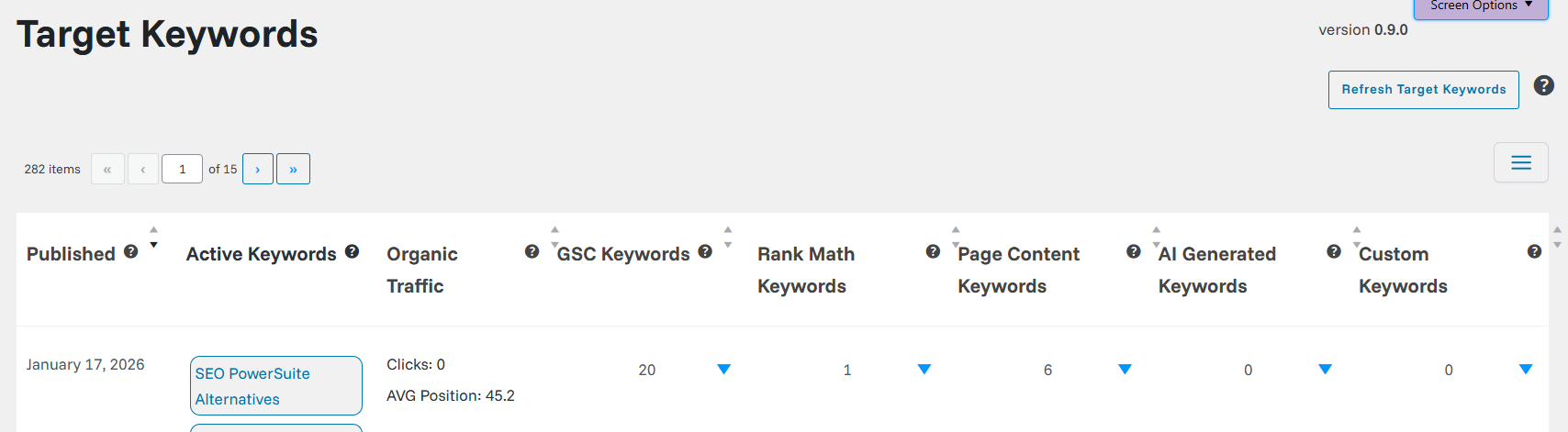
The Target Keywords section in Link Whisper is designed to centralize and manage all important keywords associated with your posts, pages, and taxonomies.
It pulls in keyword data from multiple sources, such as Google Search Console, your SEO plugin (like Rank Math), on-page content, AI-generated suggestions, and any custom keywords you add, then displays them in a structured table for each URL.
This section makes it easy to see which keywords are actively tied to each piece of content, how many target phrases are in use, and where additional keyword opportunities may exist.
What this feature gives you
- Post: Shows the title of the post or page that the target keywords belong to.
- Published: Displays the publication date of that specific post or page.
- Active Keywords: Lists all target keywords currently associated with that URL from any source.
- Organic Traffic: Indicates basic organic performance data such as clicks and average position.
- GSC Keywords: Shows how many target keywords are pulled from Google Search Console for that URL.
- Rank Math Keywords: Shows how many focus keywords come from the Rank Math SEO settings for that URL.
- Page Content Keywords: Counts keywords detected directly from the on-page content.
- AI Generated Keywords: Counts keywords that were suggested or generated by AI inside Link Whisper.
- Custom Keywords: Counts keywords that you have manually added as custom target phrases for that URL.
5. Link Whisper Settings
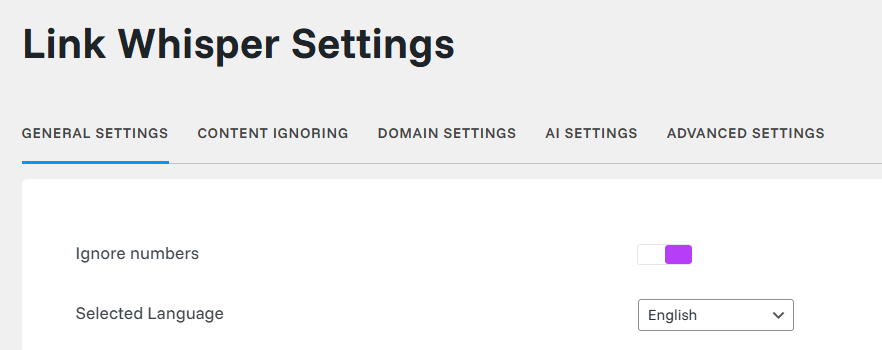
The Link Whisper Settings page is the main control center for how the plugin behaves across your site.
From here, you can fine-tune general options, ignore specific content, manage domains, configure AI behavior, and adjust advanced performance settings so internal link suggestions match your SEO strategy and workflow
- General Settings: This tab controls the basic behavior of Link Whisper. You choose the language, which post/term types are processed, how many sentences or paragraphs to skip at the start of a post, how many suggestions to show, and whether to hide the Link Whisper support pop-up.
- Content Ignoring: This tab lets you tell Link Whisper what to skip. You can define words, phrases, post IDs, categories, or sections that should be ignored so they do not generate or receive internal link suggestions.
- Domain Settings: This tab manages how domains are treated in link suggestions. You can whitelist or blacklist specific domains, control how often certain domains are suggested, and fine-tune whether internal or external domains should be prioritized.
- AI Settings: This tab configures how the AI features work. You can enable or disable AI assistance, adjust how AI-generated suggestions appear, and connect AI features to your available AI credits and preferences.
- Advanced Settings: This tab contains more technical and performance-related options. You can tweak how scans run, clear or rebuild Link Whisper data, and adjust other low-level behaviors that affect how the plugin processes large sites.
How Link Whisper’s AI Internal Linking Works (2026)
Before deciding if Link Whisper is right for your site, it helps to see exactly how its AI engine scans your content, finds opportunities, and turns them into practical internal links you can control.
In this section, you’ll see how the plugin works behind the scenes and what the day‑to‑day workflow looks like for a real WordPress blog in 2026
1. Manual Internal Linking vs AI Internal Linking
Doing internal linking manually means opening multiple tabs, searching for related posts, and inserting links one by one, which is slow and easy to mess up on large sites.
With Link Whisper’s AI, you see contextual suggestions directly inside the editor or in bulk screens, so adding dozens of relevant links takes minutes instead of hours.
This reduces missed linking opportunities, avoids over‑optimizing the same anchor text, and keeps your internal linking consistent across hundreds of articles.
In practice, what used to be a full day of “internal linking cleanup” can be done in short, repeatable sessions as part of your regular publishing workflow.
2. Real‑World Usage: How You Actually Use It
A typical workflow looks like this: you install Link Whisper, let it scan your content, and then start accepting or tweaking suggested links from the post editor or reports.
For existing sites, you can open the orphan pages report, add a handful of strategic links to each, and turn those isolated posts into part of your main topic clusters.
For new content, you simply write your article and then review Link Whisper’s suggestions to connect it to pillar posts, money pages, and related guides in a few clicks.
Whether you run a niche blog, authority site, or client sites as an agency, this workflow gives you consistent internal linking without needing a separate manual audit every time.
SEO Benefits You Get From Link Whisper
Internal links are not just navigation helpers; they directly influence how search engines understand, crawl, and rank your content clusters.
Below, we’ll break down the key SEO benefits you can expect from Link Whisper, from fixing orphan pages to strengthening topical authority and improving link equity flow across your site.
1. Better Site Structure and Topical Authority
By systematically connecting related posts, Link Whisper helps you build a clear hierarchy and topic clusters that search engines can understand more easily.
Your important pillar posts and money articles receive more internal links from relevant supporting content, which can strengthen their perceived importance and ranking potential.
This structured internal linking also makes it easier for users to navigate deeper into your content, discover related topics, and stay longer on your site.
2. Fixing Orphan Pages and Deep Pages
Link Whisper’s orphan pages report surfaces content that has zero or very few internal links, so you can integrate them into your site architecture.
Once you add internal links from relevant posts, those previously “hidden” URLs become easier for Google to crawl and for users to find.
You can also identify deep pages buried several clicks away and create shorter internal paths, improving both crawl depth and user experience.
3. Improved Crawlability, Engagement, and Revenue
With more logical internal links, crawlers can discover and recrawl important pages faster, which often leads to more stable indexing and quicker reflection of content updates.
Users get more relevant next‑step links inside your articles, which can increase pages per session, reduce pogo‑sticking, and improve overall engagement metrics.
When you point more internal links toward key affiliate reviews, product comparisons, or service pages, you also create more entry points to revenue‑generating content, which can translate into higher conversions over time.
Start fixing your internal links today
Link Whisper scans your existing posts, finds orphan content, and suggests smart internal links in seconds – no more manual audits or missed opportunities.
- Improve topical authority and on‑page SEO with better internal structure.
- Send more link juice to your most important money pages.
- Save hours every month on manual interlinking work.
Affiliate link: I may earn a small commission at no extra cost to you.
Link Whisper Pricing & Plans (Is the Plugin Worth It?)
When evaluating any WordPress plugin, pricing alone doesn’t tell the full story.
With Link Whisper, the real question is whether the time saved, SEO improvements, and internal link management benefits justify the cost—especially in 2026, where internal linking plays a bigger role in rankings.
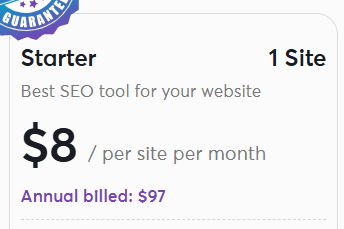
1. Starter Plan – $97/year
- Best if you run a single main blog
- Sites: 1 website
- Cost: $8 per site per month (billed annually at $97)
- AI Credits: 2,000 monthly
Key Features:
- 1-Click Setup
- Auto Linking functionality
- Google Search Console Integration
- Domains Report
- Data Export to CSV
- Multiple SEO Plugin Integrations (Rank Math, Yoast, etc.)
- Dynamic Visual Sitemaps
- AI-powered internal link suggestions
- Fix 404 errors & orphan pages
- Link Coverage improvement tools
- Track Link Relation score
- Automated monthly Link Maintenance
- Powerful Link Health Dashboard
- Meet the Team access
- Monthly educational Webinars
- New Features Every 2 Weeks
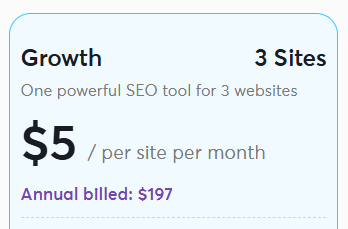
2. Growth Plan – $197/year⭐ Most Popular
- Best if you manage 2–3 blogs or client sites.
- Sites: 3 websites
- Cost: $5 per site per month (billed annually at $197)
- AI Credits: 3,000 monthly
- Savings: 32% off
Everything in Starter, PLUS:
- Premium Support
- 1:1 call with the team
- Increased AI Credits for more suggestions
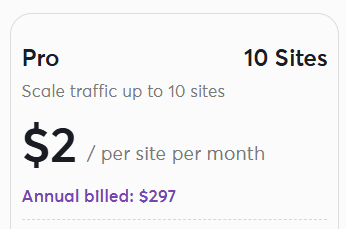
3. Pro Plan – $297/year
- Best for serious affiliates and content marketers with a portfolio of sites.
- Sites: 10 websites
- Cost: $2 per site per month (billed annually at $297)
- AI Credits: 5,000 monthly
- Savings: 69% off
Everything in Growth, PLUS:
- Support for up to 10 websites
- Higher AI credit allocation
- Enhanced team collaboration features
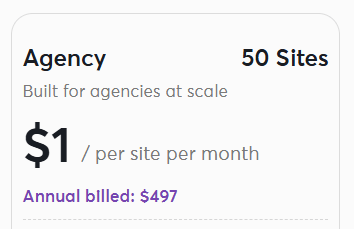
4. Agency Plan – $497/year
- Best for agencies managing 20–50+ client sites.
- Sites: 50 websites
- Cost: $1 per site per month (billed annually at $497)
- AI Credits: 10,000 monthly
- Savings: 90% off
Everything in Pro, PLUS:
- Massive scalability (50 sites)
- Maximum AI credits for unlimited optimization
- Priority enterprise support
Pick your plan and save $15 now
Whether you run a single blog or manage multiple client sites, Link Whisper has flexible licenses so you only pay for what you need.
- 1, 3, 10, and 50‑site licenses available for bloggers and agencies
- All plans include the core AI internal linking features.
- Works smoothly with popular SEO plugins and WordPress setups.
- Use coupon code DEN to save $15 on any Link Whisper plan.
Affiliate link: I may earn a small commission at no extra cost to you.
All Plans Include:
- No Setup Fees: Get started in minutes with 1-click installation
- Automatic Updates: Always access the latest features
- 60-Day Money-Back Guarantee: Risk-free trial period
- Annual Billing: Pay once yearly, cancel anytime
- Premium Features: Full access to all core functionalities
- Regular Feature Updates: New improvements every 2 weeks
Key Differentiators:
- AI-Powered Intelligence: Uses advanced AI to suggest contextually relevant internal links
- Time Savings: Reduces 100+ hours of manual linking work
- SEO Integration: Works seamlessly with Rank Math, Yoast SEO, and other popular plugins
- Analytics Dashboard: Visual insights into your site’s internal linking health
- Orphan Page Detection: Automatically identifies and helps fix isolated pages
Pricing Comparison Table
| Feature | Starter | Growth | Pro | Agency |
| Annual Price | $97 | $197 | $297 | $497 |
| Monthly Cost/Site | $8 | $5 | $2 | $1 |
| Number of Sites | 1 | 3 | 10 | 50 |
| AI Credits | 2,000 | 3,000 | 5,000 | 10,000 |
| Premium Support | ❌ | ✅ | ✅ | ✅ |
| 1:1 Team Call | ❌ | ✅ | ✅ | ✅ |
| Auto Linking | ✅ | ✅ | ✅ | ✅ |
| SEO Plugin Integration | ✅ | ✅ | ✅ | ✅ |
| Money-Back Guarantee | 60 days | 60 days | 60 days | 60 days |
Which plan I recommend: Most bloggers should start with the Starter or Growth plan; you can upgrade later as your number of sites grows.
Note: Pricing may change; always check the official Link Whisper site for the latest plans
Pros and Cons of the Link Whisper Plugin
Pros of Link Whisper
- AI-powered internal link suggestions
- Saves time on internal link building
- Helps find relevant internal linking opportunities
- Improves internal linking structure
- Inbound internal links report included
- Identifies pages with no internal links
- Works well with WordPress and major SEO plugins
- Useful for content-heavy websites
- Visual sitemaps and link health metrics help you understand your site structure at a glance.
- Works at scale for multi‑site setups (up to 50 sites on the Agency plan).
Cons of Link Whisper
- No free version available
- Less useful for very small blogs
- Requires basic internal linking knowledge
- Premium plugin with yearly pricing
- Some suggestions may not be perfect on very old or loosely related content, so manual review is still needed.
Link Whisper vs Rank Math, Yoast, Internal Link Juicer & Other Alternatives (2026)
Choosing the right internal linking plugin depends on how much control, automation, and SEO depth you need. Below is a clearer comparison of Link Whisper with other popular internal linking tools used by WordPress bloggers in 2026.
1. Link Whisper vs Rank Math Internal Links
Link Whisper is built specifically for internal link building, while Rank Math treats internal links as a supporting SEO feature.
- Link Whisper focuses only on internal linking and link management
- Provides detailed inbound internal links reports
- Suggests links contextually using AI
- Rank Math includes basic internal linking as a full SEO plugin
- Rank Math is better if you want one plugin for everything
Best choice:
- Link Whisper → serious internal link building
- Rank Math → general SEO with light internal linking
2. Link Whisper vs Yoast Internal Linking
Yoast SEO offers internal linking insights mainly in its premium version, but it remains limited compared to Link Whisper.
- Link Whisper gives real-time internal link suggestions in the editor
- Yoast provides general linking recommendations, not automation
- Link Whisper helps identify pages with no internal links
- Yoast is more focused on readability and on-page SEO basics
Best choice:
- Link Whisper → content-heavy blogs needing scalable internal linking
- Yoast → beginners focusing on basic SEO guidance
3. Link Whisper vs Internal Link Juicer Plugin
Internal Link Juicer is a popular alternative that focuses on rule-based automatic linking.
- Internal Link Juicer adds links based on predefined keywords
- Link Whisper suggests links based on context and relevance
- Internal Link Juicer works well for simple keyword-based linking
- Link Whisper offers better control over link distribution and reports
- Internal Link Juicer is easier but less flexible for strategy
Best choice:
- Link Whisper: Strategic, AI-driven internal linking
- Internal Link Juicer: Simple automatic keyword linking
Which Internal Linking Tool Is Best in 2026?
- Link Whisper: Best for AI-powered, scalable internal linking and SEO-focused sites
- Rank Math: Best all-in-one SEO plugin with basic internal links
- Yoast SEO: Best for beginners needing SEO guidance
- Internal Link Juicer: Best for rule-based automatic internal linking
If your goal is to build a strong internal linking structure, improve link equity flow, and manage internal links efficiently as your site grows, Link Whisper stands out as the most complete internal linking tool among these options.
Best Practices for Using Link Whisper Effectively
To get the best results from Link Whisper, it’s important to use the tool strategically rather than relying entirely on automation. Following proven internal linking best practices helps maintain a clean internal linking structure, supports SEO, and avoids common over-optimization issues.
- Follow the One Link per Paragraph Rule: While Link Whisper can suggest multiple internal links, it’s best to limit links to one relevant internal link per paragraph. This keeps the content readable, avoids clutter, and ensures each link adds value instead of distracting users or search engines.
- Avoid Over-Optimization: Adding too many internal links with the same anchor text or repeatedly to the same URL can look unnatural. Review suggestions carefully and avoid forcing links where they don’t fit. A balanced internal linking approach works better than aggressive link building.
- Choose Relevant and Natural Anchor Text: Anchor text should match the context of the sentence and feel natural to the reader. Instead of exact-match repetition, use variations that reflect the topic clearly. This improves relevance and helps search engines understand the relationship between linked pages.
- Review Every Link Before Publishing: Even though Link Whisper provides AI-powered internal link suggestions, manual review is essential. Check whether the suggested link truly adds value, points to the right page, and fits logically within the content. This step helps maintain content quality and trust.
- Build a Natural Internal Linking Strategy: Think beyond individual links and focus on the overall internal linking structure within the same topical cluster. Connect related posts within the same topic, strengthen important pages with more inbound internal links, and ensure no valuable content is left isolated. Over time, this creates a well-connected site that’s easier for users and search engines to navigate.
When used thoughtfully, Link Whisper becomes a powerful support tool rather than a shortcut. Combining automation with these best practices ensures your internal linking strategy remains effective, natural, and SEO-friendly in 2026.
Who Should Use Link Whisper?
Link Whisper is not designed for every type of website, but it delivers strong value for users who actively work on SEO and content growth. Below are the types of users who benefit the most from this internal linking tool in 2026.
- Affiliate Marketers: Affiliate marketers rely heavily on internal links to pass link equity, guide users toward money pages, and support affiliate link management. Link Whisper helps identify relevant internal linking opportunities from informational posts to commercial pages, making internal link building more structured and less manual.
- Bloggers With 50+ Posts: Once a blog crosses 50 or more posts, managing internal links manually becomes difficult. Older content is often forgotten, leading to weak internal linking and pages with no internal links. Link Whisper helps reconnect old and new posts, ensuring every link added supports the overall internal linking structure.
- SEO-Focused WordPress Users: If SEO is a priority, internal linking cannot be ignored. WordPress users who actively optimize for search engines benefit from Link Whisper’s AI-based internal link suggestions, inbound internal links reporting, and link distribution insights. These features support a cleaner, more strategic approach to internal link building.
- Content-Heavy Websites: Content sites with multiple categories, topic clusters, or long-form articles often struggle with uneven link distribution. Link Whisper helps balance internal links across pages, strengthen weaker URLs, and improve crawlability. This is especially useful when managing internal linking needs across one site—or even one of my sites with large content archives.
In short, Link Whisper is best suited for site owners who publish regularly, care about SEO, and want a scalable way to manage internal links without relying entirely on manual internal linking.
If you are just starting your blog, follow my step‑by‑step guide on how to start a WordPress blog before installing Link Whisper, so you set up everything correctly from day one.
If you’re ready to try it, click the button above and apply the coupon code DEN at checkout to save $15 instantly.
Get Link Whisper for your blog in 1 click
If you have 50+ posts or manage multiple niche sites, Link Whisper will quickly clean up your internal links and strengthen your site structure.
- Perfect for affiliate blogs, info sites, and client projects.
- Ideal for updating older content and fixing orphan posts.
- Beginner‑friendly dashboard with powerful reports for advanced users.
Affiliate link: I may earn a small commission at no extra cost to you.
Who Should Avoid Link Whisper?
While Link Whisper is a powerful internal linking tool, it’s not the best fit for every website or workflow. In some situations, the plugin may offer limited value compared to its cost or complexity.
- Very Small Blogs: If your blog has only a handful of posts, there will naturally be limited internal linking opportunities. On very small sites, you may already know exactly which pages to link, making an AI-powered internal linking plugin unnecessary. In such cases, adding internal links manually is often faster and more practical.
- Sites With Limited Internal Content: Websites with thin content, landing-page–only setups, or a small number of URLs don’t benefit much from automated internal link suggestions. Since internal linking depends on having enough related content, sites with limited internal pages may not see meaningful improvements in internal linking structure or SEO.
- Users Who Prefer 100% Manual Linking: Some site owners prefer complete manual control over every link they add. If you enjoy managing internal links yourself, selecting each anchor text, and deciding link placement without any tool assistance, Link Whisper’s automation may feel unnecessary—even though suggestions can be reviewed and edited.
- Non–Content-Focused Websites: Sites that don’t rely on ongoing content creation—such as simple business websites or brochure-style sites—often have minimal internal linking needs. For these sites, a full internal linking plugin may be more than what’s required.
In short, Link Whisper is best suited for content-driven WordPress sites with active SEO goals. If your site is small, static, or heavily manual by preference, simpler internal linking methods may be enough without using a dedicated internal linking tool.
Real-World Use Cases: How I’d Use Link Whisper Across My Sites
When managing multiple content-driven WordPress sites, internal linking quickly becomes difficult to track manually. This is where Link Whisper fits naturally into a real-world SEO workflow. Below are practical ways the plugin can be used without overcomplicating the process.
- Fixing Pages With No Internal Links: One common issue on growing sites is pages with no internal links pointing to them. These pages are harder for search engines to discover and often underperform. Link Whisper highlights such pages clearly, making it easy to add inbound internal links from relevant content and bring them back into the internal linking structure.
- Adding New Internal Links to Old Content: As new articles are published, older posts often miss out on fresh internal links. Using Link Whisper, you can quickly find relevant internal linking opportunities in existing content and add new internal links without rewriting entire articles. This helps refresh old posts and keeps internal links aligned with current topics.
- Creating a Strong Internal Linking Structure: A healthy site needs more than random links—it needs a clear internal linking structure. By consistently linking related posts and supporting key pages, internal links help distribute link equity and guide search engines through your content. Link Whisper supports this process by suggesting links that make sense contextually, not just by keyword matching.
- Managing Internal Links in a Visual and Organized Way: On larger sites, internal link management can feel overwhelming. Link Whisper’s reports provide a clearer view of how links are distributed across URLs, making it easier to understand which pages are strong, which are weak, and where internal links should be added. This makes internal link building more organized and less dependent on memory or guesswork.
Why trust my review?
I’ve been blogging and doing SEO since 2009, and I run multiple WordPress blogs, including all my blogs, where I regularly test blogging and SEO tools before recommending them. I use Link Whisper on my own sites to speed up internal linking, fix orphan posts, and strengthen topical authority
- 15+ years of experience helping bloggers with SEO and monetization.
- Hands‑on testing of Link Whisper on real content, not just reading features.
- Focus on practical results like faster internal link updates and better crawl paths, not just theory.
In real-world use, Link Whisper isn’t about adding as many links as possible—it’s about making sure every link serves a purpose. When used consistently, it helps maintain cleaner internal links, better relevance, and a more scalable SEO workflow across multiple WordPress sites.
FAQs – Link Whisper Review 2026
Is Link Whisper safe for SEO?
Yes, Link Whisper is safe for SEO when used correctly. It focuses on adding relevant internal links based on context and keywords, which helps search engines understand content relationships without harming rankings.
Does Link Whisper automatically add internal links?
Link Whisper can suggest internal links automatically, but it does not force them. You can review, edit, or skip each suggestion, which helps maintain a natural internal linking structure and avoid over-optimization.
Can Link Whisper handle broken links?
Link Whisper includes basic link reporting that helps identify outdated or broken internal links. While it’s not a full-blown link checker, it’s useful for maintaining clean internal links within WordPress content.
Does it work with Rank Math?
Yes, Link Whisper works well alongside Rank Math and other SEO plugins. It focuses only on internal link building, so it doesn’t conflict with Rank Math’s on-page SEO features.
Is Link Whisper the best internal linking plugin?
For content-heavy WordPress sites, Link Whisper is one of the best internal linking plugins available in 2026. Its AI-driven link suggestions, inbound internal links reports, and focus on relevance make it especially useful for bloggers and SEO-focused users.
What is Link Whisper and how does it work for bloggers in 2026?
Link Whisper is an AI internal linking plugin for WordPress that scans your content and suggests relevant internal links to improve site structure. It works by showing you contextual link opportunities directly in the editor, so bloggers can quickly add inbound and outbound links without manual searching. This saves time and helps with SEO for blogs with 50+ posts.
Is Link Whisper worth it for WordPress bloggers in 2026?
Yes, Link Whisper is worth it for most WordPress bloggers managing growing sites, as it automates internal link building and fixes orphan content. It’s especially valuable if you’re publishing regularly and want to boost topical authority without spending hours on manual links. For very small blogs under 30 posts, you might stick to manual methods first.
How much does Link Whisper cost in 2026?
Link Whisper’s pricing starts at about 97 USD per year for a single‑site license, with higher tiers for 3 or 10 sites typically ranging between 147 and 297 USD annually. You can often find limited‑time discounts or special deals via affiliate partners, and all plans are backed by a 60‑day money‑back guarantee, while multi‑site options are ideal for agencies and niche‑site builders.
What are the best Link Whisper alternatives for internal linking in 2026?
Top Link Whisper alternatives include Internal Link Juicer for simpler keyword-based linking, Linkilo for WordPress with cannibalization reports, and Semrush for all-in-one SEO. Choose Link Whisper if you want AI suggestions; go with free manual methods for tiny sites or full suites like Semrush for broader needs.
Does Link Whisper work with page builders like Elementor or Divi?
Yes, Link Whisper integrates smoothly with page builders like Elementor, Divi, and Thrive Architect, plus Gutenberg and Classic Editor. It creates standard HTML links, so there’s no compatibility lock-in if you deactivate the plugin later.
Can Link Whisper help fix broken links and orphan pages?
Absolutely—Link Whisper scans for broken links and orphan content (pages with no internal links) and offers bulk fixes. It reports inbound/outbound link counts and lets you update URLs site-wide, making it great for site audits and maintenance.
How do AI credits work in Link Whisper?
Link Whisper includes a set number of AI credits with each plan, and these credits are used whenever you run AI features like smart link suggestions or relation analysis. Each AI action consumes a small portion of your credits, and when they run out, AI features pause until your credits renew with your billing cycle or you buy extra credits, while non‑AI parts of the plugin continue to work normally.
Final Thoughts on Link Whisper – Is It Worth It in 2026?
Link Whisper is a WordPress plugin for internal link building that makes the process of building internal links much faster and more accurate.
In this comprehensive review, it’s clear that “Link Whisper” stands out by giving relevant internal link suggestions instead of random links, so you always know where you want to link and why.
Compared with tools like Internal Link Juicer, which offers robust but rule‑based automation, Link Whisper delivers a more flexible, contextual system that you can control.
By utilizing Link Whisper across various content‑heavy WordPress sites, you can fix orphan posts, use built‑in broken link checkers, and keep specific link paths to your money pages strong and consistent.
When you know internal links matter for SEO and link building remains a key ranking factor, this plugin for internal link building helps your links create better structure, relevance, and UX.
If you want to make Link Whisper part of your regular SEO workflow, it’s a practical way to simplify your internal linking strategy without losing control over each specific link you add.
If your blog has 50+ posts and you care about SEO, Link Whisper will save you hours every month. Use coupon DEN here to get $15 OFF and start optimizing your internal links today.
Link Whisper – Smart Internal Linking Tool for WordPress SEO
Link Whisper is an internal linking plugin for WordPress that automates internal link suggestions, fixes orphaned posts, and improves your site’s SEO structure and rankings. This AI internal linking plugin helps you to improve seo, ranking, and organic traffic.
Product SKU: LINKWHISPER-WP
Product Brand: Link Whisper
Product Currency: USD
Product Price: 97
Price Valid Until: 2026-11-30
Product In-Stock: InStock
5
Pros
- Array
- Array
- Array
- Array
- Array
Cons
- Array
- Array
- Array
- Array
- Array