Smarter internal linking, less manual SEO work.
Rank Math AI Link Genius helps you discover link opportunities, automate internal links with keyword maps, and update links in bulk without editing posts one by one.
Get Rank Math PRO →Building a strong internal link structure is one of the most overlooked yet powerful SEO strategies. Many bloggers and marketers struggle to manually discover link opportunities, maintain topical relevance, and fix broken links as their websites grow. This often results in poor crawlability, weak internal link coverage, and missed ranking opportunities.
That’s where Rank Math AI Link Genius changes the game. Built directly into Rank Math Pro, this AI-powered internal linking tool automates the entire process—from identifying link opportunities to inserting contextual internal links.
Affiliate Disclaimer: We only recommend tools we use and trust. Affiliate earnings help keep our blog running at no extra cost to you. The reviews are based on our experiences, which they did not pay us for. The next is an affiliate disclaimer.
In this in-depth Rank Math AI Link Genius review, you’ll discover how the tool works, its key features, step-by-step usage, and whether it’s truly the best internal linking solution for WordPress SEO. If you’re looking to improve your rankings with intelligent internal linking, this guide will provide a complete, actionable roadmap.
What is Rank Math AI Link Genius?
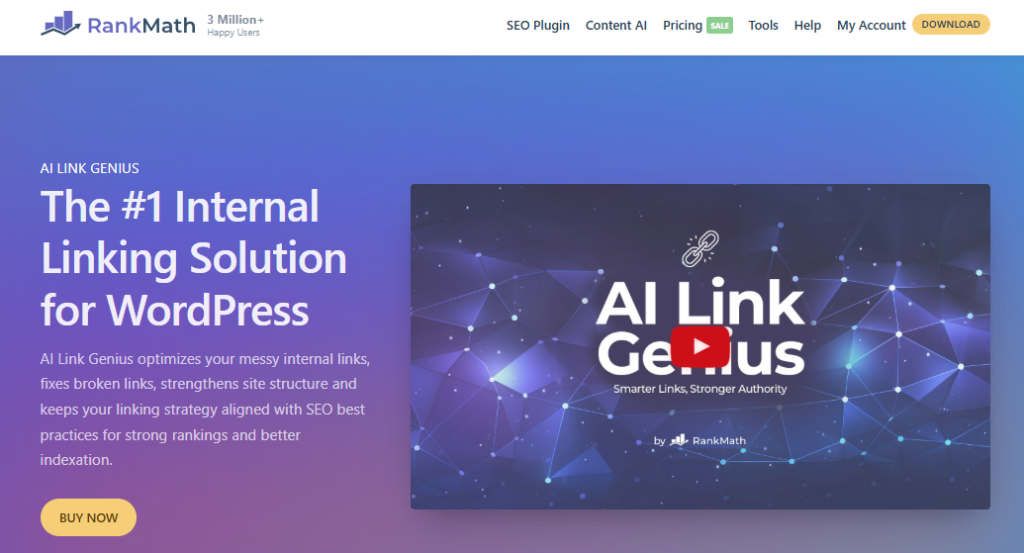
Rank Math AI Link Genius is an advanced, AI-powered internal linking tool built directly into Rank Math Pro. It automatically links related pages across your website by analyzing your existing content and identifying the best internal link opportunities.
Instead of manually searching for and adding internal links, AI Link Genius scans your site, understands the context of each page, and suggests highly relevant connections. This helps you build a strong internal link structure, improve link health, and ensure every important page receives proper internal link coverage.
Because it’s included with Rank Math Pro and uses Content AI credits, it functions as a complete internal link management solution. If you already use Rank Math Pro, this feature can dramatically improve your WordPress SEO without needing additional tools.
The system reviews your existing content, identifies the most suitable pages to link, and delivers clear, actionable link recommendations directly inside your WordPress dashboard.
Key highlights include:
- Built directly into Rank Math Pro
- Uses AI-powered link analysis
- Generates contextual internal and external links
- Works with content AI subscription/credits
This makes using AI Link Genius one of the easiest ways to scale internal linking without increasing workload.
Why Internal Linking is Critical for SEO
Internal linking is essential because it helps search engines understand your website’s structure and how your pages relate to one another. Without a strong internal link framework, even high-quality content may struggle to rank due to weak internal link coverage.
A strong internal linking strategy helps the following:
- Distribute link authority across pages
- Improve crawlability and indexing
- Increase time on site
- Strengthen keyword relevance
However, manual linking often leads to:
- Missed link opportunities
- Poor link structure
- Pages with weak internal links
- Broken links affecting SEO
This is where an internal linking tool like AI Link Genius becomes indispensable. It ensures that every internal link on your site supports better rankings and consistently follows SEO best practices.
How AI Link Genius Improves Internal Link Strategy
AI Link Genius streamlines internal linking with AI-driven automation, making the process faster, smarter, and highly scalable. Instead of manually inserting links, it analyzes your entire site and recommends optimized internal links based on real data and contextual relevance.
Here’s how it enhances your strategy:
- Identifies pages with weak internal link coverage
- Suggests relevant anchor texts using AI variations
- Automatically connects related content
- Improves overall link structure and link data
- Helps fix internal linking gaps
Additionally, AI Link Genius uses advanced algorithms to ensure links are placed naturally within your content. This helps prevent over-optimization while improving both user experience and overall SEO performance.
In short, AI Link Genius makes internal linking effortless by combining automation with intelligent decision-making—something manual linking simply cannot match at scale.
How AI Link Genius Works (Internal Linking Using AI)
Understanding how AI Link Genius works is key to unlocking its full potential. This feature is not just a basic internal linking tool—it’s a complete AI-powered system that analyzes your entire website, identifies linking gaps, and suggests or applies internal links automatically.
When you enable the AI Link Genius module in Rank Math, it immediately begins scanning your existing content—including posts, pages, and both internal and external links. It then builds structured link data, pinpoints pages with weak internal link coverage, and generates clear, actionable internal linking recommendations.
The entire process is powered by Content AI credits, allowing the AI to continuously refine its suggestions based on your content. This makes AI-driven internal linking significantly faster, more accurate, and far more scalable than manual linking.
AI Link Genius Algorithm
At its core, AI Link Genius uses advanced AI algorithms to understand how your content is connected. Instead of simply scanning for keywords, it analyzes context, relevance, and semantic meaning to generate high-quality, AI-powered internal link suggestions.
Here’s what happens behind the scenes:
- AI analyzes your content structure and keywords
- It identifies pages to link based on relevance
- Evaluates incoming and outgoing link counts
- Detects weak internal link coverage
- Builds a smarter internal link structure
This algorithm ensures that every suggested internal link contributes to better SEO performance. Unlike manual linking, which is often inconsistent, AI Link Genius works systematically to optimize your entire site.
How It Finds Link Opportunities Automatically
One of the most powerful features of AI Link Genius is its ability to automatically discover link opportunities across your website.
Instead of manually searching for pages to link, the AI:
- Scans your entire content library
- Identifies related topics and keywords
- Matches relevant anchor text within content
- Suggests where to add internal links
- Highlights pages with weak internal link coverage
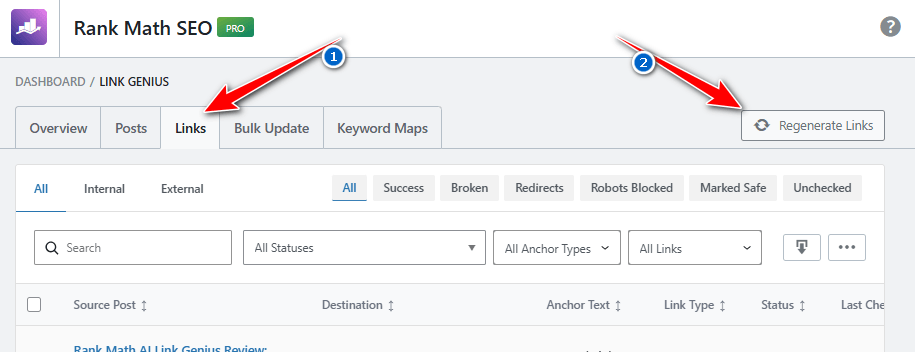
You can simply go to Rank Math → Link Genius → Links and click “Regenerate Links” under link opportunities to see suggestions.
This process ensures that:
- No important page is left unlinked
- Every link on your site has a purpose.
- Your internal linking becomes consistent
In short, AI Link Genius automatically finds linking gaps and fills them intelligently, saving hours of manual work.
AI Variations & Smart Link Suggestions
Another powerful aspect of this tool is its ability to generate AI variations for anchor text. This is crucial because overusing the same anchor text can harm SEO.
With AI Link Genius:
- It generates multiple AI variations for each link
- Suggests natural anchor placements
- Avoids keyword stuffing
- Maintains contextual relevance
The system also tracks:
- How many times a link appears
- Link type (internal or external)
- Overall link count and link health
These intelligent AI suggestions help ensure your internal linking follows SEO best practices while keeping your content natural, relevant, and user-friendly.
How Rank Math AI Link Genius Works (Simple Steps)
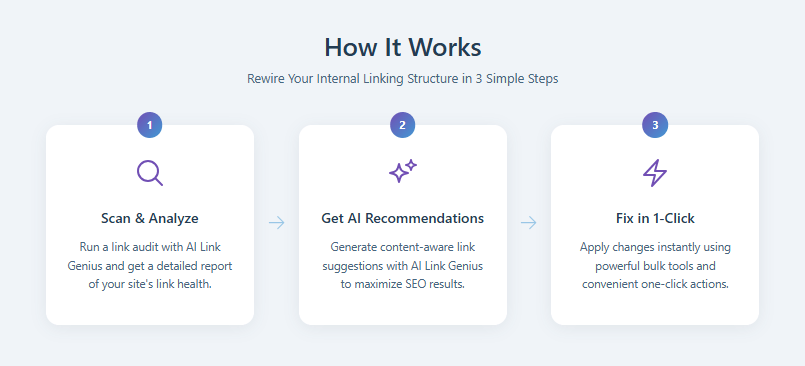
- Scan & Analyze: AI Link Genius scans your website and performs a link audit to analyze your internal link structure. It checks link health, identifies weak internal links, and finds pages that need better linking.
- Get AI Recommendations: The AI analyzes your content and provides smart link suggestions. It identifies relevant pages to link and generates contextual anchor text to improve your SEO and internal link coverage.
- Fix in 1-Click: Instantly apply all recommended internal links using the bulk update tool. With a single click, you can strengthen your internal linking structure and optimize your site for better rankings.
These 3 simple steps make AI Link Genius one of the easiest internal linking tools for WordPress SEO.
👉 Ultimately, AI Link Genius combines automation with intelligence, making it one of the most advanced internal linking tools available in WordPress SEO today.
Features of Rank Math AI Link Genius
Rank Math AI Link Genius is more than just an internal linking tool—it’s a complete internal link management suite built directly into Rank Math Pro. It combines AI-powered link analysis, automation, and data-driven insights to help you strengthen your internal link structure efficiently.
What makes it powerful is that it doesn’t just suggest links—it helps you analyze, manage, and optimize every link on your site. From identifying link opportunities to fixing broken links, everything is handled inside a single dashboard.
If you’re already paying for Rank Math Pro, these AI features add massive value by simplifying complex SEO tasks like internal linking using AI.
1. AI Link Suggestions
The AI Link Suggestions Engine is the core of AI Link Genius. It continuously scans your existing content and generates intelligent link suggestions based on context, keyword relevance, and semantic understanding.
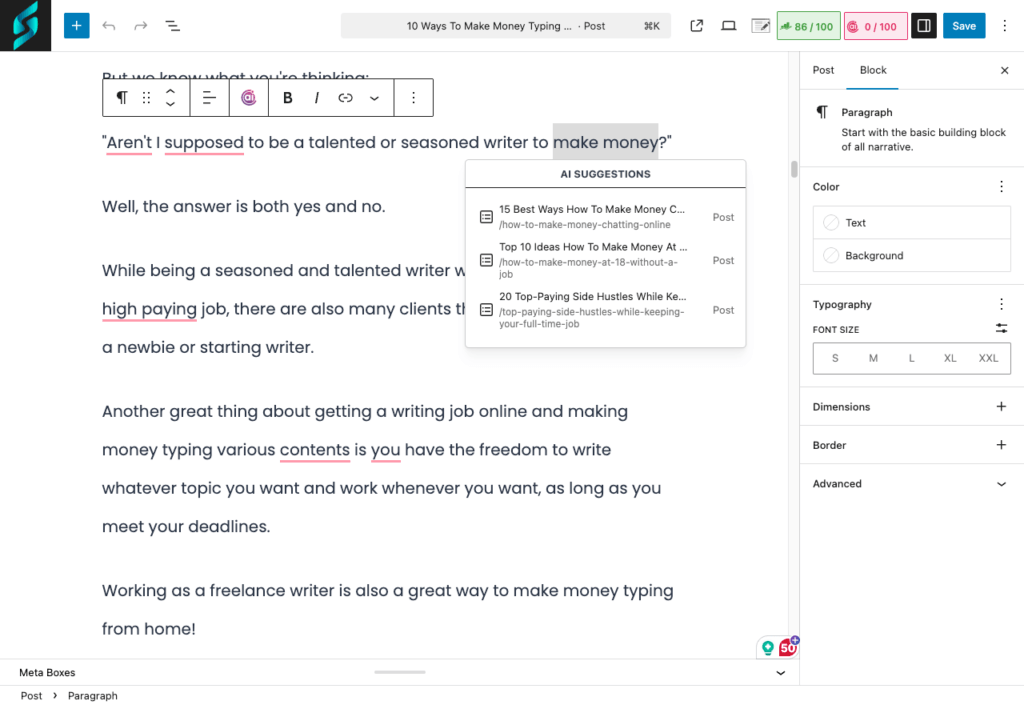
Here’s how it works:
- AI analyzes your content and identifies pages to link
- Suggests contextual anchor texts
- Recommends both internal and external links
- Ensures balanced internal link coverage
Unlike manual linking, this engine ensures that no important page is missed. It also improves link data accuracy, making your site structure stronger.
👉 In short, this feature helps you automatically link relevant content without spending hours searching for opportunities.
2. Bulk Update Tool
The Bulk Update Tool is a game-changer for anyone managing large websites. Instead of manually adding links one by one, you can apply multiple link changes instantly.
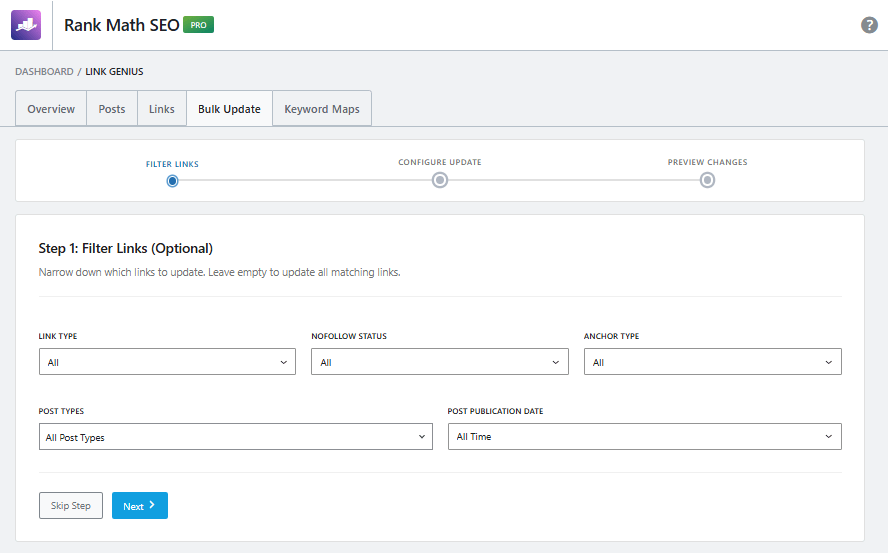
Key benefits include:
- Add internal links in bulk
- Apply AI suggestions with one click
- Update multiple posts simultaneously
- Save hours of manual work
When you click “Generate” under link opportunities, you can review suggestions and use the bulk update tool to implement them across your site.
This feature makes AI Link Genius automatically insert links at scale, which is especially useful for bloggers with hundreds of posts.
3. Dashboard Overview
The AI Link Genius dashboard gives you a complete overview of your site’s internal linking performance. It acts as a central hub where you can monitor and optimize your link structure.
Inside the dashboard, you’ll find:
- Incoming and outgoing link counts
- Internal link coverage metrics
- Pages with weak internal links
- Link opportunities and suggestions
You can access it via Rank Math SEO → Links → AI Link Genius dashboard.
This dashboard helps you understand:
- Which pages need more links
- How your links are distributed
- Where improvements are required
👉 It provides actionable insights that help maintain strong link health and SEO performance.
4. Link Audit & Broken Link Detection
Another powerful feature is link audit and broken link detection, which ensures your internal links remain healthy and functional.
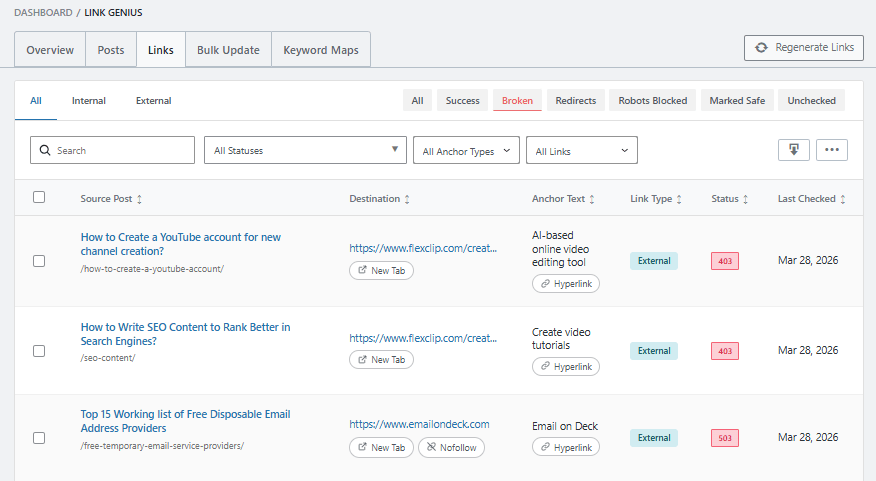
AI Link Genius includes:
- Built-in broken link detection
- Link audit reports
- Identification of outdated or old links
- Suggestions to fix linking issues
Broken links can negatively impact user experience and SEO rankings. With this feature, you can quickly identify and fix these issues using the broken link checker.
👉 This ensures that every link on your site contributes positively to your SEO rather than harming it.
5. Spot and Fix Misused Nofollow Tags
Managing nofollow internal links is critical for maintaining a healthy internal link structure. With AI Link Genius, you can easily detect internal links that incorrectly use the nofollow attribute, which may block link equity flow.
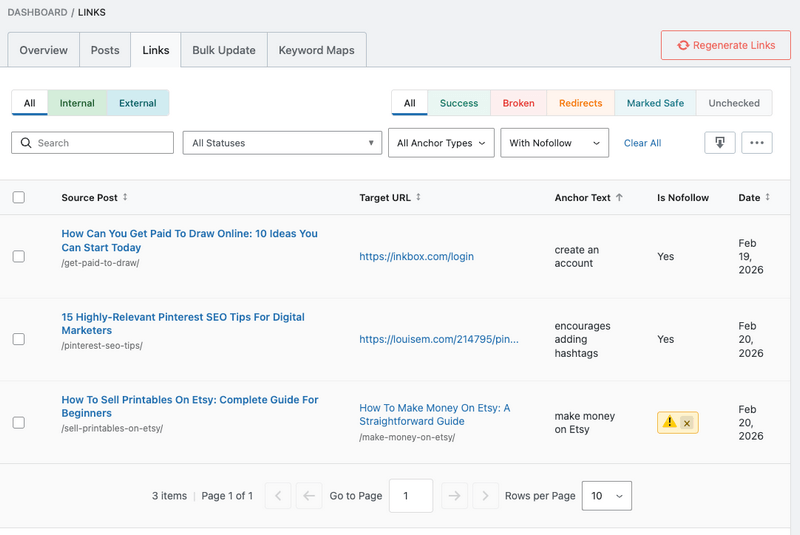
This feature helps you:
- Identify all internal links marked as nofollow
- Get a quick overview of nofollow links across your site
- Manage nofollow attributes in bulk
- Remove unnecessary nofollow tags with one click
👉 This ensures that your internal links properly pass SEO value and improve overall link health.
6. Keyword Maps
AI Link Genius enhances semantic SEO by automatically creating keyword-to-URL mappings using AI-generated variations. Instead of relying on exact match anchors, it uses smart synonyms to improve contextual linking.
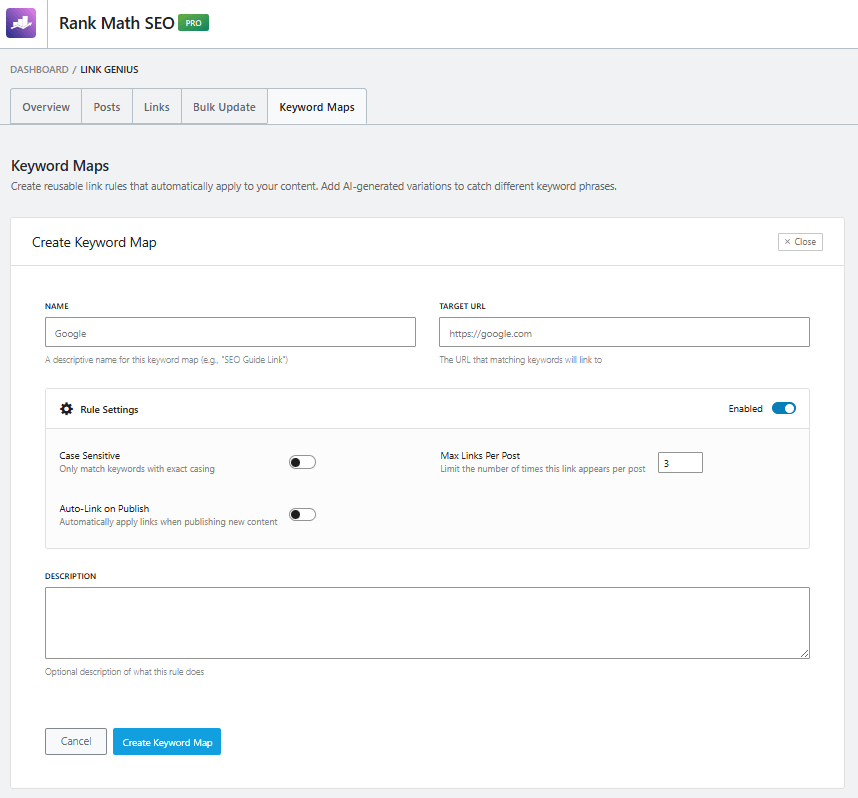
With this feature, you can:
- Generate AI-based keyword variations for each target page
- Automatically link different keyword phrases to the correct URLs
- Enable or disable specific keyword mappings
- Track execution history for better control
👉 This helps improve keyword relevance, avoid over-optimization, and strengthen your site’s topical authority.
7. AI-Recommended Related Posts
Keeping users engaged is essential for SEO, and AI Link Genius includes an intelligent related-posts system designed to enhance user experience and reduce bounce rates.
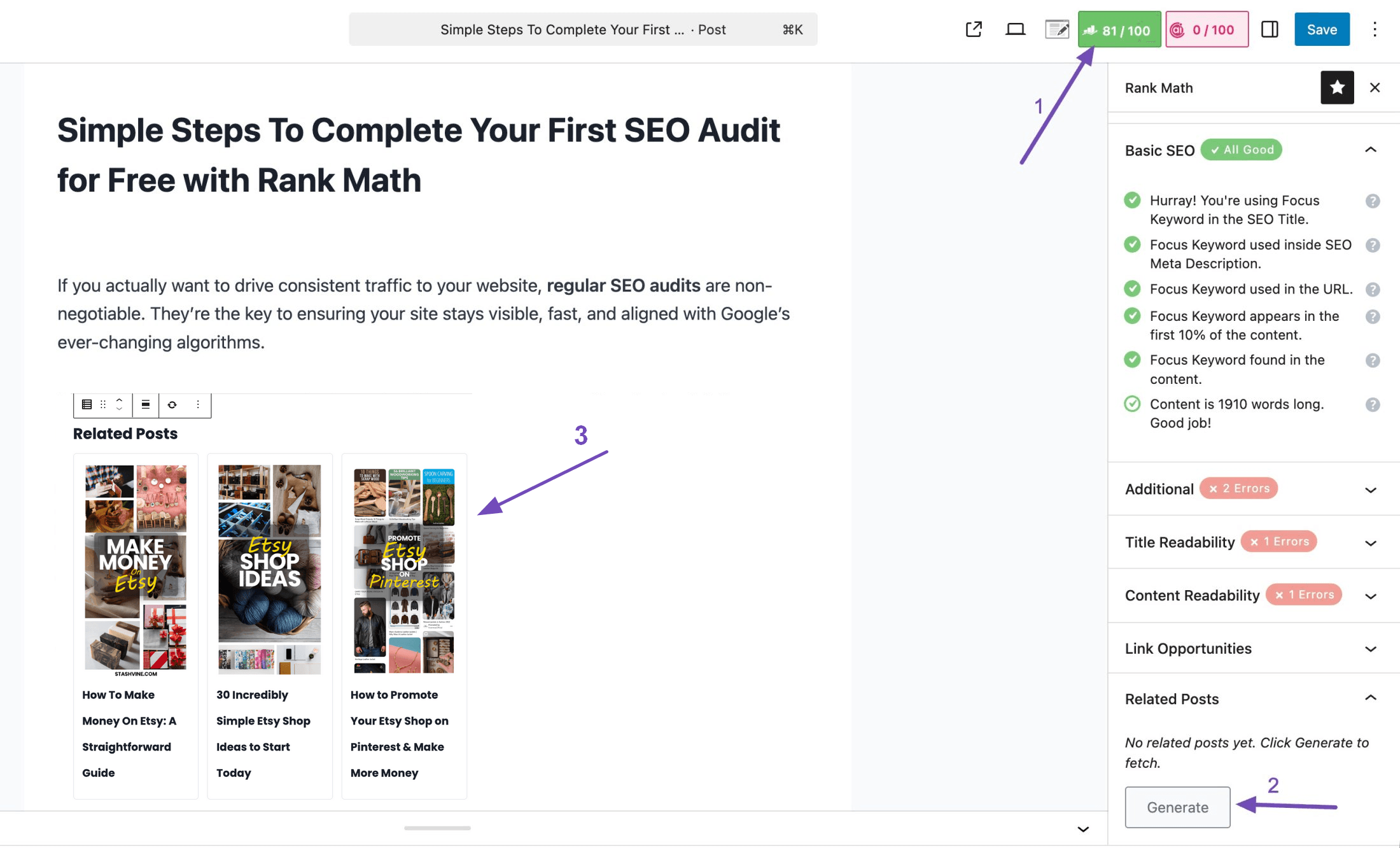
This feature allows you to:
- Add AI-recommended related posts to your content
- Improve internal linking using contextual suggestions
- Use a dedicated Related Posts block in the Block Editor
- Insert related posts using shortcode in the Classic Editor
- Add recommendations with one click from the sidebar
👉 This creates a more connected content structure and encourages users to explore more pages.
8. Identify & Fix Orphaned Pages Easily
Orphan pages are among the most serious SEO issues because they lack internal links pointing to them. AI Link Genius includes a dedicated orphan-page detection system to help you quickly identify and fix this problem.
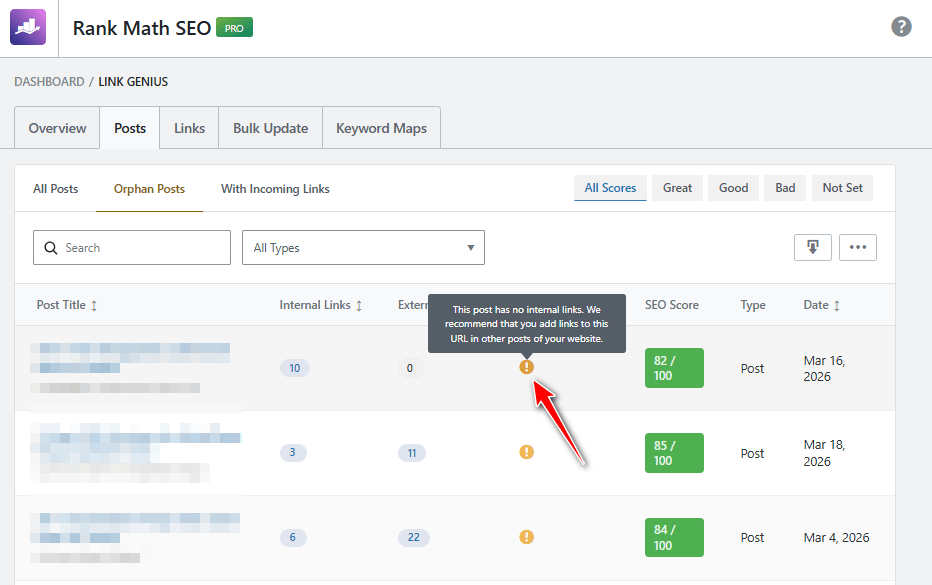
With this feature, you can:
- Identify pages with no incoming internal links
- View a warning indicator for orphan posts
- Access a dedicated “Orphan Posts” filter tab
- Check incoming link counts instantly
👉 Fixing orphan pages improves crawlability, boosts authority flow, and gives those pages a second chance to rank.
9. 1-Click Breakdown of Link Profile
Understanding your link profile is essential for optimizing internal linking. AI Link Genius allows you to quickly analyze link connections for any page.
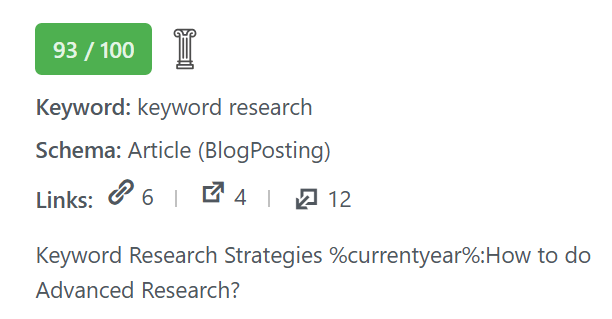
This feature includes:
- Clickable link counts directly from the Posts view
- Instant access to a detailed link breakdown
- Filtered view inside the Links dashboard
- Insights into internal and external links connected to a page
This makes it easy to analyze and optimize your link structure and link data without complex tools.
👉 As a result, AI Link Genius makes internal linking smarter, more natural, and highly effective for both users and search engines.
Save Hours with AI-Powered Internal Linking
Let AI find link opportunities, fix orphan pages, and improve your internal link structure automatically.
- Bulk link updates
- AI keyword variations
- Smart link recommendations
How to Use Rank Math AI Link Genius (Step-by-Step Tutorial)
Using Rank Math AI Link Genius is straightforward, even for beginners. The tool is built directly into Rank Math Pro, so you don’t need any extra plugins or complex setup. Once you enable the Link Genius module, the AI starts analyzing your existing content and generates actionable link recommendations.
This section will guide you step-by-step on how to enable AI Link Genius, access the dashboard, generate link opportunities, and use the bulk update tool to automatically link pages across your site.
👉 If you’re already using Rank Math Pro and have a content AI subscription, you can start using AI Link Genius immediately.
How to Enable AI Link Genius in Rank Math
To start using this feature, you first need to enable the AI Link Genius module inside Rank Math.
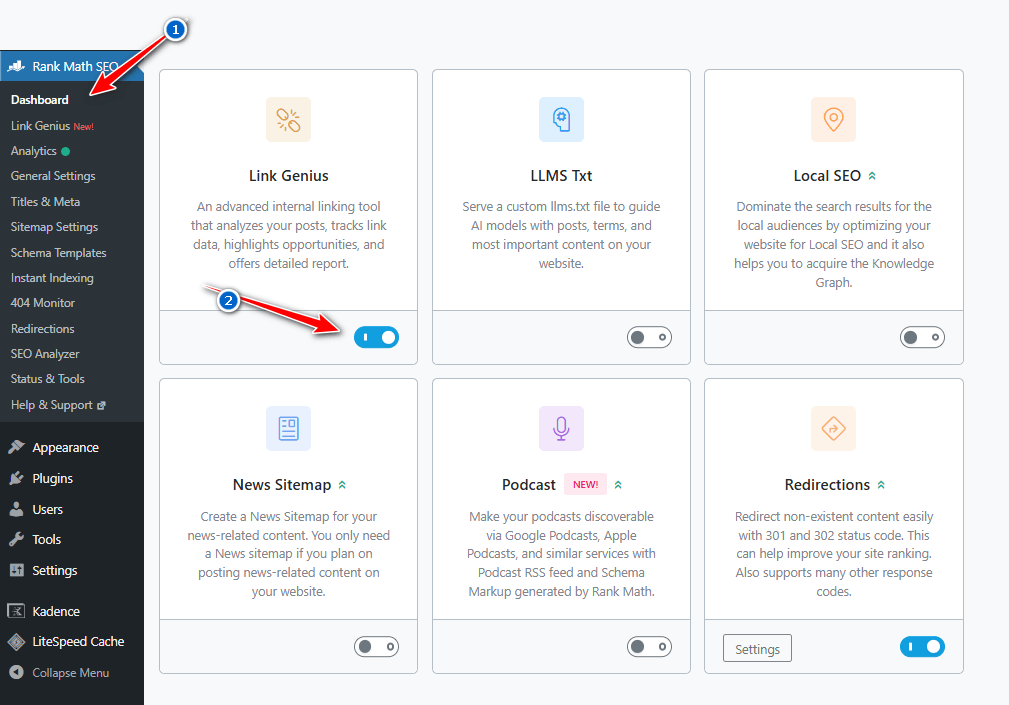
Follow these steps:
- Go to Rank Math SEO → Dashboard
- Locate the AI Link Genius module
- Click to enable the module
- Make sure you have Content AI credits available
Once enabled, the feature becomes active and starts scanning your site. Since it is built directly into Rank Math Pro, there’s no need for additional configuration.
Important Tip: If you don’t see this feature, you may need to upgrade the Rank Math Pro plan or activate your content AI subscription.
AI Link Genius Dashboard Overview
The AI Link Genius dashboard gives you a complete overview of your website’s link performance in one place. It helps you monitor your internal and external links, identify issues, and improve your overall SEO strategy without manually checking each page.
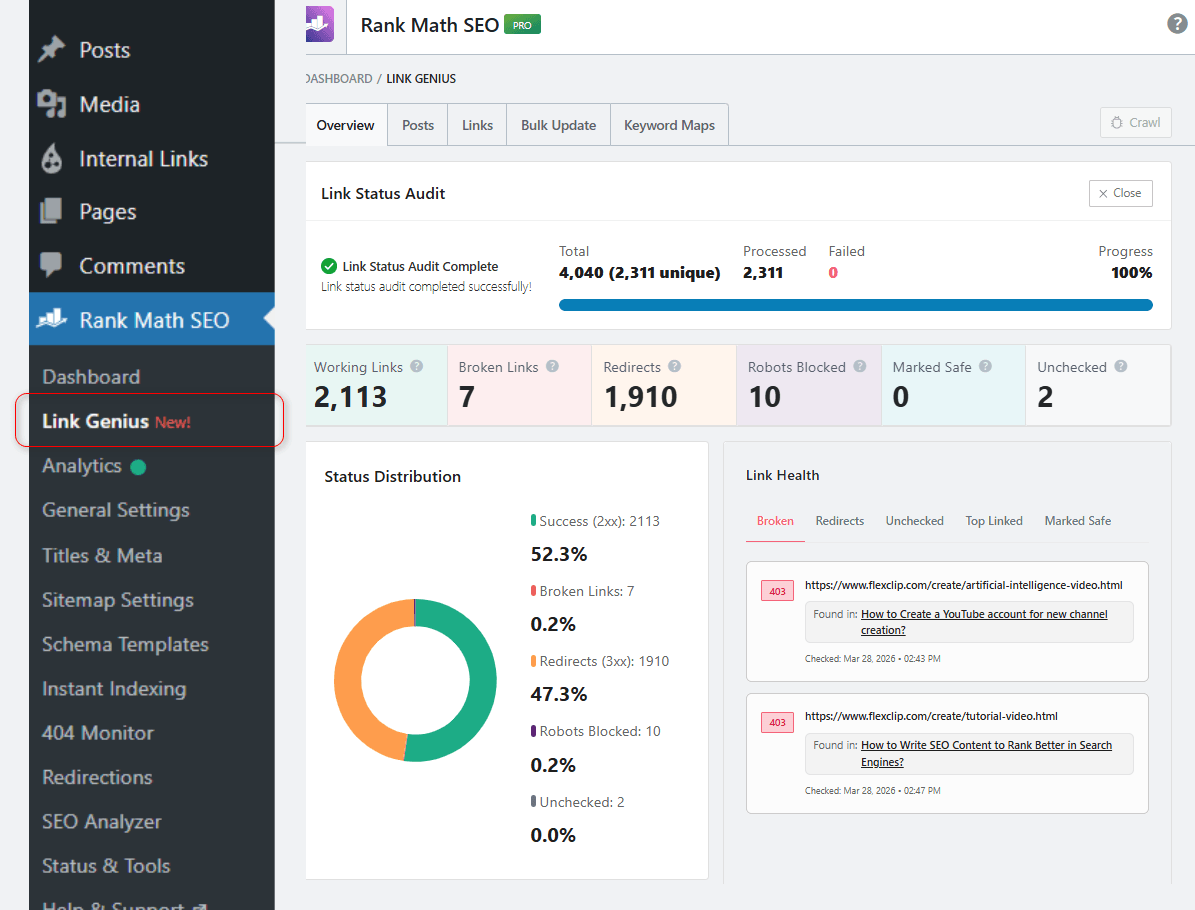
Features in the Dashboard
The dashboard includes several useful features to manage your links effectively:
- Overview of total links scanned
- Tabs like Overview, Posts, Links, Bulk Update, and Keyword Maps
- One-click crawl option to refresh link data
- Quick access to link insights and reports
These features make it easy to manage your entire link structure from a single panel.
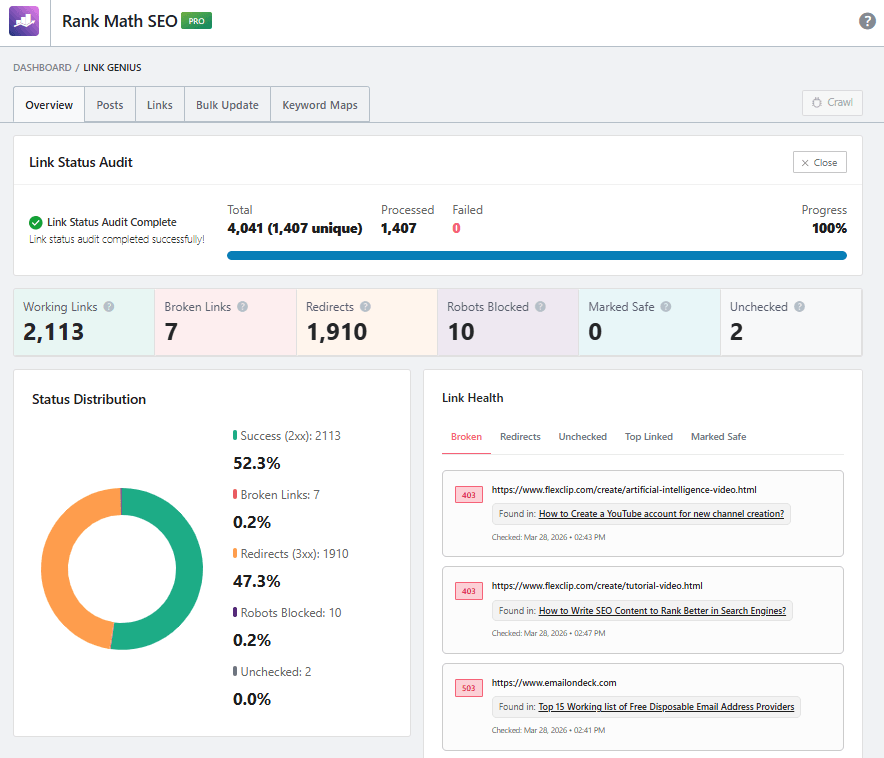
1. Link Status Audit
The Link Status Audit section shows a summary of your website’s links.
It includes:
- Total links and unique links
- Number of processed links
- Failed links (if any)
- Audit progress (usually shown as 100%)
This section confirms whether your site’s link audit is complete and up-to-date.
2. Status Distribution
This section provides a visual breakdown of your link types.
You can see:
- Working links (success)
- Broken links
- Redirected links (3xx)
- Robots blocked links
- Unchecked links
It helps you quickly understand how your links are distributed across your website.
3. Link Health
The Link Health section highlights issues that need attention.
It shows:
- Broken links with error codes (like 403, 503)
- The exact pages where these links appear
- Recently checked link status
This makes it easy to find and fix problematic links to improve SEO.
How to Check This Dashboard
Follow these simple steps:
- Go to Rank Math SEO → Link Genius
- Click on the Overview tab
- Review the Link Status Audit
- Check the Status Distribution chart
- Analyze issues in the Link Health section
This helps you regularly monitor and maintain a strong internal link structure.
In short, the AI Link Genius dashboard acts as a central hub to track, analyze, and improve your website’s link performance easily.
How to Add Internal Links Automatically
With the latest update, Rank Math AI Link Genius uses keyword maps to automate internal linking. Instead of manually adding links, you define rules once, and the tool automatically links keywords across your content.
Step 1: Enable AI Link Genius
Before you start, you need to activate the feature inside Rank Math.
Go to Rank Math SEO → Dashboard and enable the Link Genius module. This allows you to access all internal linking automation features and start using AI-powered linking.
Step 2: Go to Keyword Maps
Once the module is enabled, the next step is to access the internal linking settings.
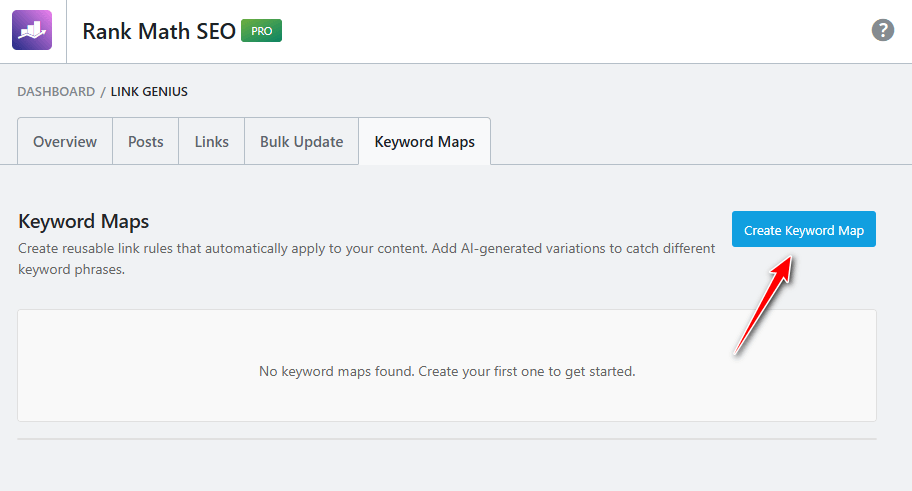
Navigate to Rank Math SEO → Links → Keyword Maps. This section is where you create and manage all your automatic internal linking rules. Now hit the Create Keyword Map button.
Make reusable link rules that your content will automatically follow. To capture various keyword phrases, incorporate AI-generated versions.
Step 3: Create a Keyword Map
Now, you need to define how your internal links should work.
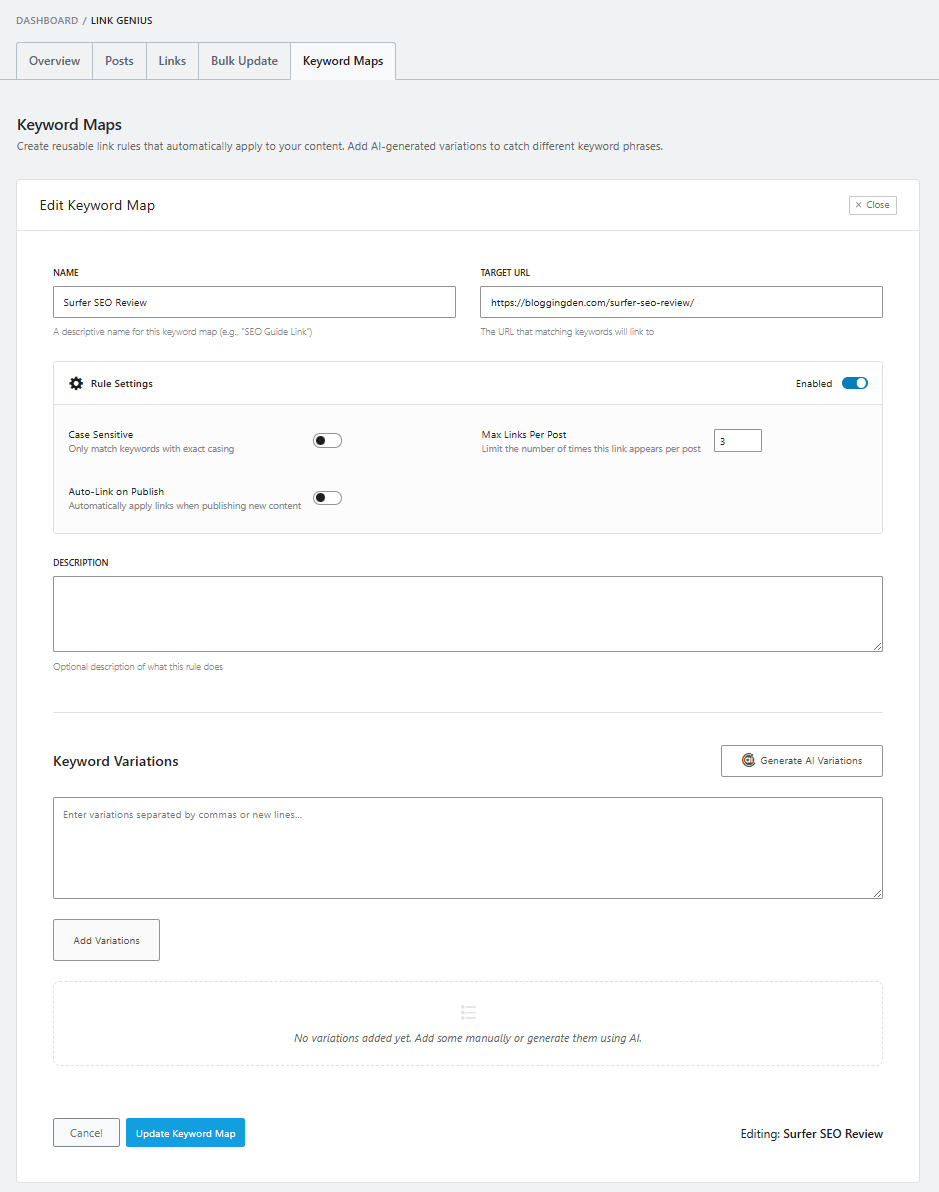
Click “Create Keyword Map” and fill in the details:
- Name → Main keyword / Primary Keyword (anchor text)
- Target URL → Page you want to link to
- Description → Enter the keyword map a description.
- Max Links per Post → Control how many links appear
- Auto-Link on Publish → Apply links to future posts
- Keyword Variations → Add related keywords
- Generate AI Variations → Get AI-based suggestions
This step tells AI Link Genius how to automatically link your content.
Step 4: Execute the Keyword Map
After creating the keyword map, you need to apply it to your content.
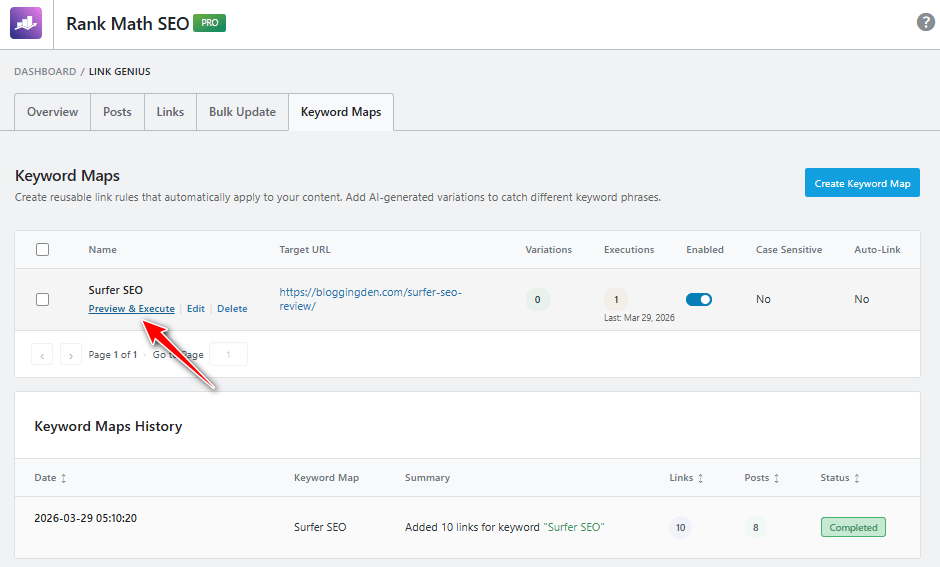
Click Preview & Execute, review the suggested links, and uncheck any you don’t want. Then, click “Add Link Changes” to apply them across your posts.
👉 This is where AI Link Genius automatically adds internal links to your content.
Step 5: Rollback Changes (If Needed)
If you want to undo the applied links, you can easily revert the changes.
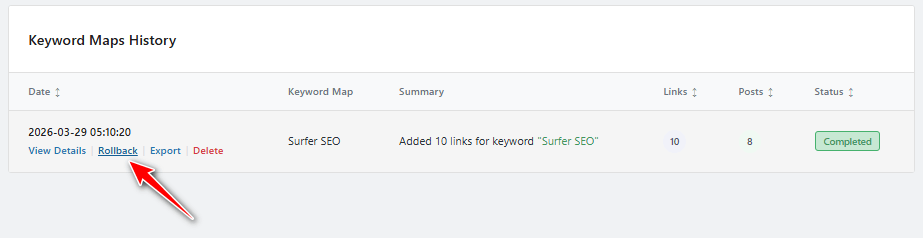
Go to the keyword map history, click Rollback, review the links, and select which ones to remove. Then apply the rollback to restore your content.
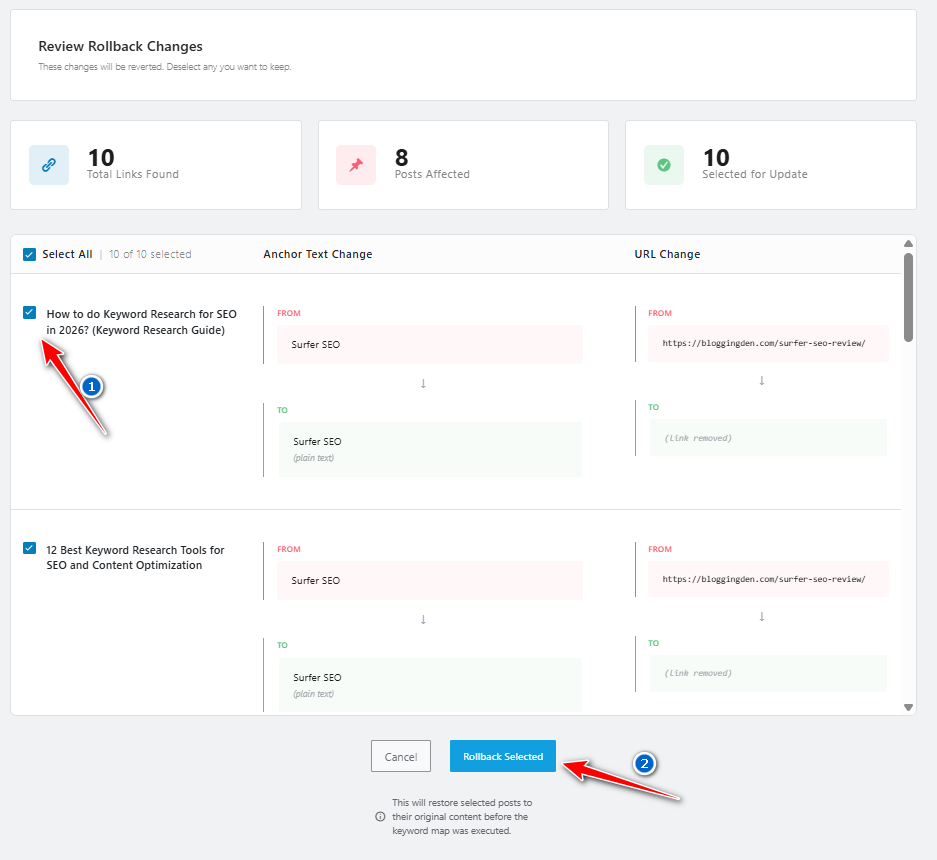
This ensures you always have full control over your internal linking.
Key Benefits of This Method
- Automatically links keywords across existing and future content
- Uses AI-generated keyword variations
- Reduces manual effort completely
- Helps prevent orphan pages
- Maintains a strong internal link structure
In short, AI Link Genius simplifies internal linking by turning it into a one-time setup process, where you define rules once and let AI handle the rest automatically.
Bulk Update Tool Setup
The bulk update tool allows you to apply multiple link suggestions across your website in just a few clicks. This is especially useful for large blogs with hundreds of posts.
With AI Link Genius, you can quickly update links across your website without editing each post manually. It helps you replace old URLs or anchor text in just a few steps.
- Enable the Feature: Go to Rank Math SEO → Dashboard and enable the Link Genius module.
- Open Bulk Update Tool: Navigate to Rank Math SEO → Links → Bulk Update.
- Choose What to Update: Decide whether you want to change:
- Anchor text
- URL
- Or both
- Enter Old & New Details: Add:
- The text or URL you want to find
- The new text or URL to replace it with
- Preview Changes: Click preview to check what changes will be made.
- Apply Changes: Click Apply Changes to instantly update links across your site.
- Rollback if Needed: If an issue arises, you can undo changes from the History section.
Key Benefits:
- Update links across your entire site in minutes
- No need to edit posts manually
- Maintain a clean and updated internal link structure
- Easily fix outdated or broken links
- Full control with preview and rollback options
In short, the bulk update tool saves time and makes large-scale link management simple and efficient.
Best Settings for Maximum SEO Impact
To get the best results from AI Link Genius, you need to configure and use it strategically rather than blindly applying suggestions.
Here are some best practices:
- Enable AI variations for natural anchor diversity
- Monitor link count to avoid over-linking
- Focus on pages with weak internal link coverage
- Regularly check link audit reports
- Combine AI suggestions with manual review
Also, ensure:
- You’re using the latest version of Rank Math Pro
- You have sufficient content AI credits
- You follow SEO best practices for internal linking
When used correctly, AI Link Genius helps you build a strong, scalable, and SEO-friendly internal linking system.
Rank Math AI Internal Linking vs Manual Linking
When it comes to building a strong internal link structure, you have two main approaches: manual linking or internal linking using AI. While manual linking has been the traditional method, tools like Rank Math AI Link Genius are transforming how SEO professionals manage links.
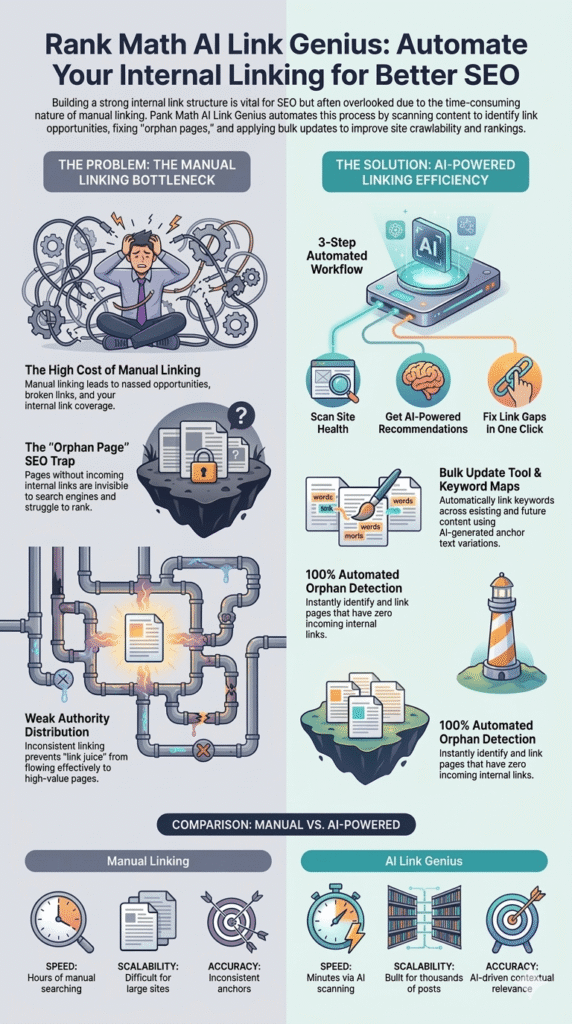
With AI Link Genius built directly into Rank Math Pro, you can automate link building, identify link opportunities, and improve link coverage without spending hours manually editing content.
In this section, we’ll compare AI Link Genius vs manual linking in terms of efficiency, accuracy, and SEO performance—so you can decide which approach works best for your workflow.
1. AI Link Genius vs Manual Internal Link Building
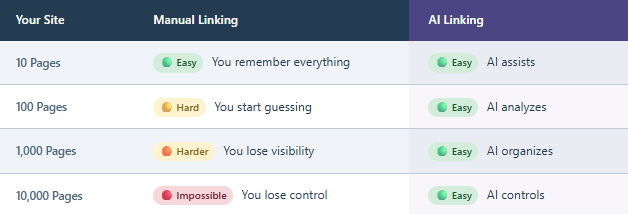
Manual internal linking requires you to:
- Read each post individually
- Identify relevant pages to link
- Add anchor text manually
- Maintain consistency across content
This process becomes difficult as your site grows.
On the other hand, AI Link Genius:
- Automatically analyzes your content
- Identifies pages to link instantly
- Suggests contextual link recommendations
- Helps you add internal links in bulk
Because AI Link Genius uses advanced AI, it eliminates guesswork and ensures a more structured linking strategy.
In simple terms, manual linking is time-consuming, while AI Link Genius makes internal linking faster, smarter, and scalable.
2. Time Saving & Efficiency Comparison
One of the biggest advantages of using an AI-powered internal linking tool is the massive amount of time it saves.
With manual linking:
- You spend hours finding link opportunities
- Updating old content takes significant effort
- Scaling becomes difficult
With AI Link Genius:
- AI scans your entire site in minutes
- Generates multiple link opportunities automatically
- Applies links using the bulk update tool
- Reduces manual workload drastically
For websites with large amounts of existing content, AI Link Genius can save dozens of hours while maintaining consistent internal linking.
3. Accuracy & SEO Impact Comparison
Accuracy plays a crucial role in internal linking, because poorly placed links can harm your SEO instead of improving it.
Manual linking often results in:
- Inconsistent anchor text
- Missed link opportunities
- Weak internal link coverage
- Poor link distribution
In contrast, AI Link Genius works using data-driven analysis:
- Evaluates incoming and outgoing link counts
- Detects pages with weak internal links
- Suggests contextually relevant anchors
- Maintains proper link structure and link health
Because AI Link Genius analyzes your content deeply, it ensures that every link improves SEO rather than creating clutter.
Overall, AI Link Genius provides higher accuracy, better consistency, and stronger SEO impact compared to manual linking.
Real SEO Benefits of Using AI Link Genius
Using Rank Math AI Link Genius is not just about saving time—it directly impacts your overall SEO performance. By improving your internal link structure, fixing gaps, and optimizing link coverage, this AI-powered internal linking tool helps your website perform better in search results.
Since it is built directly into Rank Math Pro, the tool integrates seamlessly with your existing SEO workflow. It continuously analyzes your link data, identifies weak areas, and suggests improvements to maintain strong link health.
When used correctly, AI Link Genius helps you build a clear site structure that search engines can easily crawl, understand, and rank.
1. Improved Crawlability
One of the biggest advantages of using AI Link Genius is improved crawlability. Search engines rely heavily on internal links to discover and index pages on your website.
With poor internal linking:
- Some pages remain undiscovered
- Crawl efficiency decreases
- Important content may not rank
With AI Link Genius:
- It ensures proper internal links pointing to important pages
- Connects pages across your site using smart linking
- Improves how search engines navigate your content
By strengthening your internal link structure, this tool makes it easier for search engines to crawl and index your site more efficiently.
2. Better Keyword Ranking
Internal linking plays a key role in boosting keyword rankings. When pages are properly connected, they pass relevance and authority signals to each other.
AI Link Genius improves rankings by:
- Creating contextual links around target keywords
- Distributing link equity across pages
- Strengthening topic relevance
It also ensures that pages with weak internal link coverage get more visibility by linking them from stronger pages.
This results in better keyword positioning and improved organic traffic over time.
3. Increased Page Authority Flow
A strong internal linking strategy helps distribute page authority (link juice) across your website. Without proper linking, some pages may receive little to no authority.
With AI Link Genius:
- Authority flows evenly across pages
- Important pages get more internal links
- Weak pages receive a second chance to rank
The tool tracks incoming and outgoing link counts, helping you balance your link distribution effectively.
This ensures that every page contributes to your SEO strategy rather than being isolated.
4. Reduced Broken Link Issues
Broken links can negatively impact both user experience and SEO. They create dead ends for users and reduce trust signals for search engines.
AI Link Genius includes built-in features for:
- Broken link detection
- Link audit reports
- Identifying outdated or old links
- Suggesting link fixes
Using the broken link checker, you can quickly identify issues and maintain a healthy link profile.
This improves link health, enhances user experience, and ensures your website follows SEO best practices.
Use Cases (Who Should Use AI Link Genius?)
Rank Math AI Link Genius is designed for anyone who wants to improve their internal link structure using AI. Whether you are managing a small blog or a large content website, this AI-powered internal linking tool can significantly simplify your SEO workflow.
Because it is built directly into Rank Math Pro, users don’t need separate tools to handle internal linking. Instead, they can use a complete internal link management suite that identifies link opportunities, improves link coverage, and automates linking across the site.
Let’s explore who can benefit the most from using AI Link Genius.
1. Bloggers & Content Creators
For bloggers, internal linking is often a time-consuming task. As content grows, it becomes harder to track which posts should be linked together.
AI Link Genius helps bloggers by:
- Automatically linking existing content
- Identifying new link opportunities
- Improving internal link coverage
- Saving time with the bulk update tool
Instead of manually editing posts, bloggers can let AI handle linking while focusing on content creation.
This makes AI Link Genius one of the best WordPress SEO tools for scaling blogs efficiently.
2. Affiliate Marketers
Affiliate marketers rely heavily on SEO to drive traffic and conversions. A strong internal link structure ensures that money pages receive maximum visibility and authority.
With AI Link Genius:
- You can link informational content to affiliate pages
- Improve link authority flow
- Increase visibility of high-converting pages
- Strengthen keyword relevance
The tool also helps ensure that important pages are not left with weak internal link coverage, giving them a better chance to rank.
For affiliate sites, AI Link Genius helps turn content into a well-connected revenue system.
3. Niche Site Owners
Niche site owners often manage dozens or hundreds of articles targeting specific topics. Maintaining a proper internal link structure manually can be overwhelming.
AI Link Genius simplifies this by:
- Automatically identifying pages to link
- Creating topic clusters using internal links
- Improving overall link structure and link data
- Ensuring no page is isolated
It also helps revive older posts by linking them to newer content, giving them a second chance to rank.
This makes it ideal for building strong topical authority in niche websites.
4. SEO Agencies
SEO agencies manage multiple client websites, making internal linking a repetitive and time-consuming task.
With AI Link Genius inside Rank Math Pro, agencies can:
- Automate internal linking for multiple sites
- Use AI-powered link suggestions for accuracy
- Improve client site performance quickly
- Save time on manual SEO tasks
The tool also provides detailed insights through the AI Link Genius dashboard, allowing agencies to monitor link health, link count, and internal link coverage efficiently.
For agencies, AI Link Genius is a scalable solution for managing internal linking across multiple projects.
Pros and Cons of Rank Math AI Link Genius
Before using Rank Math AI Link Genius, it’s important to understand both its strengths and limitations. This AI-powered internal linking tool is built directly into Rank Math Pro and works using content AI credits, making it a powerful addition to your WordPress SEO workflow.
Here are the key pros and cons:
Pros
- Automates internal linking process: AI Link Genius automatically identifies link opportunities and helps you add internal links across your existing content without manual effort.
- Saves significant time and effort: With the bulk update tool, you can apply multiple link changes instantly, making it ideal for large websites.
- Improves internal link structure: It strengthens your overall internal link structure and ensures better internal link coverage, especially for pages with weak internal links.
- AI-powered contextual link suggestions: The tool uses advanced AI to generate accurate link recommendations based on content relevance and context.
- Built directly into Rank Math Pro: No need for third-party plugins—everything works seamlessly inside Rank Math.
- Enhances SEO performance and link health: Helps maintain proper link structure, improve crawlability, and follow SEO best practices.
Cons
- Requires Rank Math Pro plan: AI Link Genius is only available in the paid version, so free users cannot access this feature.
- Consumes Content AI credits: Generating AI suggestions and link opportunities requires Content AI credits, which may increase costs.
- Needs manual review for best results: Not all AI suggestions are perfect, so reviewing links before applying them is recommended.
- Learning curve for beginners: New users may take time to understand the AI Link Genius dashboard, link data, and settings.
- Risk of over-automation: Blindly applying AI suggestions may lead to over-linking or unnatural anchor text usage.
Overall, AI Link Genius makes internal linking faster and more efficient, but combining AI automation with manual control is the best strategy for long-term SEO success.
Best Practices for Internal Linking Using AI Link Genius
While Rank Math AI Link Genius can automate internal linking, using it strategically is essential to get the best SEO results. Simply applying all AI suggestions without review can harm your internal link structure instead of improving it.
To maximize the benefits of this AI-powered internal linking tool, you should combine automation with smart SEO practices. This ensures your links remain relevant, natural, and effective for both users and search engines.
Below are the best practices to follow when using AI Link Genius for optimal performance.
1. Smart Anchor Text Optimization
Anchor text plays a crucial role in internal linking because it tells search engines what the linked page is about. Poor anchor usage can reduce SEO effectiveness.
With AI Link Genius:
- Use AI variations to diversify anchor text
- Avoid repeating the same keywords excessively
- Ensure anchor text matches the context of the content
- Focus on natural readability rather than keyword stuffing
Since AI Link Genius uses advanced analysis, it suggests relevant anchors—but reviewing them helps maintain quality.
Proper anchor optimization improves keyword relevance and boosts rankings.
2. Avoid Over-Linking
Adding too many internal links can dilute SEO value and negatively affect user experience. Even though AI Link Genius automatically suggests multiple links, you should be selective.
Best practices include:
- Maintain a balanced link count per page
- Avoid linking every keyword unnecessarily
- Focus on high-value link opportunities
- Keep content clean and readable
Monitoring your internal link coverage helps ensure that links are distributed effectively without clutter.
Remember: quality matters more than quantity in internal linking.
3. Maintain Contextual Relevance
Contextual linking is one of the most important aspects of SEO. Links should always feel natural and relevant within the content.
With AI Link Genius:
- Ensure links are placed within meaningful sentences
- Avoid forcing links into unrelated content
- Check if the linked page adds value to the reader
- Maintain a logical link structure
Although the AI provides smart link recommendations, manual review ensures the best results.
Contextually relevant links improve user experience and SEO performance.
4. Combine AI + Manual Strategy
Even though AI Link Genius works efficiently, relying entirely on automation is not recommended. The best approach is to combine AI with manual SEO expertise.
Here’s how:
- Use AI to find link opportunities quickly
- Review and refine suggested links
- Manually adjust anchor text where needed
- Regularly monitor link data and link health
- Perform periodic link audit checks
This hybrid approach ensures:
- Better accuracy
- Stronger SEO performance
- Natural internal linking
In short, let AI do the heavy lifting, but use your expertise to fine-tune the results.
Common Mistakes to Avoid
While Rank Math AI Link Genius makes internal linking easier, many users make critical mistakes that can reduce its effectiveness. Since this tool automates internal linking using AI, it’s important to use it wisely rather than relying completely on automation.
Ignoring best practices can lead to poor link structure, over-optimization, and even SEO issues. To get the most out of this AI-powered internal linking tool, you need to avoid common pitfalls and maintain control over your link data and link health.
Below are the most common mistakes to avoid when using AI Link Genius.
1. Blindly Accepting AI Suggestions
One of the biggest mistakes is applying all AI suggestions without reviewing them. Although AI Link Genius uses advanced algorithms, it may not always understand nuanced context perfectly.
Problems with this approach:
- Irrelevant internal links
- Poor user experience
- Unnatural content flow
Best practice:
- Always review link recommendations before applying
- Check if the link adds value to the reader
- Ensure contextual relevance
Remember, AI Link Genius helps—but human judgment is still essential for high-quality SEO.
2. Ignoring Link Audit Reports
Another common mistake is not paying attention to link audit reports and broken link detection. Internal linking is not a one-time task—it requires continuous monitoring.
If ignored:
- Broken links may accumulate
- Link health deteriorates
- SEO performance drops
Using Rank Math’s link audit and broken link checker, you should:
- Regularly check for broken links
- Fix outdated or old links
- Monitor overall internal link coverage
Maintaining good link health ensures that your site remains SEO-friendly over time.
3. Overusing Exact Match Anchors
Over-optimization is a serious issue in internal linking. Using the same keyword-rich anchor text repeatedly can look unnatural to search engines.
Common issues include:
- Keyword stuffing
- Reduced content readability
- Potential SEO penalties
With AI Link Genius:
- Use AI variations to diversify anchors
- Keep anchor text natural and relevant
- Avoid repeating exact match keywords excessively
A balanced anchor strategy improves both user experience and SEO performance.
Rank Math AI Link Genius vs Other Internal Linking Tools
Choosing the right internal linking tool can significantly impact your SEO performance. While Rank Math AI Link Genius offers advanced automation, several alternatives like Link Whisper, Yoast SEO (Internal Links feature), and Internal Link Juicer also help with internal linking—but in very different ways.
The key difference lies in automation, AI capabilities, and scalability. Let’s break this down in a practical way so you can choose the best tool for your needs.
1. Rank Math AI Link Genius vs Link Whisper
Link Whisper is one of the most popular internal linking plugins, known for its suggestion-based linking system.
How Link Whisper Works:
- Scans your content and suggests link opportunities
- Provides anchor text recommendations
- Requires manual approval for inserting links
Where AI Link Genius Wins:
- Uses AI-powered link analysis instead of rule-based suggestions
- Automatically generates AI variations for anchor text
- Allows bulk application using the bulk update tool
- Built directly into Rank Math Pro (no separate plugin needed)
Key Difference: Link Whisper helps you find links, while AI Link Genius helps you find AND apply links automatically.
Link Whisper Review | Link Whisper Discount ($15 Off) | Link Whisper Black Friday Deal
2. Rank Math AI Link Genius vs Yoast Internal Links
The internal linking feature in Yoast SEO is basic compared to AI-driven tools.
How Yoast Internal Linking Works:
- Suggests internal links based on focus keywords
- Requires manual insertion of links
- Limited link data and no automation
Where AI Link Genius Wins:
- Uses Content AI to analyze full content context
- Identifies pages with weak internal link coverage
- Tracks incoming and outgoing link counts
- Provides deeper link audit and link health insights
Key Difference: Yoast gives basic suggestions, whereas AI Link Genius provides a complete internal link management system.
3. Rank Math AI Link Genius vs Internal Link Juicer
Internal Link Juicer focuses on automation but works differently from AI-based tools.
How Internal Link Juicer Works:
- Automatically links keywords based on predefined rules
- Uses keyword-based linking rather than contextual AI
- Requires manual configuration of keywords
Where AI Link Genius Wins:
- Uses AI to understand context, not just keywords
- Generates smart link recommendations dynamically
- Avoids over-optimization with AI variations
- Provides a full AI Link Genius dashboard with insights
Key Difference: Internal Link Juicer is rule-based automation, while AI Link Genius is intelligent, context-driven automation.
4. Rank Math AI Link Genius vs All In One SEO (AIOSEO)
All in One SEO (AIOSEO) includes a basic internal linking assistant, but it is not fully automated.
How AIOSEO Works:
- Suggests internal links inside the editor
- Provides link suggestions based on keywords
- Requires manual insertion
Where AI Link Genius Wins:
- Automatically identifies and applies link opportunities
- Uses AI-powered link suggestions instead of simple keyword matching
- Includes a bulk update tool for scaling
- Offers deeper link data and link coverage analysis
Key Insight: AIOSEO helps with guided linking, but AI Link Genius automates the entire process.
5. Rank Math AI Link Genius vs SEOPress
SEOPress is another SEO plugin with basic internal linking support, but it lacks advanced automation.
How SEOPress Works:
- Provides SEO tools and manual linking support
- No dedicated internal linking automation system
- Limited link analysis features
Where AI Link Genius Wins:
- Full AI-powered internal linking tool
- Identifies pages to link automatically
- Tracks link health, link count, and link structure
- Built as a complete internal link management suite
Key Insight: SEOPress focuses on general SEO, while AI Link Genius specializes in advanced internal linking automation.
Here’s a simplified comparison:
| Tool | Automation | AI Capability | Bulk Linking | Link Analysis |
|---|---|---|---|---|
| Rank Math AI Link Genius | ✅ Full | ✅ Advanced AI | ✅ Yes | ✅ Deep |
| Link Whisper | ⚠️ Partial | ❌ No AI | ⚠️ Limited | ⚠️ Moderate |
| Yoast SEO | ❌ Manual | ❌ No AI | ❌ No | ❌ Basic |
| Internal Link Juicer | ⚠️ Rule-based | ❌ No AI | ⚠️ Limited | ⚠️ Basic |
| All In One SEO | ⚠️ Partial | ❌ No AI | ❌ No | ⚠️ Moderate |
| SEOPress | ❌ Manual | ❌ No AI | ❌ No | ❌ Basic |
If you want automation + AI intelligence + scalability, Rank Math AI Link Genius is clearly ahead of all alternatives.
- Choose Link Whisper for manual + assisted linking
- Choose AIOSEO or Yoast for basic suggestions
- Choose Internal Link Juicer for rule-based automation
- Choose SEOPress for general SEO
But if your goal is fully automated, AI-powered internal linking with deep insights, AI Link Genius is the most advanced and future-ready solution.
Rank Math AI Link Genius Pricing
Understanding the pricing of Rank Math AI Link Genius is important before deciding whether to use this AI-powered internal linking tool. Since AI Link Genius is included in Rank Math Pro and works with Content AI credits, its value depends on how effectively you use its features.
Unlike standalone tools, AI Link Genius is part of a complete internal link management suite, which includes link audit, broken link detection, link suggestions, and a bulk update tool. This makes it a cost-effective solution for users already using Rank Math.
Let’s break down the pricing plans and evaluate whether it’s worth the investment.
Rank Math offers three main pricing plans that include AI Link Genius as part of Content AI features:
1. Starter Plan (Perfect for Beginners)

- $5.99/month (billed annually)
- 5,000 monthly Content AI credits
- Unlimited websites & user seats
- Includes the AI Link Genius module
- Semantic keyword variations
- Link opportunities in 1-click
- 125+ AI prompt templates
- RankBot SEO assistant
- AI-powered image alt text
- Long-form articles with 1-click
- 24/7 premium support
👉 Best for beginners who want to start internal linking using AI at a low cost.
2. Creator Plan (Most Popular)

- $10.99/month (billed annually)
- 12,000 monthly Content AI credits
- All Starter features included
- Enhanced AI-powered link recommendations
- Better scalability for growing sites
👉 Ideal for bloggers and marketers who already use Rank Math Pro and want to scale their internal link structure efficiently.
3. Expert Plan (High-Volume Users)

- $16.99/month (billed annually)
- 30,000 monthly Content AI credits
- All Creator features included
- Designed for high-content websites
- Advanced internal linking automation
👉 Best suited for agencies and large websites managing extensive existing content and needing advanced link data analysis.
Value for Bloggers & SEO Professionals
When evaluating whether AI Link Genius is worth it, you need to consider the value it delivers compared to manual work and other tools.
Why It’s Worth It:
- Saves hours of manual internal linking work
- Automates link-opportunity discovery
- Improves internal link coverage and link structure
- Helps fix broken links and improve link health
- Combines multiple tools into one (no need for separate plugins)
When It May Not Be Worth It:
- If you are not using Rank Math Pro
- If your site has very few pages
- If you don’t actively use Content AI features
If you’re already paying for Rank Math Pro or planning to upgrade, AI Link Genius becomes a high-value feature that can significantly improve your SEO workflow.
Final Insight: Compared to tools like Link Whisper or manual linking, AI Link Genius offers better automation, deeper insights, and long-term scalability—making it one of the best internal linking tools for WordPress SEO today.
My Review on Rank Math AI Link Genius
After using Rank Math AI Link Genius on real blog content, I can honestly say it’s one of the most practical AI features I’ve tested for SEO. Instead of spending hours manually linking posts, AI Link Genius took care of identifying relevant connections across my existing content within minutes.
What impressed me the most was how AI Link Genius goes beyond basic suggestions. It doesn’t just recommend links—it analyzes context, finds meaningful relationships between pages, and helps build a solid internal link structure automatically. This made my workflow much faster and more efficient.
Another standout feature is how the genius includes a dedicated orphan page detection system. It helped me discover posts that had no internal links pointing to them, giving those pages a second chance to rank.
Overall, my experience has been very positive. If you’re managing a growing blog or content-heavy site, AI Link Genius can significantly simplify internal linking while improving SEO performance at the same time.
Frequently Asked Questions (FAQs) on Rank Math AI Link Genius Review 2026
Can AI Link Genius automatically add internal links?
Yes, Rank Math AI Link Genius can automatically add internal links using its AI-powered system. It analyzes your content, identifies link opportunities, and allows you to apply them using the bulk update tool. However, it’s recommended to review suggestions before applying them to ensure accuracy and contextual relevance.
Can AI Link Genius handle very large sites with thousands of posts?
Yes, AI Link Genius is designed to scale efficiently and can handle large websites with thousands of posts. It scans your entire content database, identifies internal link opportunities, and improves link coverage. This makes it ideal for content-heavy sites, niche blogs, and SEO agencies managing multiple projects.
Can I roll back changes made by AI Link Genius?
AI Link Genius applies changes through controlled actions, and in most cases, you can manually edit or remove inserted links if needed. While there isn’t always a one-click rollback for bulk changes, maintaining backups or reviewing suggestions before applying ensures better control over your internal linking strategy.
Can I use AI Link Genius to manage links on client sites?
Yes, AI Link Genius is perfect for managing client websites, especially for SEO agencies. Since it is included in Rank Math Pro with unlimited website usage, you can automate internal linking, monitor link health, and improve SEO performance across multiple client projects efficiently.
Can I use AI Link Genius with Yoast SEO?
No, AI Link Genius requires Rank Math to function and cannot be used alongside Yoast SEO. Since both are full SEO plugins, you should use only one at a time. To access AI Link Genius, you need to switch to Rank Math and enable the feature within its dashboard.
Can I use both AI Link Genius and Link Whisper together?
Technically, you can use both, but it’s not recommended. Running AI Link Genius and Link Whisper together may create overlapping link suggestions and inconsistencies. Since AI Link Genius offers advanced automation and AI-driven linking, it is usually sufficient as a standalone internal linking solution.
Can I use keyword maps without Content AI credits?
No, most advanced features of AI Link Genius, including keyword mapping and AI suggestions, require Content AI credits. Without credits, the tool’s functionality becomes limited. To fully utilize its internal linking automation and AI capabilities, an active Content AI subscription is recommended.
Does AI Link Genius help with topical authority?
Yes, AI Link Genius helps build topical authority by connecting related content across your website. It creates a strong internal link structure, reinforces topic clusters, and improves content relationships. This helps search engines better understand your site and boosts rankings for related keywords.
Does AI Link Genius impact how search engines crawl my website?
Yes, AI Link Genius improves crawlability by creating a well-structured internal linking system. It ensures that important pages receive internal links, helping search engines discover and index them more efficiently. This leads to better visibility, improved indexing, and stronger overall SEO performance.
Does AI Link Genius slow down my site?
No, AI Link Genius does not slow down your website because most processing happens in the backend. Once links are applied, they behave like normal internal links. Since it is built into Rank Math, it is optimized for performance and does not negatively impact page speed.
Final Verdict: Should You Use AI Link Genius?
When it comes to modern WordPress SEO, internal linking is no longer something you can ignore or manage manually at scale. Rank Math’s AI Link Genius transforms this process by combining automation, AI intelligence, and deep link analysis into a single system.
Unlike traditional tools, AI Link Genius is Rank Math’s built-in solution, which means you don’t need a separate plugin or external tool. It works seamlessly with Rank Math’s Content AI, where features use content AI credits to generate intelligent link recommendations, analyze your content, and improve your overall internal link structure.
In simple terms, AI Link Genius gives you a smarter, faster, and more scalable way to manage internal links.
Who Should Use It
AI Link Genius is ideal for anyone serious about SEO and content growth. Whether you’re a beginner or an experienced marketer, this tool adapts to your needs.
You should consider using it if:
- You already use or plan to get AI Link Genius inside Rank Math Pro
- You want to automate internal linking using AI
- You manage large amounts of existing content
- You want to improve internal link coverage and link structure
- You’re using or planning to use a content AI trial or subscription
Because AI Link Genius combines a full link management system, it helps identify pages with weak internal link coverage and improves them automatically.
It also includes advanced capabilities, where:
- Link Genius includes a dedicated system for finding orphan pages
- Helps revive content that has no internal links
- Gives those pages a second chance to rank
If you’re already paying for Rank Math Pro, this feature becomes a powerful advantage rather than an extra cost.
When to Avoid It
While AI Link Genius is powerful, it may not be necessary for every website.
You may want to avoid or delay using it if:
- You have a very small website with minimal pages
- You are not using Rank Math or don’t want a separate Content AI subscription
- You prefer fully manual control over internal linking
- You don’t want to use content AI credits regularly
Also, if your workflow does not involve scaling content, then the benefits of automation may be limited.
Final Takeaway
AI Link Genius is Rank Math’s most advanced internal linking feature, designed for modern SEO workflows.
- It combines a full link optimization system with automation
- It analyzes link count to open new opportunities
- It improves link structure, link health, and SEO performance
- It removes the need for manual linking at scale
Although AI Link Genius uses Content AI credits, the time saved and SEO improvements often outweigh the cost.
In short: If you’re serious about SEO and already using Rank Math, AI Link Genius is not just useful—it’s a competitive advantage.
Ready to Boost Your SEO with AI?
If you’re serious about rankings, traffic, and automation, Rank Math AI Link Genius is a must-have tool in 2026.