
ProWritingAid Review 2026: Is This AI Writing Assistant Worth It for Bloggers and Authors?
In‑depth AI writing editor with 25+ reports for serious writers.
ProWritingAid goes beyond basic grammar checking with 25+ writing reports that analyze style, readability, sentence structure, overused words, pacing, and clarity, making it the ideal editing toolkit for bloggers, novelists, academics, and professional writers who want to craft polished, publication‑ready content.
Try ProWritingAid Now →Do you write a lot? Are you a writer or a blogger? For most of us, an online grammar checker is becoming an essential editing tool.
Are you searching for the best writing software? If yes, you are in the right article. You can go through this ProWritingAid Review 2026 and improve your overall content writing skills.
ProWritingAid has grown from a simple grammar checker to a full-fledged AI-powered writing assistant with 25+ in-depth reports, paraphrasing, and story-level feedback for long-form content by 2026.
In this 2026 ProWritingAid Review, you’ll find out how the latest AI features, pricing and integrations compare to Grammarly and other popular tools – and whether it’s still the best value for bloggers, authors and students.
But what if you need a thorough analysis of your grammar problems? How about giving your style a test run with a premium editing tool?
Affiliate Disclaimer: We only recommend tools we use and trust. Affiliate earnings help keep our blog running at no extra cost to you. The reviews are based on our experiences, which they did not pay us for. The next is an affiliate disclaimer.
When you have chosen an online grammar and editing assistant, some important factors are available for your specific needs.

For other mobility needs, portability should be a concern. This includes multiple browser support. It also involves text error checking in a smartphone.
You must have tried or seen other writing aids. However, most of them cost more. ProWritingAid is one you should look at now.
The premium writing and grammar checker tool will offer you convenience and flexibility. It provides an in-depth analysis to help you become a skilled writer.
In this ProWritingAid review 2026, I will try to cover most of the details about this tool. I will explain how to use it as a language syntax checker.
You will receive tips to improve your content writing skills by using ProWritingAid’s style suggestion features. There are many more features to help you become a better writer.
Are you searching for the best online grammar and editing assistant or tool? If yes, you are in the correct place. Read this review first and grab the tool with the ultimate discount.
This ProWritingAid Review 2026 also compares ProWritingAid free vs paid plans and explains whether the Premium or ProWritingAid Premium vs Premium Pro option is better for your needs.
How Can It Help You Improve Your Writing?
ProWritingAid is the most popular personal writing coach and AI editing tool for authors, bloggers, students, and business writers who want cleaner drafts and faster self‑editing.
It helps you clean up many write-ups by identifying spelling mistakes, contextual errors, and grammatical problems.
- This online software gives brilliant suggestions for your writing improvements.
- It scans your writing and provides detailed feedback. This includes information about word repetitiveness and vague wording. It also checks for over-dependence on adverbs and sentence length. The tool identifies passive voice and suggests active voice alternatives. Many more features are included as well.
- It comes with a free and a premium version.
- The application comes with an inbuilt word explorer and a contextual thesaurus.
- It helps you to expand their vocabulary and to express their ideas.
After cleaning up the write-ups, it helps you. You can identify the common writing errors by using their special tracking and reporting tools.
From the closet, it only takes a while to comprehend that ProWritingAid has outstanding features. Let us see, is it better than the Grammarly tool?
You can scan email, social media posts, and blog posts for grammar errors and plagiarism checks.
ProWritingAid Features: An In-Depth Look
It is also available as a Chrome extension, plugin for Microsoft Word and extension for Google Docs. There are several online grammar check software available on internet but none of them support MS Word integration for Mac users.
The web-based editors are simple. They come with an easy-to-understand interface. You can address the content directly. Or you can upload a word file. Anything you like. Upload quickly.
The online grammar checks are great. They scan the content. The same speed applies using the web app editing panel and Chrome add-on/extension too.
It corrects compared to other online grammar checking tools. It enriches content. It reports quickly. This process makes the writing easier to read and better to the eyes of a reader.
ProWritingAid offers a variety of features to help writers improve their writing and produce more effective writing. Some of its main features include:
- Grammar and Spelling Checking: ProWritingAid uses artificial intelligence to identify and correct errors in grammar and spelling.
- Style and Readability Analysis: ProWritingAid analyzes writing style and provides suggestions for improving readability and engagement.
- Thesaurus and Dictionary: ProWritingAid includes a thesaurus and dictionary, making it easy to find synonyms and definitions.
- Contextual Thesaurus Suggestions: ProWritingAid provides contextual thesaurus suggestions based on the context of the text.
- Plagiarism Checker: ProWritingAid checks for plagiarism and reports potential issues.
- Writing Reports: ProWritingAid provides detailed reports on writing style, including readability, pacing, and sentence structure.
- Integrations: ProWritingAid offers integrations with popular writing tools. Examples include Microsoft Word, Google Docs, and Scrivener. This makes it easy to use with your existing writing process.
- AI‑powered paraphrasing: ProWritingAid now includes an AI paraphrasing tool and rewriting tool that can rework sentences, adjust tone, and generate alternative phrasings directly inside the editor and browser extension.
- 25+ in‑depth reports: You still get 25+ reports for readability, sticky sentences, pacing, dialogue tags, overused words, and more—very useful for long‑form blog posts and novels.
- Goals and custom rules: You can set writing goals, add custom style rules, and maintain a personal dictionary, which is useful for consistent brand voice and domain‑specific terms.
- Security and privacy: ProWritingAid emphasizes bank‑level security and does not train its algorithms on your documents, which is important for authors and client work.
ProWritingAid offers comprehensive features to help writers improve their writing skills and create more effective content.
Who Is ProWritingAid For?
ProWritingAid is the perfect choice for professional writers. It is also ideal for hobby writers. Both types of writers want to eliminate spelling and grammatical mistakes from their writings.
Anyone can get benefits while writing/typing the content while running the ProWritingAid in the background.
Most writers, like authors, copywriters, content writers, bloggers, students, and academics, will get the most benefits with ProWritingAid.
It is very good while writing and drafting emails and presentations with the ProWritingAid corporate settings.
ProWritingAid is providing excellent support to business writers to make their writings understand.
Should you choose ProWritingAid?
Absolutely yes. You might be searching for an online writing coach. If you prefer writing in MS Word, then this could be the wonderful choice for you. There is so much advice they offer you.
Once you analyze the writing, it will suggest corrections and provide suggestions. It will highlight the quotation marks. It will also indicate the use of passive voice.
Also, it matches the use of quotation marks, which is remarkable and could not be found in any other software.
Also, ProWritingAid is one such premium application that integrates nicely with the Mac OS.
For instance, when you’re up for writing a post in WordPress.
The ProWritingAid extension on the Chrome add-on works like a charm with no lag. It accurately finds suggestions for you.
ProWritingAid: Free vs Premium
ProWritingAid is a popular writing tool. It offers a range of features to help writers improve their writing skills. It also helps create effective content.
While the software offers free and premium versions, there are some key differences between the two.
Here are some key points to consider when comparing ProWritingAid’s free and premium versions:
Features:
- The free version of ProWritingAid offers limited access to key features. These include grammar and spelling checking, contextual thesaurus suggestions, and integration with popular writing tools.
- The premium version of ProWritingAid includes all the free version’s features. It also offers advanced style and readability analysis, detailed writing reports, and a plagiarism checker.
- Additionally, the premium version allows users to access the software through desktop applications, which can be useful for offline work.
Integrations:
- Both the free and premium versions of ProWritingAid allow for integration with popular writing tools. However, the premium version offers more options. It also provides a more seamless integration experience.
- The premium version allows integration with more desktop applications. This feature is useful for writers who prefer to work offline.
Pricing:
- ProWritingAid’s free version is, as the name suggests, completely free to use. However, it does come with limitations on the features available.
- The premium version of ProWritingAid is available through various pricing plans. These include monthly and yearly subscriptions. This makes it accessible to writers of all levels.
Ad-free experience:
- The free version of ProWritingAid includes ads. The premium version offers an ad-free experience. This can be helpful for writers who find ads distracting.
While the free version of ProWritingAid provides useful features, the premium version offers more extensive tools. It enhances writing skills and helps create effective content. Depending on your writing needs and budget, the premium version may be worth the investment.
If you want to check over 500 words, upgrade or pay for the premium version. I purchased this software a few years back and have been using it till now.
How to use ProWritingAid step by step?
ProWritingAid is the free grammar mistake checker and proofreading tool. By using these free proofreading online tools, your content becomes attractive and easy to understand.
ProWritingAid gives suggestions with colored underlines. It uses red lines for spelling errors, blue lines for grammatical errors, and yellow lines for style issues.
If you click on the color line words, you will get three options. You can choose to implement, ignore, or, in spelling cases, “add to dictionary.” These are wonderful choices to improve your writing skills with these online grammar checkers.
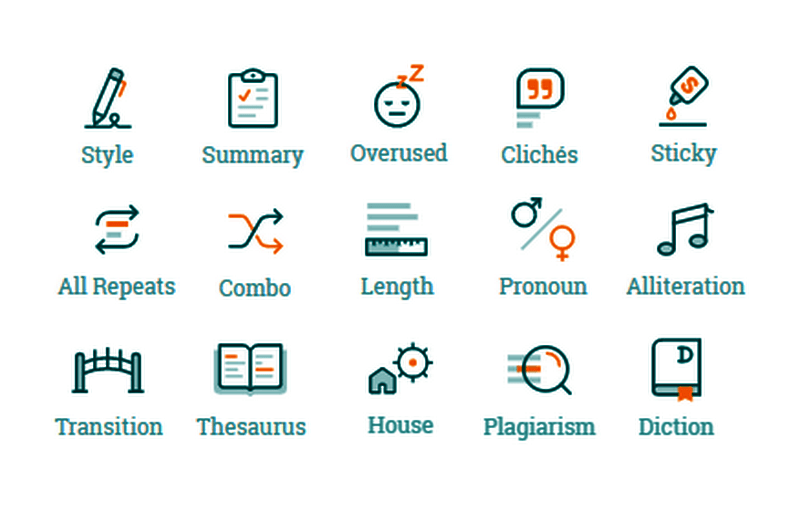
The real-time tracker is the most favorable feature for every ProWritingAid user. When you write, the real-time tracker scans your document and gives the complete main report, which includes,
- Summary report: It summarizes your writing.
- Style report: It checks your writings for style improvements. This report highlights areas where your writing style will improve, such as the use of passive and hidden verbs.
- Grammar check: It checks your writing for spelling mistakes and grammatical mistakes.
- Thesaurus: It shows potential replacements for nouns, verbs, adjectives, and adverbs.
- Overused: It helps you check your writing for commonly overused words and phrases. It can compare the frequency of commonly used words in your text to published writing. This helps give you a sign of where you may be overusing words.
- Sentence Structures: It compares your usage of different sentences to published texts in your genre.
- Plagiarism checker: It identifies parts of your text that occur in other documents. It also scans millions of web pages, books, and academic papers.
The other reports, like the sentence length and dialogue tags checkers, provide excellent information. This assists in a better review of your content.
But overusing dialogue tags can drag your content. Basically, it helps you to identify the speaker of the content.
Follow each tab to make changes. Check the ProWritingAid suggestions. You can either accept or reject these changes to your document.
To use, ProWritingAid is available in five different versions. They are
a. Online Editor

ProWritingAid offers a very good web-based online editor. To use this online editor, log into the ProWritingAid site.
Click on the “Start Web Editor” button. Then you will get the complete features to start and scan your writing document.
For the free user, this is the only option to use the ProWritingAid feature. With this, you have access to only 500 words in the document. If your document is over 500 words, buy a premium account.
The ProWritingAid online editor is a wonderful option to try this service before you buy.
b. Microsoft Word Plugin
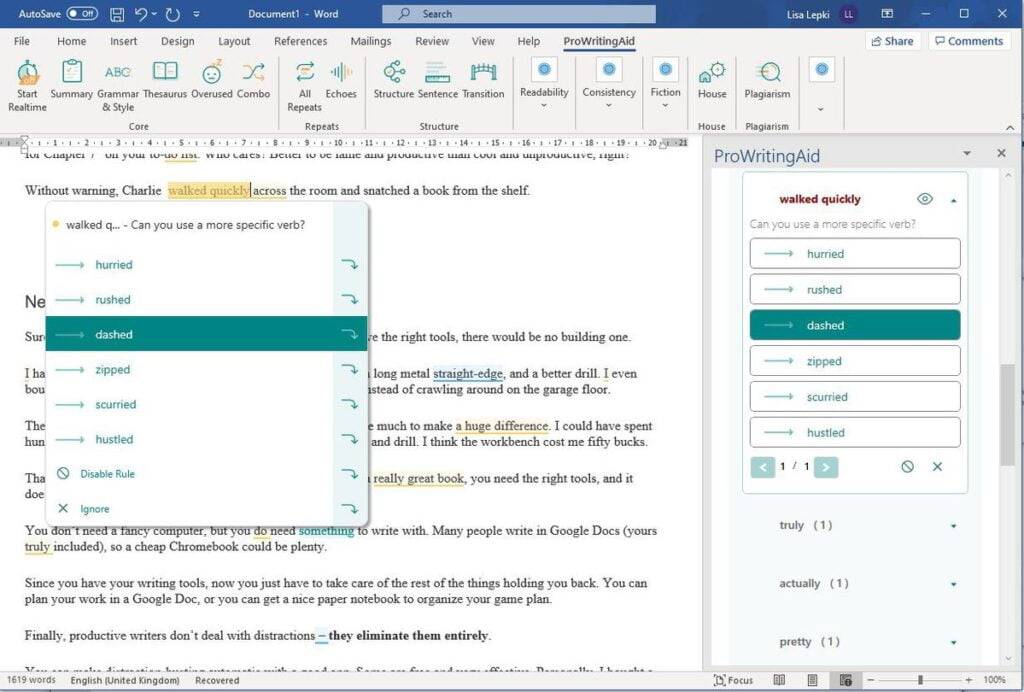
If you are a Microsoft Word user, you can use the ProWritingAid plugin for Word users. You can download the integration setup file from the official account.
After downloading the plugin, you need to install and integrate it with the Microsoft office suite.
Once you finish the integration, you can start writing the content from MS Word. Provide the ProWritingAid logins to connect and grant access.
c. Google Docs Extension
GDocs is a free online word processor from Google services. It helps you create and format documents. You can work with other people in real-time by sharing the document.
The major advantage is free to share with anyone. If you are using this free Google Document tool to write articles, use the ProWritingAid add-on. It will improve your writing styles.
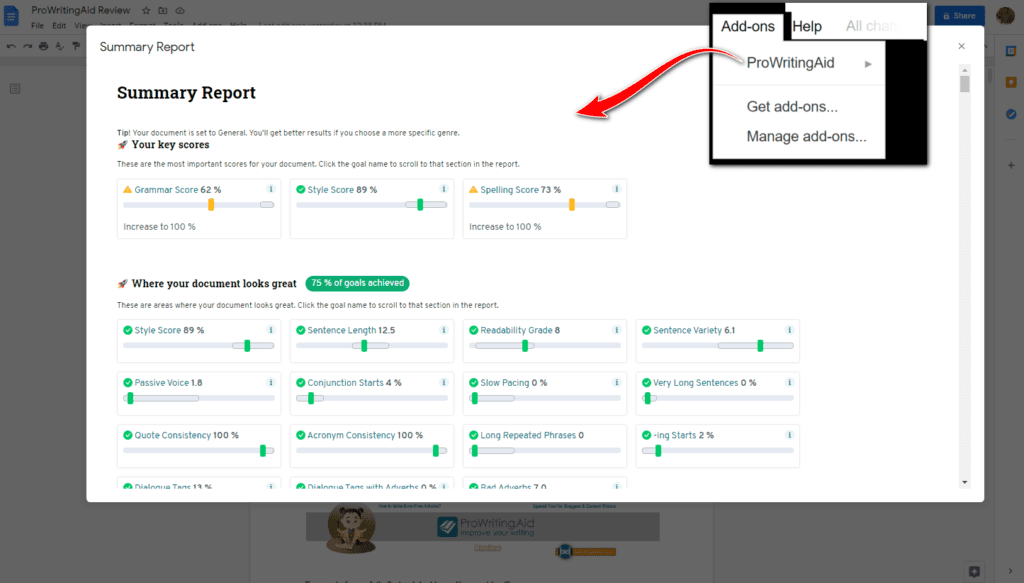
You need to install the ProWritingAid add-on from the G Suite add-ons library. This add-on works best when you are writing in Google Docs. From this add-on, you will get the suggestion edits with lines under the words.
Basically, add-ons improve the value of this Google Doc. You can check the writing style check, grammar check, overused words check, consistency check, and sticky sentences check. Choose these options from the ProWritingAid extension.
d. Browser Extensions
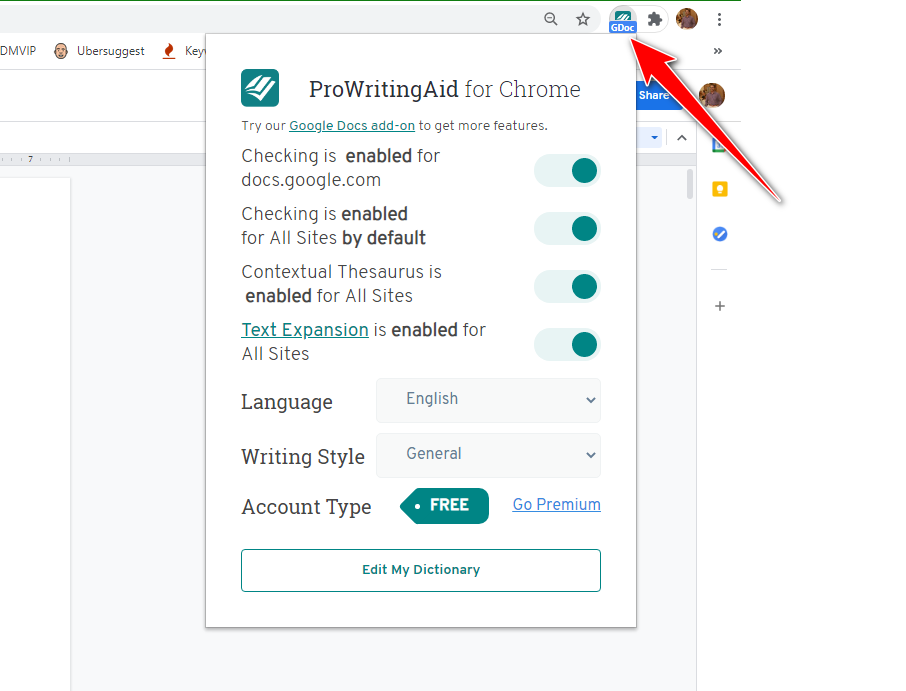
ProWritingAid is providing a free browser add-on for its users. They develop it for Chrome, Firefox, and Safari users.
It is a little different from a web-based editor because they will integrate it within the browsers. When you write online within Facebook, Gmail, or WordPress, it works automatically by scanning your writings and suggesting edits.
It permits very simple edits like grammar and spelling issues with the free version. If you need full editing features, you need to go for the premium version.
This browser add-on or extension helps you to edit everywhere you write online. It integrates with WordPress, Gmail, and Facebook easily.
e. Desktop App
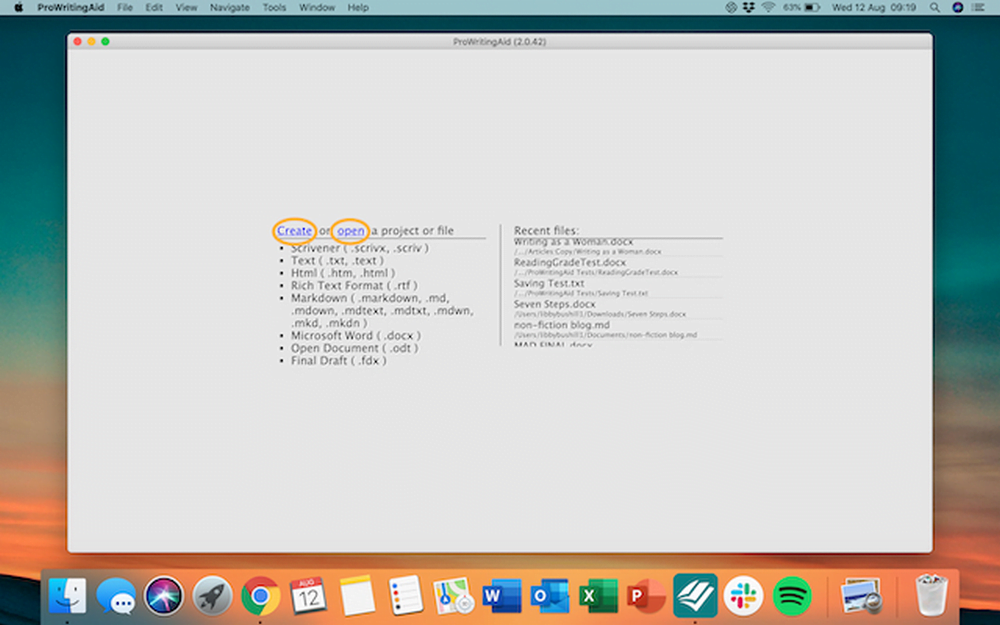
It is an excellent feature to write error-free content. It works like a web application. But you need to download the setup file to install on your computer. After successful installation, connect your ProWritingAid account to start work.
You can open .doc and other word processing files like Microsoft files, RTFs, and OpenOffice files. You can also open Scrivener files directly. Edit those files directly in the desktop app. It is a perfect choice for Mac users.
To work with this desktop application, it needs an internet connection. You can not use it offline. But this feature is available for premium users only.
ProWritingAid pricing 2026
When people search for ProWritingAid pricing 2026, they mainly want to know how the free plan compares to Premium and Premium Pro and which plan is best for regular bloggers.
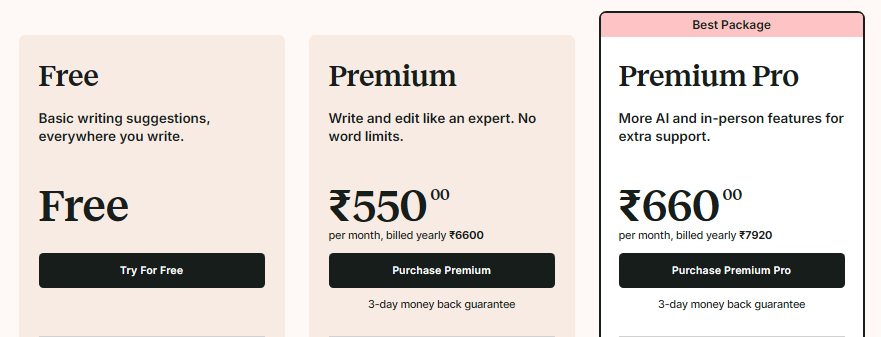
ProWritingAid offers a free plan, two premium subscription tiers, and optional lifetime licenses.
Free plan
- Price: Free forever.
- Limits: 500 words per check, 2 runs per report per day, 10 rephrases per day, and 3 sparks per day.
- Features: Grammar, spelling, punctuation, Word Explorer & Thesaurus, document type selection, and full data security.
- Price (India): Around ₹6,600 per year with a 3‑day money‑back guarantee.
- Usage: Unlimited word count, unlimited report runs, unlimited rephrases, 5 Sparks per day, 1 chapter critique per day, up to 40% off story credits.
- Extra features: Advanced style suggestions, 25+ writing reports, custom style guides, terminology management, collaboration tools, citations, and unlimited document storage.
- Price (India): Around ₹7,920 per year with a 3‑day money‑back guarantee.
- AI & usage: Unlimited word count and reports, 50 Sparks per day, 3 chapter critiques per day, and up to 65% off Story Credits.
- Extras: Live workshops with authors and editors, on‑demand workshop library, daily cowriting sprints (beta), group critique sessions (beta), networking events (beta), guided writing challenges (beta).
| Plan | Billing type | Core limits & AI use | Key extras |
|---|---|---|---|
| Free | Free | 500 words, 2 runs/report/day, 10 Rephrases, 3 Sparks/day | Basic grammar, spelling, punctuation, thesaurus |
| Premium | Annual | Unlimited words/reports, unlimited Rephrases, 5 Sparks/day, 1 Chapter Critique/day | Advanced reports, style guide, collaboration |
| Premium Pro | Annual | Unlimited words/reports, 50 Sparks/day, 3 Chapter Critiques/day | Workshops, sprints, events, higher Story Credit savings |
| Premium Lifetime | One‑time | Same as Premium, no recurring fee | Long‑term cost saving for single user |
| Pro Lifetime | One‑time | Same as Premium Pro, no recurring fee | Long‑term access to AI limits and learning hub |
If you are confused between ProWritingAid free vs paid, start with the free version and upgrade once you hit the 500‑word limit or need advanced reports regularly.
ProWritingAid Review 2026
As a writer, I always want to produce error-free and polished writing pieces. That’s why I searched for a reliable tool to help my writing process, and I stumbled upon ProWritingAid. I was amazed by the countless positive reviews on social media sites. I’m not the only one who has benefited from this amazing tool.
The toolbar of ProWritingAid provides a comprehensive set of features and functions that help analyze the writing. When I first opened the desktop web editor, I noticed different graphical menus. They were at the top of the screen, showing options for improving my writing. I was thrilled to see that it checks syntax errors and offers more than 20+ grammar and critical spell checks.
The real-time checks are one of the most helpful features of ProWritingAid. They come in handy when I need to submit my document in less time. I started using the premium edition, which was very new. However, ProWritingAid also provides a free trial version. It helps users understand the software features and functionalities before buying them.
I explored different options in the left-hand corner. It runs similar to a scoreboard. Then, I was informed about my document’s number of mistakes or issues. This tool has been incredibly useful in analyzing my social media posts, blog posts, reports, and white papers.
As I analyze my writing in ProWritingAid, I appreciate the real-time checks. They are shown in highlighted colors. I see these colors as I make my corrections. The tool sits in the top left-hand corner, and it helps me identify spelling issues, grammar, and style.
My favorite feature of ProWritingAid is the Word Explorer. It helped me choose the perfect word or phrase every time. Overall, I highly recommend this tool to writers who want to take their writing to the next level.

Once you analyze the writing, ProWritingAid informs you with colored lines beneath words and phrases with the suggested corrections.
Getting Started with ProWritingAid
To work with ProWritingAid, download the desktop app to your computer. Install the ProWritingAid setup file on your PC and enter your license code to activate the desktop app.
Then open the project file link and choose Scrivener, checking the MS Word file for grammar errors. After uploading the file, choose “Create” and give the filename to save your project on a local drive.
The premium version of ProWritingAid gives a real-time score on your document by providing the grammar and style score. You can check those scores in the top-left corner of the editing screen while you are editing the document.
How to make an error-free document?
- To make your document error-free, you need to use either the web version or the desktop app. First, copy the content and paste it on the working dashboard of the ProWritingAid tool, or upload the existing document.
- Now click on the “Real-Time” button for the common grammar errors, spelling mistakes, style issues, and a few other errors.
- Check each issue and try to solve it. Here you will find colored underlines.
- Blue → Grammar issues
- Red → Spelling issues
- Yellow → Style issues
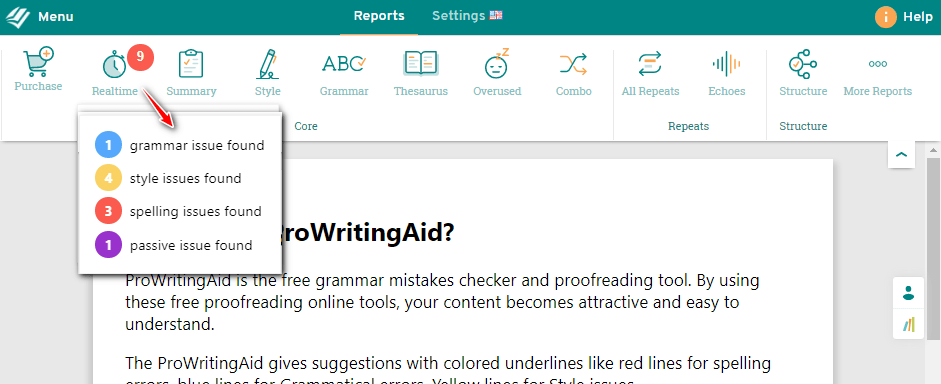
- First, click on those colored lines of words to see the suggestion. If the suggestion is suitable for the words, you can accept the suggestion or ignore it.
- You can check those highlighted sentences and words in your document. Continue doing this until the content becomes error-free. Use ProWritingAid until you are happy with those sentences.
- Finally, save the document after finishing your changes to the document. Now you can export the content into word processing format with a single click.
How to Develop a Good Writing Style with ProWritingAid?
ProWritingAid improves your content writing approach very much if you follow their recommendations. Here are a few recommendations to improve the great writing approach with ProWritingAid.
- All Repeats: This option helps you to check the overused words in the content. It suggests the best words if it finds repeated words.
- Dictionary and Thesaurus: It helps you to improve your word choice. The ProWritingAid tool analyzes your work and finds the relevant words to convey your content.
- Spelling consistencies: It checks when the alternate between the US and UK English. The same feature helps you to analyze the Flesch score of your document.
By using these major features, you can develop good writing reports and styles.
How to integrate ProWritingAid with online writing tools?
ProWritingAid is providing a free browser add-on for its users. This is free in the Google Chrome Web Store.
This browser extension helps you to edit everywhere you write online. It integrates with WordPress, Gmail, and Facebook easily.
a. How to use ProWritingAid with browsers?
You activate the free real-time grammar checking system by typing in the Gmail compose box, Facebook status, or Messenger. The same action works in the WordPress post editor. It triggers this system immediately. It also activates the spelling checking system. The system will scan your writings and recognize the errors, and they will inform you.
You need a premium license to access the complete functionality of the full editor.
To get this, just follow the below steps.
Step 1: Go for the Add-on Page
First, click the below button to install the browser extension.

Step 2: Install ProWritingAid Chrome Add-on
In this screen, to complete this step, just click the “Install ProWritingAid extension” button. It will redirect the link to the Chrome web store.
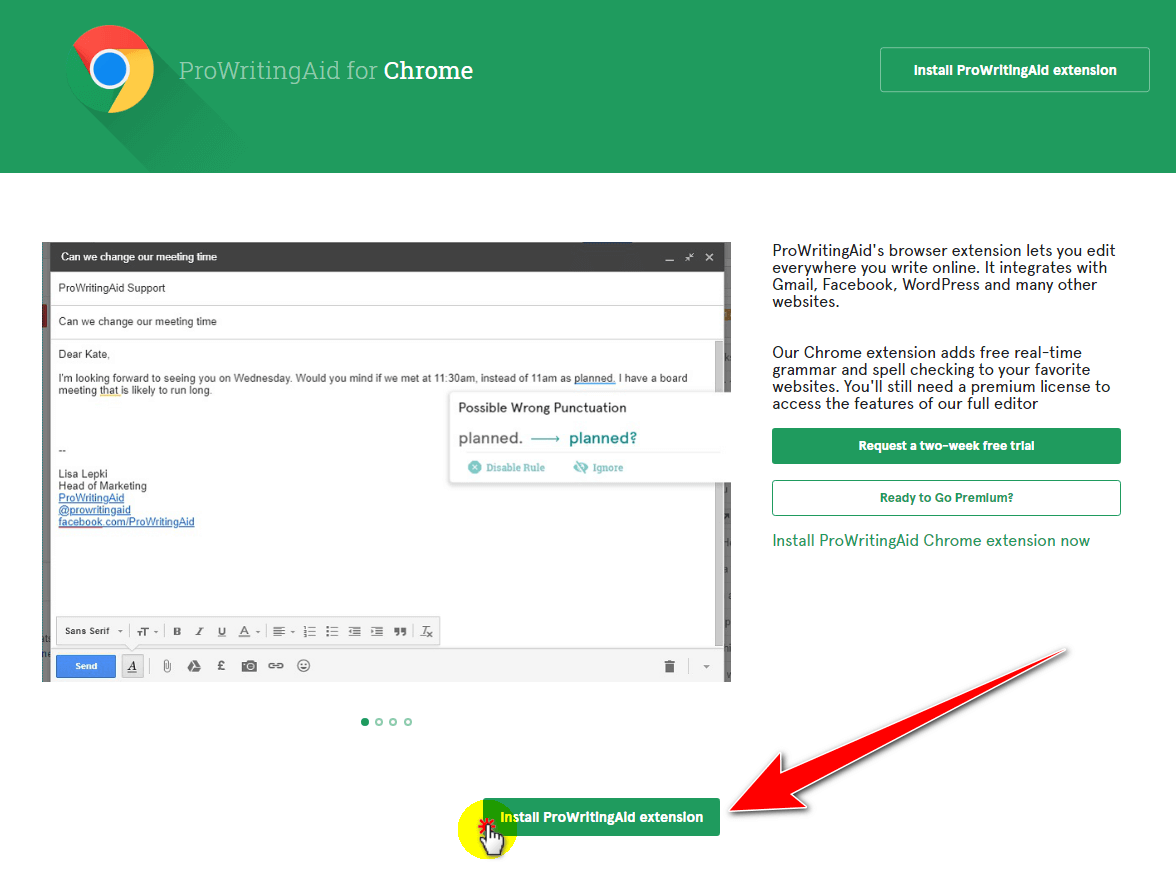
Step 3: Hit on the Add to Chrome
Now you are in the Chrome Web Store. Here, just click the “Add to Chrome” button to add the extension in your browser.

Step 4: Permit the Addon installation
Click the Add Extension in the pop-up.

Step 5: Complete the ProWritingAid signup
If it does not register you with your details, simply sign up. Then, make a premium account purchase. If you purchased a premium account before this, just log in. Use your username and password to access your account.

Now the extension is ready to scan your writings on Facebook, Gmail, WordPress, post editors, and other websites.
b. How to use ProWritingAid with Google Docs?
GDocs is one of the free online Office suites. It comes with Slides, which is like PowerPoint in Microsoft Office. It also includes Sheets, similar to Microsoft Excel.
The major advantage is being free to share with anyone. If you are using this free Google Document tool to write articles, this ProWritingAid add-on can help. It improves your writing style.
Just follow the steps below to integrate this add-on into your document.
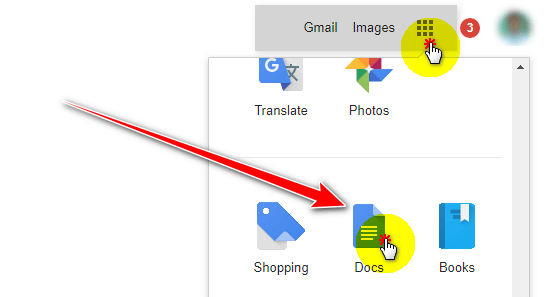
Step 1: Go for GDocs
First, log in to Gmail and open Docs from the top right side.
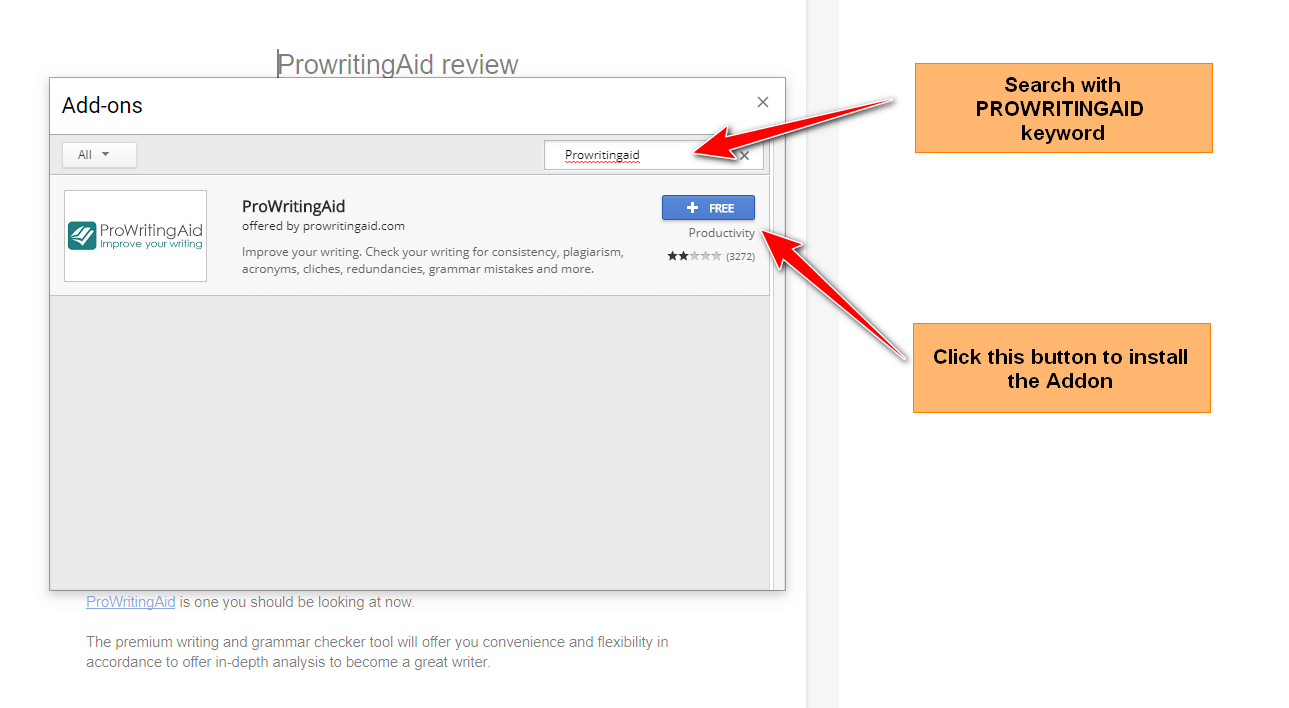
Step 2: Search for the Addon
Search for ProWritingAid in the Add-ons box. Then click on the blue color button for integration. After a few seconds, the add-on will be active.
Now open a new tab and log in to the ProWritingAid account. The installed add-on will be active with all ProwritingAid premium features.
Step 3: Check and Permit the Addon installation
Click the “Allow” button to access your Google account.
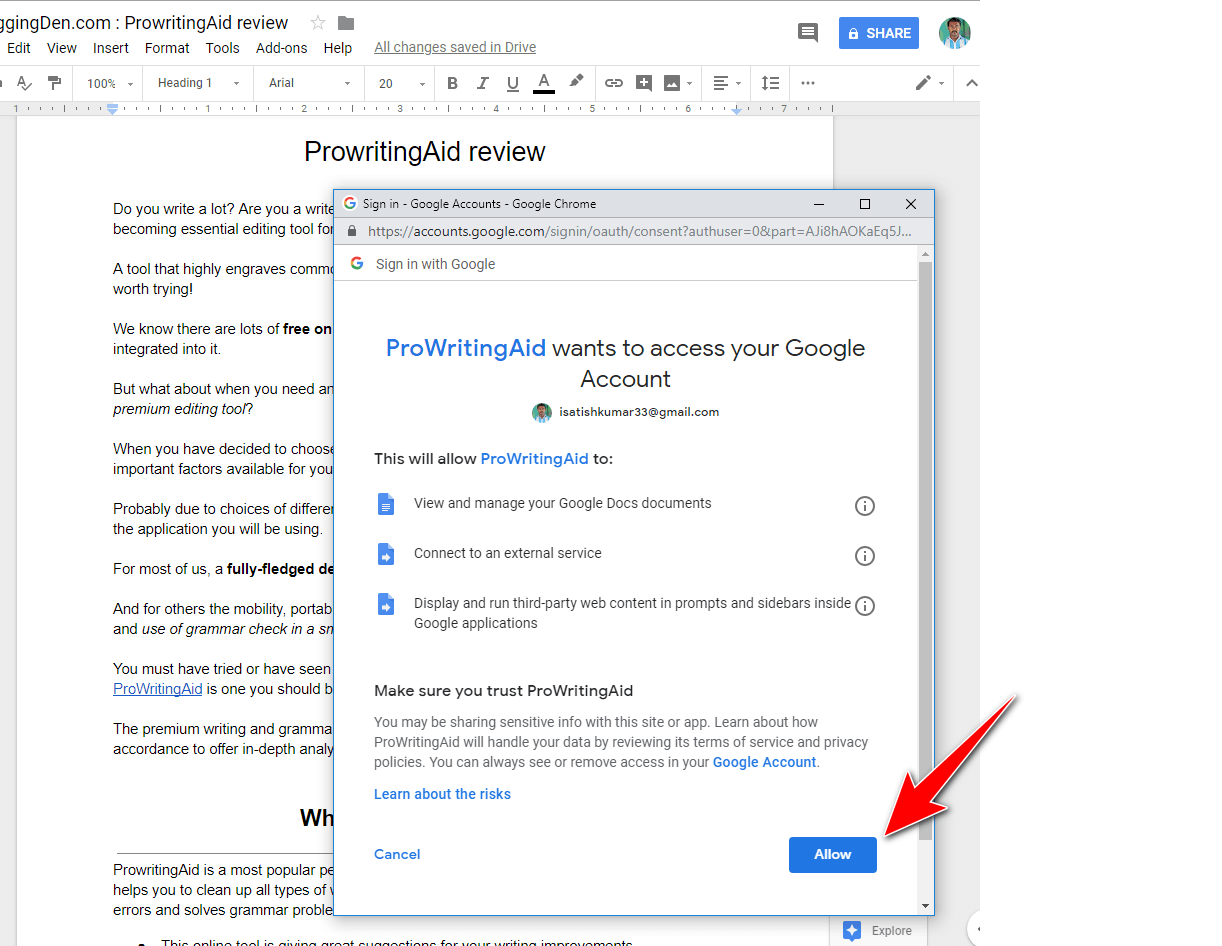
Step 4: Where to start the addon function
After opening your document file, just go for Add-ons > Get Add-ons.

Step 5: Analyse the document
To check your document, just go for the Add-ons tab > ProWritingAid > Summary report.
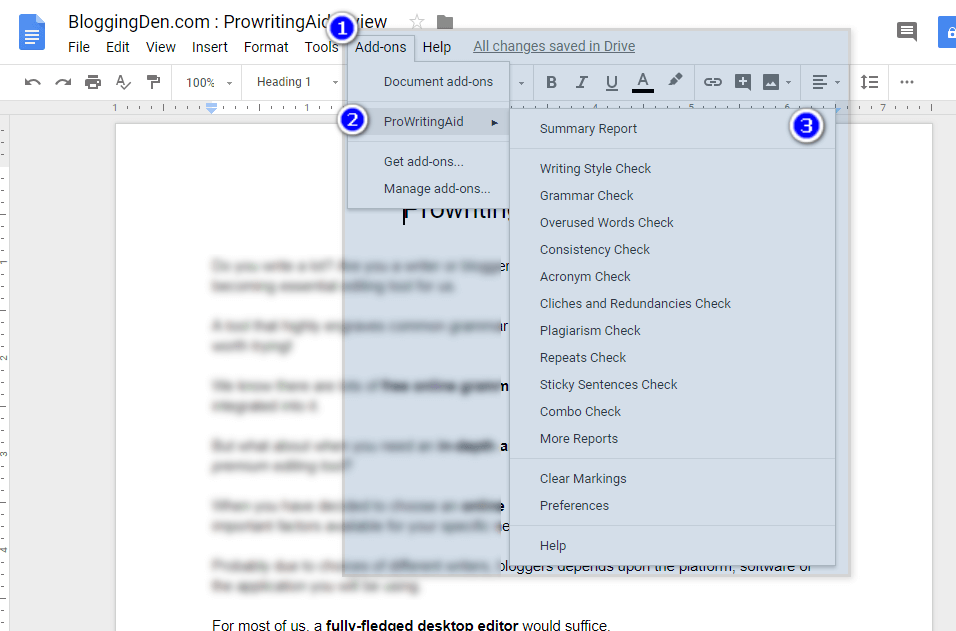
Step 6: Now analyze the Report
The tool will scan all the documents that show the report.
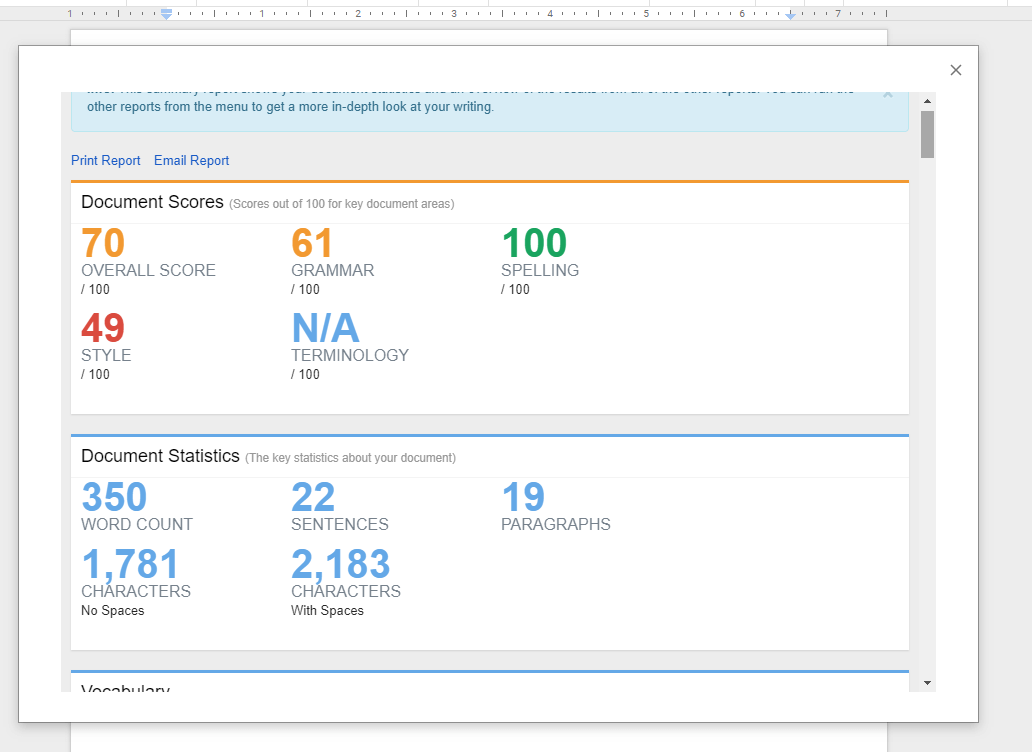
Add-ons, in a nutshell, increase the value of this Google Doc. You can check the writing approach by selecting an option from the ProWritingAid extension.
It allows for grammar checks, frequently used word checks, consistency checks, sticky sentences checks, and more.
How to get ProWritingAid?
How much does ProWritingAid cost? ProWritingAid is coming with effective pricing and plans in the regular plans.
To get this amazing tool, you need to register your details. It is offering free and premium plans. In the free version, there are more limitations…
- Summary Report on Key Issues
- Only 19 Writing Reports
- You can edit 500 words at a time. No more than that.
- Providing an attractive report and areas for improvement
- Use online only—Not providing desktop software
So better to pick one premium plan for complete functionality.
That’s it.
ProWritingAid discount prices (20% Discount)
If you are ready to grab this, ProWritingAid offers two plans—yearly and lifetime plans. Here is good news for you. I have been using this tool for a few years and have a good relationship with the ProWritingAid company.
Really, I love ProWritingAid’s design and their support. They are providing a 20% great discount for BloggingDen readers. So grab this small discount and save more for your career as a small business.
I prepared a small table with original pricing and discounted prices for you. So choose the perfect choice according to your needs.
My recommendation is ProWritingAid Lifetime. Because you can use this tool anytime, anywhere, with no time limitations. Review ProWritingAid recommendations so they will not auto-change.
Who Uses ProWritingAid?
Most of the writers are using the ProWritingAid tool to handle a wide range of projects around the globe.
You can review ProWritingAid software before starting to use the free trial version. Four different people are using this tool frequently. They are.
a. For Novelists / Story Writers
ProWritingAid is a key part of the modern fiction writing process. Most novelists are using book-writing apps like Microsoft Word for their writing. It is a strong option for fiction writers who need pacing and dialogue feedback.
By using the Word add-on, they are getting significant results. If you are a good story writer, ProWritingAid gives you more power. If you are a new novelist, here is the alternative plan for new novelists.
b. For Bloggers and Content Writers
The tool is perfect for bloggers and content writers who are working with their own blogs. If you are writing content for your blog or for others, it gives clear and readable content for you.
This is one of the best AI writing assistants for bloggers who publish long, SEO articles.
ProWritingAid allows bloggers and content creators to self-edit more effectively before they hit “publish.” Definitely, the tool will improve your proofreading skills.
c. For Students
Most of the students are submitting their records, compositions, assignments, and research data in a soft-copy format. Many students are searching for essay writing apps. ProWritingAid for students helps polish essays and theses before submission.
They want to improve the quality of their paper or thesis. If your professor is getting distracted by errors and unclear ideas, you may not be getting the grade you deserve.
d. Business Writers
Most professionals write nearly all day long: reports, emails, applications, pitches, or presentations. In the fast-based corporate world, mistakes look unprofessional, and yet there is little time to self-edit.
ProWritingAid helps business writers deliver concise, error-free communications that get ideas across to colleagues and clients.
ProWritingAid vs Grammarly in 2026
| Aspect | ProWritingAid | Grammarly |
|---|---|---|
| Core focus | Deep editing and structure for long‑form writing (reports, fiction tools, pacing, dialogue). | Fast real‑time grammar and tone fixes for emails, social posts, and short content. |
| Best for | Novelists, bloggers, content writers who want detailed feedback and self‑editing help. | Students, business users, and anyone needing quick, polished corrections with minimal setup. |
| AI features | Paraphrasing, structural reports, style and readability goals, and 25+ reports. | Generative AI with prompts, tone detection, auto‑rewrite, and unlimited plagiarism checks on some paid plans. |
| Pricing | Lower annual/lifetime cost; free tier plus Premium and Premium Pro; plagiarism extra. | Generally higher subscription pricing, plagiarism included in many paid plans, and no lifetime option. |
The Pros & Cons of ProWritingAid
If you are looking for an online wiring coach, consider creating a brilliant piece of content for your blog posts. The same applies to assignments or online publishing.
Then ProWritingAid is one of the best coaches for perfect syntax and proofreading checks. There is literally so much advice it offers you.
No tool is perfect. However, ProWritingAid can accomplish most tasks. It might even perform a little better when compared with other online editing and error-free software.
We have placed an emphasis on the PROS & CONS so you can decide for yourself by reading them.
Pros of ProwritingAid:
- Fully equipped: ProWritingAid tool offers you almost all the writing check that you could ever need or want
- Ease of use: The ProWritingAid application has an intuitive panel. All the features and functionalities are listed on the top bar. This writing assistant for online users offers you a great way to enhance the content only in a few minutes.
- Pricing: Compared with other grammar checkers, ProWritingAid Premium and Premium Pro are still affordable, especially if you choose the lifetime plan.
- Integrates Scrivener and Google Docs: This we have been waiting for for a long time. Especially those who use Scrivener. Google Docs doesn’t support it; however, ProWritingAid corrects your text within your document, which makes it easier for you.
- Style Editor: It comes with attractive writing and editing tool
- Strong for fiction and long‑form content, with pacing, dialogue, and repetition reports many competitors lack.
- Lifetime plan still available, which most grammar checkers do not offer.
- AI rewriting and paraphrasing integrated into the editor and browser extension.
Cons of ProWritingAid:
- Mobile support is still more limited than desktop, especially for full editing features.
- Plagiarism checks are limited. It has to be purchased in addition to the editing.
- Real‑time checking can feel slightly slower or heavier than Grammarly on low‑end machines or very long documents, according to some reviews.
Frequently Asked Questions (FAQs)
What is ProWritingAid used for?
ProWritingAid is an AI‑powered writing assistant that checks grammar, spelling, style, and readability, and gives in‑depth reports to improve articles, books, academic papers, and business writing.
Is ProWritingAid worth it in 2026?
Yes, ProWritingAid is still worth it in 2026 if you write long‑form content, books, or blog posts and want detailed feedback plus AI paraphrasing at a lower price than many competitors.
Is ProWritingAid better than Grammarly?
ProWritingAid is usually better for deep editing and long‑form writing, while Grammarly is better for quick, real‑time fixes in emails and short documents. Many writers use both for different tasks.
Is there a free version of ProWritingAid?
Yes, ProWritingAid offers a free plan with limited document length and features so you can test grammar, style, and AI suggestions before upgrading to Premium.
How much does ProWritingAid cost?
ProWritingAid has monthly, yearly, and lifetime Premium plans, plus higher‑tier options with extra AI and plagiarism checks. Exact prices change often, so always confirm on the official pricing page.
Does ProWritingAid use AI?
Yes, ProWritingAid uses AI for paraphrasing, style improvements, and story‑level feedback, including tools like Sparks, Manuscript Analysis, and Virtual Beta Reader.
What are the main features of ProWritingAid?
Key features include grammar and spell checking, style and readability reports, AI paraphrasing, 25+ in‑depth reports, manuscript analysis, and integrations with Word, Google Docs, Scrivener, and major browsers.
Does ProWritingAid work with Google Docs and Word?
Yes, ProWritingAid integrates with Google Docs, Microsoft Word, and other writing tools through desktop apps, add-ins, and browser extensions.
Can ProWritingAid check an entire book?
Yes, ProWritingAid can analyze full manuscripts using its web app and desktop app and now offers Manuscript Analysis and Virtual Beta Reader for story‑level feedback.
Does ProWritingAid have a browser extension?
Yes, ProWritingAid has a browser extension for Chrome and other major browsers that checks grammar and style and offers paraphrasing wherever you write online.
Does ProWritingAid check for plagiarism?
Yes, ProWritingAid offers a plagiarism checker, but it is usually sold as an add-on or included in higher-tier plans, not as unlimited scans on every plan.
Does ProWritingAid work on mobile?
ProWritingAid focuses on desktop and browser use. Dedicated iOS and Android apps are limited or unavailable, so mobile support is not as strong as desktop.
Is ProWritingAid safe and private?
ProWritingAid states that it uses strong security and does not share or sell your writing, making it suitable for client work, academic papers, and unpublished manuscripts.
Does ProWritingAid support other languages?
ProWritingAid is primarily designed for English writing. It can sometimes flag issues in other languages, but its best suggestions are for English text.
Is ProWritingAid a one‑time purchase?
ProWritingAid offers monthly and yearly subscriptions plus a lifetime license, so you can choose between ongoing payments or a one‑time purchase for long‑term use.
Is ProWritingAid good for students?
Yes, ProWritingAid is helpful for students writing essays, research papers, and theses because it improves clarity, grammar, and citations while teaching better writing habits.
Is ProWritingAid good for bloggers?
ProWritingAid works well for bloggers who write long, SEO‑friendly posts and want help with readability, structure, and style, not just basic grammar fixes.
Can ProWritingAid replace a human editor?
ProWritingAid cannot fully replace a professional editor, but it can reduce errors, polish drafts, and make human editing faster and cheaper.
Final Words on ProWritingAid Review 2026
ProWritingAid is one of the great online grammar-checking software programs that wins when compared with Grammarly, the popular online tool. This is because of the competitive pricing and providing an array of features to the users.
If you have mistakenly landed here and were searching for an online grammar checker tool on a budget. Your search ends here.
It can not replace a human editor. The review of ProWritingAid provides basic knowledge. It guides you on how to work with this human editor, like Grammarly (another best grammar-checking tool).
ProWritingAid is the best free online grammar checker software. It corrects and suggests punctuation. Complete reports are offered to a user.
I hope this ProWritingAid Review 2026 helps you to write error-free content for your blogs and novels. Use it for your assignments and business letters too.
Do not leave this article after completing your reading. Grab this outstanding tool immediately and share this with your friends on social media.
ProWritingAid Review 2026
Honest ProWritingAid Review 2026: Latest AI Features, Pricing, Pros &Cons, and practical tips to use it with Word, Google Docs, Scrivener, and WordPress
Price: 56
Price Currency: USD
Operating System: Windows, MAC OS
Application Category: Writing software
9.3
Pros
- Catches grammar, spelling, and punctuation mistakes accurately.
- Improves style and readability with 25+ detailed reports.
- Excellent for long‑form content and book‑length manuscripts.
- Powerful tools for fiction writers: pacing, dialogue, repetition, and structure checks.
- Built‑in AI rephrase (Sparks) to fix clunky sentences and change tone.
- Integrates with Word, Google Docs, Scrivener, and major browsers.
- Offers a lifetime plan and affordable premium pricing.
- Helps you learn and improve writing skills over time, not just fix typos.
Cons
- The free version is limited for serious or long‑form use.
- The interface and number of reports can feel overwhelming at first.
- Can be slower or glitch with very large documents or in Google Docs.
- Plagiarism checks are not unlimited and often cost extra.
- Mobile apps and support for some devices and languages still remain limited.



Hi,
very nice article and very helpful
I have been using Grammarly for the past 7 months feeling good with it hence not tried prowritingaid will have a look into it. Thanks for the tool bro