Publishing a blog post is only half the battle; the real work begins after you hit publish. If you want consistent traffic and higher search rankings, you need a solid plan to promote your blog posts across multiple platforms.
Most new bloggers spend 90% of their time writing and only 10% promoting. The smart approach is the opposite. The more strategically you promote your content, the faster you build authority, backlinks, and a loyal readership.
So, how do you promote blog posts effectively in 2026?
After completing proper keyword research and publishing high-quality content, the next critical step is content promotion. Without it, even your best articles can sit unnoticed on page 10 of Google, getting zero clicks, zero shares, and zero traffic.

In this guide, you will discover 23 battle-tested blog promotion strategies that I personally use on BloggingDen to
- Drive consistent organic traffic from search engines
- Increase social media shares and referral visitors
- Build high-quality backlinks naturally
- Grow email subscribers and repeat readership
- Improve search engine rankings faster
Whether you are a beginner blogger or an experienced content marketer, these blog post promotion techniques will help you get maximum exposure for every piece of content you publish.
Let’s dive in.
How to Promote Blog Posts in 2026
If blogging is not your full-time job, it is easy to publish irregularly and then wonder why traffic and income are inconsistent. To build a predictable flow of visitors and revenue, you must treat blog promotion as seriously as content creation.
Instead of publishing and hoping Google or social media will automatically send traffic, follow a clear promotion checklist every time you hit publish.
In the next sections, you will learn proven ways to promote blog posts using search engines, SEO, and publishing consistency so your content keeps working for you long after it goes live.
1. Promote Your Blog Posts on Search Engines
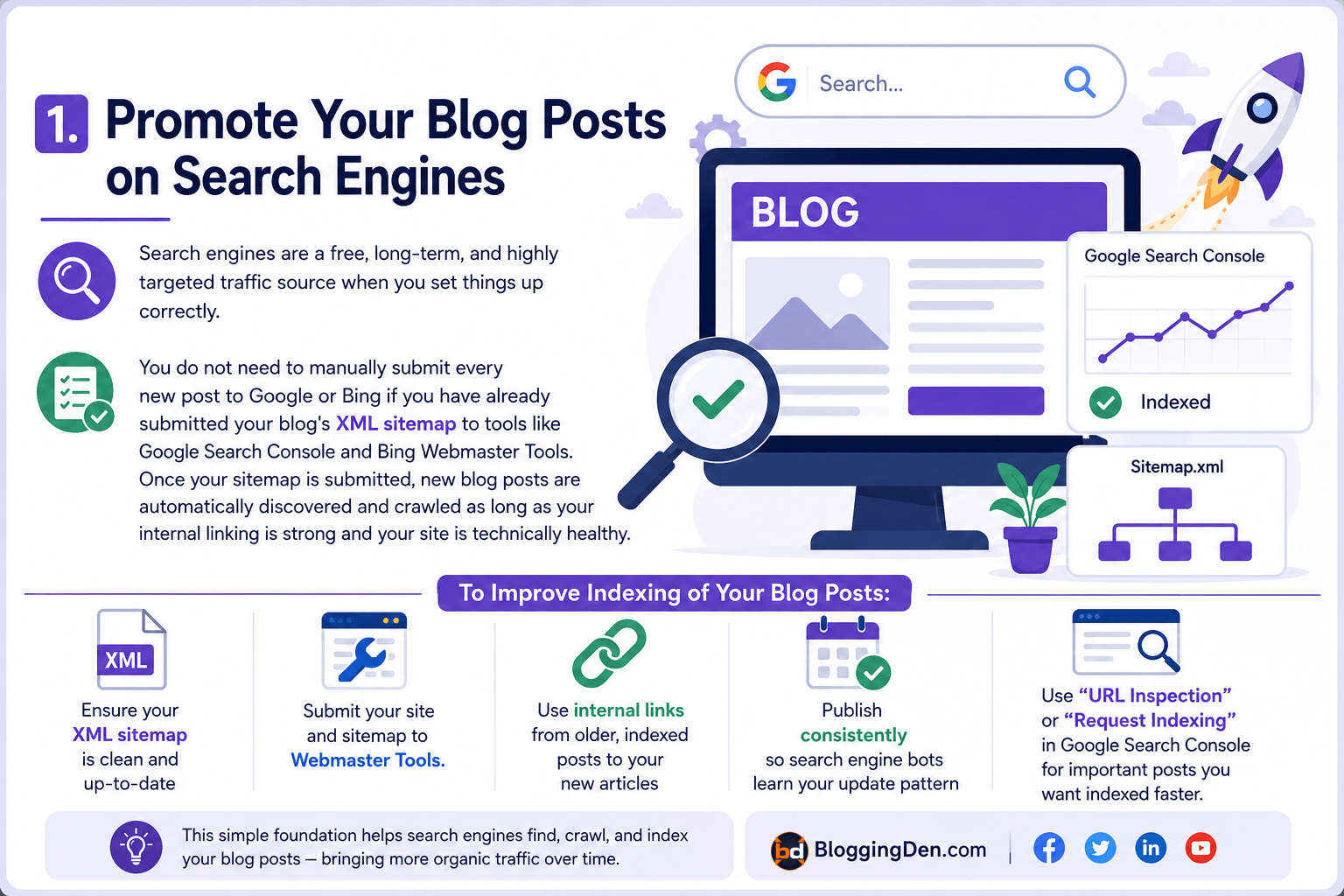
How do you promote a blog on Google and other search engines? The good news is that search engines are a free, long-term, and highly targeted traffic source when you set things up correctly.
You do not need to manually submit every new post to Google or Bing if you have already submitted your blog’s XML sitemap to tools like Google Search Console and Bing Webmaster Tools.
Once your sitemap is submitted, new blog posts are automatically discovered and crawled as long as your internal linking is strong and your site is technically healthy.
To improve how quickly and reliably your posts are indexed:
- Ensure your XML sitemap is clean and up-to-date
- Submit your site and sitemap to webmaster tools
- Use internal links from older, indexed posts to your new articles
- Publish consistently so search engine bots learn your update pattern
You can also use “URL Inspection” or “Request Indexing” in Google Search Console for important posts you want indexed faster. This simple foundation helps your blog posts appear in search results without any extra manual submission each time.
2. Use Strong SEO to Rank Your Posts
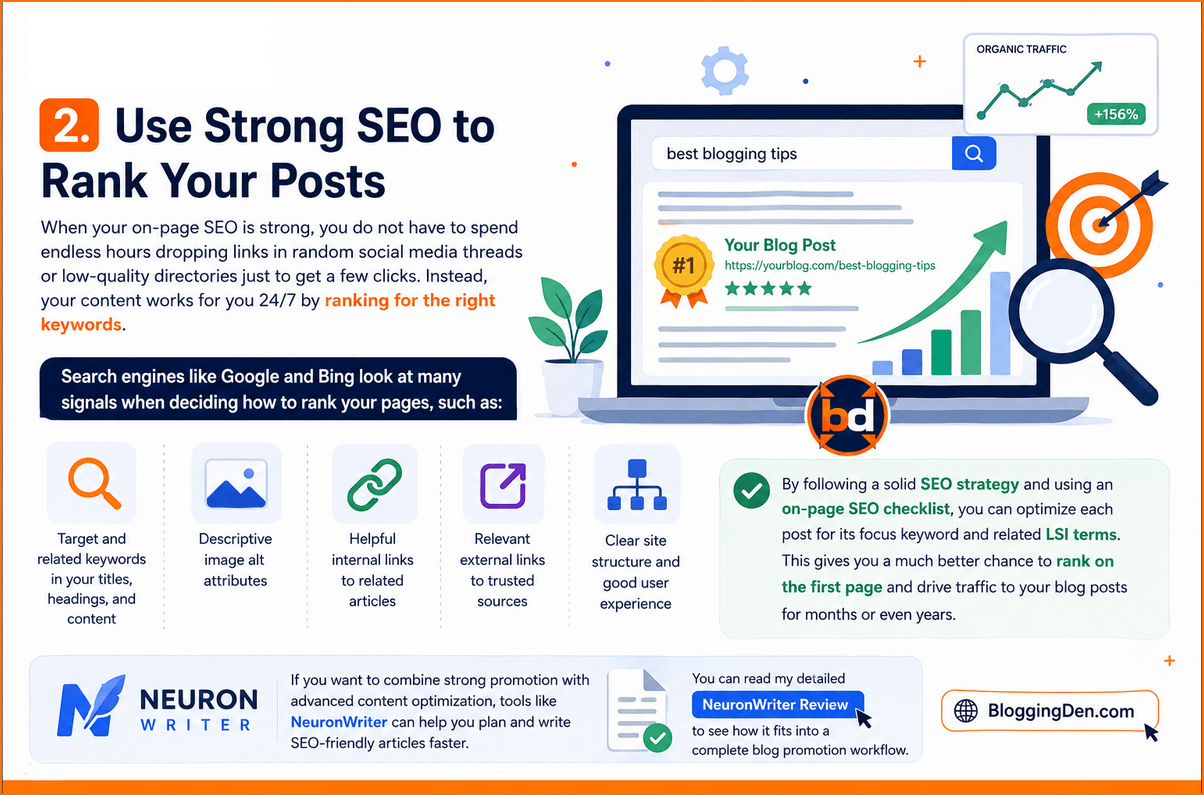
When your on-page SEO is strong, you do not have to spend endless hours dropping links in random social media threads or low-quality directories just to get a few clicks. Instead, your content works for you 24/7 by ranking for the right keywords.
Search engines like Google and Bing look at many signals when deciding how to rank your pages, such as:
- Target and related keywords in your titles, headings, and content
- Descriptive image alt attributes
- Helpful internal links to related articles
- Relevant external links to trusted sources
- Clear site structure and good user experience
By following a solid SEO strategy and using an on-page SEO checklist, you can optimize each post for its focus keyword and related LSI terms. This gives you a much better chance to rank on the first page and drive traffic to your blog posts for months or even years.
If you want to combine strong promotion with advanced content optimization, tools like NeuronWriter can help you plan and write SEO-friendly articles faster. You can read my detailed NeuronWriter Review to see how it fits into a complete blog promotion workflow.
Want better SEO content with NeuronWriter?
NeuronWriter helps you optimize blog posts with better topical coverage, content scoring, and semantic keyword suggestions so your articles have a stronger chance to rank.
3. Publish Blog Posts at Regular Intervals
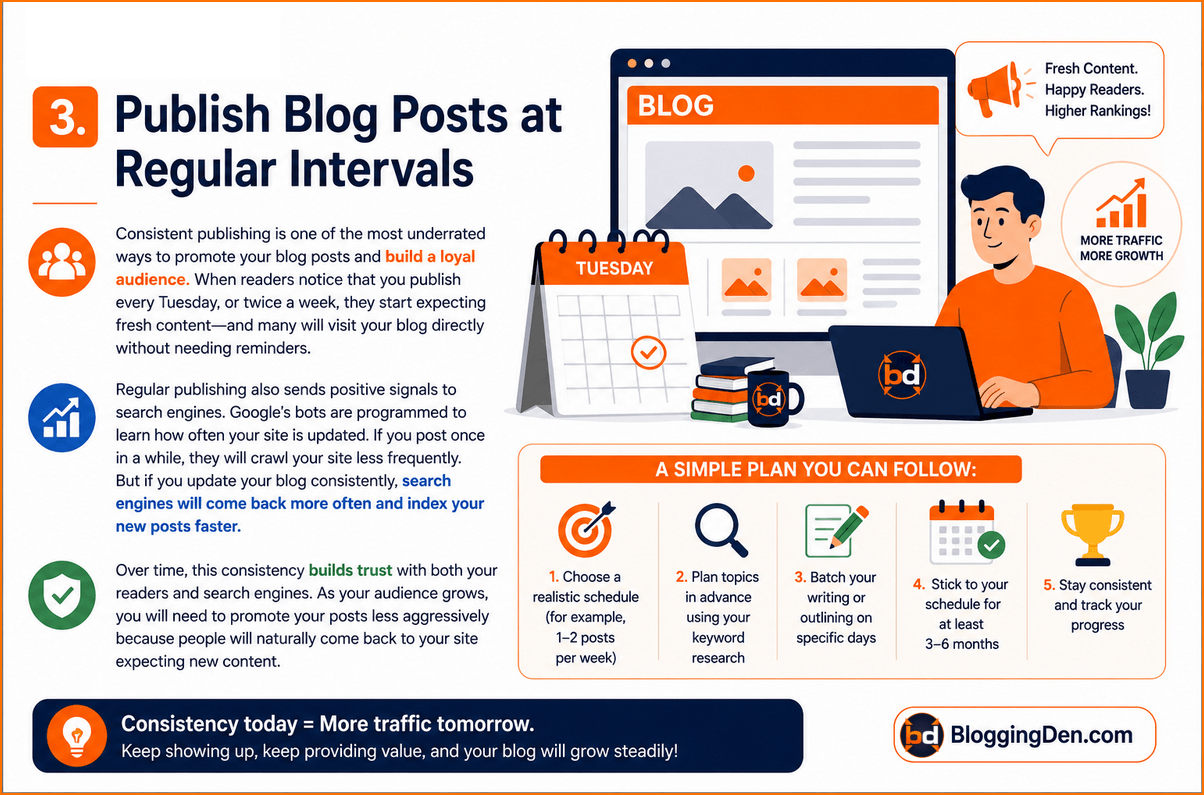
Consistent publishing is one of the most underrated ways to promote your blog posts and build a loyal audience.
When readers notice that you publish every Tuesday, or twice a week, they start expecting fresh content—and many will visit your blog directly without needing reminders.
Regular publishing also sends positive signals to search engines. Google’s bots are programmed to learn how often your site is updated.
If you post once in a while, they will crawl your site less frequently. But if you update your blog consistently, search engines will come back more often and index your new posts faster.
A simple plan you can follow:
- Choose a realistic schedule (for example, 1–2 posts per week)
- Plan topics in advance using your keyword research
- Batch your writing or outlining on specific days
- Stick to your schedule for at least 3–6 months
Over time, this consistency builds trust with both your readers and search engines. As your audience grows, you will need to promote your posts less aggressively because people will naturally come back to your site expecting new content.
4. Promote and Publish Your Blog Posts on Social Media
How do you promote a blog on social media effectively? Social platforms like Facebook, X (formerly Twitter), Instagram, Pinterest, LinkedIn, and YouTube are some of the best sources of fast, scalable traffic when used strategically.
Do not ignore these traffic sources. Many readers prefer to follow your blog updates via social media instead of email, especially if they spend most of their time on their favorite platforms.
After publishing a new post, make it a habit to share it on all relevant social networks where your audience is active.
A simple social media promotion workflow you can follow:
- Share your new post to your Facebook page, group, and personal profile with a strong hook and image.
- Post a short teaser thread or post on X summarizing the key tips, then add your blog link.
- Turn one or two key ideas into an Instagram carousel or Reel and invite people to “Read the full guide on the blog.”
- Pin your blog graphic to Pinterest boards relevant to your niche with keyword-rich descriptions.
- Share a summary or key takeaway on LinkedIn, especially if your topic is business or career-related.
Create a dedicated Facebook page and group around your blog’s niche and discussions. This not only helps you promote new posts but also builds a community where your readers can ask questions, share feedback, and engage with your brand regularly.
5. Share at the Right Time on Social Media
Different social networks have different peak engagement times. If you share your blog posts when most of your followers are offline, your reach, clicks, and traffic will be much lower than it could be.
Instead of posting randomly, try to share your content when your audience is most active. While the exact best time depends on your niche and audience location, research and real-world experience show that mid-mornings, lunch hours, and early evenings often perform best for many users. Use the following as a starting point, then refine based on your own analytics:
- Facebook: Typically between 9:00 am and 3:00 pm on weekdays; early evenings can also work well.
- X (Twitter): Early mornings and late afternoons, especially on weekdays when people check news and updates.
- Instagram: Late mornings (10:00 am–12:00 pm) and evenings (7:00 pm–9:00 pm) tend to drive strong engagement.
- YouTube: Afternoons and early evenings on Thursday–Sunday, when people have more time to watch longer videos.
- Pinterest: Weekend mornings and evenings are often strong, as users search for ideas and inspiration.
- LinkedIn: Weekdays, especially Tuesday–Thursday between 9:00 am to 12:00 pm and around 5:00 pm–6:00 pm.
Example posting-time reference for bloggers
Use this sample schedule as a guideline and then adjust based on your own data:
| Day | Facebook (local time) | X / Twitter | ||
|---|---|---|---|---|
| Sunday | 12 pm–1 pm | 11 am–1 pm | 9 am–12 pm, 7 pm–9 pm | — |
| Monday | 12 pm–3 pm | 12 pm–3 pm, 5 pm | 7 am–8 am, 5 pm–6 pm | 9 am–12 pm, 5 pm–6 pm |
| Tuesday | 12 pm–3 pm | 12 pm–3 pm, 5 pm | 7 am–8 am, 5 pm–6 pm | 9 am–12 pm, 5 pm–6 pm |
| Wednesday | 12 pm–3 pm | 12 pm–3 pm, 5 pm | 7 am–8 am, 5 pm–6 pm | 9 am–12 pm, 5 pm–6 pm |
| Thursday | 12 pm–3 pm | 12 pm–3 pm, 5 pm | 7 am–8 am, 5 pm–6 pm | 9 am–12 pm, 5 pm–6 pm |
| Friday | 12 pm–3 pm | 12 pm–3 pm, 5 pm | 2 pm–4 pm | 9 am–12 pm |
| Saturday | 12 pm–1 pm, 2 pm–4 pm | 11 am–2 pm | 8 pm–1 am | — |
Treat this table as a starting template, not a fixed rule. Always test different time slots and refine based on what your analytics show about your audience’s behavior.
Use Semrush Social Media Toolkit to Schedule at Peak Times
Manually posting at the perfect time every day is difficult, especially if you are a solo blogger. This is where tools like the Semrush Social Media Toolkit help you automate and optimize your social promotion.
With Semrush’s Social Media Poster, you can
- Connect your main social profiles (Facebook, X, LinkedIn, Instagram, and Pinterest).
- Create and schedule posts in advance for each new blog article.
- See an interactive calendar showing all your upcoming posts.
- View charts of when your audience is most active and schedule posts in those time windows.
A simple workflow to follow inside Semrush:
- Log in to Semrush and open the social media toolkit.
- Click on Social Media Poster and connect up to two social profiles (more with a Pro or higher plan).
- Click New Post, add your blog title, short description, relevant hashtags, and the full URL (avoid over-shortening links for trust).
- Use the audience activity graph to pick the best times to post for each platform.
- Schedule multiple posts for the same article over a few days or weeks, using different hooks and visuals to keep it fresh.
This approach helps you stay consistent, reach your audience at the right time, and keep promoting your evergreen blog posts without having to be online all the time.
Ready to schedule blog promotion with Semrush?
Semrush helps you plan social sharing, monitor performance, and promote new blog posts at the best times so you can get more reach, clicks, and traffic.
6. Use Hashtags Strategically in Your Social Media Posts
Hashtags are one of the simplest ways to increase the visibility of your blog promotion posts on social media. When you add a relevant hashtag to your content, your post becomes discoverable to anyone searching or following that tag, not just your existing followers.
For example, if you share a blogging tutorial, you might use hashtags like #bloggingtips #blogging or #tutorial. When someone searches for or taps on those hashtags, your post has a chance to appear in that feed, bringing you new readers who are already interested in your topic.
A few simple hashtag best practices for bloggers:
- Use specific, niche-related hashtags instead of only broad ones (for example, #wordpressblogging instead of just #blogging).
- Mix 2–3 broader tags with 3–5 niche or long-tail tags to reach both large and targeted audiences.
- Avoid stuffing too many hashtags into one caption; focus on quality and relevance.
- Create one branded hashtag for your blog name or community and use it consistently.
There are many hashtag analytics tools online that help you discover trending and related hashtags in your niche. You can mention one or two tools in your post and show readers how to find the best tags for their blog, brand, product, service, or event.
7. Create Dedicated Profiles for Your Blog on Social Media
Creating separate blog-focused profiles and pages on social media is another powerful way to promote your posts and build your brand. Instead of relying only on your personal accounts, you can set up:
- A Facebook Page and/or Group for your blog
- An Instagram business profile for your niche
- A Pinterest business account for your blog graphics
- A LinkedIn Page, if your content is business or career-focused
When you create these profiles, most platforms allow you to add your blog URL and other important links. This turns your social profiles into additional traffic sources, because anyone who discovers you on social media can click through to your website.
To get the most out of these profiles:
- Use your blog name and logo for consistent branding.
- Add a clear bio that explains who you help and what your blog is about.
- Include your main blog URL and, if possible, a link to your email newsletter.
- Pin or highlight one of your best blog posts as a featured post.
Over time, as more people find and follow your social pages, they will regularly click through to your blog, giving you steady referral traffic without extra effort.
8. Build Your Circle and Grow a Loyal Audience
On social media, it is not enough to just post links and disappear. To promote your blog posts effectively, you need to build a circle of people who trust you, enjoy your content, and want to hear from you regularly.
Your goal should be to turn casual visitors into the following:
- Followers on your main social platforms
- Active group members or community participants
- Email subscribers who receive your latest posts in their inbox
You can start by writing catchy, benefit-driven titles and post captions that make people want to click and read your articles.
When someone engages with your content—likes, comments, shares, or saves—respond to them, start conversations, and invite them to follow your profile or join your group.
A few ways to build and nurture your circle:
- Ask questions in your captions and encourage comments.
- Invite readers to like your Facebook page or join your niche Facebook group.
- Use your posts and Stories to remind people to subscribe to your newsletter for exclusive tips.
- Occasionally run small giveaways, polls, or Q&A sessions to keep engagement high.
Once your circle is strong, you will not have to look for readers elsewhere.
Every time you publish a new blog post, you can simply share it with your existing followers and subscribers, and you will instantly get traffic from people who are already interested in what you share.
9. Answer Questions in Forums Using Your Blog Posts
Answering questions in niche forums and Q&A communities is a smart way to promote blog posts and drive highly targeted referral traffic.
Many forums have hundreds of unanswered or poorly answered questions that are directly related to the topics you already cover on your blog.
Start by identifying a few relevant platforms for your niche (for example, specialized forums, Facebook Groups, Reddit communities, or Q&A sites).
Then search for questions closely related to posts you have already published. When you find a suitable question, write a helpful, detailed answer first, and then naturally link to your blog post for readers who want more depth.
A simple framework you can follow:
- Find a question that matches one of your blog topics.
- Write a clear, genuinely helpful answer in your own words.
- At the end, add a line like “For a more detailed guide, you can read my full post here” and share your link.
- Avoid spamming or dropping links without context; focus on adding value.
This way, you help the community by answering real questions and at the same time send highly relevant traffic to your posts.
Over time, a few strong answers in the right places can keep bringing new readers to your blog for months.
You can also maintain a separate resource page on your blog that lists high-quality forum posting sites and discussion boards in your niche, which adds value for your readers and supports your own link-building strategy.
10. Submit Your Blog Posts to Social Bookmarking Sites
Social bookmarking sites are still useful for helping new content get discovered and indexed faster, especially if your blog is relatively new.
These platforms allow users to save, organize, and share interesting links, which can include your latest blog posts.
Popular bookmarking-style platforms you can consider include:
- Mix (where still active in your niche)
- Slashdot
- Other niche bookmarking or curation sites in your industry
People visit these sites to find new content, images, and resources. When you save or submit your blog posts on relevant boards, subreddits, or categories, you increase the chances that interested users will click through to your site.
Best practices for using social bookmarking to increase blog traffic:
- Do not just drop your links; write short, compelling descriptions that explain the benefit of your post.
- Choose the right categories, boards, or communities for each submission.
- Follow the rules of each platform and avoid over-promotion to prevent bans.
- Focus more on platforms where your ideal readers already spend time (for bloggers, Pinterest and Reddit are usually strong).
You can also create a dedicated guide on your blog that lists the best social bookmarking sites for bloggers and explains how to use them correctly.
This not only helps your audience but also positions you as an authority on off-page SEO and content promotion.
11. Build and Nurture Your Email List
If you want long-term, consistent traffic every time you publish, building an email list is essential. Social media algorithms change, and SEO takes time, but your email list is an asset you control completely.
Ideally, email list building should start from your very first blog post. When visitors land on your site, they should immediately understand that you regularly share useful content and that they can subscribe to your newsletter to receive updates, tips, and exclusive resources.
Key steps to start and grow your email list:
- Place opt-in forms in strategic locations: within posts, at the end of articles, in the sidebar, and as a light popup.
- Offer a simple lead magnet (for example, a free ebook, checklist, template, or mini-course) to give people a clear reason to subscribe.
- Clearly explain what subscribers will receive and how often you will email them.
- Send each new blog post to your list along with a short, engaging summary and a link to read more.
When visitors subscribe to your newsletter, you collect their email addresses and build a warm audience you can reach anytime, without relying on search engines or social media. Over time, each new blog post promotion becomes much easier: you simply email your list and get immediate traffic from readers who already know and trust you.
You can also link to your existing resources on email marketing and list-building tools (like your Mailchimp or email marketing platform guides) from this section to help your readers set up their own systems.
12. Use Newsletters to Promote Your Blog Posts
Email newsletters are one of the most reliable ways to promote blog posts and bring readers back to your site every time you publish something new.
Instead of waiting for people to discover your content through search or social media, you can deliver it straight to their inbox.
If you plan to use a subscription system, set it up as early as possible. When visitors land on your blog, clearly invite them to subscribe so they can receive your latest posts, tips, and special offers.
Over time, this helps you build a loyal audience and even monetize your newsletter with affiliate offers, your own products, or sponsored mentions.
You mentioned using Mailchimp to send your email newsletters, which is a solid, beginner-friendly choice for bloggers. A simple setup looks like this:
- Create a signup form or landing page inside your email marketing tool.
- Integrate the form with your blog (sidebar, within posts, as a popup, or in the footer).
- Offer a small lead magnet (ebook, checklist, or template) to increase signups.
- After publishing a new post, send a short email with a catchy subject line, a quick summary, and a clear link to read the full article.
You can also use built-in WordPress subscription options like the Jetpack Subscription form if you want a lightweight solution, but a dedicated email marketing platform gives you more control over design, automation, and list segmentation.
For readers who want step-by-step help, you can link to your detailed guide on how to use Mailchimp to send blog post updates and build an email list.
Want to grow your email list faster?
A good email marketing tool helps you capture subscribers, send blog updates, and bring readers back to your site every time you publish a new post.
13. Interlink Your Posts to Boost SEO and Engagement
Internal linking is one of the easiest and most powerful on-page SEO techniques to increase blog traffic and keep readers on your site longer. When you link your related posts together, you help:
- Search engines understand your site structure and important pages.
- Readers discover more of your content on the same topic.
- Reduce bounce rate and increase time on site, which are positive engagement signals.
You are already doing a good job by linking to relevant posts and pages from within your content. To take this further, regularly go back to your older posts and add links pointing to your newer, related articles.
This “reverse interlinking” strategy sends authority from established posts to fresh ones and helps new articles rank faster.
WordPress makes this even easier with:
- Related posts are featured in many themes (including Kadence).
- Dedicated internal linking plugins like Link Whisper and Rank Math AI Link Genius, which suggest contextual internal links automatically and help you fix orphan pages and missed linking opportunities.
Want to build internal links faster with Link Whisper?
Link Whisper is a smart WordPress internal linking plugin that suggests relevant links as you write, helping you save time, reduce orphan posts, and strengthen on-page SEO.
A practical internal linking workflow you can follow:
- After publishing a new post, link from that post to at least 3–5 older relevant articles.
- Then, open a few high-traffic older posts and add links pointing to your new article.
- Use a plugin like Link Whisper or Rank Math AI Link Genius to scan for additional linking opportunities and automate repetitive linking tasks.
This simple habit can significantly improve your rankings, crawl efficiency, and page views across your site.
Need AI-powered internal linking inside Rank Math?
Rank Math AI Link Genius scans your content library, finds topical linking opportunities, and helps you build smarter internal links directly inside your WordPress SEO workflow.
14. Earn Backlinks from Other Blogs
Backlinks from other relevant websites are still one of the strongest off-page signals that help your blog rank higher and get more traffic.
When authoritative blogs and sites link to your content, search engines see your post as more trustworthy and valuable.
Two classic methods that still work well when done properly are the following:
- Guest posting: Write high-quality articles for other blogs in your niche and include a contextual link back to your own post or author bio.
- Blog commenting: Leave thoughtful, in-depth comments on relevant blog posts and, where allowed, include your website URL or a link to a specific article when it genuinely adds value.
For guest posting:
- Target blogs that are relevant to your topic and have real audiences.
- Pitch unique, useful topics that are not already covered on their site.
- Focus on quality and relationship building, not just dropping links.
For blog commenting:
- Avoid generic comments like “Nice post” or “Thanks for sharing.”
- Add specific insights, experiences, or additional tips related to the article.
- Only include your link when it truly fits and is allowed by the site’s commenting policy.
The benefits are twofold: you get direct referral traffic from readers who click through, and you also give your posts the SEO boost they need to start ranking better in search engines.
You can also point readers to your own detailed resources on how to create backlinks for better SEO and the best places to buy backlinks, while reminding them to focus on quality and white-hat practices.
15. Answer Every Comment You Receive on Your Blog
Finally, one of the most underrated ways to promote blog posts and build a loyal audience is to actively engage with the readers who already visit your site.
When someone takes the time to leave a comment, they are showing genuine interest in your content—and that is an opportunity you should not ignore.
Make it a habit to reply to every meaningful comment on your blog posts. Thank readers for their feedback, answer their questions, and, where appropriate, recommend additional articles on your blog that can help them further. This not only increases page views but also makes your readers feel heard and valued.
Some smart ways to use comments to promote more content:
- If a reader asks about a related topic, link them to another relevant blog post you have written.
- If you do not yet have a post on their question, note it down as a potential topic for your next article.
- Encourage commenters to join your email list or follow you on social media for more tips.
Active comment engagement sends positive signals to both users and search engines. It improves your on-page engagement metrics and helps transform one-time visitors into repeat readers and subscribers.
You can also link to your existing article on blog commenting to help readers learn how to use comments effectively for networking and traffic.
You can and should add these as new dedicated sections to make your guide more comprehensive and modern. Below are ready-to-use, SEO-friendly sections for each missing tactic, in the same tone and structure we’ve been using, without any external source links.
You can insert them after your existing methods (for example, between 10–15 or as new numbers 16–23).
16. Repurpose Your Blog Content Into Multiple Formats
One of the smartest ways to promote blog posts and reach new audiences is to repurpose your content into different formats. Instead of writing a post once and forgetting about it, you can turn it into videos, short-form content, visuals, and more.
For example, from a single in-depth blog post, you can create:
- A YouTube video explaining the main ideas
- Short Reels or Shorts highlighting key tips
- An Instagram carousel summarizing the steps
- A Pinterest infographic or pin with your main takeaways
This approach helps you appear on multiple platforms without having to create every piece from scratch. It also supports your SEO, because people discover your brand from different channels and eventually search for you or click through to your blog.
A simple repurposing workflow:
- Outline your blog post with clear sections and bullet points.
- Turn the outline into a video script for YouTube.
- Extract 3–5 key tips and convert them into Reels, Shorts, or TikTok videos.
- Use your visuals and quotes to design carousels or infographics.
Every time you repurpose content, make sure you include a clear call-to-action pointing back to the original blog post for full details.
17. Publish Articles on LinkedIn for Professional Reach
If your niche has any connection to business, career growth, marketing, or B2B, LinkedIn can be a powerful channel to promote your blog posts. LinkedIn users actively look for educational, insightful content, making it a perfect platform for repurposing your articles.
Here are a few ways to use LinkedIn for blog promotion:
- Publish a shortened version of your blog post as a LinkedIn article, and link back to the full post at the end.
- Share a feed post with a strong hook, a short summary, and a link to your blog.
- Turn your post into a carousel using key points and visuals.
When you do this consistently, you start appearing more often in your connections’ feeds. Over time, LinkedIn can become a regular traffic source, especially for high-intent, professional readers who are more likely to subscribe, share, or buy.
To maximize results:
- Use compelling, benefit-driven headlines.
- Add a clear CTA at the end of each LinkedIn article directing readers to your blog.
- Engage with comments and messages to build relationships and authority.
18. Cross-Post on Medium and Quora (With Proper Syndication)
Medium and Quora are great platforms to increase the reach of your best blog posts and drive more traffic back to your site. Many readers spend time on these platforms but may never discover your standalone blog directly.
Here is how to use them wisely:
- Medium:
- Republish your blog posts on Medium after they are indexed on your site.
- Use canonical tags (or the “Import a story” feature) so search engines know your blog is the original source.
- Add a short bio with a link to your site and lead magnet.
- Quora:
- Search for questions related to your post topics.
- Write a detailed, high-value answer and then link to your full blog post for more details.
- Focus on genuinely helping, not just dropping links.
This strategy exposes your content to existing audiences on Medium and Quora while keeping your own blog as the primary SEO asset.
19. Use Push Notifications for Instant Traffic
Web push notifications are another effective way to promote new blog posts and bring visitors back instantly. When someone allows notifications on your site, you can send them short alerts directly to their browser or device whenever you publish new content.
Popular tools like OneSignal or PushEngage make this easy to set up:
- You add a small script or plugin to your blog.
- Visitors see a prompt asking if they want to allow notifications.
- When you publish a new post, you send a short notification with a catchy title and link.
Benefits of using push notifications:
- Immediate spikes of traffic right after publishing.
- A direct channel that does not depend on email open rates or social algorithms.
- Great for time-sensitive content like offers, deals, and news.
Just use them carefully. Do not send too many notifications in a single day and always ensure that each alert offers real value, not just a random clickbait headline.
20. Collaborate With Influencers and Create Blogger Roundups
Influencer mentions and blogger roundups are powerful blog promotion strategies because they tap into other people’s existing audiences. Instead of promoting your post alone, you involve others who are likely to share it with their followers.
Two effective approaches:
- Influencer outreach:
- Mention tools, experts, or influencers inside your blog post (with genuine appreciation).
- After publishing, email or DM them with a short message and the link.
- Some of them may share your post or mention you in their content.
- Blogger roundups:
- Create a post that collects tips, quotes, or strategies from multiple bloggers in your niche.
- Include a link and short bio for each contributor.
- After publishing, share the post with all participants and encourage them to promote it to their audience.
This type of content not only attracts more shares but also naturally earns backlinks and builds relationships in your niche.
21. Optimize for Google Discover
Google Discover can drive a large amount of traffic to high-quality, engaging blog posts, especially for mobile users. While you cannot directly “submit” content to Discover, you can optimize your posts to increase the chances of appearing there.
Key elements that help with Discover:
- Use high-quality featured images (at least 1200px wide).
- Write compelling, curiosity-driven titles that make people want to tap.
- Focus on fresh, timely, or evergreen topics that people are actively interested in.
- Improve your site’s overall E-E-A-T (experience, expertise, authoritativeness, trustworthiness).
Also, make sure your site is mobile-friendly, loads fast, and uses HTTPS. When your posts are visually appealing and relevant, they have a higher chance of being shown in Google Discover feeds on Android devices and the Google app.
22. Mention Your Blog in Podcasts and Audio Content
Podcasts and audio platforms are growing fast, and they offer an excellent opportunity to promote your blog posts to an engaged audience. Even if you do not host your own podcast, you can still appear on other people’s shows in your niche.
Ways to use podcasts for blog promotion:
- Start your own niche podcast and use each episode to discuss topics covered in your blog posts, then invite listeners to read the full articles.
- Pitch yourself as a guest on other podcasts, sharing your expertise and mentioning your blog and key posts when relevant.
- Repurpose blog content into audio summaries or short episodes for platforms like YouTube, Spotify, or other podcast apps.
Every time you speak on a podcast, you can direct listeners to a specific blog post or resource, which often brings highly engaged, targeted traffic.
23. Leverage Community Marketing (Groups, Forums, and Slack Communities)
Community-based platforms are among the best places to promote your blog posts and build deep relationships with your ideal readers. Instead of just broadcasting messages, you participate in ongoing conversations.
Places to consider:
- Facebook Groups in your niche
- Reddit communities (subreddits) related to your topic
- Slack or Discord communities where your audience hangs out
- Private membership or course communities you are part of
How to use communities the right way:
- Join with the intention to help first, not just to drop links.
- Answer questions, share tips, and be active regularly.
- When suitable, mention your blog posts as detailed resources that can help members.
- Respect each community’s rules about self-promotion.
Over time, you become known as a helpful, trusted member, and community members will naturally start checking out your blog, subscribing, and sharing your content.
Frequently Asked Questions About Promoting Blog Posts
How do I promote my blog post for free?
You can promote your blog post for free by sharing it on social media, posting in relevant Facebook groups or communities, answering related questions on forums and Quora, building an email list, and interlinking it from older articles on your blog. Focus on value-driven promotion, not just dropping links everywhere.
What is the best time to promote a blog post?
The best time to promote a blog post depends on your audience, but mid-mornings, lunch hours, and early evenings usually work well. Start with these slots, then refine based on your analytics for Facebook, X, Instagram, and email open rates. Always test different days and times instead of relying on generic rules.
How many times should I promote a blog post?
You should promote a blog post multiple times over its lifetime, not just once on publish day. Share it a few times in the first week, then periodically repost it on social media, feature it in your newsletter, and resurface it when you update or repurpose the content. Evergreen posts can be promoted regularly throughout the year.
Does promoting blog posts improve SEO?
Yes. Promoting blog posts can indirectly improve SEO by driving more clicks, engagement, and backlinks. When more people read, share, and link to your content, search engines see positive signals like time on page, lower bounce rate, and external references, which can help improve your rankings over time.
What are the best ways to promote blog posts on social media?
The best ways include sharing with strong hooks and images, using relevant hashtags, posting at peak times, repurposing content into Reels, carousels, and short videos, and actively engaging with comments. Combine link posts with value-first content like tips, threads, or mini tutorials so you are not only pushing links but also building trust.
How can I repurpose a blog post to reach more people?
You can repurpose a blog post by turning it into YouTube videos, short-form videos, Instagram carousels, Pinterest infographics, LinkedIn posts, Medium articles, and podcast episodes. Each format reaches a different audience. Always add a clear call-to-action that sends people back to the original blog post for full details.
Is email marketing still effective for promoting blog posts?
Email marketing is one of the most reliable ways to promote blog posts because you reach people who already know and trust you. Every time you publish, send a short email with a compelling subject line, a quick teaser, and a link. Over time, a warm email list can drive consistent traffic without relying on algorithms.
How do I promote my blog posts on LinkedIn?
To promote blog posts on LinkedIn, share short value-packed updates with a link, publish condensed LinkedIn articles that summarize key points, and repurpose posts into carousels. Focus on practical tips and case studies. Finish each post with a clear CTA directing readers to your full article or related resource on your blog.
What are some quick ways to drive traffic to a new blog post?
Quick traffic wins include sharing the post across all social profiles, sending it to your email list, posting in relevant groups or communities that allow links, adding internal links from older posts, and answering a few related questions on Quora or forums with a link to your article. Combine these in the first 24–72 hours after publishing.
How do I know which promotion channels work best for my blog?
Track your results using analytics. Check where your clicks, sessions, and conversions come from—such as organic search, social networks, email, or referrals. Over time, focus more on the top-performing channels and formats while testing one new channel at a time. This data-driven approach prevents you from wasting time on tactics that do not move the needle.
Final Words: Start Promoting Every Post with a Plan
Publishing great content is only step one. To grow your blog in 2026, you need a repeatable system to promote blog posts across search, social, email, communities, and collaborations. When you combine strong on-page SEO with consistent promotion—through newsletters, social media, repurposed content, communities, and backlinks—you build a powerful engine that keeps working long after you hit publish.
You do not need to use every method at once. Start with a few core strategies that fit your time and skills, then gradually add more as you grow. Over time, this layered approach will steadily drive traffic to blog posts, build authority in your niche, and increase your income potential.
Now it is your turn: pick at least three methods from this guide and implement them for your next article. Track your results, refine what works, and keep improving your promotion checklist.
Which method do you use most to promote your blog posts? Comment below and share your experience.
Ready to optimize your blog with Rank Math?
Rank Math helps you improve on-page SEO, add schema, manage technical optimization, and build stronger rankings for the blog posts you want to grow.