Cloud‑based SSD hosting with strong features at mid‑range prices.
HostArmada offers cloud shared hosting with NVMe SSD storage, free domain and SSL, free daily backups, free website migration, and a 99.9% uptime guarantee, making it a solid choice for bloggers and small businesses that want faster speeds and more freebies than typical budget hosts.
Get HostArmada Hosting →Looking for a fast, secure, and affordable host for your WordPress blog or business website? HostArmada is a cloud‑based SSD hosting provider that combines LiteSpeed servers (on its Speed Reaper plan), NVMe‑powered infrastructure on select tiers, and fully managed WordPress hosting features to give you excellent performance at a beginner‑friendly price.
Unlike traditional shared hosts that run on older HDD hardware, HostArmada’s cloud SSD platform and advanced caching stack are designed to deliver faster load times, better uptime, and more consistent performance during traffic spikes.
In this updated HostArmada review 2026, you’ll see how its cloud SSD and LiteSpeed setup performs in real-world tests, what you actually get with the Start Dock, Web Warp, and Speed Reaper plans, and whether HostArmada’s managed WordPress hosting is the right choice for your next project.
Affiliate Disclaimer: We only recommend tools we use and trust. Affiliate earnings help keep our blog running at no extra cost to you. The reviews are based on our experiences, for which we did not receive payment. The next is an affiliate disclaimer.
Let’s get started.
Why HostArmada?
HostArmada is an affordable managed WordPress and cloud SSD hosting company that focuses on speed, stability, and beginner‑friendly tools.
Its shared plans run on a cloud platform with SSD (and NVMe on higher tiers), integrated caching, and multiple worldwide data centers, which helps your WordPress site load quickly, no matter where your audience is located

HostArmada is a managed cloud SSD hosting company that offers up to 75% off its shared and WordPress plans.
Affiliate link: I may earn a small commission at no extra cost to you.
HostArmada operates 9+ global data centers, including US, European, and Asia locations like Dallas, London, Frankfurt, and Singapore.
HostArmada at a glance
- Type of hosting: Managed cloud SSD shared hosting, managed WordPress hosting, reseller, VPS, and dedicated CPU servers.
- Technology stack: Cloud SSD (with NVMe on higher tiers), LiteSpeed web server on the Speed Reaper plan, integrated caching, free Cloudflare CDN.
- Data centers: 9+ locations across the US, Europe, and Asia – including Dallas, Newark, Fremont, Toronto, London, Frankfurt, Bangalore, and Singapore.
- Key freebies: Free domain name for the first year on eligible plans, free SSL certificates for all domains, free website migration, daily backups, and 24/7/365 support via chat, ticket, and phone.
- Reliability: 99.9% network uptime backed by cloud infrastructure with KVM virtualization and redundant SSD storage.
- Refund policy: 45‑day money‑back guarantee on shared and WordPress hosting plans, giving new users more time to test the platform.
HostArmada Review Video (2026)
Features of HostArmada hosting
- It provides free SSL for all sites
- Free domain name for one year
- Performing daily backups
- Offers cloud-based SSD storage
- An unmetered bandwidth
- Emails and databases are unlimited
- Migration of your website is free
- 24/7/365 customer support
- 1-click WordPress install
- An easy-to-use drag-and-drop site builder
- Website caching
- Free Malware Scan and removal tool
- Excellent firewall support
- There is a 45-day money-back guarantee
- 99.9% uptime is guaranteed
HostArmada Review 2026
HostArmada is a privately held cloud SSD hosting company launched in 2019, now operating 9+ data centers globally across the US, Europe, and Asia. It offers shared hosting, managed WordPress hosting, reseller, VPS, and dedicated CPU servers to customers worldwide.
HostArmada’s core strength lies in its cloud SSD infrastructure, advanced caching (Memcached, Brotli), LiteSpeed servers on the Speed Reaper plan, and Cloudflare CDN integration—all designed to deliver fast, reliable performance.
In this HostArmada hosting review, you’ve seen how their cloud SSD platform, LiteSpeed servers, and managed WordPress hosting features perform in real‑world usage, making HostArmada a strong choice for WordPress blogs and small business websites.
How to start a blog with HostArmada?
Are you frustrated with your current web host? It’s time to move to a new host that should be reliable and affordable, with good features. Here is a simple tutorial on starting with new web hosting. You can land your current blog or new blog on HostArmada within a few minutes.
Let us move to grab this discount by following the step-by-step instructions.
Note: HostArmada is offering a 75% discount on their regular hosting plans. If you are a newbie, you can try the Shared and WordPress plans to get maximum discounts to start.
Step 1: Go to the Offer Page
First, you need to click this link here. Then you will land on the HostArmada web hosting official page.
Step 2: Choose the shared hosting Plan
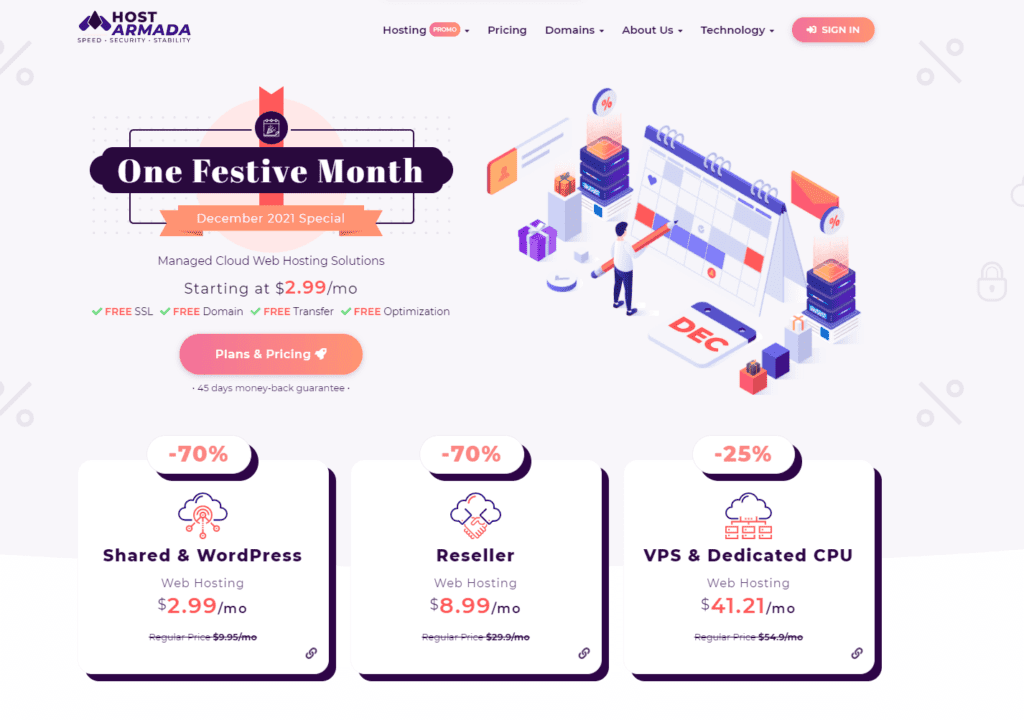
A shared hosting plan is best for newbies. It offers 75% off on selected plans. Promo codes are not necessary, and they will be added automatically. If necessary, add this code BLOGGINGDEN75 for a 75% discount.
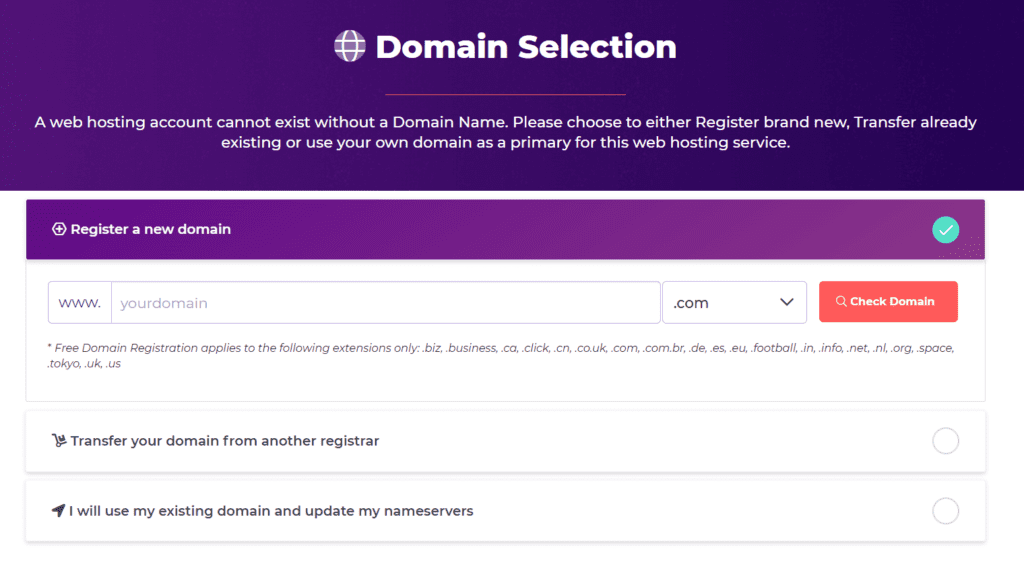
Step 3: Add the domain
On the domain selection page, select one of the options to select your domain as the root domain.
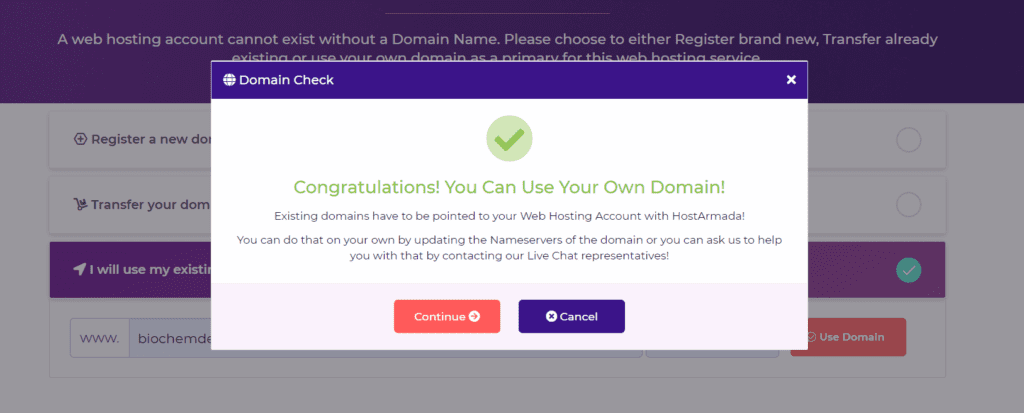
Afterward, it confirms that the page is for your domain.
Step 4: Pick the plan
Scroll down to see the three shared hosting plans mentioned above. Choose one. I recommend a SPEED REAPER plan for 36 months to save more money. Click on the Select Plan button. In the snapshot, I took the Star Dock as an example.
Step 5: Check the Product configuration
You will now see the Product configuration page. You must complete three steps on this page.
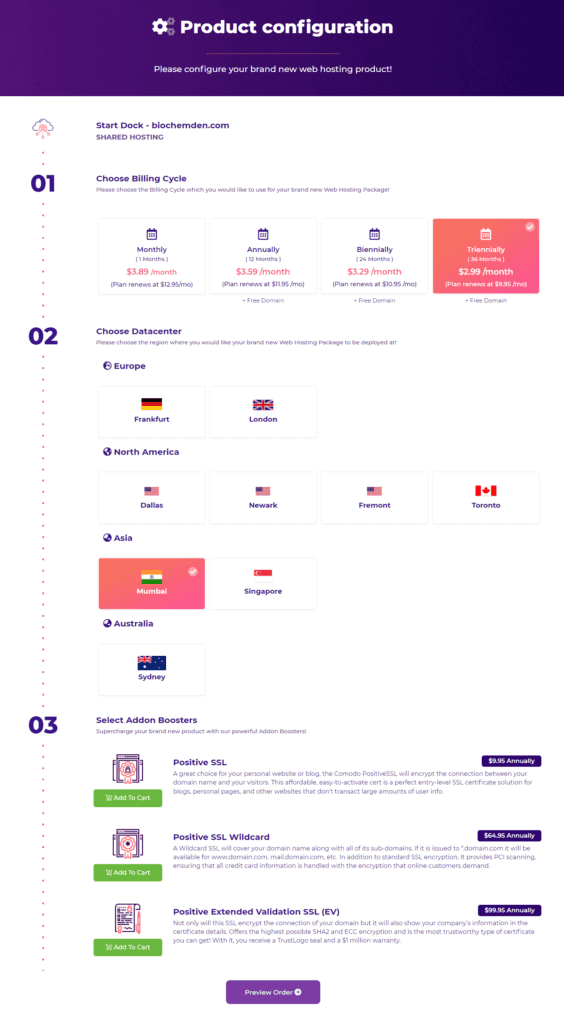
- Choose the bill: First, you have to check whether the chosen bill is correct or not.
- Choose DataCenter: Choose a data center based on the location and where the most visitors will be.
- Select Addon Booster: Do not choose anything from this section.
Finally, you can choose the billing, data center, and add-on boosters. Then you have to provide your personal information and payment information and finally click on the Place order button.
After this, you’ll have to decide on the billing cycle. It can be an annual, a biennial, or a triennial one. Then, decide on the location of your data center. All nine are available. Finally, think about including a few add-ons.
Step 6: Add your details
You must enter your personal and payment information on this Checkout page.
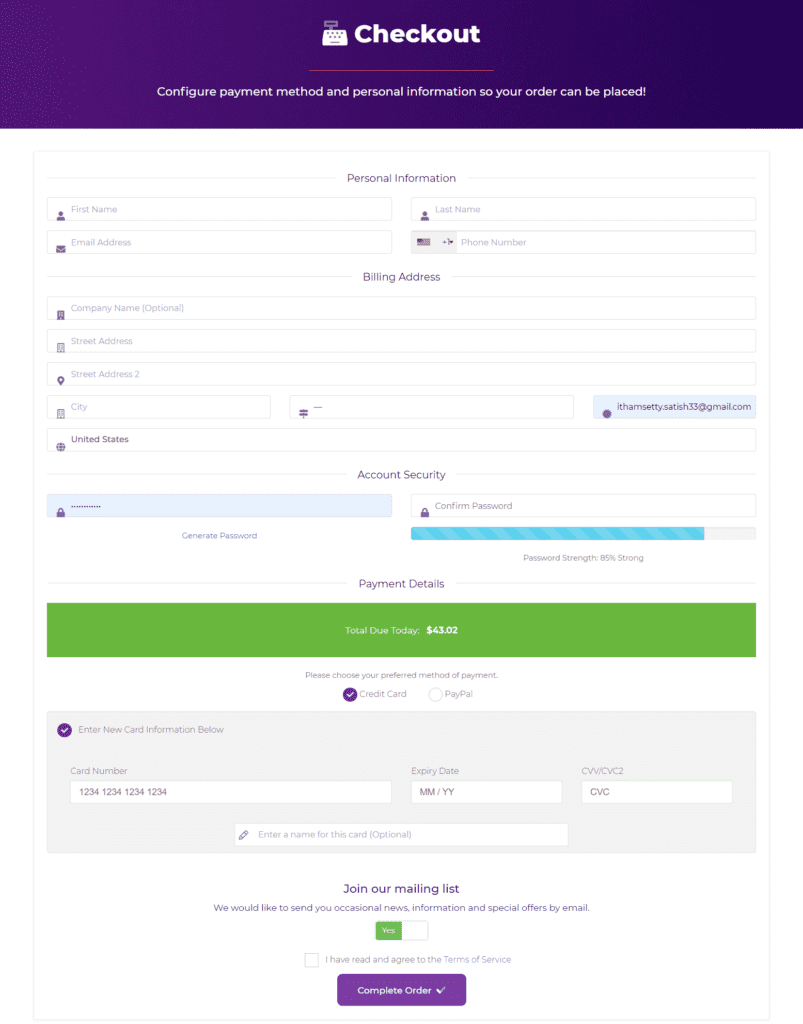
- Providing personal information: You can enter your name, phone number, email address, and address information.
- Payment details: There are two ways in which you can pay for your purchases, which are credit card and PayPal.
On this page, click on the complete order button once you enter your details.
Step 7: Check Order Summary
The next page will be the order summary page after completing the order. After completing your order, click the Order Summary button to move to the next step.

Step 8: Finish the process
First, authenticate your payment process. Then, you will receive account details. Next, click the confirmation link. After that, create a password and access your account. Once logged into your HostArmada hosting account, you can create a password or change it.
Once you have logged in to your hosting account, you will see this interface.
HostArmada User Interface
Once you finish the password setup, you will go to the HostArmada client dashboard.
You can manage everything from the billing cycle to CPanel access from this dashboard.
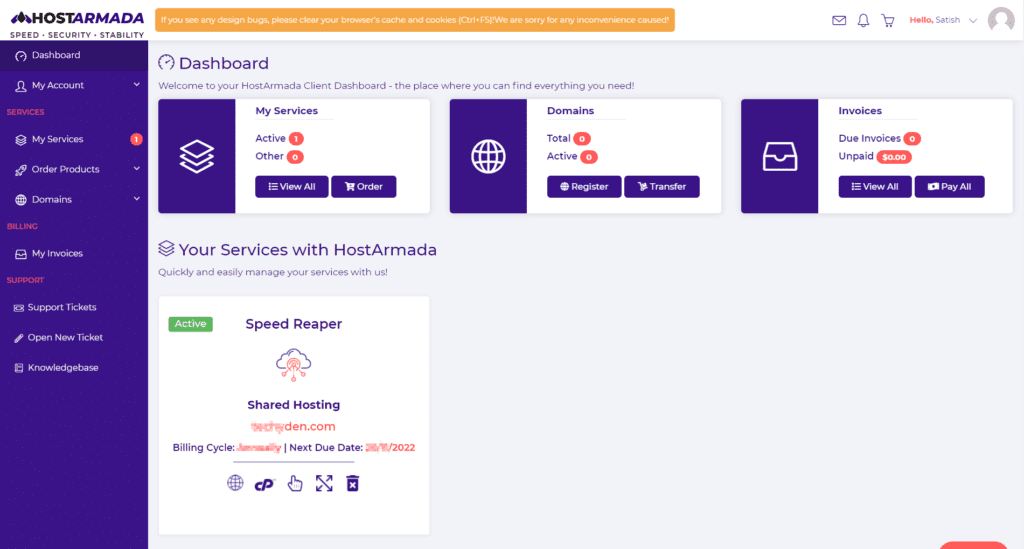
Once you click on the My Services section, you will get complete access to the root domain. You will also get access to cPanel, an email account, manage services, and upgrade plans from a single place. The dashboard is simple and user-friendly.

You can manage everything. This includes email account creation, file manager access, addon domains, and databases. You can do all this once you find the CPanel quick access.
What is the performance and speed of HostArmada?
A few days back, I migrated this blog to HostArmada. Then, I did speed tests with Google PageSpeed Insights, Bitcatcha, Gtmetrix, and Pingdom.
We did small tests after configuring the blog to get some idea about their hosting performance.
Here are the Google PageSpeed insights results.
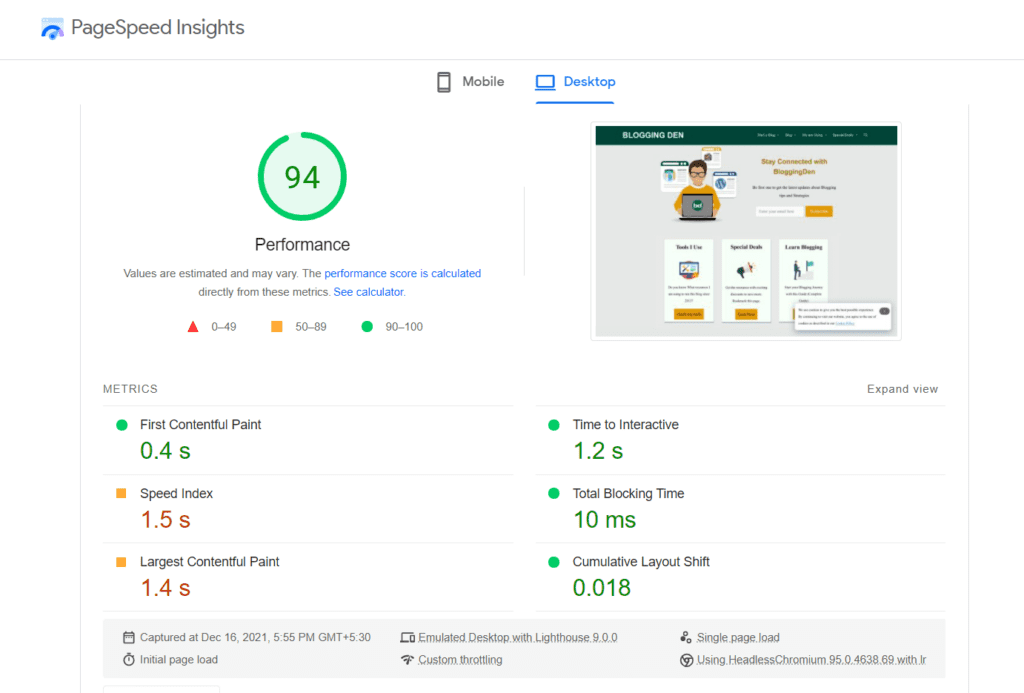
The performance results of the Desktop version are 94 out of 100.
Here are the GTmetrix results.
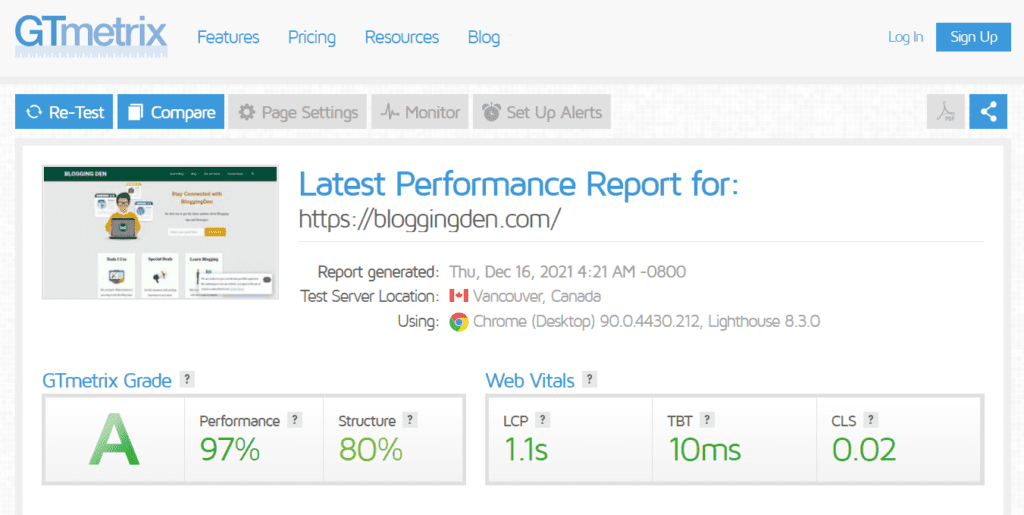
According to GTmetrix grading, the site is showing an A-Grade. It has a score of 97 (out of 100), and a Structure score is 80%.
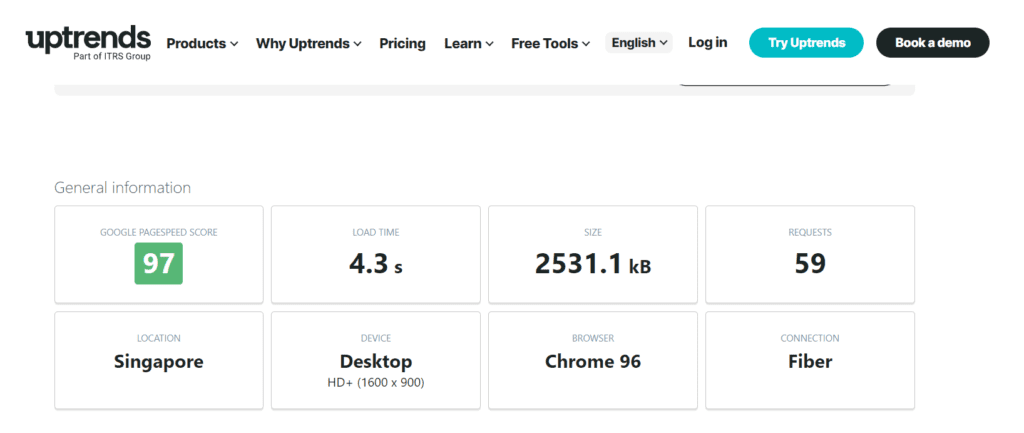
Here are the Uptrends results.
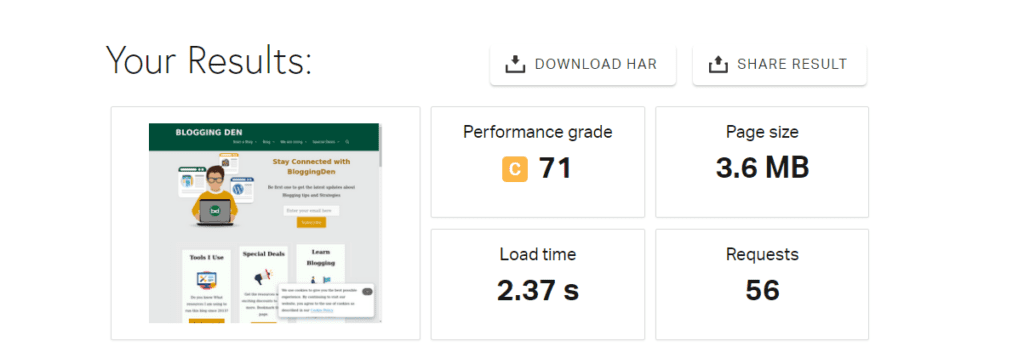
The final image represents the Pingdom score. For a quick speed test, we used Pingdom on a test site hosted on HostArmada. As you can see, even with a heavy size of 3.6 MB and with 56 requests, we get an outstanding 2.37s load time.
Why is HostArmada Hosting a Good Choice?
There are hundreds of web hosting providers. But hostArmada is different. Why? Here are the 5 top reasons.
1. Loading websites more quickly
Website loading time is crucial in ranking your website in search engines. When your website loads fast, your visitors will also be happy. Google uses the speed of a website as one of its ranking factors. So, having your website hosted on HostArmada will help improve its search engine ranking.
Brian Dean, founder of Backlinko, proved that Google is prioritizing fast-loading websites. It proves that a successful website needs the fastest website hosting.
As per the analysis, a successful website needs the fastest website hosting. Here, HostArmada gives the perfect results every time by improving overall site loading times.
How does HostArmada give better loadings? The web hosting is designed with a special technology that serves fast-loading pages. Cloud SSD drives, Memcached cache, Brotli compression, and Cloudflare CDN make web loading faster. These technologies outperform normal HDD drives.
- Using cloud SSD drives helps to make loading 300 times faster than normal HDD drives.
- Memcached cache: You can activate the cache system from the cPanel.
- Free Cloudflare CDN: It improves the user experience across the world.
- Brotli Compression: It helps compress your files and improves page loading times.
- LiteSpeed Servers: The web servers are designed with high-speed web servers instead of NGINX and Apache.
2. Clients per server are fewer
Most bloggers and small business owners choose shared hosting plans to host or launch their sites because of their affordability.
But on regular shared hosting, the providers will share the same server with more clients to host. Because of the number of people sharing the same servers, the usage of server resources will increase. Finally, it impacts the page-loading time of your website.
HostArmada is a better option than other top-rated hosting providers. Its shared hosting plans are limited. It gets better resources, performance, and low server load. In simple terms, fewer people are using the same server.
With HostArmada, you will get better resources like CPU speed, performance, and low server load. As a result, you will have 99.9% uptime with increased speed.
3. A free website migration service
Are you unhappy with your current web hosting provider? Are you planning to change your hosting? You can get a great free website migration service from HostArmada.
HostArmada offers free website migration (transferring a website). They also provide a free domain, a free SSL certificate, and a free scan for viruses and malware. When you provide the details, they will begin migrating everything. This includes files, folders, databases, and emails to their servers for free.
With HostArmada, you receive a free domain. It is automatically renewed every year as long as you stay a customer of HostArmada.
4. Great Website Security
Thousands of WordPress websites are hacked every day. Therefore, your site may appear in the search engines in another language. HostArmada’s AI-based security technologies protect your site from the most dangerous web attacks.
HostArmada’s AI-based security technologies help protect your website from the most dangerous web attacks.
As a result, extra security is required to protect your site from hackers for new sites.
HostArmada has very good security features to protect all the sites that are hosted on their servers in these situations.
Here are a few security features offered by Hostarmada web hosting. The Connection Limit protects against DoS attacks. The Web Application Solution gives extra protection from threats like XSS attacks. There is a proactive zero-day attack detection system.
- “Connection limit” protects against DoS attacks. It allows a maximum number of requests from a single IP address per second.
- It comes with a highly advanced Web Application Solution (WAF). It gives extra protection from threats like XSS attacks or SQL injection.
- Protects your website from DDoS attacks.
- Frequent malware scanning, live security monitoring, intrusion detection, and a proactive zero-day attack detection system are running every day.
HostArmada also offers a Web Server Security Fleet and an Environment Security Fleet.
- The Web Server Security Fleet surveils the web traffic on every shared web hosting server. They aim to identify and deny incoming attacks. For this reason, they implement features such as connection-level limits. They also use a requests checking service. They implement a web application firewall, static files checking, or DDoS protection service.
- The Environment Security Fleet features Live Security Events Monitoring, Advanced Network Firewall and WAF, Intrusion Detection and Prevention System, Malware Scanning, and Proactive
5. Customer Support
If you have any technical issues on your site, the technical team is ready to help you around the clock. The response time is very good. When I open the live chat section to contact the supportive team, they respond within seconds.
When I contact the top-rated world-class web hosting companies, their support teams respond within 20 to 40 minutes. I contacted HostArmada, and the response time is less than 15 seconds.
The team is technically very good, dedicated, and knowledgeable, and it solves the issues within 30 minutes.
HostArmada provides five different support services to its customers. They are
- Web support service
- Domain support service
- Email Support
- SSH Support
- SSL Support
- cPanel Assistance
You can contact the team anytime by using their contact systems such as live chat, support tickets, email, and phone.
HostArmada specializes in website optimization. The company truly excels in this field. Optimization is conducted for each customer’s site(s) to ensure they operate at peak performance.
6. Offers many freebies!
Along with the above additional services, it offers useful freebies. Hostarmada provides many freebies, like free SSL certificates. Google gives more priority to HTTPS-enabled sites.
i. Free SSL certificate
The SSL is a mandatory element to secure your website from attacks. It creates a secure connection between the browser and the server. Google gives more priority to HTTPS-enabled sites.
Hostarmada provides free SSL certificates for all of your domains hosted on their servers. It means that they give you an unlimited number of SSL certificates. You can use them to change all of your sites from HTTP to HTTPS. You will set up a secure, encrypted connection.
You can install this feature from the cPanel of your hosting account. You can also take the help of their service team. They will install SSL certificates free of cost.
ii. Free regular backups
Most of the time, regular website backup is the typical process. But it is a very important process.
If you are technically good, you can take the backup by using backup and restoring WordPress plugins to help. But it needs some time and consumes more resources from your account.
Webhosting providers charge for enabling the normal backup process. But HostArmada provides free regular backups to its customers. But HostArmada enabled an automated cPanel backup service by default. So you can restore the data anytime if you lose it.
iii. Free domain registration
HostArmada is offering free registration and transfer of domain names, free private DNS, and free private DNS hosting. It does not charge for the registration of domain names. As long as you remain a customer, you don’t have to pay money to register a new domain name.
Your domains can also be freely transferred from your previous provider.
iv: Free private DNS
HostArmada offers a free private DNS service that lets you replace the nameservers on your servers.
v. Free Malware Scanning
HostArmada periodically scans your website for vulnerabilities and automatically patches them. This is a feature that other web hosts like GoDaddy and SiteGround offer as a paid service. So once again, it’s impressive that they do this for free.
HostArmada Pricing Plans
As of 2026, HostArmada’s cloud SSD shared hosting plans (Start Dock, Web Warp, and Speed Reaper) generally range from around $2.49–$5.99 per month on long‑term billing during promotions, with higher standard and renewal rates once the initial term ends.
The main differences between these three plans are how many websites you can host, how much SSD/NVMe storage you get, and how many CPU/RAM resources are allocated to your account.
- Cloud Shared hosting
- Cloud WordPress hosting
- Cloud Reseller hosting
- Cloud VPS hosting
- Dedicated CPU server hosting
HostArmada’s managed cloud SSD shared hosting often starts at around $2.49–$2.99 per month on long‑term promotional deals for the entry‑level Start Dock plan. It offers a single Website, a 2-core CPU, 2 GB RAM, Free domain registration, and 7 daily backups.
Cloud-shared hosting
You can choose from three different shared web hosting plans. Those are Star Dock and Web Wrap, which are NGINX-based, and Speed Reaper, which is LiteSpeed-powered. All three plans have their own set of features. Clients can upscale as their site and company expand without breaking their budget.
It offers the three best plans with reasonable prices on its managed cloud SSD shared hosting. They are
1. Start Dock
This is the cheapest plan, and it usually starts from around $2.49–$2.99/month on a long‑term deal. Let us see the plan’s limitations and features.
- You can install a single website.
- 15 GB Cloud SSD Storage (disk space)
- 2-Core CPU
- 2 GB RAM
- FREE domain registration or transfer
- Suitable for the site is getting approximately 30,000 unique visitors.
- Regular database backup
- Malware Scan
- Malware Removal
- WAF & IP Firewall
Enjoy 75% OFF on the hosting service (Coupon code: BLOGGINGDEN75)
2. Web Warp
If you have more than one website, you can choose this plan. It costs $4.49 per month for 36 months. It is a suitable plan for the site, which is getting nearly 60,000 unique visitors. You can host unlimited websites. You get the following features: 14 daily backups, free malware scan and removal, and a one-click restore manager.
Web Warp typically costs a bit more per month but adds more CPU, RAM, and storage for multi‑site users. The plan has the following features:
- You can host unlimited websites
- 30 GB Cloud SSD storage (disk space)
- 4-core CPU
- 4 GB RAM
- Unmetered bandwidth
- 14 daily backups
- Free website migration
- Free Malware Scan and removal
- 2X CPU and RAM
- 1-Click Restore Manager
Enjoy 75% OFF on the hosting service (Coupon code: BLOGGINGDEN75)
C. Speed Reaper
Speed Reaper is the premium LiteSpeed‑powered shared plan, often priced in the $5+ per month bracket on longer billing cycles with discounts applied.
- You can host Unlimited Websites
- 40 GB Cloud SSD Storage
- 6-Core CPU
- 6 GB RAM
- 21 Daily Backups
- Malware Scan and Removal
- WAF & IP Firewall
- Warp Features
- Speed Reaper Features
- Dynamic Caching
- 3x More CPU and RAM
- 3x Fewer clients per server
- LiteSpeed Webserver
- Dynamic Caching
Enjoy 75% OFF on the hosting service (Coupon code: BLOGGINGDEN75)
You can choose any of the plans for your new blog. When your site is getting a lot of good traffic, you can move up to a better plan. Traffic can come from different places. You can do this by visiting their “Upgrade Center” from your Client Area dashboard. Choose the plan that best fits your website’s needs.
My recommendation is to skip the first two hosting packages. Try out the Speed Reaper, as it is the only one of the three that is on a Litespeed server. When you sign up at the introductory rate, you can lock it in for up to three years. That’s what I did. Under $100 for 36 months of great hosting is an amazing value.
You can contact the support team whenever you need more assistance. So this is the right time to switch hosting.
Pros & Cons of HostArmada
Every web hosting has different pros and cons; this HostArmada Review 2026 summarizes the key benefits and drawbacks you should know before choosing them.
Pros of HostArmada
- HostArmada’s exceptional customer service with knowledgeable support staff and quick response times.
- Their hosting plans are affordable and offer many features, including free SSL certificates and daily backups.
- HostArmada’s cPanel interface is user-friendly, making it easy for users to manage their websites.
- They offer a 45-day money-back guarantee, allowing users to try their service risk-free.
Cons of HostArmada Web Hosting:
- The navigation of their website can be confusing at times. This makes it difficult for users to find the information they need.
- Introductory prices are low, but renewal pricing is higher after the first term, similar to most shared hosting providers.
- Performance varies by plan—Start Dock on heavy sites may see slower speeds than Web Warp or Speed Reaper. Higher-tier plans are recommended for traffic-heavy WordPress sites.
HostArmada is a good option for those looking for affordable hosting plans with various features. However, users should be aware of the potential downsides, including the navigation of their website and slower loading speeds.
HostArmada vs Competitors – How Does It Compare?
| Provider | Entry price | Key strength | Best for |
|---|---|---|---|
| HostArmada | ~$2.49–$2.99/m | Cloud SSD + LiteSpeed, fewer clients/server | Bloggers, WordPress, affordable speed-focused hosting |
| Hostinger | ~$2.49/m | Ultra-budget, global data centers | Budget-conscious users |
| Cloudways | ~$11/m | Managed cloud, pay-as-you-go, developer-friendly | High-traffic projects, developers |
| TMDHosting | ~$2.99/m | SSD, budget shared hosting | Shared hosting alternative |
Frequently Asked Questions (FAQs)
Is Hostarmada reliable?
Hostarmada is a reliable web hosting provider with a 99.9% uptime guarantee. They use SSD storage, Cloudflare CDN, and other advanced technologies to ensure fast and reliable website performance.
What kind of customer support does Hostarmada offer?
Hostarmada offers 24/7 customer support via live chat, phone, and email. They also have a knowledge base and support center with articles and tutorials on various topics.
Does Hostarmada offer website migration services?
Hostarmada offers free website migration services for new customers transferring their websites from another hosting provider.
What is the refund policy of Hostarmada?
HostArmada offers a 45‑day money‑back guarantee on most shared and WordPress hosting plans. If you are not satisfied with their service, you can request a refund within the first 45 days of signing up, which gives you more time than the typical 30‑day window offered by many competitors.
How can I contact the HostArmada Technical Support Team?
HostArmada’s Technical Support Team is available 24/7 with friendly, knowledgeable staff. You can reach them by phone or by email.
Is HostArmada worth it in 2026?
HostArmada is worth considering in 2026 if you want affordable cloud SSD shared hosting and managed WordPress hosting with LiteSpeed on higher plans, free migrations, and generous backups. For small‑to‑medium WordPress sites, this HostArmada Review 2026 shows that the Speed Reaper plan, in particular, delivers strong performance for the price, while Start Dock and Web Warp are ideal for new and growing blogs that need stable hosting without a big budget.
Final Words on HostArmada Review
HostArmada offers a stellar free domain, website migration, regular backups, and SSD storage on its cloud shared and WordPress hosting plans. The review helps you choose the best web hosting service for better website performance.
Do not think more about it. HostArmada Hosting is the best option for new bloggers, SMBs, and WordPress sites seeking affordable cloud SSD hosting with LiteSpeed performance and managed features.
In conclusion, HostArmada is a reliable and affordable web hosting provider with many features and excellent customer service.
Their website navigation can be confusing. Their uptime guarantee is similar to most shared hosts in this price range. However, their affordability and range of plans make them a good option for small businesses. They are also suitable for individuals looking for hosting solutions.
With a 45-day money-back guarantee and a user-friendly cPanel interface, HostArmada is worth considering for your web hosting needs. Share this HostArmada Review 2026 with your friends on social media. Your support is more precious.
HostArmada Review 2026

Hostarmada is a website hosting provider that offers speed, security, and performance. You can host your websites at the highest quality and uptime with Hostarmada’s excellent service. Hostarmada offers speed, security, and performance and has a great team of professionals to assist you whenever needed. You can grab this hosting with a 75% great discount now.
Product SKU: HostArmada
Product Brand: HostArmada
Product Currency: USD
Product Price: 2.49
Price Valid Until: 2026-10-31
Product In-Stock: InStock
5
Pros
- HostArmada offers fast cloud SSD hosting with consistently strong uptime performance.
- LiteSpeed and advanced caching help websites load faster without manual optimization.
- Free domain and SSL certificates reduce the overall website setup cost.
- Daily backups and built-in security features are included at no extra charge.
- Customer support is available 24/7 and is responsive for both beginners and advanced users.
- Black Friday and seasonal discounts make cloud hosting extremely affordable.
- A 45-day money-back guarantee provides more flexibility than most competitors.
Cons
- Renewal prices are higher than the initial discounted signup cost.
- Data center locations are limited compared to some global hosting providers.
- Entry-level plans may feel restrictive for resource-heavy websites.
- No free monthly billing option is available on the lowest-priced plans.
HostArmada Review 2026: Fastest and Best #webhosting for #wordpress #hostingerreview
HostArmada is a new and cheap web hosting company for beginners. Get HostArmada – https://go.bloggingden.com/hostarmada/Use Coupon Code "BLOGGINGDEN75" to ge…
Affiliate link: I may earn a small commission at no extra cost to you.