Surfer SEO Review 2026: Features, Pricing & Is It Worth It?
Data‑driven content optimization for writers and SEO professionals.
Surfer SEO uses real SERP data, Content Editor scores, audits, and AI features to help you plan, write, and update articles that match what top‑ranking pages are doing on Google.
Check Surfer SEO Plans →Are you seeking a quick solution to enhance your search engine rankings? Unfortunately, there isn’t one. However, as you might have guessed, you’re in the right place. We offer a one-stop solution for all your SEO-related problems.
SEO doesn’t have to be hard. There are a lot of SEO tools out there. Many of them promise to help you rank higher in search engine results pages (SERPs), but only a few of them deliver on their promises.
Surfer SEO streamlines the content creation process by providing tools for keyword research, content planning, and optimization.
With Surfer SEO, you can create content efficiently using AI-powered features and integrations, such as with Jasper.ai, to generate high-quality, SEO-optimized content from scratch.
Surfer SEO is one of those few tools that truly deliver. It helps you improve search engine rankings by optimizing your content and providing actionable insights. It also assists you in creating content that aligns with what search engines are looking for.
Affiliate Disclaimer: We only recommend tools we use and trust. Affiliate earnings help keep our blog running at no extra cost to you. The reviews are based on our experiences, which they did not pay us for. The next is an affiliate disclaimer.
After using Surfer SEO for over 2 years on multiple blogs and client projects, I can confidently share both the strengths and limitations of this tool in 2026.
This article is a Surfer SEO review. It aims to help you decide if this tool can help you rank higher in search.
What is a Surfer SEO tool?
Surfer SEO is a cloud-based SEO tool that helps you improve your website’s ranking in search engines. It provides you with a detailed analysis of your website’s SEO, including your website’s keywords, backlinks, and more.
| Surfer SEO – Quick Summary (2026) | Details |
|---|---|
| Best For | Content optimization, on-page SEO, AI writing |
| Pricing | $49 – $299 per month (annual billing) |
| Top Feature | Content Editor with 500+ ranking factors |
| Rating | ⭐⭐⭐⭐⭐ (5/5) |
| Limitations | Expensive for solo bloggers, noticeable learning curve |
| Free Trial | Content optimization, on-page SEO, and AI writing |
Surfer SEO enables you to spy on your competitors’ SEO strategies. This way, you can learn from their successes and avoid their mistakes.
This tool set comes with four different tools: SERP Analyzer, Site Audit, Content Editor, and Keyword Researcher. The SERP Analyzer tool is used for in-depth serp analysis, helping users evaluate search engine results pages and competitor performance.
Surfer SEO’s content editors are designed to help users craft and optimize content for better search rankings. They offer features like real-time content scoring and keyword suggestions. It takes 500 SEO ranking factors into account in its SEO analysis and consideration. I’ve been using a survey tool since 2019.
Why 500+ Ranking Factors Matter
Unlike tools that analyze 20-30 basic metrics, Surfer SEO examines over 500 ranking factors, including content structure, keyword density, NLP terms, headings, images, internal links, and SERP patterns. This data-driven approach ensures your content matches what’s actually working in 2026 SERPs.
Master Content Optimization the Smart Way
Learn how Surfer SEO helps boost rankings with data-driven insights for content structure, keywords, and SEO performance.
What are the Surfer SEO features?
Surfer is a powerful SEO tool that was made to help you increase your website’s traffic. Surfer provides data-driven insights that are unique to each website. These insights will inform you about the necessary steps to increase your website’s ranking.
- It offers the Surfer SEO Content Editor, an AI-powered tool. This tool analyzes competitors’ pages. It provides actionable keyword suggestions and content structure recommendations. These features help you optimize and create high-quality, SEO-friendly content.
- The Surfer SEO Audit service helps you optimize existing content. It checks web pages by examining on-page SEO factors such as meta descriptions.
- The SERP Analyzer helps you discover hidden keywords
- The Content Planner helps you find content ideas with suitable keywords.
- You can create the headings and content with the help of Surfer SEO AI Write.
Let us check out the tools that come with the Surfer SEO tool set.
Discover the Power Behind Surfer
Explore every feature that makes Surfer SEO an essential tool for content creators, marketers, and SEO pros.
What’s New in Surfer SEO in 2026
Based on my analysis of both your blog content and the official Surfer SEO site, here are the major changes and new features in Surfer SEO for 2026:
🚀 Major Shift: AI Search Visibility Focus
The biggest change in 2026 is Surfer’s strategic pivot from traditional SEO to AI Search Optimization. Their new tagline is: “Pricing & Plans for teams that want to win AI search—not guess it”.
Key 2026 Updates:
1. AI Visibility Tracking (Formerly AI Tracker)
- Now integrated into main plans (Standard, Pro, Peace of Mind) instead of being a separate add-on
- Tracks mentions across 5 major AI platforms: ChatGPT, Perplexity, Google AI Mode, Google AI Overview, and Google Gemini
- AI Prompt Quotas by plan:
- Standard: 25 AI prompts tracked weekly
- Pro: 50 AI prompts tracked daily
- Peace of Mind: 100 AI prompts tracked daily
- Includes Mention Gap and Brand Sentiments analysis
2. Upgraded Auto-Optimize
- One-click optimization for both Google AND AI answers
- Automatically refreshes articles by adding smart entities, facts, and improving flow while keeping your brand voice intact
- Helps you “rank better and get cited more” in AI-generated responses
3. Surfer AI Speed Boost
- 3-minute content generation (previously took 20 minutes)
- Fully-branded content with custom tone of voice settings
- Customizable templates for blog posts, comparison pages, and YouTube scripts
4. Sites: New SEO Mission Control Hub (Launched April 2025)
- All-in-one dashboard powered by Google Search Console data
- Integrated Content Audit, Topical Map, and performance tracking
- No more tab chaos or tool-hopping
5. Enhanced Brand Knowledge
- Custom brand voice across all content creation
- Available in all plans (Discovery through Enterprise)
- Integrates with Surfy AI assistant for consistent brand messaging
6. Improved Collaboration Features
- Live collaboration in Content Editor
- Extended content version history (up to 6 months on Peace of Mind plan)
- Activity logs tracking (1 week to 12 months, depending on plan)
- Real-time comment notifications
7. Smarter Keyword & Topic Detection
- Improved main keyword detection in Content Audit
- Enhanced Topical Map with 54 new countries
- Cannibalization Report to identify competing content
8. Coverage Booster
- Instantly fill content gaps based on competitor analysis
- Integrated with Content Editor for seamless optimization
9. AI-Powered Image Generation
- Generate stunning AI images directly in Surfy assistant
- No need to switch to external tools
10. Advanced Integrations
- WordPress, Google Docs, Contentful, and Zapier
- API Access (Peace of Mind and Enterprise plans)
- Chrome extension with Humanizer integration inside ChatGPT
Pricing Structure Changes
The 2026 pricing is now usage-based around AI search visibility rather than just content editor credits:
| Plan | Price | Documents/Year | AI Prompts Tracked | Team Seats |
|---|---|---|---|---|
| Discovery | $49/mo | 120 | 0 (no AI tracking) | 1 |
| Standard | $99/mo | 360 | 25 weekly | 3 |
| Pro | $182/mo | 360 | 50 daily | 5 |
| Peace of Mind | $299/mo | Unlimited* | 100 daily | 10 |
| Enterprise | Custom | Custom | Custom | Custom |
*Annual billing saves ~17% across all plans
What This Means for SEO in 2026
According to Surfer’s data, 25% of their new customers now come from AI assistants like ChatGPT, Perplexity, and Gemini. This validates their shift toward “Search Everywhere Optimization”—focusing on visibility across the following:
- Traditional Google search
- AI Overviews
- ChatGPT responses
- Perplexity citations
- Reddit discussions
- YouTube search
The 2026 version of Surfer SEO represents a fundamental evolution from a traditional SEO tool to an AI search optimization platform. While it still maintains all core features (content editor, SERP analyzer, audit, etc.), the focus has clearly shifted to helping brands get cited in AI-generated answers—because as search behavior changes, visibility in LLMs is becoming as important as ranking in Google.
Surfer SEO Review 2026
If you are looking for an honest and in-depth Surfer SEO review, then you have come to the right place. I have been using Surfer SEO for over two years. I can say without a doubt that it is one of the best SEO tools on the market. In this review, I will discuss all the features that Surfer SEO offers. I will also explain how they can help you rank higher in Google.
Surfer SEO is a tool that helps you optimize your website for Google search. It provides you with data-driven insights so that you can make better decisions about your SEO strategy.
Surfer SEO also allows you to track your progress over time and see where you need to improve.
One of the best aspects of Surfer SEO’s platform is its keyword research tool. This tool allows you to find the best keywords to target for your website.
You can also see how difficult it will be to rank for each keyword. You can also see how much traffic you can expect to get from each keyword.
Another great feature of Surfer SEO is the competitor analysis tool. This tool allows you to see what your competitors are doing well and where they are failing. You can then use this information to improve your own website.
1. Audit
Most of the best-performing blog posts can lose traction over time. That’s where Surfer SEO’s Audit feature comes in. It is a smart tool. It helps you revive, re-optimize, and reclaim rankings without having to start from scratch.
Whether you’re managing a blog, agency site, or affiliate portfolio, the audit tool is important. It is your secret weapon for ongoing SEO maintenance. The tool also aids in growth.
What is Surfer SEO’s Audit Tool?
The Audit tool is designed to analyze your existing content and compare it against the top-performing pages in the SERPs. The content audit feature helps identify missing backlinks. It also finds other key ranking factors.
This process makes it easier to improve your page’s SEO performance. It highlights on-page SEO issues, keyword gaps, internal linking suggestions, and content structure improvements—all in one actionable report.
With Audit, you can breathe new life into outdated articles. You can optimize for new ranking factors. Boost your content’s visibility with minimal effort.
The Surfer SEO audit is one of the best on-page SEO tools. The Surfer SEO audit uses data from your organic competitors. It provides you with a step-by-step guide to improving your search engine results.
Site or page audits play an important part in technical SEO.
If you are new to this section, you can check out my guide on the Best SEO Website Audit Tools.
Surfer SEO may suggest that you use your keyword throughout your blog post. It might also recommend including it in the headline as one of the on-page SEO factors.
The Content Audit tool identifies pages that are most likely to increase traffic with suggested updates.
Surfer audit shows exactly what needs to be improved.
To start using the Surfer SEO Audit tool, you need to add the URL of the site or page. Enter the keywords. Choose the location to optimize in the audit section.

Once you fill in the details, hit the “Create Audit” button. After a few seconds, the tool provides the complete audit information on a single page with a proper solution.
In this section, you can find the following audit topics.
- Content Score
- Internal links
- Terms to use
- Word Count
- Missing common backlinks
- Exact Keywords
- Partial keywords
- Page structure
- Title and meta description length
- Time to first byte
- Load time (ms)

First, analyze each section of the audit report. Next, understand the proposed solution. Finally, implement it on your audited page.
Once you finish fixing the issues, you need to hit the Refresh button to observe the changes.
After implementing the recommended changes from the Audit tool, it’s important to click the “Refresh Audit” button. This will show how your updates have impacted the page performance.
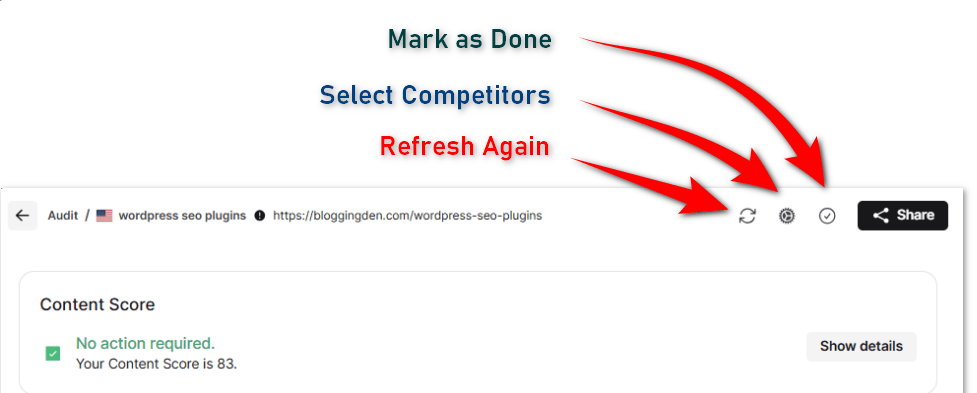
On the Audit interface, you’ll find four key buttons—each serving a specific purpose:
- Refresh Audit: Once you’ve completed the necessary updates, click this button to reanalyze your page. It will check the latest version and provide updated suggestions based on current SERP data.
- Select Competitors: Use this option to choose the most relevant competitor URLs for analysis. Surfer will then compare your content against these selected pages to deliver more accurate recommendations.
- Mark as Done: Finished optimizing your page? Click this button to mark the audit as complete. This helps you stay organized and track your progress.
- Share: Easily share the audit report with team members, clients, or collaborators using this button. It generates a shareable link for quick and efficient collaboration.
Fix SEO Issues Instantly
Use Surfer’s Audit tool to identify content gaps, keyword issues, and structural problems to boost rankings fast.
2. Topic Research
If you’re serious about dominating search rankings in 2026, you need more than just keywords. You need a strategic content plan built around semantic SEO and topical authority. That’s exactly what Surfer SEO’s Topic Research delivers. This feature helps you to build authority through data-driven clusters.
Surfer’s Topic Research is a powerful, visual content strategy tool that helps you:
- Discover content gaps,
- Uncover topic clusters and subtopics,
- Analyze competitor content coverage, and
- Build a complete SEO content** roadmap** around your niche.
What is Topic Research?
The Topic Research is a powerful feature in Surfer SEO. It helps you visually organize your entire content strategy. This organization is based on topical relevance and keyword clusters.
- It generates a clustered visual map around your main topics using a hexagonal layout.
- Each hexagon represents a topic cluster—big central ones for core topics and surrounding ones for related subtopics.
- Visual indicators, such as color shading and size, show the coverage of your content. They also indicate the difficulty level of each topic.
Key Components:
- All Topics View: Displays existing content clusters and highlights missing areas where your site lacks coverage.
- Recommendations Tab: The tab offers AI-sorted topic ideas. They are scored by relevance, difficulty, and rank opportunity. This allows you to focus on content that moves the needle. The topic research also helps you discover relevant keywords and generate keyword ideas for building comprehensive content clusters.
- Domain Map Integration (with GSC): Connect Google Search Console to map actual search performance data to clusters. It shows keywords you already rank for. It highlights competing domains. It also identifies gaps in your own content.
Why It Matters:
- Strategic Planning: Never guess what to publish next—Topic Research tells you.
- Build Authority: Publish deeper, coherent clusters of content that show subject expertise to Google.
- Efficient Resource Allocation: Focus on topics that will bring the most SEO return, based on real data.
- Stay Ahead of Competitors: Visualize and compare your topical coverage against competitors in one clear interface.
How to Use Topic Research: Step-by-Step Guide
Using Surfer SEO’s Topic Research is straightforward, even if you’re new to content strategy tools. Here’s a detailed walkthrough of how to use this feature to plan smarter, rank faster, and build topical authority.
Step 1: Connect Your Site and Access the Topic Research
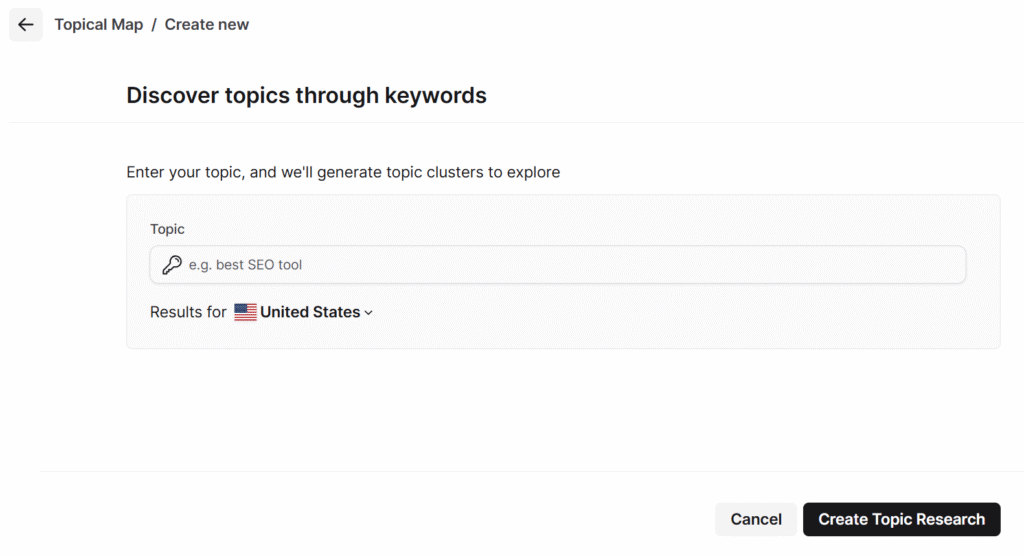
- Go to your Surfer SEO dashboard.
- Navigate to the “Sites” section in the left menu.
- Add your domain and connect it with your Google Search Console (GSC).
- Once your domain is verified, click on “Topic Research.
Why this matters: Linking GSC allows Surfer to fetch actual performance data from your website, giving you personalized content insights.
Step 2: Explore the Hexagonal Topic Research
Once generated, you’ll see a hexagonal visual map with color-coded topic clusters.
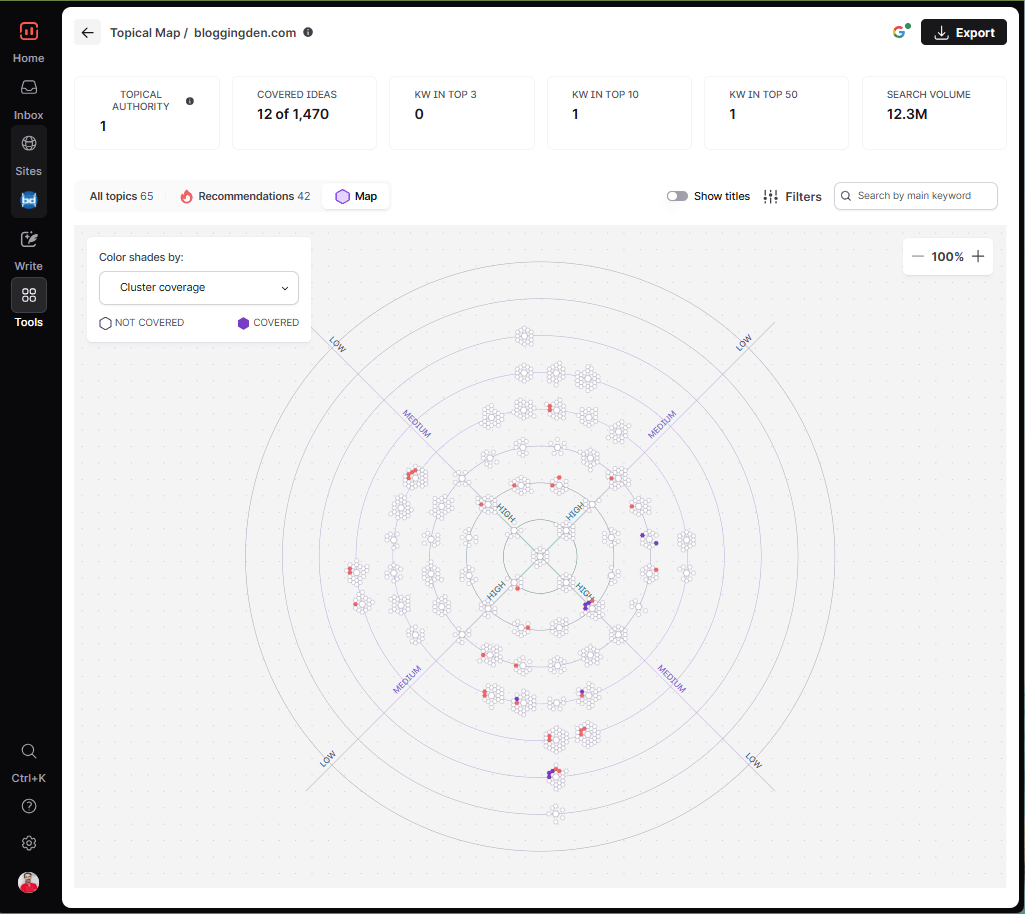
- Purple (or filled) hexagons represent topics you’ve already written about.
- White or empty hexagons indicate uncovered topics or content gaps.
- The size of the hexagon reflects the relative importance or keyword potential of that topic.
Example: If your site is about “Affiliate Marketing,” a filled hexagon might show “affiliate links.” An empty one might suggest “CPA networks.” This is a gap worth covering.
Step 3: Open the Recommendations Tab
Click on the “Recommendations” tab to get a prioritized list of content ideas.
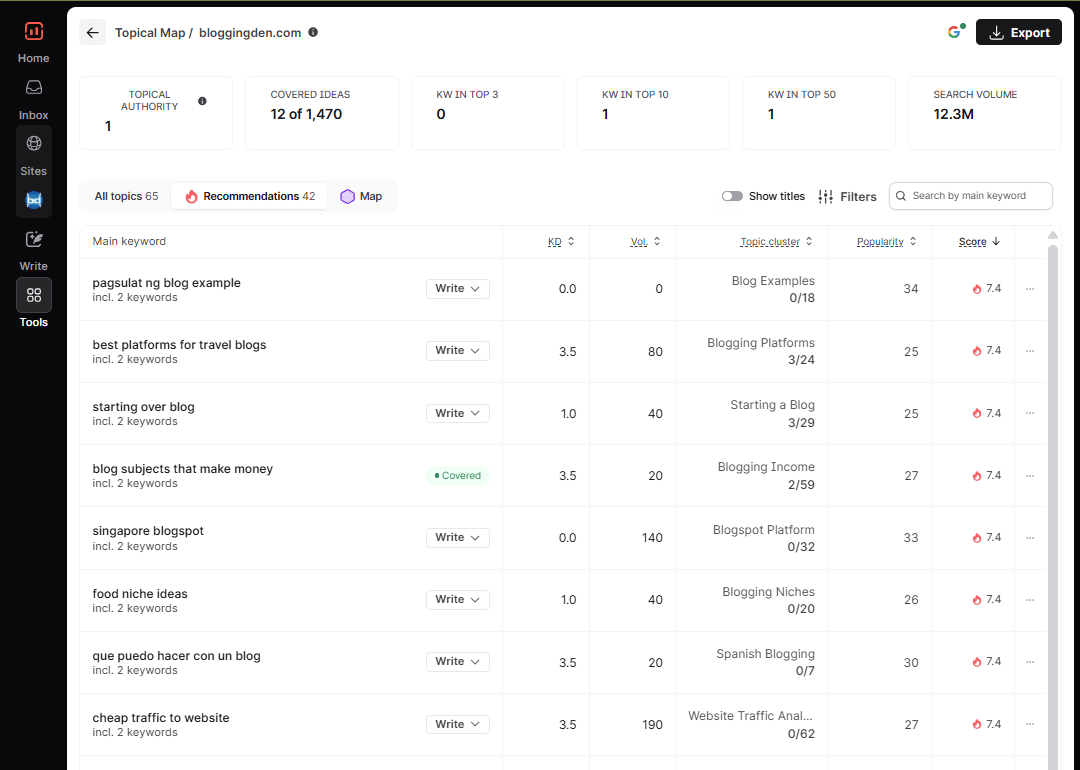
You can:
- Sort by difficulty to find easy-win topics.
- Sort by topical score to find content that complements your existing clusters.
- Choose content ideas that match your niche authority level and publishing schedule.
Tip: Start with medium-difficulty, high-potential topics to see quick SEO results.
Step 4: Analyze Competitor Topical Coverage
Use the “Competitors” filter to view how other websites in your niche cover these topics.
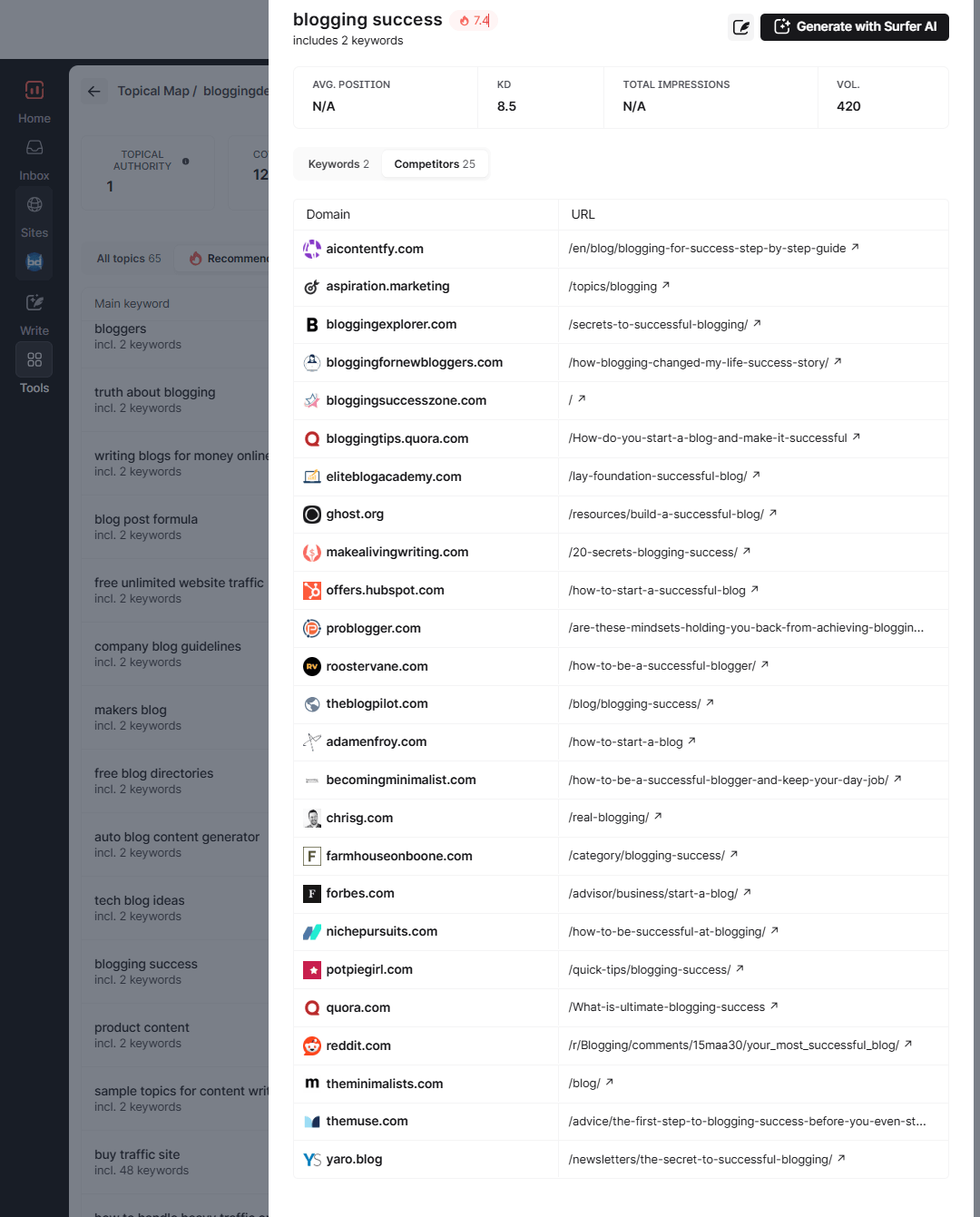
ou’ll see:
- Which competitors already rank for certain clusters
- How deep their coverage goes
- Topics they’ve covered that you’ve missed
Why this helps: It shows exactly where your competitors have a topical advantage. You can fill the gaps or outperform them with better, updated content.
Step 5: Create and Optimize New Articles
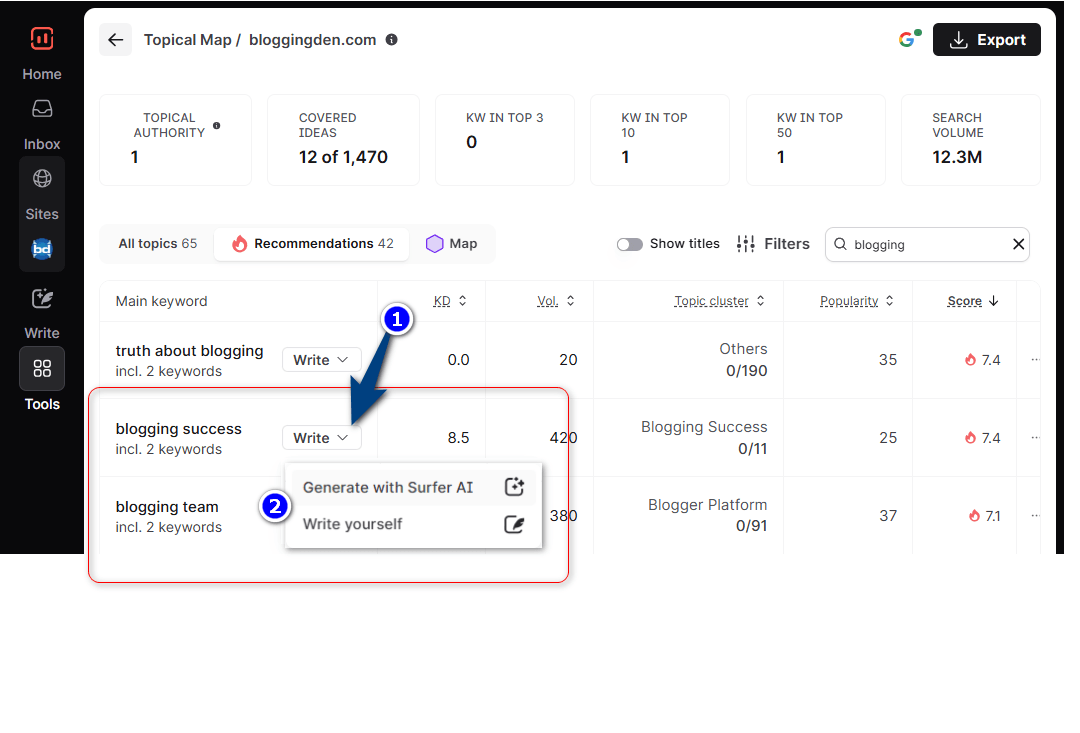
Now that you have a clear list of topics to pNow that you have a clear list of topics to publish:
- Open Surfer’s Content Editor or Surfer AI for your chosen keyword.
- Get real-time NLP-driven guidelines on:
- Word count
- Relevant terms to include
- Header structure
- Keyword frequency
- Write your content or let Surfer AI generate a draft based on SERP data.
Once the article is ready:
- Optimize it to reach a Content Score of 75+.
- Publish it on your blog and link internally to related articles within the same cluster.
Bonus Tip: Schedule Ahead with a Cluster Strategy
Topic Research offers a smart, visual approach to content planning—introducing a balance of data, structure, and efficiency. It’s perfect for anyone aiming to:
- Build topical authority,
- Avoid content overlap,
- Plan future content coherently, and
- Execute SEO strategy backed by search and competitor data.
Do you want me to help you build an example? Topic research for your blog’s main theme? I can also draft an outline for one cluster using Surfer.
Goal: Complete topical coverage boosts your authority. It increases your chances of ranking for dozens of long-tail keywords within each cluster.
Plan Smarter, Rank Faster
Build powerful topic research with Surfer to dominate your niche with relevant and well-organized content clusters.
3. Keyword Research
Effective content begins with insightful keyword research. Surfer SEO’s Keyword Research feature helps analyze monthly search volume. It also assesses keyword difficulty and generates keyword ideas. This makes it easier to plan and optimize your content. It simplifies the process and helps you uncover high-potential keywords.
You can organize them into topic clusters and build a strategic content roadmap tailored to your audience and niche.
Compared to other keyword research tools on the market, Surfer’s keyword research tool is a basic, user-friendly option. It provides core metrics like search volume, keyword difficulty, and clustering.
This makes it especially useful for beginners or those seeking a simpler solution. In contrast, Semrush’s Keyword Magic Tool provides a more advanced option. It offers detailed filters and comprehensive metrics. Competitor insights are also available for deeper keyword analysis. Instead of relying on semantics, Surfer uses the reverse-engineering method to find related keywords.
Surfer’s keyword research is noted to be less comprehensive than that of Ahrefs or SEMrush.
The ranking keywords that are taken from the pages of competitors are the keywords that are given.
Users can connect their domain to get a relative difficulty score, reflecting a realistic ranking potential.
How to Use Surfer SEO’s Keyword Research Tool (Step-by-Step Guide)
Step 1: Start a New Keyword Research Session
Surfer SEO shows you how to improve your page. It helps you rank higher for your target keywords.
By adding keywords Surfer SEO suggests to the article, the content ranking chances are high.
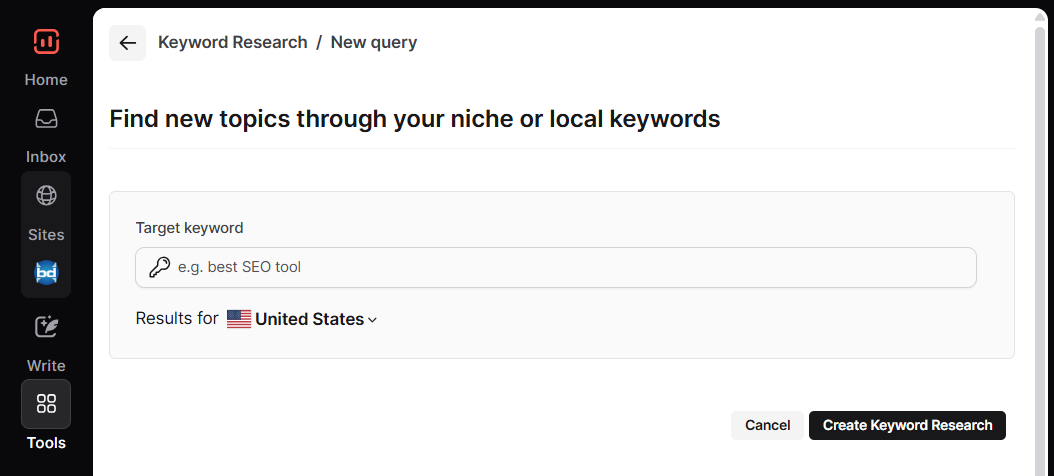
To start using this tool, first enter the keywords in the box. Begin with a seed keyword to generate clusters and related keyword ideas. Then choose the location. Finally, hit the “Create keyword research” button.
Step 2: Choose Your Focus Keyword
Now, think about the main topic you want to build your content around. For example, if you run a bakery blog, you might want to target something broad like “cookies”.
Type your keyword into the search bar. Choose your target location. Then click on “Find New Topics” or simply hit Enter.
Pro Tip: Use a broad keyword to get a wider range of results. Ensure it still matches what your target audience is actually searching for.
Step 3: Explore the Keyword Clusters
After a few moments, Surfer will generate a list of keyword clusters. These clusters group related keywords together based on search intent and semantic relevance.
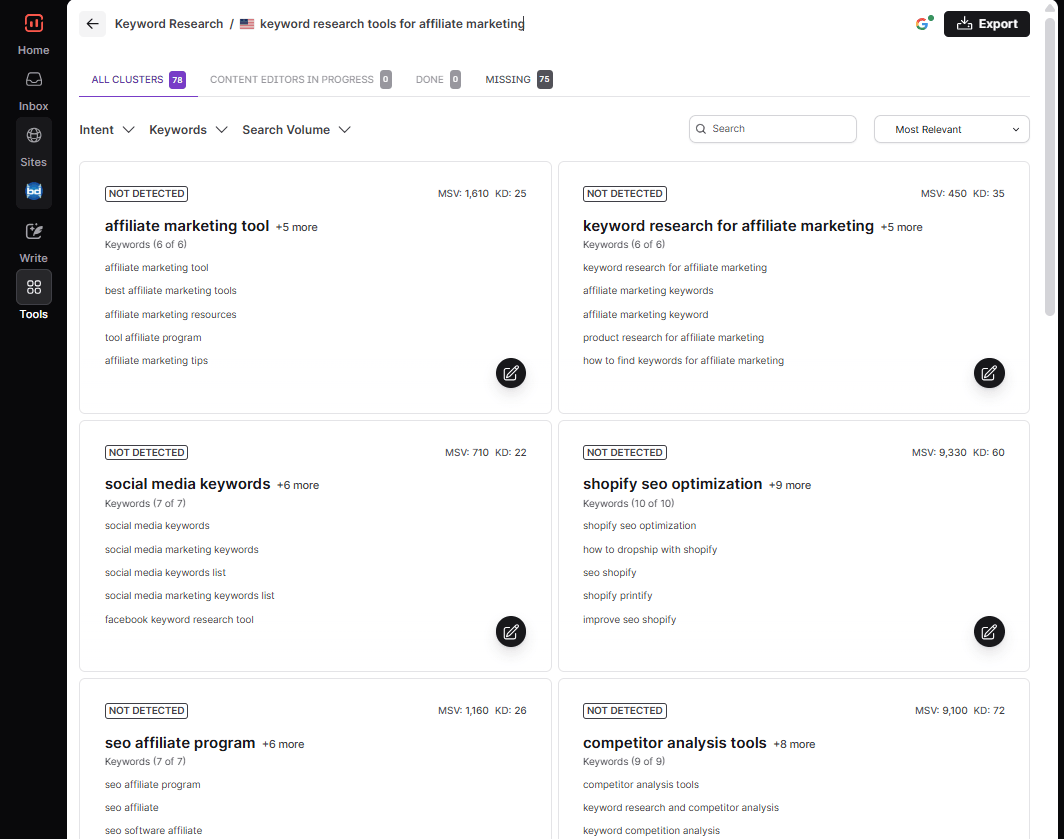
Think of each cluster as a potential article idea—complete with keyword suggestions that are closely tied to your original topic.
Step 4: Pick a Cluster and Create Your Content Plan
Browse through the clusters and click on the one that best fits your content goals. You’ll see all the keywords included in that group.
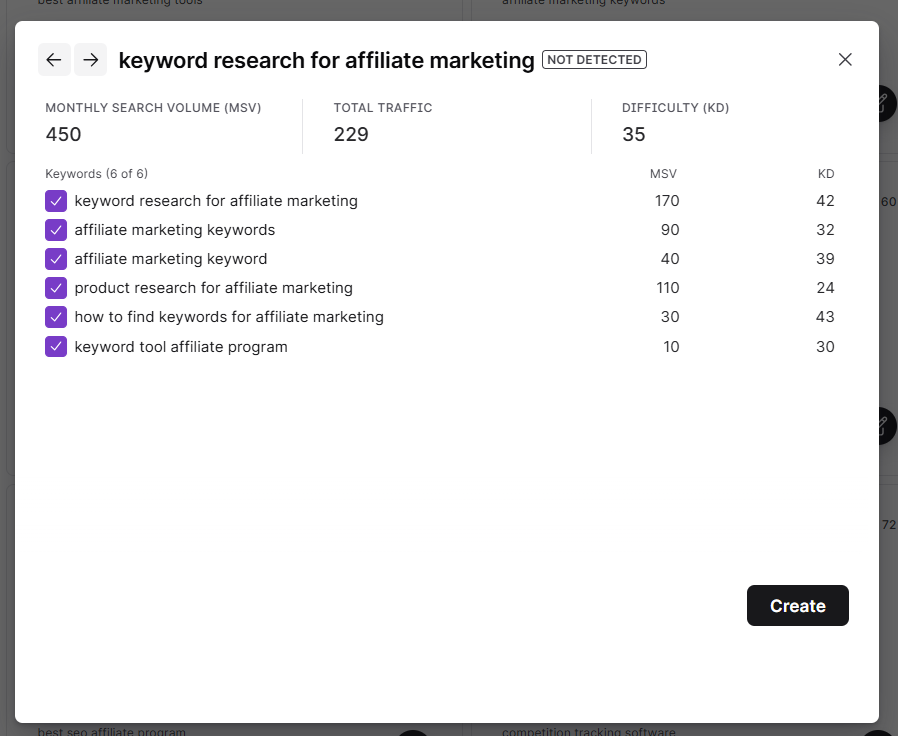
If it looks like a good fit, simply click “Create for 1 CE credit”. This will launch the Content Editor. You can start writing your SEO-optimized article right away.
Before you dive into writing, take a moment to explore these tips & tricks provided here. These little insights can help you get even more value from the Keyword Research tool. They can help in building a stronger content strategy.
Tip 1: Pick a Broad Keyword
Start with a general topic (like “online marketing” or “dentist”) instead of long, detailed phrases. This gives you more keyword suggestions to work with.
Example: Instead of “best protein powder for weight loss,” just use “protein powder.”
Tip 2: Understand Search Intent
Each keyword group (called a cluster) is sorted by search intent—this means what people are really looking for.
Here are the 4 types:
- Local – nearby searches (e.g., “dentist in Mumbai”)
- Customer Investigation – comparisons (e.g., “best SEO tools”)
- Informational – how-tos (e.g., “how to bake a cake”)
- Transactional – buying (e.g., “buy yoga mat online”)
Choose the intent that fits your content goal.
Tip 3: Connect Google Search Console
If you connect GSC to Surfer, you’ll find:
- Keywords you’re missing but should target
- Which keywords are easy or hard to rank for
It helps you make smarter decisions for your content strategy.
Tip 4: Use Your Daily Limit
You can run up to 100 keyword searches per day, so take your time and try different ideas.
Each search can take a few minutes. Surfer is collecting real data to give you the best results—so just wait!
The more you explore clusters and understand your keywords, the better your content will rank. Look for topics that match your audience and build your content around them.
Tip 5: Use Multiple Keyword Research Tools for Better Results
For comprehensive keyword recommendations, use Surfer’s keyword research tool. It provides accurate search volume data. Use it alongside other keyword research tools like Ahrefs or Semrush. This approach helps you compare keyword difficulty. You can also assess monthly search volume. Get a wider range of keyword ideas to strengthen your SEO strategy.
Find Winning Keywords Fast
Discover low-competition, high-traffic keywords with Surfer’s built-in Keyword Research tool.
4. SERP Analyzer
Surfer SEO’s SERP Analyzer is a powerful tool. It is designed for those who want to go beyond basic SEO. It helps explore what actually helps pages rank on Google. It’s especially useful for SEO professionals, content marketers, and website owners who want to make data-driven decisions.
SERP Analyzer is now included in all plans (Discovery, Standard, Pro, Peace of Mind, Enterprise), with usage limits based on your plan’s page-tracking capacity
The SERP Analyzer in Surfer SEO helps you deeply explore how other websites rank for specific keywords.
It allows you to analyze your niche before creating content, so you know what’s already working. You can also compare your website—even if it’s not ranking yet—to top-performing competitors to understand where you stand.
The SERP Analyzer offers a detailed breakdown of SERPs, including word count, backlinks, and headers of top-ranking pages.
Most importantly, it shows which SEO factors are strongly connected to better rankings. These factors include content length, keyword usage, backlinks, average word count, and search volume for top-ranking pages. By understanding this, you can focus on what truly matters to boost your visibility in search results.
How to Use SERP Analyzer (Step-by-Step)
Step 1: Access the Tool
Make sure your Surfer subscription is active and includes the SERP Analyzer add-on. Open the SERP Analyzer from the sidebar in your Surfer dashboard.
Step 2: Start a New Query

Enter your target keyword and select your target location. Choose whether you want to analyze mobile or desktop search results—SERPs may vary slightly depending on the device.
Step 3: Choose the Right Competitors
Make sure you’re comparing your page to relevant competitors. Focus on search intent—ask yourself:
- Are users trying to buy?
- Looking for product reviews?
- Searching for information?
Step 4: Add Your URL for Direct Comparison
Want to compare your own content to competitors?
- Copy your page’s URL
- Paste it into the “Compare your website to competitors” field
- Click Compare
Surfer will show how your Content Score, Domain Score, and other key metrics compare to top-ranking pages.
They are
- Search Visibility: This is the complete graphical presentation of your search term. It includes competitors’ URLs. It also shows their ranking positions in search engines.
- Backlinks: This segment gives data about backlinks that come from other sites pointing to your domain URL.
- Structure: This segment gives all the data about the content. You will get the data, which is arranged as a whole body with headings, paragraphs, meta tags, and alt attributes.
- Quality: This section has details of load time, TTFB, page size, and other performance metrics.
- Media: It gives the details of images you added within your website content, along with Alt text data.
You can analyze the above data by choosing each section manually. The chosen data will be shown in two ways on the right side of the screen. They are the graphical view and the tabbed view.
a. Graphical view: This view presents the data as a double Y-axis. It displays the chosen data from the left side column.

By clicking on the icon next to the URL, you can highlight a chart with the result you want.
b. Tabbed View:
When you scroll down the screen, you will find the keyword research, semantic analysis, and link-building data. This tabbed view has all the sections.
- Search Results
- Keywords
- Questions
- Popular words
- Popular phrases
- Common words
- Common phrases
- Prominent words and phrases
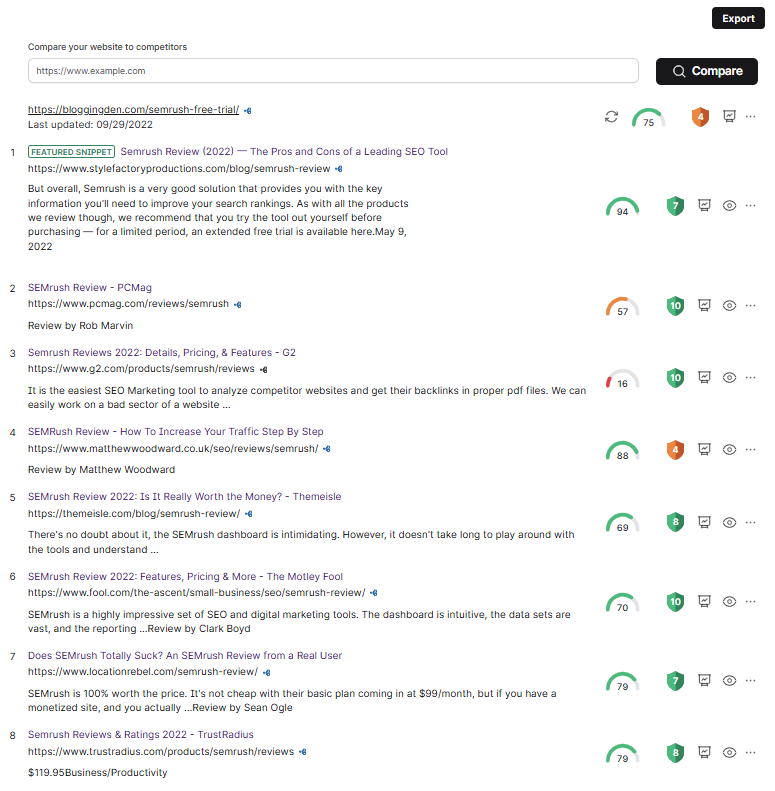
To view the data, you need to consider the words on the page.
If you’re serious about outranking your competition, SERP Analyzer gives you a detailed, data-backed edge. It takes the guesswork out of content optimization and shows you exactly what Google is rewarding in your niche.
Surfer SEO lets you compare your page with up to 50 competitors, but POP allows comparison with only 10 competitors.
SERP Analyzer is now included in all plans (Discovery, Standard, Pro, Peace of Mind, Enterprise), with usage limits based on your plan’s page-tracking capacity.
Use this tool before writing or optimizing your content to build pages that can truly compete.
Spy on Top Competitors
Understand what makes top-ranking pages succeed with Surfer’s SERP Analyzer for smarter SEO strategies.
5. Content Editor
Surfer’s Content Editor makes content creation faster and smarter by giving you real-time SEO guidance as you write. The Surfer SEO Content Editor is a key tool for optimizing content. It provides keyword suggestions and competitor analysis. AI-powered recommendations help you achieve higher search rankings.
Instead of spending time researching, you get instant recommendations. These are based on live data from over 500 ranking factors. Natural language processing (NLP) and Surfer’s algorithm are also used.
The tool gives you a content score. It is a clear number showing how optimized your article is. This way, you know exactly how close you are to publishing a high-quality, SEO-friendly post.
The content editor informs users of the ideal word count, number of headings, paragraphs, and images for an article.
Whether you’re writing new content or updating old posts, the content editor helps you stay on track with structure. It also guides you in keyword usage and search intent. You can access it from your dashboard or through tools like Keyword Research, Topic Research, or Content Audit.
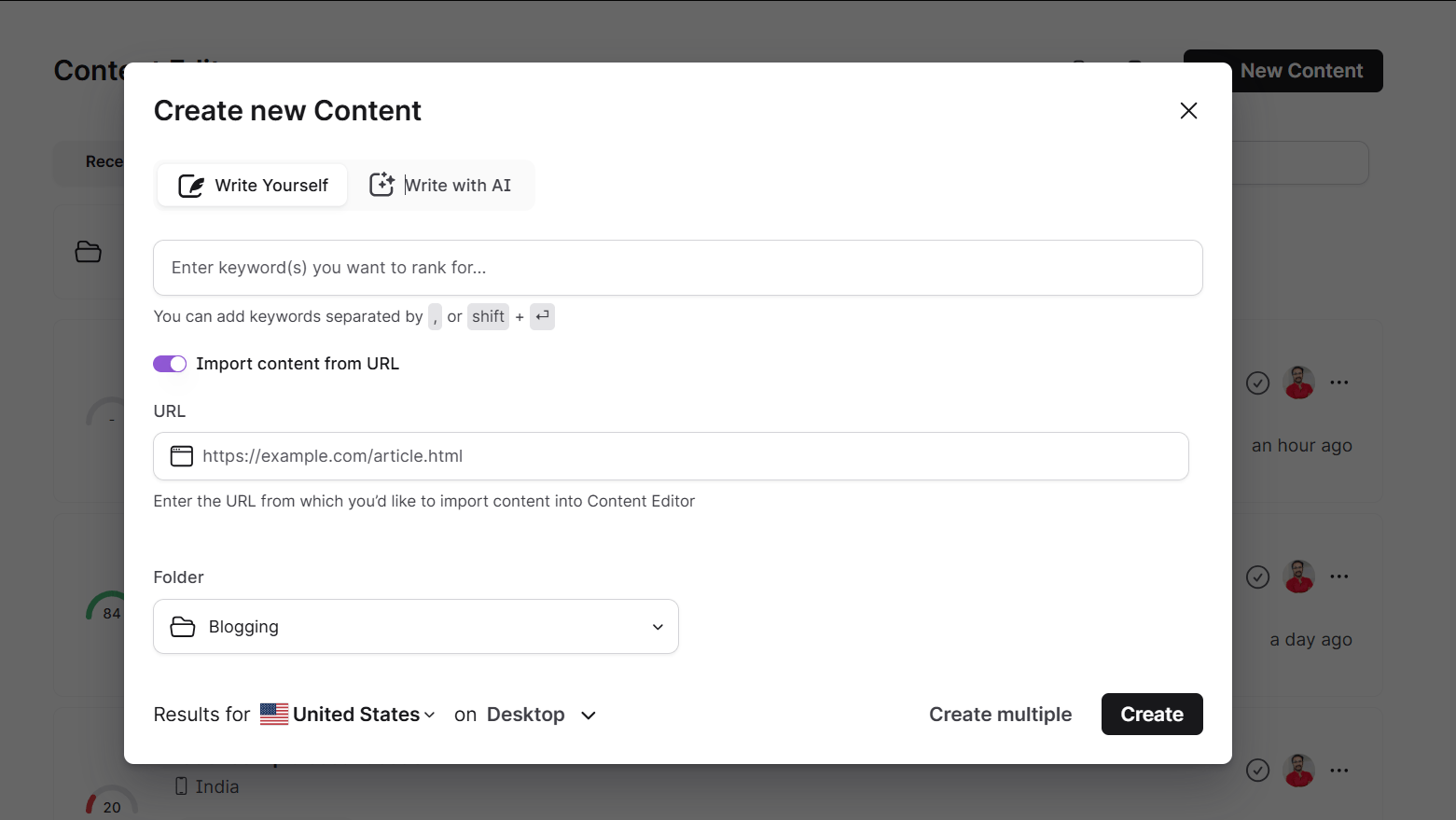
Writing content in a content editor is a very good experience. This is a completely brand-new design for content writers. The Surfer content editor and Surfer’s content editor streamline the content creation process. They make it easier to produce optimized content. These editors help improve your existing content.
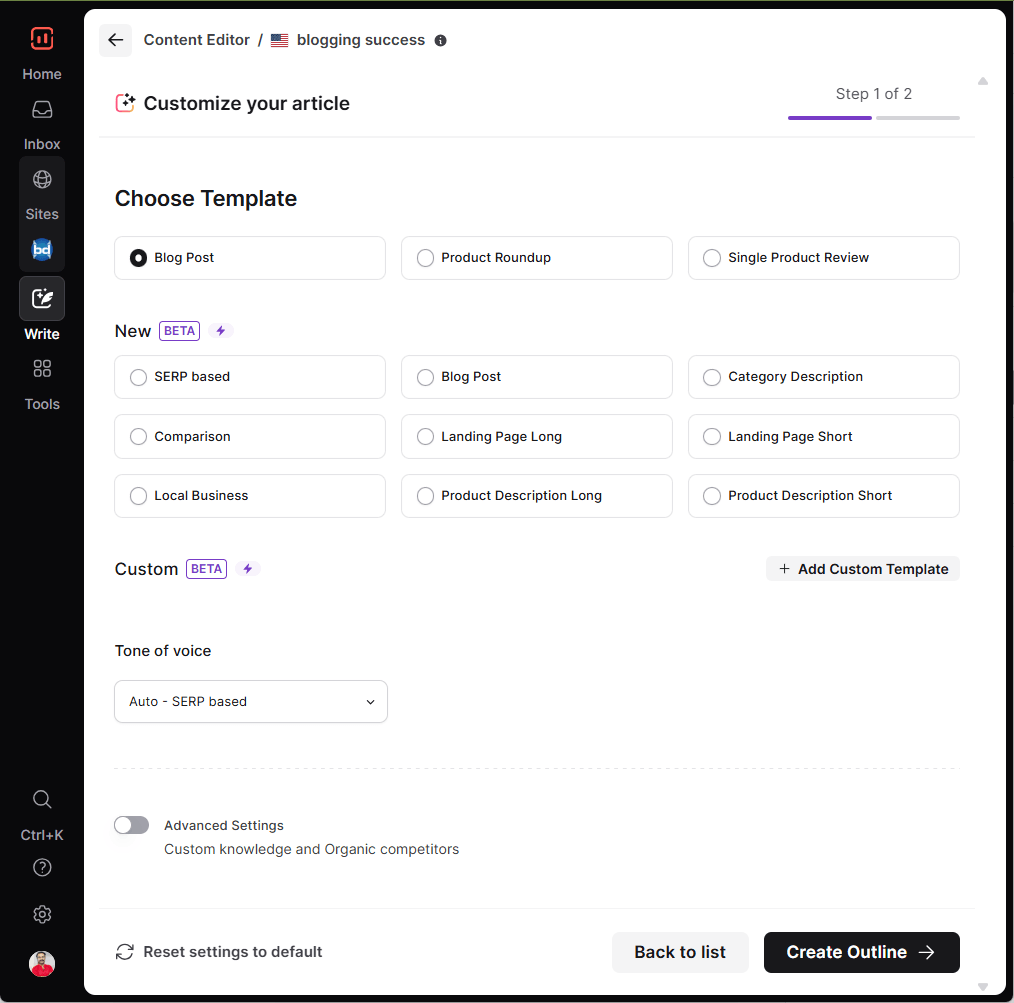
It is one of the best optimization tools. The content editor has two different screens. The writing area is on the left side of the screen. On the right side, you will see content optimization guidelines.
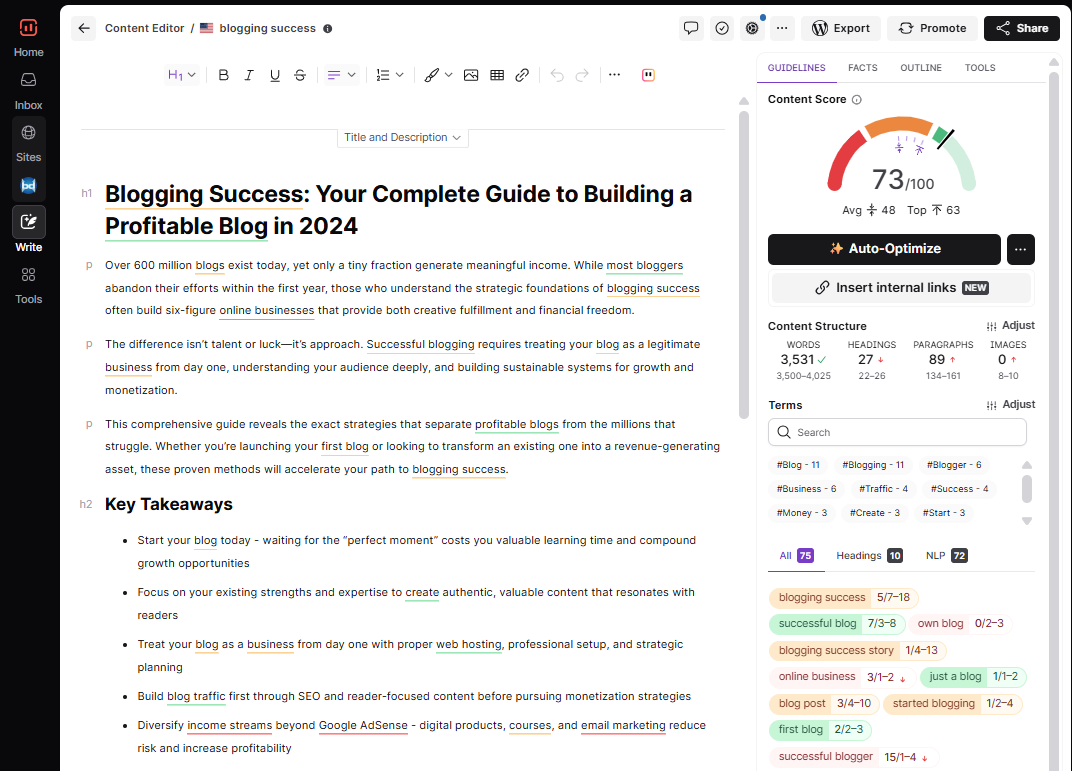
The content editor is the best starting point if you want to develop fresh content with Surfer SEO. Once you finalize the writing, you need to copy and paste the content to start optimization.
It is simple and akin to Word documents, and it comes with five different components. They are
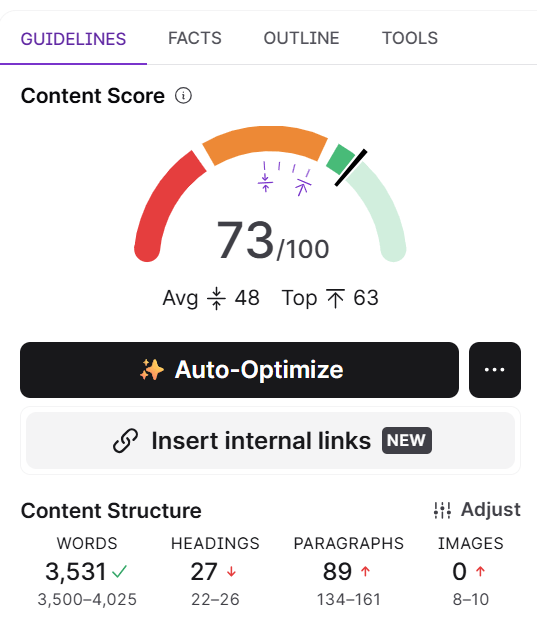
1. Content Score
A content score is a value that indicates the relevance and quality of your content. The score ranges from 1 to 100. By using this score, you can optimize the structure and terms in your content.
- Below 33: It indicates the content is not optimized well. You need more text and important terms to optimize.
- Between 33 and 66: The content is ready to use.
- Above 66: The content is decently optimized, with the highest content score.
SEO is the process of optimizing a website for Google search. The goal is to earn higher web traffic levels and improve the site’s visibility.
A good SEO score is one that falls within Google’s guidelines for quality and relevance.
The score is based on a number of factors, including the site’s age, content, backlinks, and more. A good SEO score can help a website rank higher in search results and attract more visitors.
2. Auto-Optimize (One-Click SEO Boost)
The Auto-Optimize feature in Surfer’s Content Editor helps you improve your content score instantly with just one click. After you finish writing, Auto-Optimize scans your content.
It automatically suggests improvements using NLP (Natural Language Processing) terms. It does this without changing the meaning of your text.
You’ll see real-time suggestions on the right side, and you can review, accept, or revert each change as needed.
💡 Note: Auto-Optimize is limited by your plan, so use it wisely.
3. Outline Tab (Smarter Structure for Better Content)
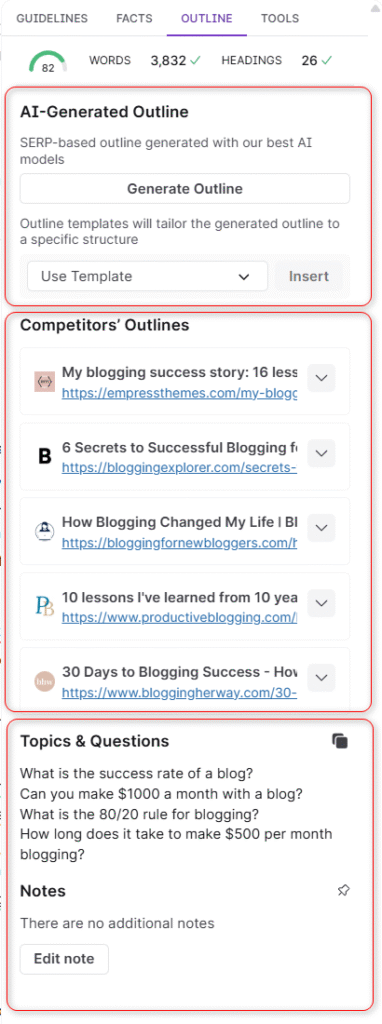
The Outline Tab helps you organize your article with a clear, SEO-friendly structure. It includes:
- AI-Generated Outline: A smart outline built using competitor data and SEO best practices. It’s unique, logically ordered, and ready to use.
- Competitors’ Outlines: See how top-ranking pages are structured. Use this view to get ideas—but don’t copy; always rewrite for uniqueness.
- Insert Outline Button: Add the outline directly into your editor with a single click—from the AI or a competitor’s layout.
- Notes Section: A place to jot down tasks, ideas, or deadlines. You can even pin it to the top for quick access.
Tip: Use the AI outline for a fast and optimized structure. Use competitor outlines to fill in topic gaps or get inspiration.
The points to consider before starting the content score stats are:
- Use prominent terms in headings
- Avoid over-optimization with suggested terms
- Upload images and add proper alt text
4. Content structure
This section provides the details of the optimal number of words, headings, paragraphs, and images. These elements are essential to complete the basic optimization process.
5. Terms
The Content Editor suggests exact LSI keywords to add, along with frequency recommendations for each.
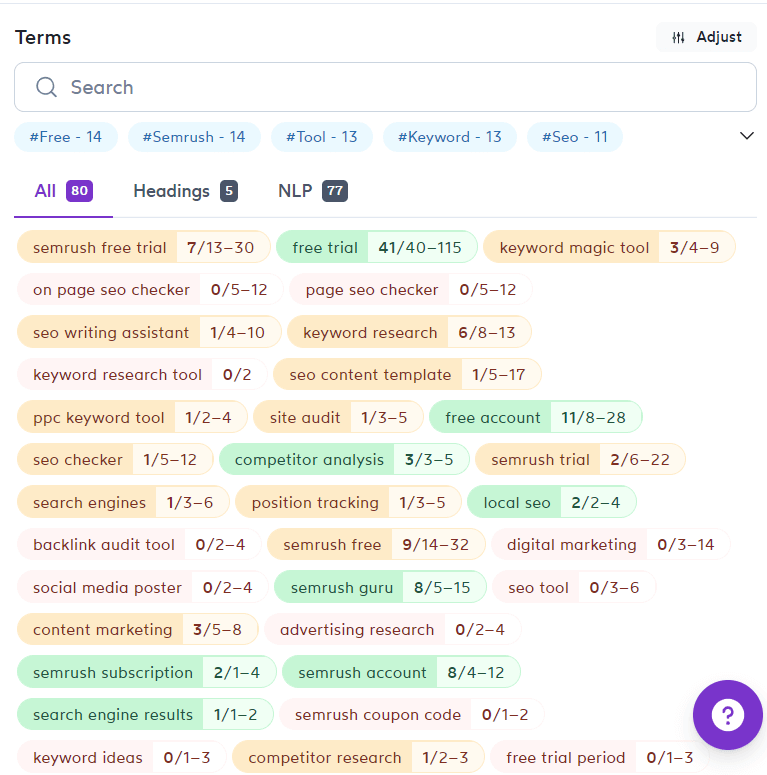
This section has a list of important terms to include in your writings.
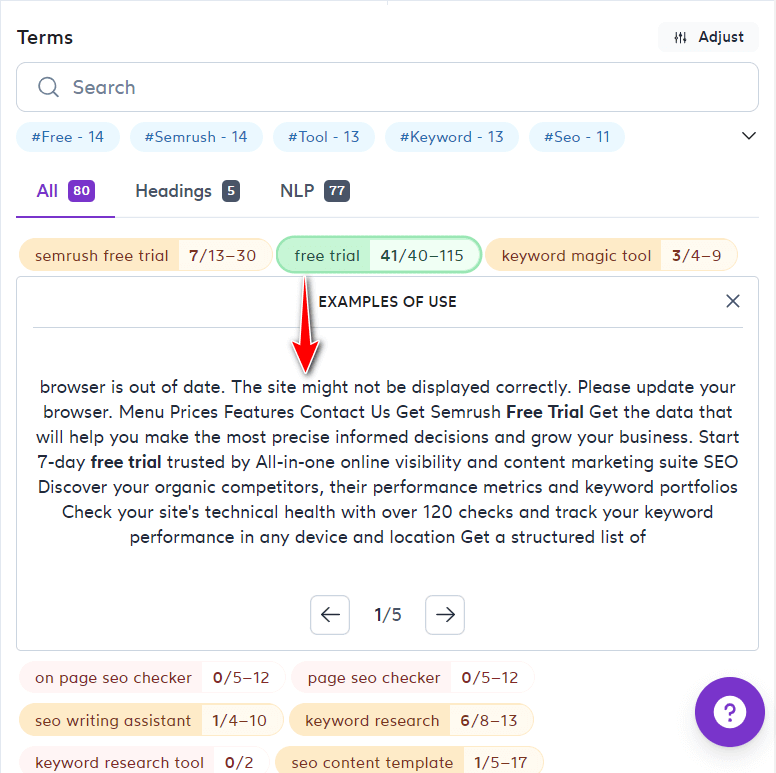
You may get the recommended word count for your article by using the content editor tool.
Here you will find the separate tabs—headings and NLP sections. You can switch between these tabs as per your needs.
- Headings: The list of phrases to include in a heading section of your content
- NLP: It gives the list of Natural Language Processing phrases to add in the content.
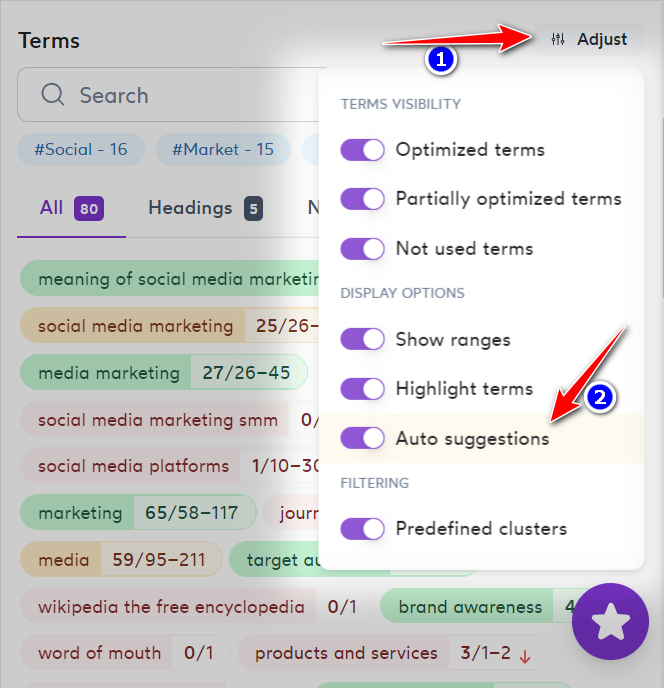
6. AutoSuggestion
It is a very helpful feature and helps you include the important terms that fit your content.
To disable this feature, go to the Terms > Adjust > Auto Suggestions option. You can enable it by toggling the key.
What is Rich-Text Editor
This is the place to start writing and get real-time feedback. It comes with the following features to improve your writing experience.
- WYSIWYG editor with styling options
- Import relevant images from Pixabay (a Royalty-free images site) or explore Photoshop Alternatives for additional editing tools
Write Content That Ranks
Get real-time SEO suggestions while you write. The Content Editor makes optimizing content easier than ever.
6. Rank Tracker
One of the most valuable features inside Surfer SEO is its built-in Rank Tracker. It is a tool designed to monitor your keyword rankings daily. It tracks them across targeted locations. The tool provides detailed competitive insights.
Whether you’re managing a small blog or running a large SEO campaign, Surfer’s Rank Tracker provides real-time visibility. It offers the insights you need. It helps you understand how your content performs in the SERPs. You can also see how your competitors are moving.
What is Surfer SEO’s Rank Tracker?
Surfer SEO’s Rank Tracker automatically tracks the main keywords from your top-performing pages. It offers:
- Daily keyword tracking
- Geo-targeted position monitoring
- SERP feature visibility (snippets, image packs, video carousels, etc.)
- Competitor movement insights
- Weekly performance reports
This removes the hassle of jumping between tools and filters. Surfer surfaces actionable ranking data in one simple dashboard.
Key Benefits of Using Rank Tracker
- Accurate Daily Updates: Your keyword positions are refreshed every 24 hours at 00:00 UTC, ensuring up-to-date insights.
- Geo-Specific Rankings: Choose your target country, language, and device type (desktop or mobile) for highly relevant tracking.
- SERP Feature Breakdown: Instantly see if your content appears in:
- Featured snippets
- Knowledge panels
- Local packs
- Video results
- Image packs
- Shopping carousels
- Competitive View: Understand who’s gaining or losing rankings next to your pages and adjust your content accordingly.
How to Use Surfer Rank Tracker: Step-by-Step
Step 1: Get Access
To start, head over to the Rank Tracker tab and click “Buy Now.” Plans start at just $8.50/month for tracking 100 keywords, with lower rates for larger packages.
Step 2: Create a New Project
- Click “New Rank Tracker Project”
- Give it a name and input your domain or page URL
- Enter your target keywords
- Choose tracking type:
- Broad Match: Track keyword rankings across the entire domain
- Exact Match: Track only the specific page you input
Note: You can’t mix types in the same project, but Surfer’s team can adjust it if needed via support.
Step 3: Choose Tracking Settings
- Set your target country
- Select device type (desktop or mobile)
- Click Create Project
Now Surfer will begin pulling ranking data automatically every day.
Understanding the Rank Tracker Dashboard
The dashboard shows valuable ranking metrics, including:
| Metric | What It Means |
| Rank | Your current position in Google |
| SERP Features | Icons show if your page is featured in snippets, local packs, videos, etc. (green = your page is featured) |
| 1d / 7d / 30d / Life | Change in position over 1, 7, or 30 days and lifetime performance |
| CPC (USD) | Avg. cost-per-click advertisers are paying for the keyword |
| Keyword Last Updated | When the keyword was last refreshed |
| URL | The page currently ranking for that keyword |
Keyword Limit & Refresh Rules
- Each plan has a daily refresh limit based on your keyword package.
- If you delete and re-add keywords, the system counts those toward your daily limit.
- Duplicates within the same project are auto-removed, but across projects, the same keyword counts multiple times.
Example: A 200-keyword plan lets you refresh or add/delete up to 200 keywords per day. Exceeding that? You’ll wait until the next daily refresh.
Why Surfer’s Rank Tracker Is a Game Changer
Unlike most basic trackers, Surfer’s Rank Tracker is:
- Built into your content workflow (no extra tools needed)
- Fast, accurate, and easy to use
- Designed for bloggers, affiliate marketers, and SEO pros
- Gives context by tracking you vs. your competitors
It is directly tied into your Surfer SEO tools, such as the Content Editor and Audit. This connection helps you take instant action on performance changes.
If you’re serious about SEO performance, daily tracking isn’t optional—it’s essential. Surfer’s Rank Tracker makes it seamless to:
- Monitor your growth
- Identify content drops
- Track competitors
- Make smart optimization decisions
For those interested in WordPress SEO, check out this complete guide on how to set up Rank Math SEO plugin.
Track Your SEO Progress
Monitor keyword rankings and performance metrics daily with Surfer’s Rank Tracker. Stay ahead of the game.
7. AI Tracker
AAI tools like ChatGPT, Claude, and Perplexity are becoming dominant in online search behavior. Brands need to know: “Is my content being used as a source in AI-generated answers?”
Surfer SEO’s AI Tracker is a groundbreaking solution. It gives you direct insight into how frequently your content is cited in responses from major large language models (LLMs). It helps you measure your influence in the new frontier of search—AI-powered visibility.
What is AI Tracker?
AI Tracker is an advanced Surfer feature that evaluates how often your domain or content appears in AI-generated results. It tracks branded and non-branded mentions across prompts and shows which domains LLMs prefer when answering queries.
Whether your content is being used as a source in ChatGPT, Claude, Perplexity, or other LLMs — AI Tracker reveals:
- Which pages are being cited
- Which competitors are gaining ground
- How often your domain appears
- What types of content LLMs prioritize (forums, news, educational, etc.)
- Prompt-level visibility to see what queries you’re winning or missing
Key Metrics You Can Monitor
When you create an AI Tracker query, you’ll get weekly reports on the following:
| Metric | Description |
|---|---|
| Mentions | Number of times your domain appears in LLM responses |
| Position | Where your domain ranks in the list of cited sources |
| Prompt Visibility | Which prompts your brand shows up for |
| Top Domains | Domains most frequently cited by each AI model |
| Source Categories | Whether the LLMs favor forums, social, blogs, or editorial sites |
AI-generated search is no longer a future trend—it’s a current reality. Surfer SEO’s AI Tracker gives you visibility into a new SEO frontier. You can see whether your brand shapes the answers AI delivers.
It’s not just about Google rankings anymore—it’s about becoming a trusted source in LLMs that millions of users rely on.
Measure AI-Generated Content
Track the performance of AI-written content and optimize it for better visibility and ranking.
8. Ai Humanizer
AAI writing tools are powerful. But let’s face it, they often produce content that sounds robotic. This content lacks the natural tone of a human writer. That’s where Surfer SEO’s Humanizer and AI Detector come in.
These two tools help ensure your content not only ranks well on Google but also resonates with real readers. They also help your content pass AI detection filters.
What is the Humanizer Tool?
The Surfer Humanizer is a smart rewriting tool. It transforms AI-generated text into content that sounds natural, human, and engaging. It does this without altering its meaning or SEO value.
Whether you’re using Surfer AI, ChatGPT, or Jasper, the Humanizer is your go-to solution. It helps to refine the output into something truly publishable.
Key Benefits:
- Rewrites text to sound more authentic and natural
- Retains your original tone, style, and SEO intent
- Perfect for editors, bloggers, marketers, and publishers
- Supports Custom Voice for tone-matching content
How to Use the Humanizer (Step-by-Step)
If you’re a Surfer subscriber:
- Log in to your Surfer SEO dashboard.
- Scroll to find the Humanizer tool.
- Paste your AI-generated content into the text box.
- View the AI Detector percentage just below.
- Click ‘Humanize’ — your improved version will be generated instantly.
If you’re not subscribed yet:
- You can try a free version of the Humanizer with a limited word count.
- Subscribing gives you up to 50,000 words/month to humanize!
Word Limits Based on Subscription
| User Type | Monthly Word Limit (Humanizer) |
| No Surfer account | 500 words |
| Surfer account, no subscription | 1,000 words |
| Active Surfer subscriber | 50,000 words |
Note: The AI Detector tool is unlimited and freNote: The AI Detector tool is unlimited and free for all users.
Custom Voice: Add a Personal Touch
Want the content to sound like you? Use Surfer’s new Custom Voice feature to teach the Humanizer your unique tone of voice.
How it works:
- Paste at least 200 words of your original writing
- Choose “Custom Voice” from the dropdown
- Humanizer will adjust its style to match your tone
Whether you’re creating branded content, ghostwriting, or polishing client copy, this is a game-changer.
Make AI Content Feel Human
Improve your AI-generated content’s tone and naturalness with Surfer’s AI Humanizer.
9. Surfer’s AI Detector
Alongside the Humanizer, Surfer provides an AI Detector to analyze how “human” your content appears. It scans the pasted text and delivers a percentage-based AI score, helping you adjust your writing before it goes live.
Why it’s helpful:
- Avoids AI-detection penalties in sensitive niches (e.g., education, health, legal)
- Enhances trust and authenticity
- Great for affiliate marketers, bloggers, and SEO professionals
Bonus: Use Humanizer Inside ChatGPT with Keyword Surfer
Surfer’s Keyword Surfer Chrome extension now integrates Humanizer and AI Detector directly inside ChatGPT. This lets you:
- Write inside ChatGPT
- Humanize in real-time
- Analyze for AI detection — all in one place!
Need More Humanizer Credits?
Running low on Humanizer word count? You can always reach Surfer’s support team via live chat. Use this option to purchase additional credits. You can also explore bulk offers that suit your content needs.
Human + AI = Winning Content
While AI can help scale your content creation, it’s the human tone and emotional connection that drive real results. Surfer SEO’s Humanizer and AI Detector bridge that gap—giving you the best of both worlds.
- Boost readability
- Pass AI detection tools
- Maintain SEO structure
- Sounds authentic and professional
Ensure Originality and Compliance
Identify AI-written content to ensure compliance with guidelines and avoid detection penalties.
Google Search Console Integration
One of the standout features of Surfer SEO is its seamless integration with Google Search Console (GSC). By connecting your GSC account, Surfer SEO taps directly into your website’s real search engine data. This connection unlocks a new level of actionable insights to boost your search engine rankings.
This integration allows Surfer SEO to analyze your existing content and overall site authority. It provides tailored recommendations for rankable topics. It also highlights areas that need improvement. With GSC data, Surfer’s content audit tool becomes even more powerful. It offers a comprehensive review of your site’s SEO performance by domain. You’ll receive detailed metrics such as Content Score, keyword positions, organic traffic, impressions, and click-through rates—all in one place.
By leveraging Google Search Console, Surfer SEO can also deliver personalized weekly SEO recommendations through its Grow Flow feature. These suggestions focus on optimizing keywords. They strengthen internal links. They also revise content to maximize your site’s visibility in search engine results. Whether you’re looking to refresh existing content or find new ranking opportunities, the GSC integration keeps your SEO strategy data-driven. It also ensures it is always up to date.
Connecting Google Search Console to Surfer SEO is simple. This step unlocks the full potential of the platform’s content audit and optimization tools. It’s essential for anyone serious about improving their search engine rankings. It’s also crucial for making the most of every piece of content on their site.
Sync Your SEO Data Seamlessly
Integrate Surfer SEO with Google Search Console to get powerful insights directly from your search data.
Surfer SEO Support and Resources
Surfer SEO is committed to helping users succeed in their search engine optimization journey. They offer robust support. They also provide a wealth of educational resources. Whether you’re a seasoned SEO professional or a beginner, you’ll receive help. This support will help you maximize your SEO efforts.
Every page within the Surfer SEO platform features an Intercom chat button, giving you instant access to customer support.
The response times are impressively fast, so you can get answers to your questions or resolve issues without delay. While the support team may not always provide in-depth metrics or extended follow-up, their assistance is generally prompt and helpful.
Surfer SEO provides more than direct support. It offers a comprehensive library of resources. These resources help you master the platform.
They also help improve your search engine rankings. You’ll find step-by-step tutorials, detailed guides, and insightful blog posts covering everything from on-page optimization to advanced content strategies.
The Surfer SEO community is also active and welcoming. Users share tips, experiences, and best practices. This helps each other achieve better results.
These resources make it easy to stay up to date with the latest trends in search engine optimization. They also help to continually refine your SEO strategies. Whether you’re troubleshooting a specific issue or aiming to learn more, Surfer SEO’s support and educational materials are invaluable. They are essential for anyone aiming to boost their search engine rankings and grow their online presence.
Get Help When You Need It
Explore helpful guides, community, and live support to make the most of Surfer SEO.
Who uses Surfer SEO?
Surfer SEO is an excellent tool used by both SEO professionals and webmasters to improve their search engine optimization.
It provides users with detailed information about their website’s performance, including keyword rankings, backlink data, and organic traffic statistics.
This information can help modify a website’s design and content. These changes aim to improve its search engine ranking.
Additionally, Surfer SEO can be used to monitor a competitor’s website to better understand their SEO strategies.
Used by SEO Experts Worldwide
From solo bloggers to large agencies—Surfer SEO empowers thousands to improve content and increase rankings.
Pros and Cons of Surfer SEO
PROS
- Surfer SEO is easy to use, even for beginners.
- It gives real-time SEO suggestions while you write.
- The Content Editor improves content quality with a clear content score.
- Keyword Research shows topic clusters to build content around.
- SERP Analyzer helps compare your page with top-ranking competitors.
- Integration with Google Docs and Semrush boosts workflow flexibility.
- Auto-Optimize saves time by suggesting NLP terms instantly.
- AI tools like Humanizer and AI Tracker make it future-ready.
- Audit tool helps improve and refresh old content for better ranking.
- Rank Tracker offers clear insights into keyword performance and competition.
CONS
- It can be expensive for small businesses or freelancers.
- Some features (like SERP Analyzer and AI Tracker) are paid add-ons.
- Daily or monthly usage limits may apply to certain tools.
- Content Editor credits can run out quickly with high usage.
- Learning all the features may take some time for new users.
Is It the Right Tool for You?
Compare the strengths and limitations of Surfer SEO to see if it aligns with your SEO goals.
Surfer SEO Plans and Pricing
Surfer SEO has redesigned its pricing around AI search visibility rather than just content editor credits. The new lineup includes Discovery, Standard, Pro, Peace of Mind, and an Enterprise tier for custom needs. Pricing starts from 49 USD per month (billed yearly) and goes up to 299 USD per month for teams that need unlimited optimization, advanced AI visibility tracking, and API access.
The main differences between plans are documents per year (120 → 360 → Unlimited), pages tracked (10 → 50 → 200 → 500), AI prompt quotas for visibility tracking, and team seats (1 → 3 → 5 → 10 → Custom).
Their plans are flexible, so you can change or cancel them at any time. Annual billing saves around 17% compared to monthly billing across all plans.
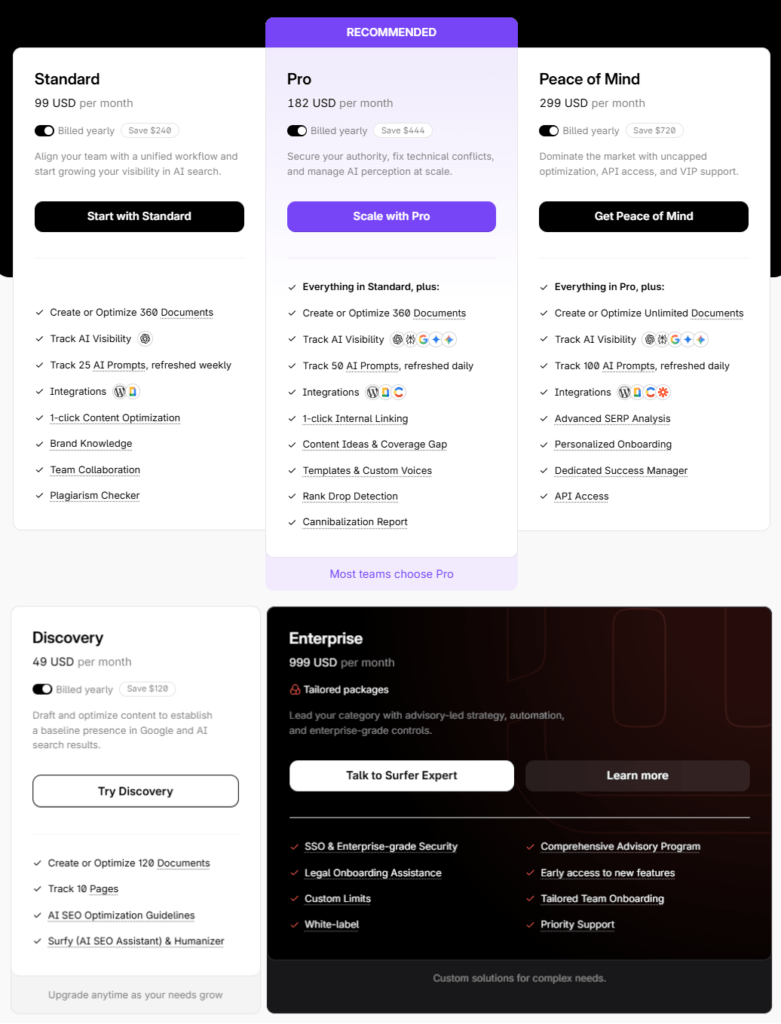
Annual billing saves approximately 17% compared to monthly billing across all plans.
Discovery Plan
Best For: Solo bloggers, freelancers, and niche site owners who want to test Surfer on a handful of key pages.
What’s Included:
- 120 documents per year for creating or optimizing content
- Track 10 pages for ongoing audits
- Content Editor with Content Score
- SERP Analyzer and Audit tools
- Keyword Research and Topic Research
- Surfy AI assistant
- Humanizer, plagiarism checks, and 1-click optimization
- Google Docs, WordPress, and Contentful integrations
Discovery is perfect for validating Surfer’s impact before scaling up to higher plans.
$49
per month, (billed annually)—Discounted from $99/month
Standard Plan
Best For: Full-time bloggers, authority site builders, and small agencies publishing regularly.
What’s Included:
- 360 documents per year
- Track 50 pages with ranking alerts
- 25 AI prompts tracked weekly for AI visibility (ChatGPT, Google AI Overview, etc.)
- 3 team seats with collaboration features
- All content tools: Editor, SERP Analyzer, Audit, Keyword Research
- Auto-Optimize, Humanizer, and plagiarism detection
- Google Docs, WordPress, and Semrush integrations
- Comments, folders, and external collaboration links
Standard is the sweet spot for most bloggers and small agencies looking for consistent optimization and basic AI visibility tracking.
$99
per month, (billed annually)
Pro Plan
Best For: Agencies and in-house teams managing multiple sites or clients.
What’s Included:
- 360 documents per year
- Track 200 pages with cannibalization reports
- 50 AI prompts tracked daily across ChatGPT, Perplexity, Google AI Mode, AI Overview, and Gemini
- 5 team seats with extended activity logs
- Topical maps and ranking-drop alerts
- All Standard features plus advanced controls
- Longer content version history
Pro is ideal when you need daily AI visibility data, higher page limits, and tools to prevent keyword cannibalization across many projects.
$182
per month, (billed annually)
Peace of Mind Plan
Best For: Larger agencies, media companies, and in-house content teams running high-volume operations.
What’s Included:
- Unlimited documents (fair usage policy)
- Track 500 pages
- 100 AI prompts tracked daily for maximum visibility insights
- 10 team seats
- API access for custom integrations
- Dedicated customer success manager
- 6-month content version history and 12-month activity logs
- SSO and advanced admin controls
Peace of Mind is designed for teams that never want to worry about document limits and need enterprise-grade automation and support.
$299
per month, (billed annually)
Enterprise Plan
Best For: Large organizations, agency networks, and brands with complex SEO operations.
What’s Included:
- Custom limits for documents, pages, and AI prompts
- SSO (Single Sign-On) and SOC 2 Type II compliance
- White-label options and legal/PO-based invoicing
- Priority support and strategic SEO training workshops
- Advisory-led onboarding and tailored team governance
- Early access to new features
Enterprise is built for organizations that require bespoke limits, security, and governance on top of Surfer’s full feature set.
Custom Pricing
per month, (billed annually)
Surfer SEO provides flexibility by allowing users to purchase additional editing credits or AI article credits as needed.
Optional Add‑Ons
Surfer has simplified add-ons by building many capabilities directly into the main plans. AI visibility tracking (formerly AI Tracker) now uses AI prompt quotas included from Standard upwards. SERP Analyzer and Audit are also included in all plans, with usage tied to each plan’s page-tracking limits.
You can still purchase extra credits for:
- Surfer AI – AI-generated articles (pricing varies by plan and promotions)
- Auto-Optimize – Additional NLP optimization runs
- Humanizer – Extra word credits for AI humanization
Exact add-on prices may change over time, so it’s best to check the latest rates inside your Surfer account.
Surfer’s pricing is considered high relative to competitors but is justified by specialized features for content optimization.
Which Plan Should You Choose?
- Discover Plan: If you’re a solo blogger testing Surfer on a few key pages
- Standard Plan: If you publish regularly and need more documents + basic AI visibility tracking
- Pro Plan: If you’re an agency managing multiple sites and need daily AI prompt tracking
- Peace of Mind Plan: If you want unlimited content optimization and API access
- Enterprise Plan: If you need custom limits, SSO, and strategic support
If you want a more detailed breakdown of each plan with use cases, add-ons, and money-saving tips, check out our comprehensive Surfer SEO Pricing Guide. It covers everything from annual vs. monthly billing to which plan works best for bloggers, agencies, and enterprises.
Choose a Plan That Fits You
Flexible pricing options to suit individuals, teams, and agencies. Find the perfect plan for your SEO needs.
Surfer SEO Alternatives
While Surfer SEO is a powerful on-page optimization tool, it’s not the only player in the SEO content game. When you consider Surfer SEO vs other SEO tools, first compare differences in features and pricing. Then, determine which tool is best suited for your specific needs. Depending on your workflow, budget, and goals, you may find other tools better suited to your needs.
Ahrefs provides much more comprehensive keyword research capabilities compared to Surfer SEO.
Here are the best Surfer SEO alternatives in 2026:
1. Semrush

Semrush is the best alternative to Semrush. It comes with more than fifty SEO tools. You can access those tools under the same roof.
I have been using this tool for 4 years. This is one of the most popular tools, used by 7 million users around the world.
Semrush is an all-in-one digital marketing suite. It is known for its advanced keyword research, SEO audit, backlink analysis, and content marketing capabilities. It is a go-to solution for professionals managing large-scale SEO campaigns. You can find more details on Semrush Review article.
Features of Semrush
- Powerful keyword research and tracking tools
- Content Marketing Platform with SEO templates
- Comprehensive site audits and technical SEO recommendations
- Competitor analysis and domain overview
- PPC and social media tools
Comparison with Surfer SEO:
Surfer SEO focuses primarily on on-page content optimization. Semrush offers a broader SEO toolkit. This includes backlink analysis, PPC, and social media tools.
Surfer is better for optimizing individual pieces of content, while Semrush is more suitable for managing a full digital strategy.
So what are you waiting for?
Comprehensive SEO Suite
All-in-one SEO solution offering deep keyword research, backlink analysis, and site audits. You can try Semrush 7-days free trial.
2. MarketMuse

MarketMuse is a content intelligence and strategy platform. It focuses on in-depth content planning and topic modeling. It also handles content quality assessment at scale.
MarketMuse has built an AI-powered platform. It helps marketers easily create engaging content. The platform assists in building high-quality content briefs, writing copy, analyzing data, and testing ideas. All this is possible without having to hire expensive freelance writers or editors.
This means they can generate more leads, increase customer engagement, and boost conversions. And it’s fast! MarketMuse is one of the best alternatives to Surfer SEO tools.
Basic Features of MarketiMuse
- AI-powered topic clustering.
- Content inventory audit for existing articles.
- Internal linking recommendations.
- Real-time content briefs and outlines.
- Competitive gap analysis.
How it Compares to Surfer SEO:
MarketMuse is more suited for enterprise-level teams that manage hundreds of pages. It goes beyond content optimization into strategic planning, unlike Surfer, which excels in execution-focused features. MarketMuse is a powerhouse but comes at a much higher cost.
Content Strategy Powered by AI
Great for planning and optimizing content with advanced topic modeling and AI insights.
3. Frase.io
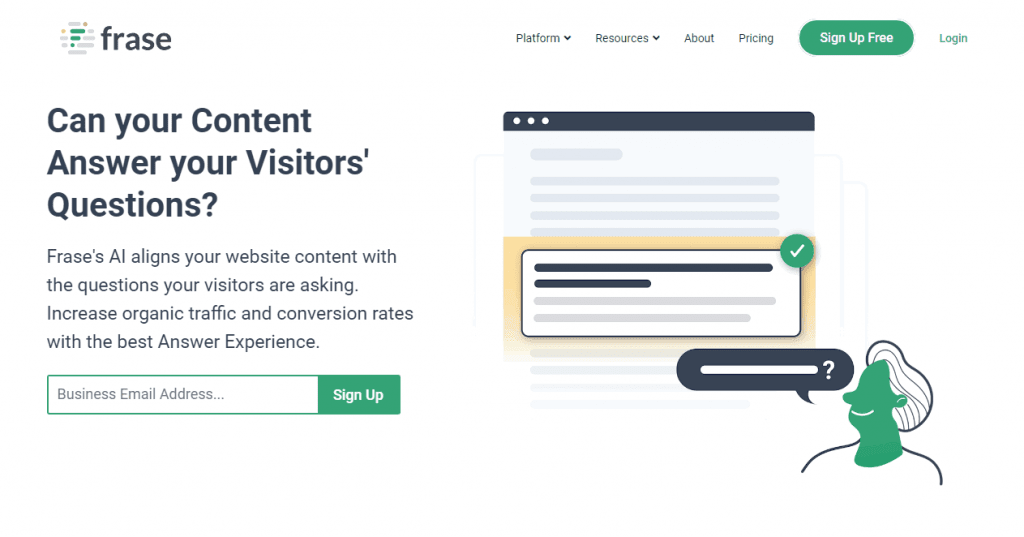
Frase.io is an AI-powered content optimization platform focused on answering user questions and improving topical authority. It’s particularly popular among bloggers and content creators for its clean interface and AI-assisted content briefs.
Frase started as a content creation tool. It later added SEO features. Surfer SEO began as an SEO optimization tool.
Frase is an easy-to-use SEO content creation tool that helps people write high-quality articles and pages quickly and easily. You can choose between 3 templates and more than 50 different topic types. Like Surfer, Frase is a tool that is readily available.
After you’ve written your content, our artificial intelligence engine automatically optimizes it for keywords. We have over 10 years of experience optimizing hundreds of thousands of websites. This experience has helped us build a reputation as the best tool. Our tool will make sure you rank 1st on Google.
With Frase-Best SEO Article Writer, it’s easy to make high-quality content quickly on any niche topic.
Basic Features of Frase IO
- AI-powered content briefs based on SERP analysis.
- Topic and question research using People Also Ask and Quora data.
- Integrated AI writer with custom templates.
- Content scoring system based on topic coverage.
- Google Search Console integration for content gap analysis.
How it Compares to Surfer SEO:
Frase and Surfer SEO both offer content scoring and optimization. Frase is more beginner-friendly and focuses heavily on questions. Surfer provides deeper NLP insights and a broader set of SEO tools (like audits and SERP tracking). Surfer is better suited for SEO professionals, while Frase works well for solopreneurs and content marketers.
Smart Content Creation Tool
Create SEO-friendly content using AI research and brief generation with Frase’s intuitive platform.
4. WriterZen
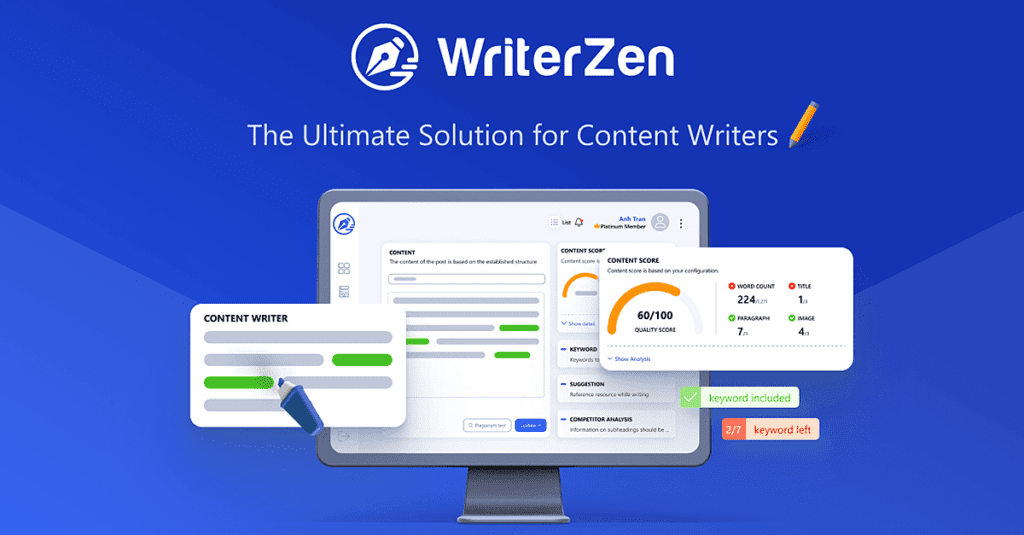
WriterZen is a content research and optimization platform. It helps you plan, create, and optimize content. The platform uses AI-powered tools and Google NLP data. It’s especially popular for SEO content writing and topic clustering.
It’s never been easier to start writing. WriterZen is a content production tool that simplifies your workflow from start to finish. It can be used for any content marketing need, from blogs to emails and campaigns, and everything in between.
With a single dashboard, you’ll be able to manage your projects. You can research keywords. It also allows you to write better content for SEO purposes. All of this can be done without the need for code.
WriterZen is a tool that helps writers and content creators generate content at scale. It is a machine learning-driven, AI-powered writer that can produce quality content in any language. You can read our detailed review on WriterZen.
While Surfer SEO offers robust optimization features, you can also explore other powerful platforms in our roundup of the best WriterZen alternatives for more flexible content strategies.
WriterZen’s features:
- Topic discovery and content planning
- Keyword research with clustering and golden keyword filter
- AI-assisted content generation
- Content brief creation and optimization tools
- Google NLP and SERP analysis
Comparison with Surfer SEO:
WriterZen excels in topic discovery and keyword clustering, which Surfer SEO lacks. However, Surfer’s Content Editor is more powerful for real-time writing feedback and optimization. WriterZen is ideal for early-stage planning, while Surfer is strong in execution and refinement.
SEO Writing with Precision
From keyword discovery to content creation, WriterZen is built for simplicity and SEO accuracy.
5. NeuronWriter
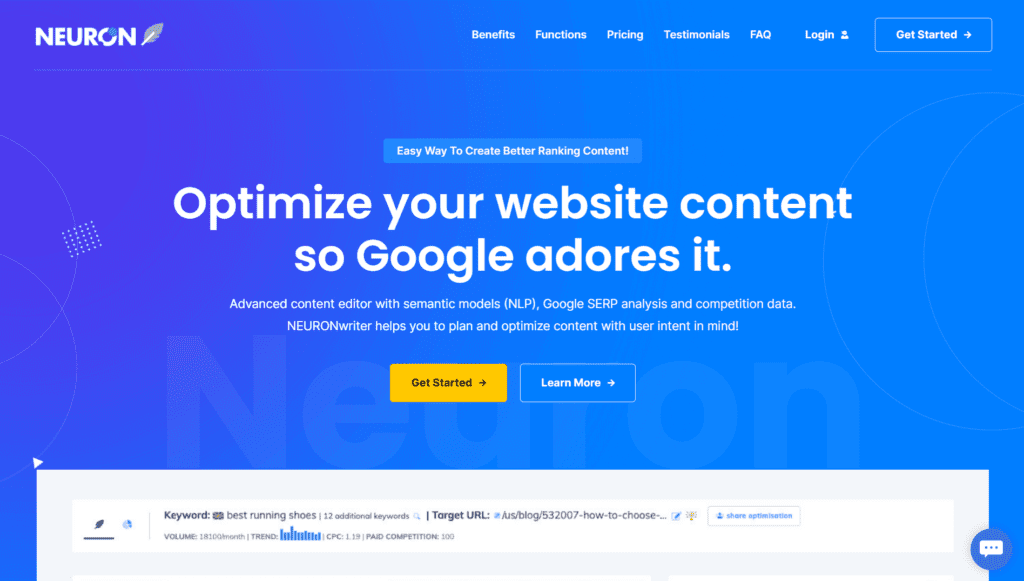
NeuronWriter is a growing AI content optimization tool that combines NLP-based scoring with AI-assisted writing. It has become a favorite among budget-conscious creators and affiliate marketers. You can read more details about this tool on Neuronwriter Review article.
Key Features:
- NLP term recommendations.
- Competitive SERP analysis.
- AI writing assistant with templates.
- Content structure and length guidance.
- Multilingual support and AI writing in various tones.
How it Compares to Surfer SEO:
NeuronWriter is a more affordable alternative to Surfer SEO and includes similar NLP content scoring features. However, its UI and SERP analysis are not as advanced or accurate as Surfer’s. Still, it’s a solid tool for beginners and mid-level users on a budget.
| Feature | Surfer SEO | Clearscope | MarketMuse | Frase |
|---|---|---|---|---|
| Content Editor | ✅ | ✅ | ✅ | ✅ |
| AI Writing | ✅ | ❌ | Limited | ✅ |
| SERP Analyzer | ✅ | Limited | ✅ | ✅ |
| Pricing (entry) | $49/mo | $170/mo | $149/mo | $15/mo |
| Best For | Agencies & Bloggers | Enterprises | Strategy | Beginners |
Affordable SEO Writing Assistant
Ideal for small businesses and freelancers looking for content optimization at a budget-friendly price. Grab this tool with a one-time payment (lifetime deal) now.
Frequently Asked Questions (FAQs)
What is Surfer SEO?
Surfer SEO is an AI-powered on-page SEO tool. It helps you create, optimize, and audit content. These activities can improve your search engine rankings. It offers tools like Content Editor, Keyword Research, SERP Analyzer, and Rank Tracker. These tools are designed to simplify SEO for bloggers, marketers, and agencies.
Who is Surfer SEO best for?
Surfer SEO is ideal for content writers, bloggers, and affiliate marketers. SEO professionals and digital agencies also find it useful. They aim to rank higher in Google with data-driven content strategies.
How does the Content Editor work?
The Content Editor analyzes top-ranking pages for your target keyword and gives real-time suggestions as you write. It shows keyword usage, ideal content length, headings, and NLP terms and provides a Content Score to help you stay optimized.
What is the Content Score?
The Content Score is a number (0–100) that tells you how well-optimized your article is. It’s calculated based on structure, keyword usage, NLP terms, and headings. The higher the score, the better your content aligns with SEO best practices.
Does Surfer SEO help with keyword research?
Yes. Surfer’s Keyword Research tool provides keyword clusters based on your main topic. These clusters can be used to build content hubs, find related terms, and target specific user search intent.
Can I use Surfer SEO with Google Docs or WordPress?
Absolutely. Surfer integrates smoothly with Google Docs through a Chrome extension. It can also be used with WordPress to optimize content directly from your dashboard.
Is Surfer SEO beginner-friendly?
Yes. Surfer offers advanced features. Its clean interface and real-time tips make it easy for beginners to get started with SEO. The guided setup and tutorials also help you learn quickly.
What is Auto-Optimize in Surfer?
Auto-Optimize is a feature that automatically adds suggested NLP keywords. It makes small changes to improve your Content Score. This saves you time on manual optimization without altering your original message.
Does Surfer SEO track keyword rankings?
Yes. The Rank Tracker tool tracks keyword positions daily and shows how your content performs over time. It also provides competitor insights and alerts on position changes.
How much does Surfer SEO cost?
Surfer SEO starts at $49/month (billed annually) for the Discovery Plan. The Standard Plan is $99/month, Pro is $182/month, and Peace of Mind is $299/month. Add-ons like extra Surfer AI credits are available separately.
What is Surfer’s AI Humanizer?
Surfer’s Humanizer tool rewrites AI-generated text to sound more natural and human. It’s perfect for improving readability and reducing AI detection scores while keeping your SEO elements intact.
Is there a free trial or money-back guarantee?
Yes. Surfer SEO offers a 7-day money-back guarantee on annual plans, so you can try it risk-free. They also have a free version of the Humanizer tool with limited word usage.
Is SurferSEO worth it?
Yes, SurferSEO is worth it if you’re serious about improving your content’s SEO performance. It provides data-driven recommendations to help you rank better in search engines.
Is SurferSEO better than SEMrush?
SurferSEO is better for content optimization. SEMrush focuses more on overall SEO. This includes keyword research, backlinks, and competitor analysis. It depends on your specific needs.
How much does SurferSEO cost?
SurferSEO pricing starts at $49/month (Discovery plan) and goes up based on the number of content editors and features. Custom plans are also available for teams.
Is Surfer AI reliable?
Yes, Surfer AI is reliable for generating SEO-optimized content quickly. However, it’s always a good idea to review and edit the AI-generated text to ensure accuracy and personalization.
What’s included in the Discovery Plan?
The Discovery Plan ($49/month billed yearly) includes 120 documents per year, tracking for 10 pages, Content Editor, SERP Analyzer, Audit, keyword research, Surfy AI assistant, and integrations with Google Docs and WordPress.
Does Surfer SEO Actually Work in 2026?
Yes, Surfer SEO works when used correctly. In my experience managing 50+ optimized articles, pages with content scores above 70 consistently rank in the top 10. However, it’s a co-pilot, not autopilot—you still need strong writing, user intent matching, and quality backlinks for the best results.
Have Questions? We’ve Got Answers
Clear, concise answers to the most common queries about Surfer SEO.
⭐ Join 10,000+ content creators using Surfer to rank higher and write faster.
Final Verdict: Is Surfer SEO Worth It in 2026?
If you’re serious about improving your website’s on-page SEO, you need Surfer SEO. Creating content that ranks becomes easier with this tool. It helps in building topical authority faster than ever before. Surfer SEO is an essential tool for your toolkit in 2026.
Its AI-powered Content Editor is a key feature. It also offers advanced keyword research and insightful Content Audit capabilities. These features make it one of the most powerful platforms for content optimization. Whether you’re a solo blogger, niche site builder, content marketer, or agency, Surfer helps you make data-driven decisions. These decisions translate directly into better visibility. You will also experience more traffic and higher rankings.
The addition of tools like Rank Tracker, AI Humanizer, and AI Tracker makes Surfer a complete SEO content platform. It bridges the gap between content creation and real-time performance tracking.
There’s a learning curve for beginners. However, Surfer SEO offers plenty of tutorials. It also provides support to help you maximize its potential. It offers affordable pricing and flexible add-ons. There are seamless integrations with Google Docs, WordPress, and Semrush. Because of these features, it stands out as a reliable solution for modern SEO in 2026.
Here’s What We Think
Find out if Surfer SEO is the right tool for your business in 2026. Our expert review and testing can help determine its suitability.
Bottom Line: If you want to scale your content marketing strategy, Surfer SEO is absolutely worth the investment. It will help increase your organic traffic. It also helps you stay ahead in the evolving world of AI + SEO.
Surfer SEO Review 2026

Discover the full Surfer SEO Review 2026, including features, pros and cons, real use cases, pricing plans, Surfer AI tools, and the best alternatives. This guide helps you decide if Surfer SEO is the right content optimization tool for your SEO strategy in 2026.
Product SKU: Surfer Sp. z o.o.
Product Brand: Surfer SEO
Product Currency: USD
Product Price: 99
Price Valid Until: 2026-12-31
Product In-Stock: InStock
9.1
Pros
- Real-time SEO suggestions while writing content
- Easy-to-use Content Editor with clear scoring system
- AI-powered tools like Humanizer and AI Tracker
- Excellent keyword research with topic clustering
- Integrates smoothly with Google Docs and WordPress
Cons
- Can be expensive for solo bloggers and freelancers
- Some features like SERP Analyzer require add-ons
- Content Editor credits can run out quickly with heavy use
- Learning curve for beginners to master all features
- Monthly usage limits on certain tools and features